Task Wheel
 Max3k downloads
See every open task once, on purpose. Task Wheel visualises all your tasks to help you manage them: each one is a stop on a wheel you turn, so nothing hides at the bottom of a long todo list.
- Overview
- Scorecard
- Updates36
See every open task once — and know that you did.
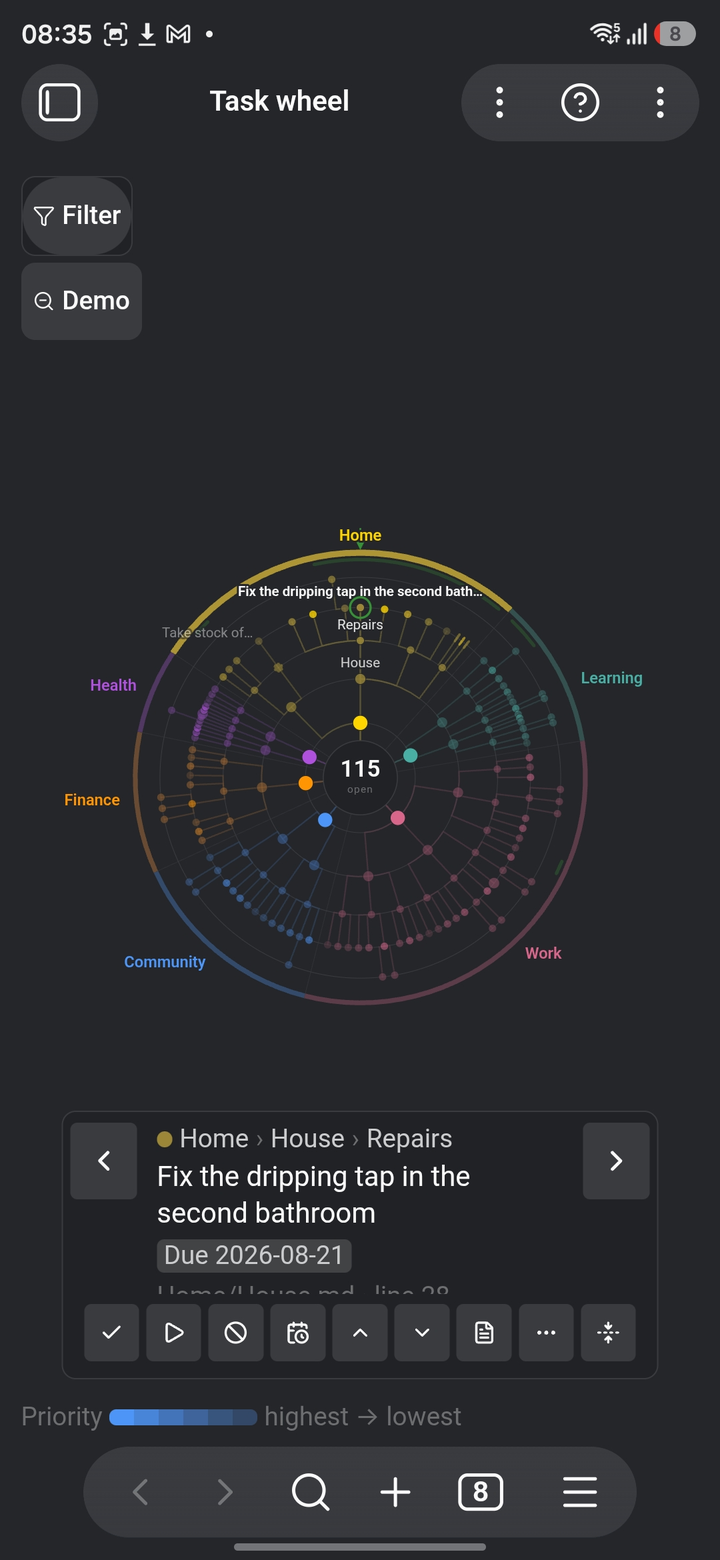
Task Wheel is an Obsidian plugin for reviewing every open task in your vault. It reads the checkboxes you already write, in Obsidian Tasks syntax, and draws them as a turnable radial tree you go through one stop at a time. The angle is the life domain a task belongs to; the radius is how deep it sits in the hierarchy. You turn the wheel, and each task comes past a fixed reading wedge at the top, one stop at a time, until you have been all the way round.
It is for the weekly review, or whatever you call the moment you sit down and go through everything: the moment a list of five thousand checkboxes is exactly the wrong tool.
It is built for reviewing, and it does not try to own your tasks: no list of its own, no syntax of its own, nothing stored outside your notes. But a review you cannot act on is only reading, so you can act. Tick, push a week out, reprioritise, rename, move, add a subtask: every one of those writes straight back into the note it came from, in the syntax that was already there. The point is still being able to say with certainty that you have seen everything.
Everything is computed locally: no network calls, no telemetry, no account. Free and GPL-3.0.
 |
 |
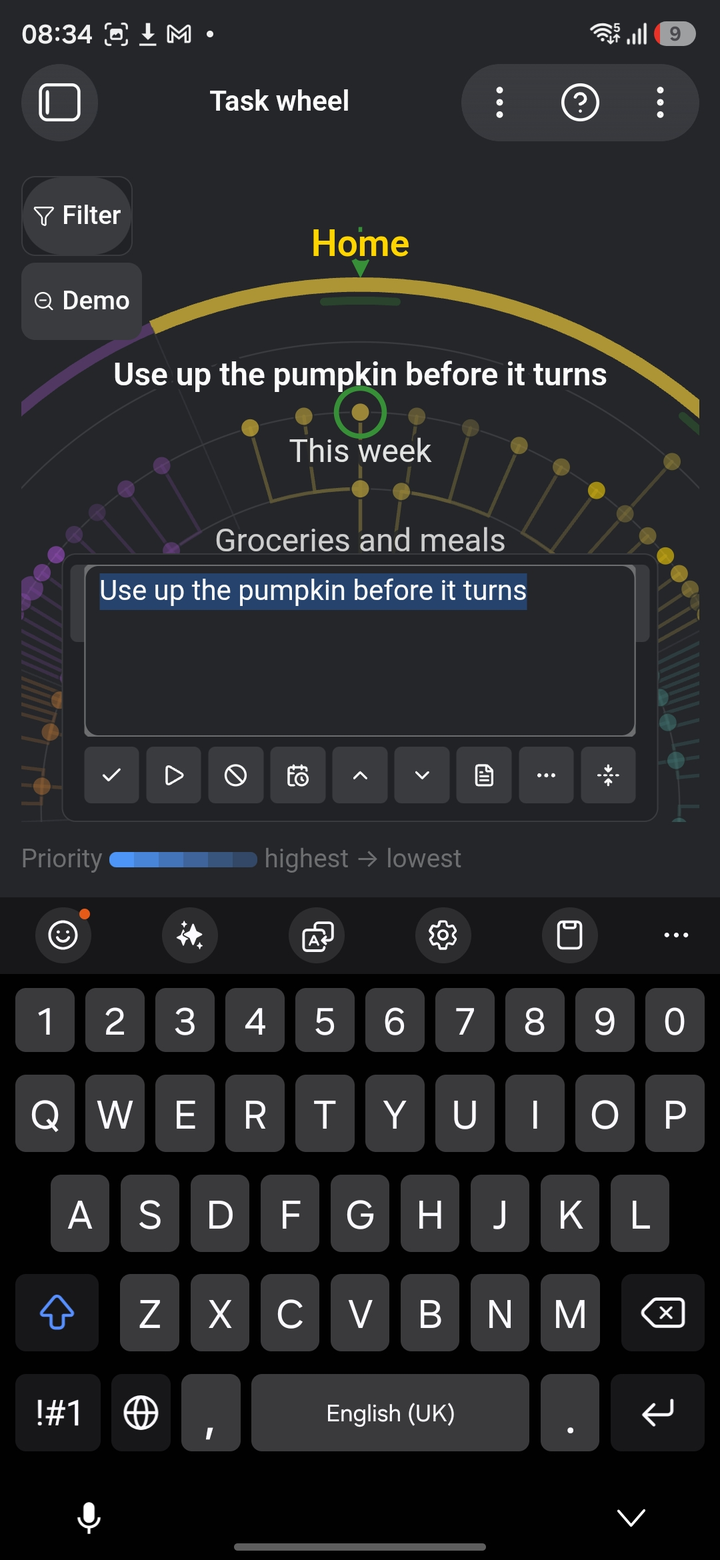 |
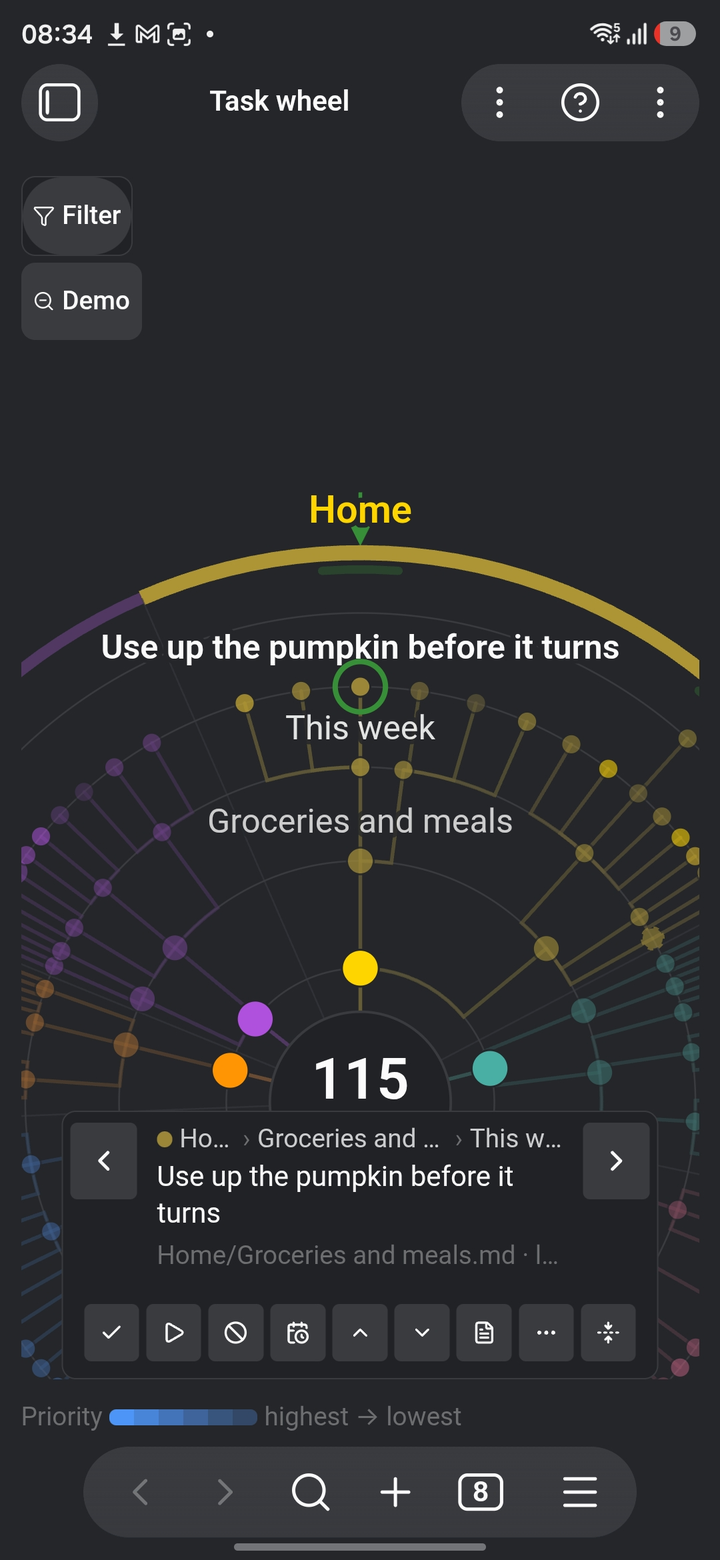
| The whole vault at once | The reading wedge, closer in | Editing without leaving the round |
Why a wheel
A list of five thousand tasks is not reviewable. You scroll, you lose your place, and you never know whether you reached the end. A circle has no end to lose: it has a position you can come back to, and a stop for every item.
Two properties make that work, and both are enforced rather than hoped for:
- Position is stable. Every domain gets a fixed angular budget that does not move with the number of tasks in it. Work grows into its own wedge; empty space is allowed to stay empty. That is what lets spatial memory build up — "the client work lives at two o'clock" — which is half the value of the idea.
- Nothing disappears silently. A folded branch stays as a stump with a counter. What the rings cannot reach is counted where it belongs. When a filter is on, the wheel says so and says how much it is leaving out. The wheel may show you less than everything; it may never be quiet about it.
What it reads
Plain checkboxes in Obsidian Tasks syntax. There is no format of our own to learn:
- [ ] Call the plumber 📅 2026-08-20 ⏫ #huis
    - [/] Find the last invoice
- [ ] Water the plants 🔁 every 3 days
- [-] Move the shed
All four of Tasks' statuses are read. [ ] open and [/] in progress are
work: both are on the wheel, and started work wears a ring around its dot so
you can see at a glance what you already picked up. [x] done and [-]
cancelled are finished — one you did, one you decided not to do, and
neither leaves anything to review — so both stay off unless you ask for
finished work. A custom status of your own counts as open: an unfamiliar
character is no reason to drop work from a round.
Hierarchy is read in this order of precedence: indentation under a parent task,
then headings in the note, then the note as a project, then the folder as a
domain. The domain can also come from a tag namespace such as #domein/werk,
from a front-matter property, or from the heading a task sits under — that
is a setting.
That last one is for a vault that splits its work by horizon rather than by subject: one note for today, one for this week, one for someday, each with the same headings inside. The folder then says nothing about what a task is about and the heading says everything, so Home in three notes becomes one wedge, with the three notes side by side inside it — one turn of that wedge walks the same subject across every horizon. Only the outermost heading becomes a wedge; deeper ones stay rings, and a task under no heading falls back like any other.
Unlike the other three sources, this one also holds on a wheel over a folder: narrowing to a folder narrows what is drawn, not what the angle means. A wheel over one note or one section is the exception — there the headings are already the axis.
A heading wedge opens, like everything else on the wheel: a second tap gives you a wheel over that heading wherever it is written, with the notes as its wedges. Opened from a folder wheel it stays inside that folder, and the way back out returns you to it.
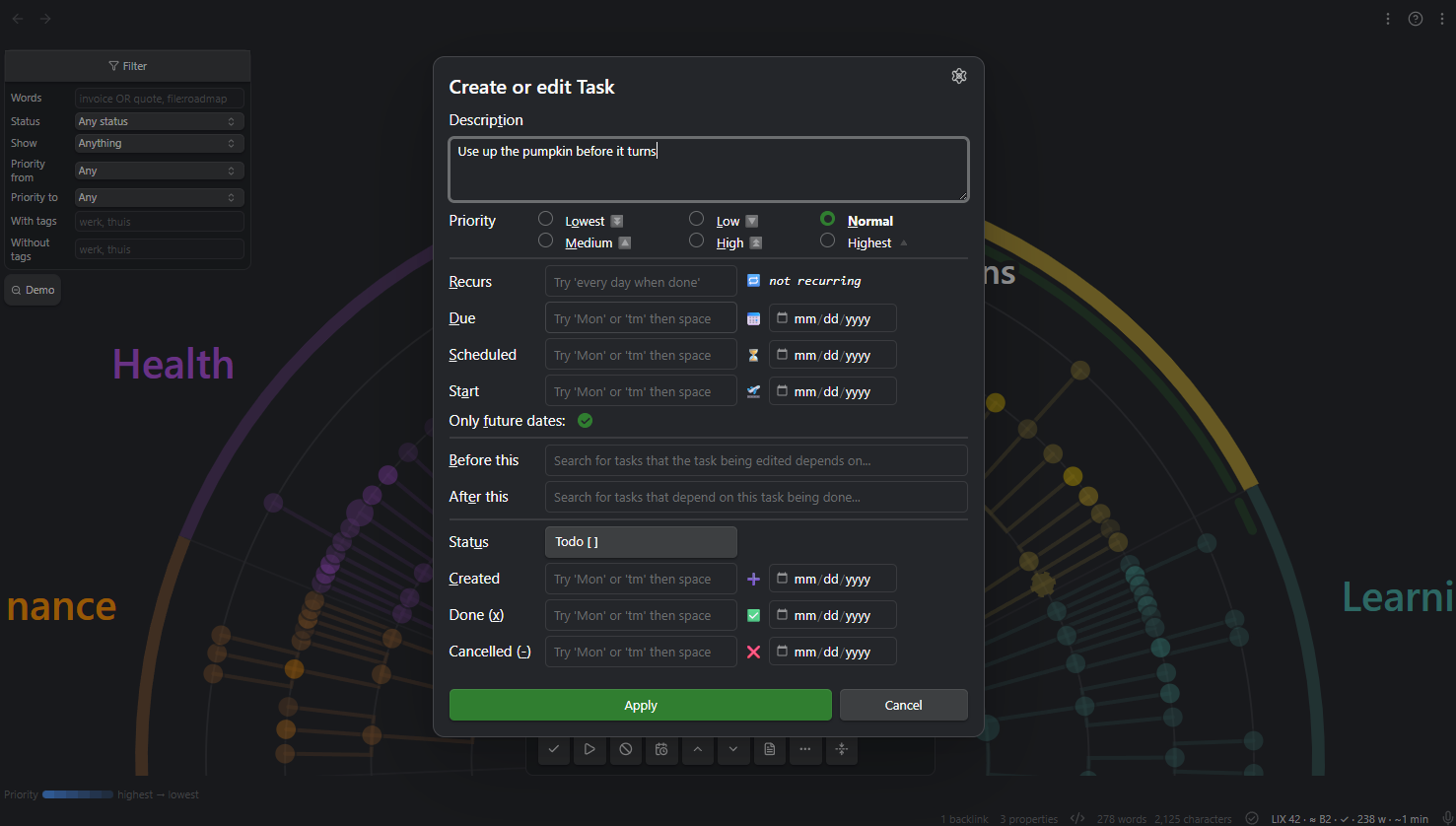
The Tasks plugin is not required. When it is installed, the wheel borrows two things from it: ticking a task off goes through it, so recurring tasks roll over exactly as Tasks itself would do it, and the ⋯ menu offers Edit in Tasks…, which opens that plugin's own edit window on the task in front of you — dates, recurrence, dependencies, your own status set. A setting can send the quicker gesture there too: Clicking a task's title, and adding a task opens the wheel's own box by default, or that window instead. That one setting covers both, because they are the same question asked about an existing task and a blank one. One difference is worth knowing: the wheel's own box stays open so you can type a run of tasks one after another, while the Tasks window makes one task and closes, as it does everywhere else in Obsidian. Without Tasks the entry is simply not there and the setting has nothing to switch to, so the wheel keeps to what it has: rewrite the words, change the priority, push a week out, or open the note.
Working the wheel
| Turn | Drag, scroll, or ← → |
| One item sideways | The ‹ › buttons beside the card, or ← → |
| …the other way of stepping sideways | Shift + ← → |
| In or out a ring | ↑ ↓ |
| Go to an item | Tap or click it |
| Open what you are on | Double-click or double-tap it, or Enter |
| Back out to the wider wheel | Backspace, or the button in the corner — you land back on what you stepped out of |
| Open the note it lives in | Ctrl/Cmd + Enter — add Shift if something else on your setup already claims that combination — or the note button on the card |
| Zoom | Pinch, ctrl-scroll, or + − |
| Fold a branch away | Space, or the button on the card |
| Open a wheel over the note you are in | The command Open the wheel over this note — it lands on the task under your cursor |
| Open the filter | Ctrl/Cmd + F, or the panel in the corner — the cursor lands in the search box |
| Jump to what you searched for | Enter in any filter box: it applies what you typed, gives the wheel its keyboard back and goes to the next match in the turn direction. Escape hands the wheel back without applying |
| One stop in the flat order | PageUp / PageDown |
| Jump to the first or last | Home / End |
| Carry to a named place | The ⋯ button, or a key you bind yourself |
| Add a task | a beside this one, Shift+A inside it — on any wheel; it goes into the note the task is written in. Both are commands too, so Obsidian can bind other keys |
| Make it a subtask of another | The ⋯ button — on any wheel, choosing from the other tasks in its own note |
| Help | The ? in the wheel's header — keys, the drawing's legend, and where this round stands |
The help speaks thirteen languages (English, Nederlands, Deutsch, Français, Español, Italiano, Português, Русский, 日本語, 한국어, 中文, العربية, हिन्दी) and follows Obsidian's own language setting; a setting overrides it.
Turning is the big movement; the two chevrons beside the card are the small one. They do what ← → do, one step sideways rather than a turn, so the place your eye is on stays put. Turning is where the guarantee lives: it walks the flat order, and that is the walk that cannot skip anything.
Sideways takes you to the next thing this round has not been past, wherever on the circle that is: reviewing the same task twice is time spent for nothing, and after sorting for an hour most of a ring is behind you — including, once you have moved work about, the stragglers. Only forwards. Back is always a single step, because coming to rest on something marks it seen, so a backwards step that skipped what it had seen could never take you back to where you came from. Turning is untouched, and PageUp / PageDown still walk the flat order without skipping anything.
What sideways steps through is yours to choose, under What the arrows step through:
- Every task (the default) — the next task, wherever it hangs. No branch is a dead end.
- Along the ring — the next item at the same depth, across branches. Keeps the eye at one radius, which is the move for comparing the same level of two projects. Be aware that a depth only one branch reaches is a ring of that branch alone: a long branch ending in three tasks walks round those three.
On a keyboard the other one is always on Shift + ← →, so you never have to visit the settings to borrow it. The two buttons beside the card follow the setting on a desktop; on a phone they always walk every task, because there the coarse movement is a finger on the disc and there is no Shift to borrow the other with.
Either way the step is taken from the whole wheel, not from the part of it that happens to be drawn — deep in a tree the wheel draws your own branch further out than the rest, and the next item is often one that has yet to be drawn. It gets drawn, and so does the way to it: a branch you had folded away opens while you are inside it and closes again when you leave, so looking is never undoing. So the step never leaves you stuck, it never changes which ring you are on, and the opposite key always brings you back where you came from.
The wheel always comes to rest on a stop — momentum is allowed, free spinning is not. That is what makes "I have been all the way round" a fact rather than a feeling.
It keeps up with the vault on its own. Edit a note in the editor, or let sync land one, and the wheel re-reads once the vault goes quiet — only for notes it is actually about, and only while you are looking at it; a wheel in a background tab catches up when you come back to it. There is no refresh button, because a round that is only complete if you remembered to press something is not a round the instrument can promise. Rescan the vault is still there as a command for when you want to force it.
The reading card floats over the wheel and holds the item under the wedge: what it is, where it sits, what it says, its dates and priority, and the review actions — tick off, mark in progress, cancel, push a week out, raise or lower priority, and open the note. The two status buttons are toggles: pressing the one a task already carries puts it back to open, which is the only way back from a mis-tap on a phone. The card keeps one fixed size at every stop, so the drawing underneath never jumps.
The ring you are on is depth, not kind, so a folder, a note, a heading, a task and a subtask can stand side by side on it. The card's bottom line therefore starts by saying which of those you are looking at: Task · plan.md · line 12, Heading · plan.md, Note property, Task document · migratie.md. A wedge that is a tag says Tag, not Folder, because it is not one.
A task like Finish the training plan [[week-01]] says half of what it is about
in the link, so the card shows it as one: [[note]], [[note|alias]],
[label](target) and a pasted https://… are all followed, through Obsidian's
own link resolution from the note the task lives in — ctrl- or cmd-click opens
it beside, as anywhere else. The card is not a renderer, though: embeds
(![[…]]) stay as they were written, and nothing else is formatted.
At scale
A vault of two hundred tasks and one of twenty thousand produce the same amount of drawing. The wheel never draws more than a fixed number of items; a degree of interest picks which ones — what is under the reading wedge swells and shows its deeper rings, the far side recedes to a silhouette — and everything else folds into stumps that carry counters. Turn towards a stump and it opens.
That is the answer to "there is too much to draw". The answer to "there is too much to review" is the filter, in its own panel at the top left of the wheel: by words, by status, by date, by priority, by tag. A round is then explicitly a round of that selection, and the panel says which selection and how much is outside it — even when it is closed.
Each wheel filters for itself. Open the vault in one tab and a project in the next and they no longer take each other's filter over: the filter belongs to what the wheel is looking at, beside the round it defines. Two wheels over the same thing do share one — they are two windows on one round.
Under heading narrows a round to the work that stands under one heading,
wherever it is written: "give me everything in this scope that sits under a
heading Project". That is the one question the other rules cannot ask — the
same subject, scattered over a dozen notes in half as many folders. It reads
any heading above the task, so a section deep in a note that opens with a
title heading is found as readily as one at the top. A heading is prose, so a
bare word matches part of the name: bonnetjes finds Project bonnetjes.
A * widens it further.
Paste the heading in with its ## if that is how you have it: the hashes are
markdown's way of writing the level and are taken off. It works whatever
the domain comes from, and it combines with the rest, so "this subject, high
priority, this week" is one question rather than three wheels. A task that
stands under no heading at all is left out while it is set — and counted as
left out, like anything else the filter removes.
Status is not started, in progress or finished — done and cancelled
together, since a round makes no distinction between them. Picking finished
brings finished work back for that round whatever Include finished tasks
says: asking for it in the filter is asking for it. The hub then counts what it
is showing rather than what is open, and says shown instead of open.
Dates are all reckoned from today — today or earlier, soon, has a date, has no date — except the window. Each of them then asks which date it means, on the line right below: the deadline (📅), the scheduled date (⏳) or the start date (🛫). Tasks carries all three, and "what did I mean to pick up this week" is as ordinary a question as "what has to be finished this week". The rules are named for the shape of the question rather than for one of the dates, so the name stays true whichever you point them at, and the line under the wheel says which one it was.
Between two dates takes a window of its own, and both ends count as inside it: up to the 22nd includes the 22nd. Leave an end empty and the window is open at that end, which is how you ask for "everything from September onwards" or "anything that was already due before this week". A task without the date you picked is in no window at all — for those there is has no date, one line up. A window that ends before it starts holds nothing, and the line under the wheel says so rather than leaving you with an empty wheel and no reason.
There is no "deferred" among the statuses, because Tasks has no status
character for it: putting something off is a date. So that lives with the
dates, as parked for later — a start (🛫) or scheduled (⏳) date that has
not arrived yet, wherever the due date happens to sit — and ready now,
which is the same line drawn from the other side: it hides everything you have
already decided not to think about yet. Neither looks at the due date, which is
a deadline and not a deferral. In a vault that uses no 🛫 or ⏳ dates there is
nothing to park, so ready now keeps everything and the badge says 0 out —
that is the filter reporting an empty rule, not ignoring you.
The search box takes four things and nothing more. Words are combined:
roof invoice wants both, in any order, and either may be typed slightly
wrong — plummer still finds the plumber. OR in capitals offers an
alternative: invoice OR quote. Quotes hold a phrase together and are matched
exactly: "annual plan 2027". And file: looks at the note instead of the
task: file:roadmap finds the tasks in every note whose name says so, and
call file:roadmap wants both at once. Half of what a task is about is often
only in the title above it — call under Northwind roadmap never says
Northwind itself — but that is a thing you ask for, so a bare plan cannot
quietly drag in everything living in Plan.md.
A * means here what it means in the settings: any run of characters. A bare
word already matches part of a word, so the star earns its keep in the middle —
week*report. It works in every box of the panel, and one line under them says
what a bare word does in each: with tags matches a tag from its start, so
may finds #maybe and #may/urgent and leaves #thuismaybe alone — a tag is
a name with structure, and #werk has always covered #werk/klant. A box holding nothing but a star asks for everything, which is
what an empty box already does, so the filter stays off. Inside quotes a star is
an ordinary character, which is how you search for a literal one.
file: reads the note's name, not the folders on the way to it, and never its
contents; Obsidian's own search is the tool for that.
Not every checkbox is a task
A list of acceptance criteria in a story file is a checklist belonging to a document, not work on your plate — but in form it is identical to a task, because the difference is intent. So the wheel does not guess. It is told, using structure your vault already carries:
- Skip notes of these types — matched against the note's own front-matter
type. A vault that keeps a document standard already says which notes are stories, templates or review forms. One entry covers the whole class, including every such note you write from now on. - Skip checkboxes under these headings — for a note that holds both. A real task under Goal still counts while the list under Acceptance criteria does not, nested items included.
Both take a * where you mean "and everything like it": accepta* covers
Acceptatiecriteria and Acceptance criteria, *criteria covers anything
ending that way, *tip* anything containing it. Without a star the whole name
has to match, because a boundary that widens quietly is worse than one that
makes you type the word out.
Both lists start empty, so nothing disappears until you say so. They are a boundary like an excluded folder rather than a filter: what falls outside was never part of a round, so it is not counted as left out either.
Which makes them silent, and a silent rule is one you cannot debug — a pattern that matches nothing looks exactly like one that works. So there is a command, Show what the skip rules take out: it says per line how many checkboxes that line removes, names a few of the headings it hit, and marks the ones that take out nothing. Under it, the headings still in play with their counts, biggest first. A heading you expected to have caught, sitting in that list, is a heading spelled differently than you think — or a checklist that turns out to sit under no heading at all, which no heading rule can reach.
A note that is itself a task
Some work is too big for a line. It gets its own note, with a body, references and a few checkboxes inside it. On the wheel such a note was a branch holding tasks and never a task itself, so the work it stands for could not be seen, reviewed or counted.
Name the front-matter property those notes carry and each of them becomes one task, labelled with its title, with the checkboxes inside it as its subtasks. The folder still decides its wedge and the note's own tags still count as its tags — it is a task like any other, in the place it was already in.
- Property that marks one —
type, say. Empty by default, and empty means nothing changes. - Values it may have —
task, next to atype, and comma-separated when more than one kind of note is a piece of work:task, projectcounts both. Leave it empty when carrying the property at all is the point, which is how an id-style marker works: its value differs in every note. Case is ignored, and a word without a dot also matches the part after the last dot, sotaskfinds a type writtenProject.Task. - Property that says it is finished, and the values that mean it —
status, withdoneandcancelled. A checkbox has its brackets; a note has whatever its front matter says, and without this a task note would keep coming back for ever. Case is ignored, and a word without a dot also matches the part after the last dot, sodonecovers a status writtenProject.Done.
Its status, in your own words
A checkbox has brackets; a document has whatever its front matter says. Name the property and the four words your vault uses, and a task document behaves like any other task: tick it off, start it, cancel it, and press the same button again to take that back. The wheel writes your word into your property, and a document in progress wears the same ring as a started checkbox.
Anything the four words do not cover — backlog, on hold — reads as open and
is never written away by itself. A vault that ends its documents in more ways
than two can name those under Other values that also mean finished; those are
read, never written.
One honest limit: un-ticking a document writes your open word. If it said
on hold before you ticked it off, that is gone — the wheel never saw it. The
same thing a checkbox has always done, and the reason the four words are yours to
set.
Renaming works from the card too: the title of a task document is its file name, so renaming it is Obsidian renaming the file, with every link that pointed at it following along.
What it deliberately does not do
Deferring and priority are absent. The wheel reads no date and no priority from a note's front matter, and writing one would be inventing a convention for every vault that has none.
That has one visible consequence, and it is deliberate: the date rules leave task documents out, rather than guessing about them. Has no date used to show a document that was due tomorrow, which is a wrong answer to exactly the question you asked. Now nothing is claimed, and the filter line says how many documents were left out and why. Their tags, their status and their title are read as ever.
Carrying is absent as well, and for a sharper reason: carrying moves task lines out of a note into another one, which on a task document would empty the very thing you meant to move. In its place the ⋯ button opens Obsidian's own file menu — Move file to…, Rename…, and whatever else your setup puts there. One way to move a file in the whole vault, and you already know it.
That menu is offered in three places now, and only three: a task document, a note ring, and a wedge that is a folder. Those are the items with a place of their own in the file list. A wedge that is a tag or a property value has none, so the entry is simply absent there. It is the same menu each time, which is also how you get Reveal in navigation: the wheel hides the folder tree on purpose, and this is the way back to it when the question is where does this actually sit. Reviewing is quick and half-attentive; making folders is not, and a folder typed with the wrong capital is a new folder on a case-sensitive file system. A finished task note leaves the round, but if a checkbox inside it is still open that checkbox stays on the wheel: nothing disappears without saying so.
Two ways to open it
- The whole vault — the ribbon icon, or the command Open the wheel.
- One folder or one note — right-click it in the file list (long-press on a phone) and choose Open task wheel here.
- The note you are reading — the command Open the wheel over this note, which lands on the task your cursor is on. Obsidian will bind a key to it if you want one.
A local wheel re-roots the angular axis: inside a folder the subfolders become the wedges, inside a note its headings do. The angle is always the top division of what you are looking at. Each wheel keeps its own position, zoom and folds.
Editing: structure in the wheel, prose in the note
The wheel reviews; it does not become a text editor. One line is drawn instead of none: structure in the wheel, prose in the note.
The task edits below work on every wheel. A task carries the note it is written in, so there is always somewhere to write, and the edit stays inside that note. Editing headings is the part that does not travel: for that the wheel has to be the note's outline, with the headings as wedges and the indentation as the depth, so it is offered in a wheel over one note or one section and nowhere else.
- Move a task up or down among its siblings, carrying everything underneath
it, including plain prose lines.
Altwith an arrow, or the⋯button — and on a heading the same key moves the whole section, which is what its own menu has always offered. This is the one the wheel does better than the editor. Dragging is deliberately not offered: it fights with turning, and on a phone it is fiddly. - Move it to another heading — a different operation from the one above,
not an extension of it: the task loses its parent, so it lands at the end of
the section you send it to, at that section's own level. A subtask becomes a
plain task there, and keeps its own subtasks. You pick the heading by typing
a couple of letters. In a note's wheel the headings are the wedges, so this
visibly moves the task to a different one. Type a name that is not there yet
and the last row of the list offers to make it — the way Obsidian offers
to make a folder you move a note into. It becomes a sibling of the section
the task is in now, right after it, and the row says which level it will get
before you choose. A name with a slash is a path:
org/afdeling 2makes afdeling 2 under org, the way a folder path does. Blank lines around it follow the note's own habit: a tightly written note stays tight. - Add a task below this one, or under it. You are asked for the words first, so changing your mind leaves no empty checkbox behind.
- Rename by clicking the title on the card — the single exception to "prose in the note", because a typo is too small a thing to open a tab for. It edits the words as written, tags included; the dates, priority and recurrence keep their place.
That last one is not only for tasks. Clicking the title renames a heading (its own line, keeping its level, from any wheel), a note and a task document (both the file name, through Obsidian's own rename, so every link that pointed there follows). A name already in use is reported rather than forced. On a folder wedge, or one that stands for a tag or a note property, the title says why there is nothing to rename: a folder is file management, and a tag is a name written down nowhere at all. Tags stay out on purpose — on a task they are part of the line and the line is the editor; on a note they would mean editing the note itself, which is what opening it is for.
Renaming and moving change what the wheel calls an item — identity is built from its place and its text — so the round's seen-marks and the reading wedge are carried across to whatever the items became. An edit never quietly undoes part of a round.
In a wheel over one note or one section, a heading has the same four moves,
one level up: move it among its siblings, hang it under another heading, add a
task to it, or give it a subheading. That includes the note's top headings, which are the wedges here —
so in a note's wheel the wedges sit in the note's own order rather than
alphabetically, and moving one is something you can see. A section travels with everything under it and is renumbered as it
goes — a ### with two #### becomes a ## with two ###, so the shape
survives and only the depth changes. Where it cannot survive, because the levels
would run past the six markdown has, the move is refused and says so: a section
flattened into its own neighbours is worse than one that stayed where it was.
Those four are note-wheel work, because each of them reshapes a document. Renaming a heading is not: it rewrites one line and leaves the level where it was, so it works from every wheel, like the edits on a task line.
Opening the note reuses its tab if it is already open, rather than stacking a new one every time; and coming back to the wheel lands on the item your cursor was left on.
There is no general delete: cancelling ([-]) already says "not doing this",
and that stays the right move for real work — it keeps the decision on record
instead of erasing it, and it can be undone. What the ⋯ menu does offer,
narrowly, is Remove this line from the note, and only when nothing hangs
under the task — no subtask, no indented note. That is for the case cancelling
was never about: a bare - [ ] a misfired paste left behind, with no decision
in it worth keeping. The line is shown before it goes, and a task with words on
it still asks — cancelling remains the suggested answer. And the first task in
an empty note still has to be typed in the note — these actions hang off a
task, so an empty note has nothing to hang them on.
Carrying work into another note
The other half of the same idea, and the one that works in both wheels. A
task on your active list that turns out to be a someday belongs in the someday
note; a task you come across while reviewing the whole vault belongs on your
list. Both live at the bottom of the ⋯ menu:
- Copy to another note… leaves the original exactly where it is. This is the one you want most of the time — a task you come across is usually inside a document that was explaining something, and taking it out breaks that.
- Move to another note… takes it out once it has landed on the other side.
What makes this more than cut and paste is that the category travels with
it. A wedge is a heading path, so a task that sat under Werk › Klanten lands
under Werk › Klanten over there — whatever of that path the other note lacks
is written, whatever it has is used, and nothing is ever duplicated. Two
headings of the same name under different parents are told apart, because the
path is compared from the top.
You are asked two things: which note, then where in it — and the second
comes with the answer already filled in as the first row, so Enter keeps the
path it has. Below that are the other note's own headings, and typing something
else reads as a whole path from the top (Werk/Klanten).
Naming a heading instead of keeping the path is the one thing that changes the shape: everything you are carrying lands under that one heading, so work from two sections arrives as one list. The row says so when it applies, and the first row remains the way to keep the sections apart.
One action carries a task with its subtasks, or a whole heading with everything
under it, subheadings included — those are renumbered as a block, so a ###
with two #### becomes a ## with two ###. Where the block would not fit
under the six levels markdown has, nothing is carried and the refusal says which
note was left alone. A heading left empty in the source note stays: it may carry
prose or meaning the wheel never sees.
A filter narrows what a branch carries. Filter on finished, stand on a heading and move it, and the finished work goes to the archive while the open work stays — the branch carries what the round is showing, not every line under it. The heading itself stays too, since it still holds what was left out, and each task keeps the subsection it hung under, so a branch with subsections arrives as a branch with subsections. Two rules keep it from orphaning anything: a task that travels takes its whole block, subtasks and all, in the round or not; and a task that stays keeps everything under it, including a subtask that is in the round. The notice afterwards says how many items went, and how many stayed behind with the task they sit under. A single task is unaffected — it always travels whole.
That second rule bites on a shape you will meet often — a card with a finished checklist under an open task:
## Huis en Tuin
- [ ] Balkon opruimen
    - [x] Bezem kopen
    - [x] Stoffer kopen
Filter on finished, take that branch, and nothing can leave: both items of the round sit under a task that is staying. The wheel says exactly that, and names the two ways out — carry that task itself, or turn the filter off. It is a different message from "nothing here is in this round", which is what an empty branch gets.
The other note is always written first, and the source is only emptied once the work has landed there. If something goes wrong in between you have it twice, which you can see and fix, rather than nowhere — and the wheel says so in those words, rather than leaving you to find the second copy later.
If this note changes while you are choosing where to send the work — a sync lands, or you edit it in another tab — the carry refuses and tells you the other note was left alone. Nothing is written anywhere. Try again and it will pick up what is there now.
New notes are not made from here: a note has a name, a folder and often a template behind it, and none of those decisions belong on a review card.
Named destinations are the places you carry to often, set up under
Destinations in the settings: a note, optionally a heading inside it, and
whether work is moved or copied. Each gets an entry on the ⋯ menu and a command
of its own, so you can bind a key to Carry to Someday. A destination points at
the note, not at the path it happened to have: rename that note, or a folder
above it, and the destination follows, the way Obsidian carries your [[links]]
along. A destination whose note you delete outright still refuses rather than
writing a new one, and says which one it was.
The round
Coming to rest on an item is having reviewed it — there is no second confirming tap. A faint band inside the rim shows which part of the circle this round has already passed. The round is about everything in the vault this wheel is looking at, not about what happens to be drawn: the wheel never draws more than a few hundred items and the rest sit behind stumps, so counting only the drawn ones would call a round finished long before it was. When the circle closes, the wheel says so once and starts a new round. How far is this round? and Start a new round are commands.
Changing the filter starts a new round, and the wheel says so. That is not an extra rule but the same one: a round is a round of that selection, so a different selection is a different round.
Not this
Task Wheel deliberately does not do: external task services, a task syntax of its own, time blocking or calendar integration, multi-user collaboration, or a full text editor.
You can edit a task from the card, but what the card edits is the task line and where it sits: its status, its dates, its priority, its wording, its place in the outline. Everything around the task stays the note's business. Splitting one task into several, or writing the paragraph that explains why it matters, is what open the note is for, and that is a button on the card.
Settings worth knowing
- Domain comes from — the top folder, a tag namespace, a front-matter
property such as
area:, or the heading a task sits under. This decides the angle, so it is the setting with the most visible consequence. The tag namespace and the heading work per task, so those are the two that let a single note feed several wedges — and the heading is the only one that lets a single wedge span several notes. - Detail — how many items may be drawn at once (compact 120, balanced 240, dense 400).
- Which notes the wheel reads — Folders to read, Excluded folders and
Note types to skip, in that order and next to each other, because they
answer one question. In a large vault, naming the four folders that hold your
tasks beats naming the ninety that do not; the third reads the note's own
front-matter
type, so a vault that already marks its templates and review forms needs no tagging by hand. None of the three is a wall: point the wheel at a skipped note or folder from its own context menu and you get it, because naming it is asking for it. Only the thing you named is exempt — a skipped note inside a folder you opened stays out. - What counts as a task inside those notes — a different question, and the next three groups: checkboxes under a checklist heading are the document's own list, a note carrying the property you name is itself a task, and its status says when it is finished.
- Filter of the vault wheel — the same fields as the panel beside that wheel, not a second, wider one. Whatever you set here you can clear there and the other way round, and no other wheel is touched: a wheel over a folder, a note, a section or a heading keeps its own filter beside its own round. Changing it here is a new round for the vault wheel, exactly as it is in the panel, and the plugin says how many marks that cost. Whatever is on is always visible under the wheel.
Common questions
Does it work with the Tasks plugin?
Yes, and it does not require it. Task Wheel reads Obsidian Tasks syntax straight out of your notes — dates, priorities, recurrence, dependencies — so a vault that already uses Tasks needs no conversion and no second syntax. With the Tasks plugin installed, ticking off goes through it so recurring tasks roll over exactly as that plugin would do it, and its own edit and create windows are available from the wheel. Without it, everything still works. See What it reads.
How is this different from a Kanban board or a task list?
Those are for doing work; this is for seeing it. A board or a list shows what you chose to put on it, which means the thing you forgot to add is exactly the thing it cannot show you. The wheel starts from every open checkbox in the vault and gives each one a stop, so the question it answers is have I now seen all of it rather than what is on my board. It is a complement to a board, not a replacement: tick a task off here if you like, but that is not what it is for. See Why a wheel.
Does it work on a phone?
Yes. Pinch to zoom, drag to turn, tap to go somewhere. The reading card and the filter panel are built for a narrow pane, and the plugin is not desktop-only.
How does it decide what goes where on the wheel?
The angle is the life domain, which by default is the top-level folder a note sits in; you can point it at a tag namespace, a front-matter property or a heading instead. The radius is depth: folder, note, heading, task, subtask. You do not tag anything specially and you do not restructure your vault. See Settings worth knowing.
Will it change my notes, or send anything anywhere?
It changes a note only when you ask it to, and then it rewrites the one line you acted on and leaves the rest of it alone — including syntax the wheel does not model. Nothing leaves your machine: no network calls, no telemetry, no account. See Privacy below.
How big a vault does it handle?
Twenty thousand tasks draw as fast as two hundred, because the number of things drawn is capped rather than the number of things counted. What is not drawn sits behind a stump with a counter on it, so it is hidden and never lost. See At scale.
Install
From the community list: Settings → Community plugins → Browse → search for Task Wheel → Install, then Enable.
Manually, today: download main.js, manifest.json and styles.css from
the latest release,
put them in <vault>/.obsidian/plugins/task-wheel/, and enable the plugin
under Settings → Community plugins. Or point
BRAT at
maxonamission/obsidian-task-wheel.
Privacy — what leaves your machine
Nothing. The wheel reads your vault through Obsidian's own APIs and writes back to your notes when you ask it to. There are no network calls, no telemetry, and no account. Every release asset carries a build-provenance attestation proving it was built from this repository's source.
Support
Task Wheel is free. If it changed how you review your work, you can buy me a coffee. Bugs and ideas: open an issue.
Development
This repository is a source mirror of the working repo; development happens
there and releases are synced here, where main.js is built from this source
during the release (that is what the attestation attests).
npm install
npm test          # vitest
npm run lint      # eslint
npm run build     # tsc --noEmit + esbuild production
The layers are kept apart on purpose: model/, parse/ and layout/ never
import from obsidian — an eslint rule enforces it — so every angle, radius,
colour, stop and filter rule is tested headlessly, without an Obsidian window.
vault/ and view/ hold everything that talks to the app.
License
GPL-3.0, with one exception: src/view/link-suggest.ts — the piece
that offers notes while you type a [[ link — is also available under the
MIT licence, so that MIT-licensed plugins can use it as it stands.