Search...Search plugins and themes...
⌘K
Sign in
  • Get started
  • Download
  • Pricing
  • Enterprise
  • Account
  • Obsidian
  • Overview
  • Sync
  • Publish
  • Canvas
  • Mobile
  • Web Clipper
  • CLI
  • Learn
  • Help
  • Developers
  • Changelog
  • About
  • Roadmap
  • Blog
  • Resources
  • System status
  • License overview
  • Terms of service
  • Privacy policy
  • Security
  • Community
  • Plugins
  • Themes
  • Discord
  • Forum / 中文论坛
  • Merch store
  • Brand guidelines
Follow us
DiscordTwitterBlueskyThreadsMastodonYouTubeGitHub
© 2026 Obsidian

Task Director

cybertrampcybertramp340 downloads

Manage and change tasks targeting a specific page

Add to Obsidian
  • Overview
  • Scorecard
  • Updates2

Change all tasks within the selected page at once.

Page에 있는 Task를 한번에 전환하세요. ⬜ --> ✅

Features

  • Changes all incomplete tasks (- [ ]) in the selected file to complete (- [x]).

    • [command] Change tasks to done
    • [select target file menu] Todo->Done
  • Changes all complete tasks (- [x]) in the selected file to incomplete (- [ ]).

    • [command] change tasks to todo
    • [select target file menu] Done->Todo
  • Show Total Summary count in page

    • [command] Show page todo summary
    • [select target file menu] Todo Summary
  • Remove task date from completed tasks: This option allows you to remove the task date (e.g., ✅ 2024-11-04) when toggling completed tasks to incomplete.

    • Default setting: Enabled

Installation

  1. Copy this plugin’s folder to your Obsidian plugins folder (.obsidian/plugins).
  2. In Obsidian, go to Settings > Community plugins, and enable this plugin.

How to use

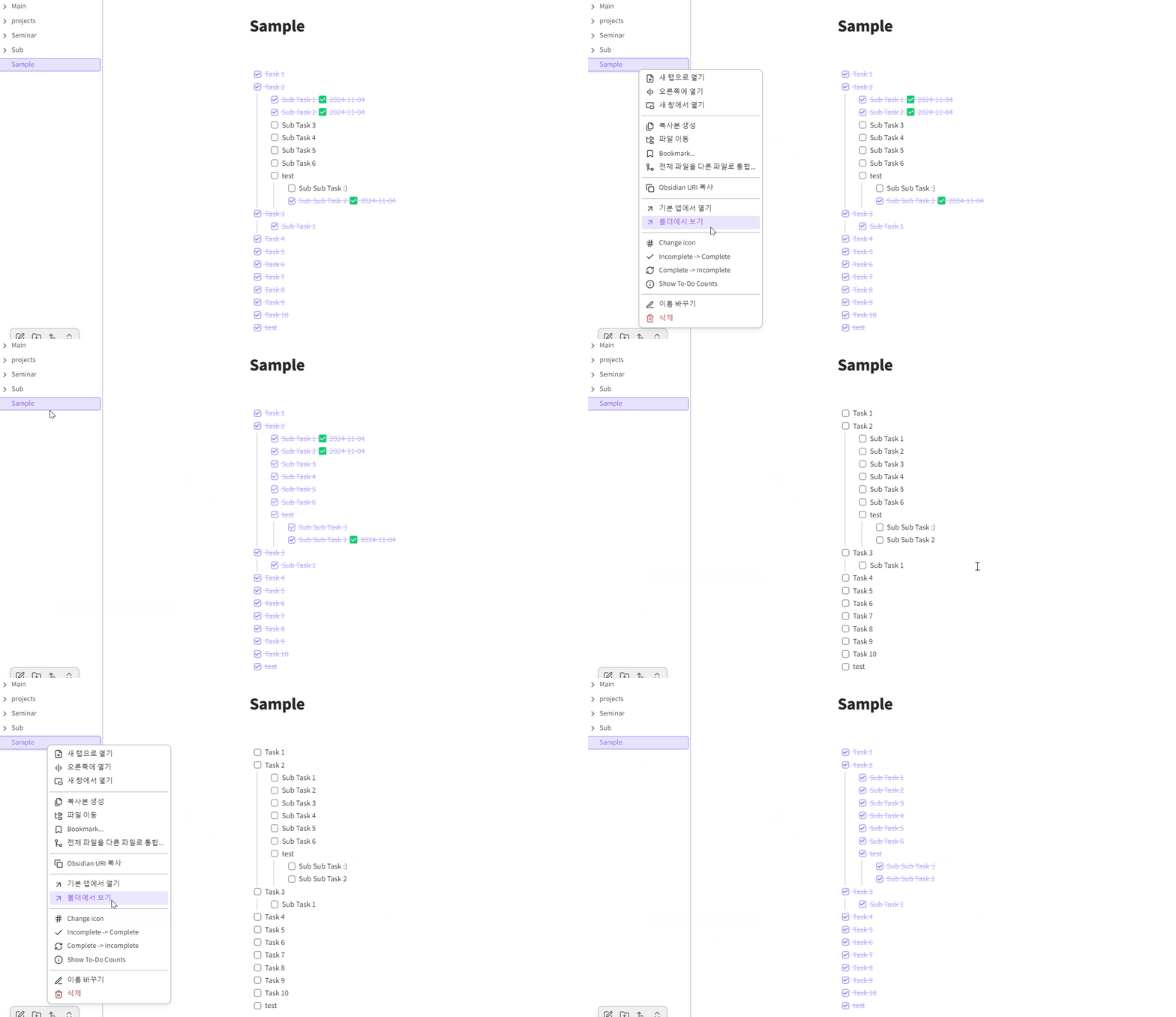
Click right and select menu item or call command

The image below shows the functionality of changing tasks on a page all at once.
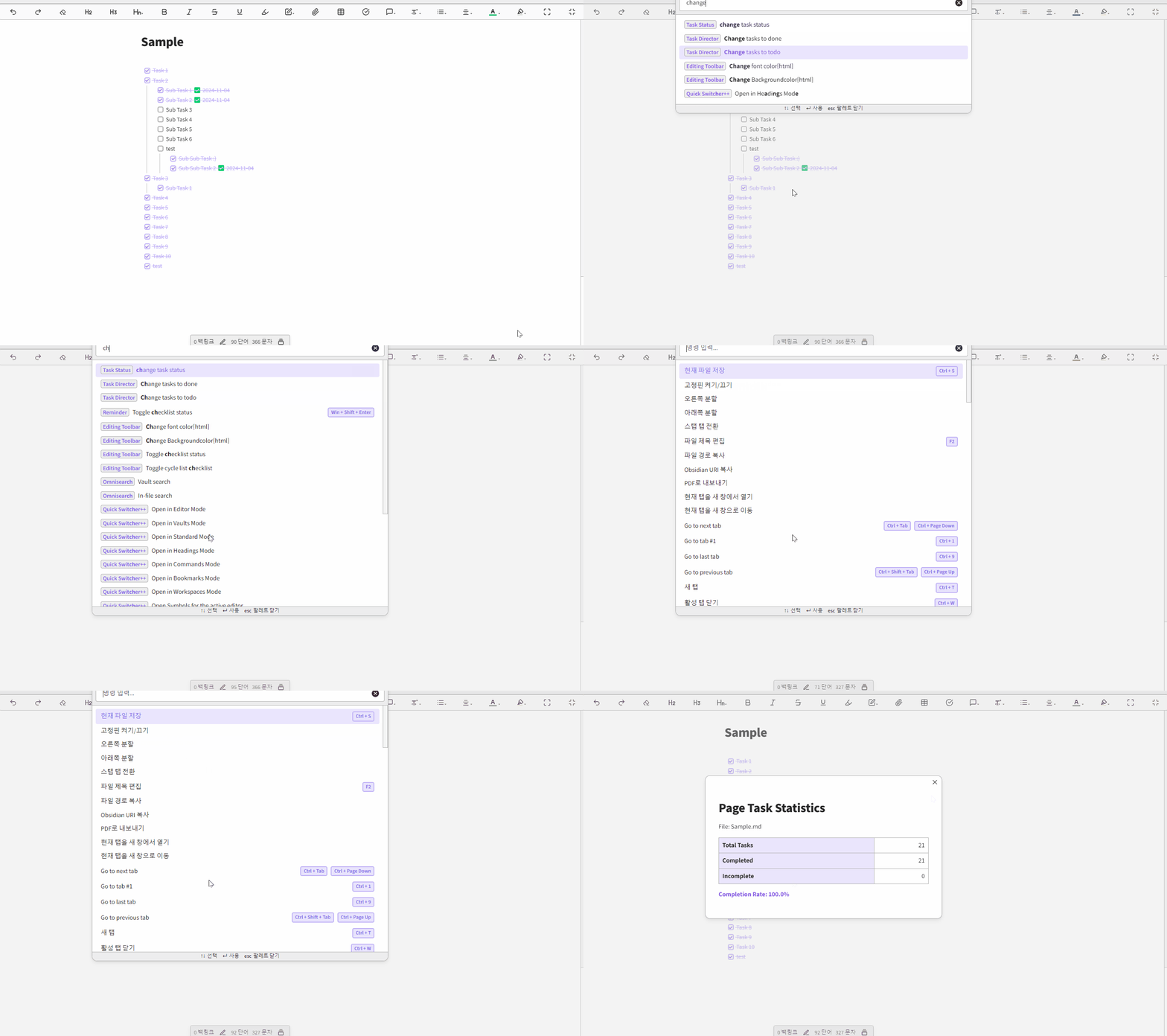
The image below shows the functionality being used through a command.
Why Task Director

I developed this plugin to address the challenge of managing incomplete tasks from past entries. Without this tool, historical uncompleted tasks would clutter task statistics and new pages, and the only solution was to manually process each task one by one.

지나간 Task들을 다 Done 처리 못했는데 새로운 페이지에서 통계를 내거나 하는 경우 이전에 Done 처리 못한 항목들이 모두 보이게되어 아무리 검색해도 이와 같은 기능을 하려면 일일이 모두 touch 해야한다는 말 밖에 없어서 그냥 만들었습니다.

Build for dev

git clone https://github.com/cybertramp/obsidian-task-director
cd obsidian-task-director
yarn install
yarn dev

# Test in yout obsidian
# Copy files to yout Vault .obsidian directory
# main.js, manifest.json, styles.css

Support

(cybertramp) [email protected]

History

Please check CHANGELOG ...

74%
HealthGood
ReviewSatisfactory
About
Change all tasks in the selected file from todo to done or revert all done tasks back to todo in one action. Show a page-level todo summary with total counts. Remove completion dates from tasks when reverting them to todo.
TasksCommandsProject management
Details
Current version
0.0.2
Last updated
2 years ago
Created
2 years ago
Updates
2 releases
Downloads
340
Compatible with
Obsidian 1.5.0+
Platforms
Desktop, Mobile
License
OTHER
Report bugRequest featureReport plugin
Sponsor
Buy Me a Coffee
Author
cybertrampcybertramp
cybertramp.net
GitHubcybertramp
  1. Community
  2. Plugins
  3. Tasks
  4. Task Director

Related plugins

Tasks

Track tasks across your vault. Supports due dates, recurring tasks, done dates, sub-set of checklist items, and filtering.

Task Collector (TC)

Change task status and collect tasks within a document using hotkeys and context menus.

Base Board

Organize notes into Kanban boards using frontmatter properties. Drag and drop cards between columns powered by Bases.

TaskChute Plus

Execute TaskChute that slots today's tasks, tracks projects, adds comments, and keeps you focused on now.

Project Manager

Full-featured project management: stunning Gantt charts, Kanban boards, Table views, customizable fields, due date notifications.

Text Block Timer

Add a timer to text block to track task time consumption.

Completed Task Display

Controls for displaying or hiding completed tasks.

Tasks Map

A visual graph view of your tasks.

Task List Kanban

Organizes all of the tasks within your files into a kanban view.

Task Board

Manage all your tasks throughout your vault from a single board and much more...