Tag Lock
 AQiong 阿琼72 downloads
Password-gate notes when configured privacy tags or folders are detected.
- Overview
- Scorecard
- Updates7
Tag Lock — 隐私标签锁
给 Obsidian 的隐私笔记加一层轻量级验证,防止别人借用你的手机或电脑时随手看到敏感内容。
在笔记中添加受保护标签,例如 #隐私 或 #密码,Tag Lock 会在内容可能被看到之前要求密码或九宫格手势验证。它面向日常“防君子”场景,不改写本地 Markdown 文件。
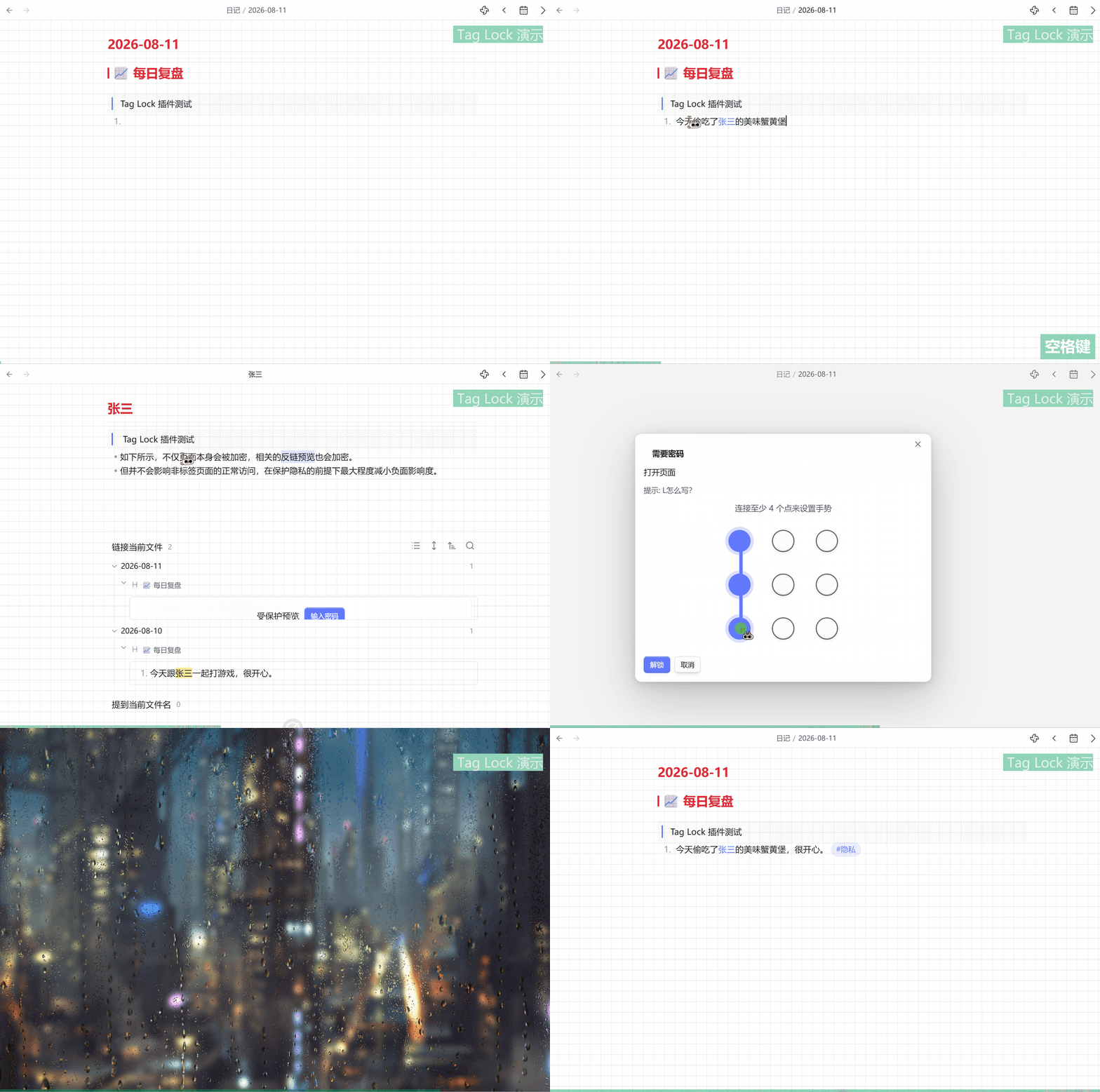
🎬 演示动画
✨ 主要功能
- 标签和文件夹保护 — 用受保护标签或配置的文件夹标记敏感内容。
- 覆盖多个泄露入口 — 保护页面打开、搜索结果、页面预览、反链预览和标签同名双链。
- 密码或九宫格解锁 — 按设备和个人习惯选择验证方式。
- 灵活的锁定规则 — 设置解锁有效时长、重启或切后台时是否锁定,以及是否每次访问都验证。
- 失败保护 — 连续输错 5 次后暂停输入 30 秒;1 秒内连续打开 3 次验证框时关闭当前标签页。
- 错误处理策略 — 验证错误或取消后,可以返回上一个页面、关闭当前页面,或不执行导航动作。
- 预览遮罩和模糊 — 受保护内容不会只变暗,而是被不透明遮罩覆盖并模糊处理。
- 保护设置页面 — 可要求进入 Tag Lock 设置前先验证,避免别人直接关闭保护规则。
一句话总结 — 它适合防止日常误看和好奇浏览,不是用来替代真正的文件加密。
🔧 工作原理
当 Obsidian 准备打开或展示内容时,Tag Lock 会检查目标文件的标签、文件名和所在文件夹:
- 发现受保护标签或文件夹后,先拦截可能暴露内容的访问。
- 用户验证成功后,继续打开页面或显示预览。
- 验证失败或取消时,按设置执行返回、关闭或保持当前导航。
除了直接打开页面,插件也会保护搜索、反链、页面预览、标签同名双链,以及文件名等于受保护标签的页面,例如 隐私.md。
🔐 默认解锁规则
首次使用时的默认设置:
| 项目 | 默认值 |
|---|---|
| 受保护标签 | #隐私、#密码 |
| 受保护文件夹 | 空 |
| 标签同名双链和页面保护 | 开启 |
| 搜索、页面预览及反链保护 | 开启 |
| 设置页面保护 | 关闭 |
| 解锁方式 | 密码 |
| 解锁有效时长 | 30 分钟 |
| 重启后锁定 | 开启 |
| 切后台后锁定 | 关闭 |
| 强制每次访问验证 | 关闭 |
| 验证成功后立即解锁 | 开启 |
| 验证错误或取消 | 跳转到上一个页面 |
受保护标签和文件夹均支持每行填写一个项目,所有规则都可以在 Tag Lock 设置中修改。
⚠️ 隐私和安全边界
Tag Lock 不会加密或改写本地 Markdown 文件。绕过 Obsidian 直接打开文件、复制 Vault、使用其他工具读取,或者查看已经解锁的 Obsidian 会话,仍然可能看到受保护内容。密码和手势凭据以带盐哈希形式保存用于验证。
如果笔记即使被复制到其他设备也必须保持机密,请使用全盘加密、操作系统锁屏或真正的文件/数据库加密方案。Tag Lock 要求 Obsidian 1.13.0 或更高版本。
📦 安装
从 GitHub Release 安装
从最新 Release下载 main.js、manifest.json 和 styles.css,复制到:
<你的 Obsidian 库>/.obsidian/plugins/tag-lock/
然后在 Obsidian 的“社区插件”设置中启用 Tag Lock。
手动构建开发版
git clone https://github.com/agarcabin/obsidian-tag-lock.git
cd obsidian-tag-lock
npm install
npm run build
将生成的 main.js、manifest.json 和 styles.css 复制到上面的插件目录,然后重载 Obsidian。
📄 许可证
Tag Lock 使用 MIT License 开源。
Tag Lock — Privacy Gate
Source: agarcabin/obsidian-tag-lock · Releases
Add a lightweight privacy gate to Obsidian so casual viewers cannot immediately see your sensitive notes.
Mark a note with a protected tag such as #隐私 or #password, and Tag Lock asks for a password or Android-style pattern before protected content is exposed. It is built for everyday shared-device privacy and does not rewrite local Markdown files.
✨ Features
- Tag and folder protection — Protect notes with configured tags or folders.
- More than direct page opening — Cover page access, search results, page previews, backlinks previews, and tag-named wikilinks.
- Password or pattern unlock — Choose the verification method that feels natural on your device.
- Flexible lock behavior — Configure unlock validity, restart/background locking, and whether every access requires verification.
- Failed-attempt protection — Pause input for 30 seconds after five failures; close the current tab after three prompts within one second.
- Navigation policy — After a failed or cancelled verification, return to the previous page, close the current tab, or take no navigation action.
- Real preview masking — Protected previews use an opaque overlay and blur instead of merely dimming text.
- Protected settings — Require verification before opening Tag Lock settings so the rules cannot be casually disabled.
TL;DR — Tag Lock is for casual viewing on a shared device, not a replacement for encryption.
🔧 How it works
Before Obsidian opens or displays content, Tag Lock checks the target file's tags, filename, and configured folder:
- If protected content is detected, the potentially exposing access is intercepted.
- A successful verification allows the page or preview to continue.
- A failed or cancelled verification follows the configured navigation policy.
The same protection model covers direct page opening, search, backlinks, page previews, tag-named wikilinks, and pages whose filename matches a protected tag, such as 隐私.md.
🔐 Default protection rules
The first-use defaults are:
| Setting | Default |
|---|---|
| Protected tags | #隐私, #密码 |
| Protected folders | None |
| Tag-named wikilink and page protection | Enabled |
| Search, page preview, and backlinks protection | Enabled |
| Tag Lock settings protection | Disabled |
| Unlock method | Password |
| Unlock validity | 30 minutes |
| Lock after restart | Enabled |
| Lock when entering the background | Disabled |
| Require verification on every access | Disabled |
| Immediate unlock after success | Enabled |
| Failed or cancelled verification | Go to the previous page |
Protected tag and folder fields accept one entry per line, and every rule can be changed in Tag Lock settings.
⚠️ Privacy and security scope
Tag Lock does not encrypt or rewrite local Markdown files. Anyone who opens the files outside Obsidian, copies the vault, uses another tool, or inspects an already unlocked Obsidian session may still read protected content. Credentials are stored as salted hashes for verification.
Use full-disk encryption, operating-system authentication, or real file/database encryption when notes must remain protected after the vault is copied. Tag Lock requires Obsidian 1.13.0 or later.
📦 Install
From a GitHub Release
Download main.js, manifest.json, and styles.css from the latest release, then copy them into:
<your-vault>/.obsidian/plugins/tag-lock/
Enable Tag Lock in Obsidian's Community plugins settings.
Build from source
git clone https://github.com/agarcabin/obsidian-tag-lock.git
cd obsidian-tag-lock
npm install
npm run build
Copy the generated main.js, manifest.json, and styles.css into the plugin directory above, then reload Obsidian.
📄 License
Tag Lock is released under the MIT License.