Search...Search plugins and themes...
⌘K
Sign in
  • Get started
  • Download
  • Pricing
  • Enterprise
  • Account
  • Obsidian
  • Overview
  • Sync
  • Publish
  • Canvas
  • Mobile
  • Web Clipper
  • CLI
  • Learn
  • Help
  • Developers
  • Changelog
  • About
  • Roadmap
  • Blog
  • Resources
  • System status
  • License overview
  • Terms of service
  • Privacy policy
  • Security
  • Community
  • Plugins
  • Themes
  • Discord
  • Forum / 中文论坛
  • Merch store
  • Brand guidelines
Follow us
DiscordTwitterBlueskyThreadsMastodonYouTubeGitHub
© 2026 Obsidian

Tab File Path

johnburnettjohnburnett642 downloads

Shows file paths in tabs

Add to Obsidian
  • Overview
  • Scorecard
  • Updates2

A simple plugin for Obsidian that makes tabs show their full, vault-relative paths.
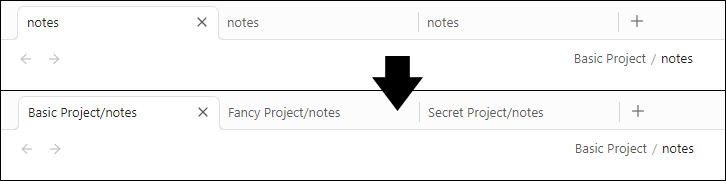
Screenshot of tabs showing before and after.

HealthGood
ReviewSatisfactory
About
Display full vault-relative file paths in tab titles to show each note's location at a glance. Make it easy to distinguish files with identical names.
InterfaceFiles
Details
Current version
1.1.0
Last updated
11 months ago
Created
Last year
Updates
2 releases
Downloads
642
Compatible with
Obsidian 1.8.10+
Platforms
Desktop, Mobile
License
MIT
Report bugRequest featureReport plugin
Author
johnburnettjohnburnett
johnburnett.com/
GitHubjohnburnett
  1. Community
  2. Plugins
  3. Interface
  4. Tab File Path

Related plugins

Notebook Navigator

A better file browser and calendar inspired by Apple Notes, Bear, Evernote and Day One.

Hider

Hide interface elements such as tooltips, status bar, titlebar, and more.

Claudian

Embeds Claude Code/Codex and other local Agents as AI collaborators in your vault.

Advanced URI

Control everything with URI.

Meta Bind

Make your notes interactive with inline input fields, metadata displays, and buttons.

Local REST API with MCP

Unlock your automation needs by interacting with your notes over a secure REST API.

Find orphaned files and broken links

Find files that are not linked anywhere and would otherwise be lost in your vault. In other words: files with no backlinks.

Omnisearch

Intelligent search for your notes, PDFs, and OCR for images.

Recent Files

Display a list of recently opened files.

Commander

Customize your workspace by adding commands everywhere, create macros and supercharge your mobile toolbar.