
- Overview
- Scorecard
- Updates14


Obsidian Syncthing integration
This plugin allows you to integrate tools in your Obsidian vault for managing synchronization using Syncthing.
:label: Badges
:link: Useful links
Related softwares
Plugin's related links
:arrow_down: Installation
You can install the plugin using the following ways :
- From the community plugins tab within Obsidian
- From the releases page on GitHub
- From the source code, please see the Development section
- With Obsidian42 BRAT
Guides
The best way to install the plugin is via the Obsidian Community Plugins tab. You can find a guide on how to do this here.
Otherwise, you can download the latest release from the releases page on GitHub. Then, you can install the plugin manually by downloading the main.js, manifest.json and styles.css files and placing them in your vault's .obsidian/plugins/obsidian-syncthing-integration folder.
If you want to install the plugin from the source code, please see the Development section.
Finally, you can install the plugin with Obsidian42 BRAT and provide the GitHub repository URL. Please see the BRAT documentation
:eyes: Plugin Vision
[!NOTE] The initial vision of this plugin has evolved since its creation. As I have tested and tried to implement the plugin, I have realized that some features are not feasible or not necessary. Therefore, some expected features or behaviours might misdirect users. An updated description of the plugin's goals is described below.
This plugin now aims to provide integrated features related to Syncthing and Obsidian. You can see the Roadmap for more information about the plugin's features and future developments.
[!NOTE] If you want a full integrated Syncthing synchronization with your notes app, you can try the anytype notetaking app. It provides a full integration of a syncing protocol in the note-taking app, see more about this here.
This project provides features like conflicting files resolution, status bar feature, diff conflicting files, ignoring files from synchronization (coming soon), and more.
It is mainly features based on files available in the vault and that are specific to Syncthing.
Feel free to suggest new features or improvements in the Discussions tab or via a new issue.
Moreover, the integrated Syncthing configuration panel (coming soon) will provide a way to configure Syncthing directly from Obsidian. It will be a lighter version than the official Syncthing app, due to technical limitations.
The plugin is more focused on getting information from an active Syncthing instance on your device (PC, mobile or tablet) and provide you meaningful information about the status of the synchronization.
:wrench: Configuration
[!WARNING] Please backup your vault and use this plugin wisely. Some features could modify files in your vault so please always remember to backup your vault in a different location.
:construction: This plugin is still in development. The configuration might not yet be fully available. :construction:
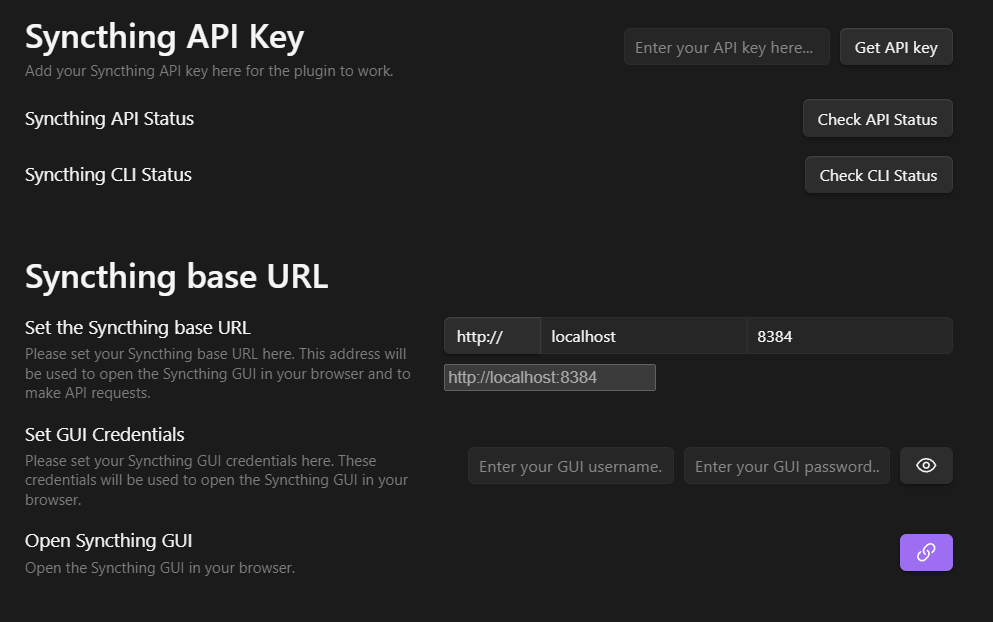
The plugin's configuration provides a way to set up the connection to your Syncthing instance. On Desktop, it should be straightforward if you have the CLI installed. Otherwise, you can use the GUI to set up the connection.
Click here to see an example of the configuration settings
[!IMPORTANT] The synchronization is done in real-time, using peer-to-peer connections. Therefore, all the devices you want to synchronize must be connected at the same time.
To overcome this, you could setup one device as a relay server. This device will be always connected and will relay the data between the other devices, like a NAS or a VPS.
:heart: Contributing
To contribute to this plugin, you can create issues and pull requests on GitHub. Moreover, you can discuss any new idea or suggestion in the Discussions tab. Please follow the Code of Conduct when contributing to this project and read the Contributing guidelines.
:hammer_and_wrench: Development
If you want to develop this plugin locally, please follow the instructions below.
- Clone the repository
- Install the dependencies using
pnpm install - Build the plugin using
pnpm dev - (Optional) Use the hot-reload plugin in Obsidian to reload the plugin automatically when you make changes
[!NOTE] When using the hot-reload plugin, you have to clone this plugin in the
.obsidian/pluginsfolder of your vault. And the plugin's files should be at the root of the folder. (main.js,manifest.jsonandstyles.css) It should be automatically set up.
:clap: Credits
Here are some inspirations for this plugin :
- Obsidian version history diff by kometenstaub - credits for :
- the
styles.scssfile, - corresponding
esbuildSCSS/CSS config, - and an overall inspiration for the diff modal layout, when resolving file conflicts.
- the
- Obsidian testing vault by pedersen - credits for :
- the plugin's dev mode feature. I added a dev mode modal to easily generate testing files w/ syncthing conflicts format.
:busts_in_silhouette: Authors
:sparkles: Contributors
 LBF38 💻 📖 |
 Josh Samuel 💻 |
:memo: Licensing
This project is licensed under the MIT License. See LICENSE for more information.