Search...Search plugins and themes...
⌘K
Sign in
  • Get started
  • Download
  • Pricing
  • Enterprise
  • Account
  • Obsidian
  • Overview
  • Sync
  • Publish
  • Canvas
  • Mobile
  • Web Clipper
  • CLI
  • Learn
  • Help
  • Developers
  • Changelog
  • About
  • Roadmap
  • Blog
  • Resources
  • System status
  • License overview
  • Terms of service
  • Privacy policy
  • Security
  • Community
  • Plugins
  • Themes
  • Discord
  • Forum / 中文论坛
  • Merch store
  • Brand guidelines
Follow us
DiscordTwitterBlueskyThreadsMastodonYouTubeGitHub
© 2026 Obsidian

sync-to-xlog

otto-jotto-j3k downloads

Push notes to xlog.app.

Add to Obsidian
  • Overview
  • Scorecard
  • Updates6

An Obsidian plugin that syncs notes to xlog.app. 一个 Obsidian 插件,可以把笔记同步到 xlog.app 上。

相关截图

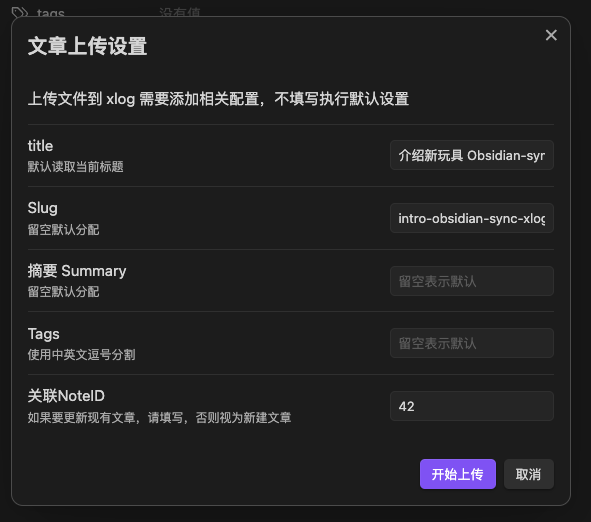
上传弹窗
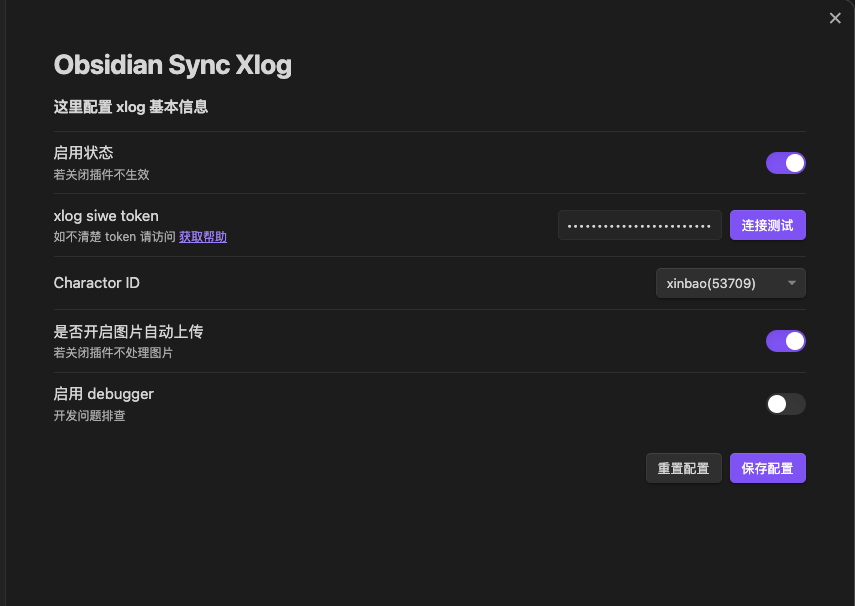
设置截图
安装

通过社区插件市场安装

目前本插件已经通过 obsidian 官方上线,可以直接在第三方插件搜索xlog。 image

也可以通过 BRAT 安装(类似于 iOS TestFlight),或者手动安装

通过 BRAT 安装

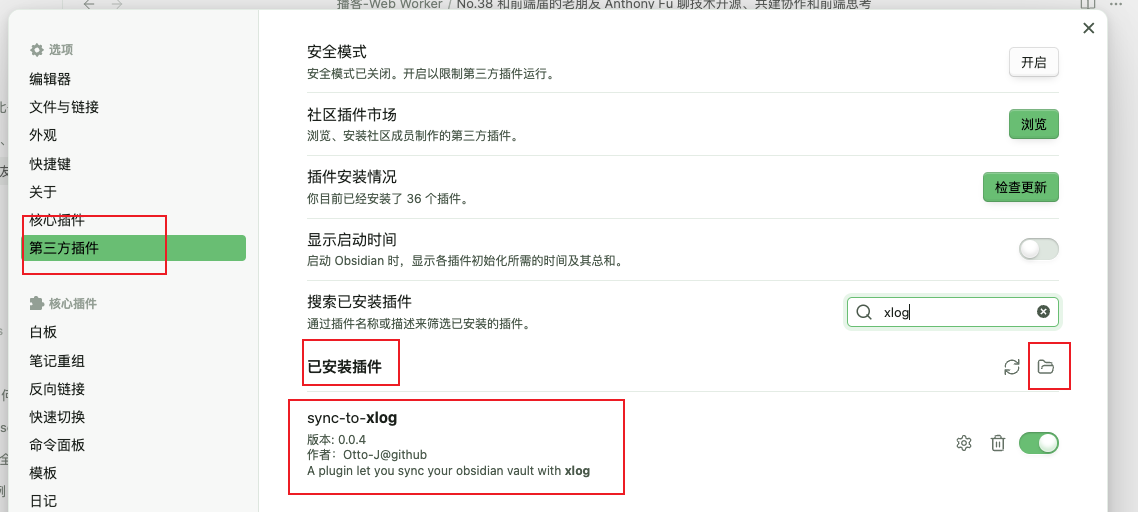
打开设置 - 第三方插件 - 浏览 - 搜索 brat,下载安装并启用。

image

打开 BRAT 设置

image

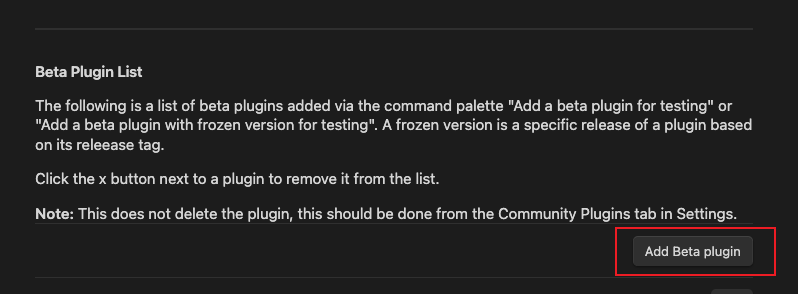
点击 Add Beta plugin 有个弹窗,填写这个网址

https://github.com/Otto-J/sync-to-xlog

点击 Add Plugin image

image

手动安装(不再推荐)

访问 https://github.com/Otto-J/sync-to-xlog/releases 下载最新 dist.zip 文件夹,放入插件目录

设置 - 第三方插件 - 已安装插件右侧有个文件夹图标。解压后放入即可。
使用教程

视频教程

见 B 站 《介绍我开发的 Obsidian-sync-xlog 插件:轻松帮你同步 obsidian 内容到 xlog 上》

文字教程

启用插件后,获取 token并连接测试成功 选择发布内容的账号(同一 token 可绑定多个账号) image

在 Obsidian 中右键文件,选择上传此文件到xlog image

编辑相关设置后,点击上传 image

当前进展

等待 obsidian 官方上线本插件

项目背景和程序设计可以访问 https://blog.ijust.cc/play-xlog-03

目前已实现功能:

  • 完成设置面板
  • 完成上传提示
  • 完成新增和更新功能
  • 更新信息同步回填到 frontMatter 中
  • md 中的 图片处理为 ipfs

未来可能会和 xlog/CrossBell 官方建立联系,也说不定。

目前已知问题

主流程已通,目前存在以下问题,如果你有空闲可以提 PR 帮我修改,感谢。

  • obsidian 内置的图片不会读取,也就是 ![[图片.jpg]] 不知道如何读取,会导致读取失败
  • 不确定图片里包含空格等关键字是否影响上传
  • 打印的日志比较凌乱,不规整
  • 页面正文不能包含 ![]() 和 ![[]] 脆弱的正则没有处理好
  • 发包靠手打,不太会搞命令行

开发

目前还在早期阶段,欢迎参与。

git clone
pnpm i
# dev
npm run dev

# build
npm run build

Copyright

MIT

60%
HealthFair
ReviewCaution
About
Sync Obsidian notes to xlog.app and write returned post metadata back into each note's front matter. Upload notes via the context menu, convert embedded images to IPFS, and create or update posts while showing upload progress and status.
PublishingSyncingIntegrations
Details
Current version
0.2.1
Last updated
3 years ago
Created
3 years ago
Updates
6 releases
Downloads
3k
Compatible with
Obsidian 0.12.0+
Platforms
Desktop only
License
MIT
Report bugRequest featureReport plugin
Sponsor
Buy Me a Coffee
Author
otto-jotto-j
github.com/Otto-J
GitHubotto-j
  1. Community
  2. Plugins
  3. Publishing
  4. sync-to-xlog

Related plugins

Self-hosted LiveSync

Sync vaults securely to self-hosted servers or WEBRTC.

Fast Note Sync

Real-time sync of your vaults across server, mobile, and web; shareable with anyone; supports REST and MCP integrations to build your personal AI knowledge base.

WebDAV Sync

General-purpose & bidirectional WebDAV syncing for your vault. Designed for stability and robust file handling without vendor lock-in.

Google Drive Sync

Syncs a vault into Google Drive for cross-platform use (works for iOS).

GitHub

Share as Gist

Share a note as a GitHub.com Gist.

Remotely Save

Sync notes between local and cloud with smart conflict: S3, Dropbox, webdav, OneDrive, Google Drive, Box, pCloud, Yandex Disk, Koofr, Azure Blob Storage.

Nutstore Sync

Sync your vault with Nutstore (Jianguoyun) using WebDAV protocol.

Quartz Syncer

Manage and publish your notes to Quartz, the fast, batteries-included static-site generator.

Syncthing Integration

Syncthing integration.

Local REST API & MCP Server

Unlock your automation needs by interacting with your notes over a secure REST API.