Synapses
 qoob23764 downloads
Map out and edit note relations in a focused graph. Requires Dataview.
- Overview
- Scorecard
- Updates11
Synapses lays out your note links as a focused graph: the active note sits in the center with its parents above, children below, jumps to the left, and siblings to the right. Click a card to activate that note, drag a handle to create a link, or hover a connector to remove one — a fast way to navigate, add, remove, and edit the connections between your notes.
It runs in both Obsidian and Logseq, reading and writing the same ExcaliBrain-style page properties.
This plugin was written with LLM assistance.
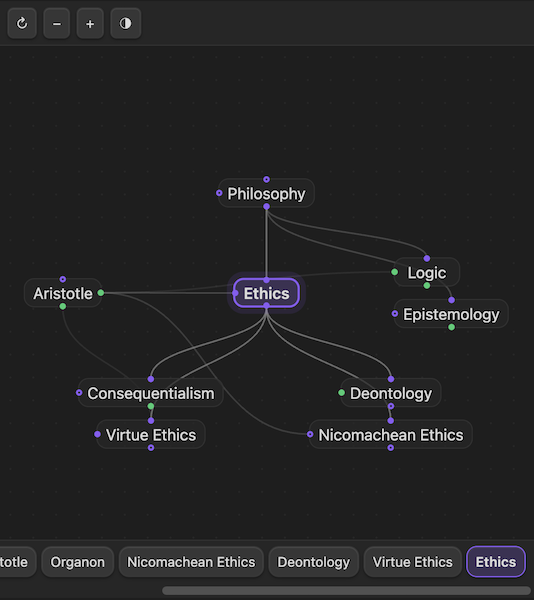
Links are page properties
Links are declared with page properties (ExcaliBrain-style), on a note's first block or in YAML frontmatter:
parent:: [[Philosophy]]
child:: [[Ethics]], [[Logic]]
jump:: [[Aristotle]]
You only declare one direction — the reciprocal (parent↔child) and symmetric jumps are inferred, and siblings are computed.
Editing properties in place
When Synapses links or unlinks notes it edits link properties in place. If your note template
prefills parent:: / child:: / jump:: — whether as an inline field anywhere in the note (top, middle,
or bottom) or as a key in the YAML frontmatter — Synapses updates that existing value instead of
prepending a duplicate at the top. Brand-new properties are added as inline fields.
Obsidian
Requires the Dataview plugin — Synapses reads
your parent:: / child:: / jump:: inline fields through Dataview's index.
- Install Dataview from Community Plugins and enable it.
- Install Synapses (from Community Plugins once published, or via BRAT for betas) and enable it.
- Open the view from the 🧠 ribbon icon, or run the command Synapses: Open in sidebar.
Configure which property names map to parent / child / jump under Settings → Synapses.
Logseq (0.10.x — Markdown/file graph)
- Logseq → Settings → Advanced → Developer mode = on.
- Plugins → Load unpacked plugin → select
packages/logseq-plugin(build first; see below). - Click the 🧠 toolbar button, or run the slash command
/Synapses: Open in sidebar.
Synapses reads
parent:: / child:: / jump::from a page's top-level blocks.
Develop
This is a TypeScript monorepo: packages/core (editor-agnostic engine + view), packages/obsidian-plugin,
and packages/logseq-plugin.
npm install      # first time
npm run build    # builds core + both plugins (obsidian → main.js/styles.css, logseq → dist/)
npm test         # run the unit tests (vitest)
Add -w <package> to build one package, or npm run dev -w obsidian-plugin to rebuild on change
(reload the plugin in the editor to pick up the new bundle).
Inspiration & credits
- TheBrain — its spatial "Plex" interface, with the active note centered and its relations fanning out around it, is the inspiration for this layout.
- Logseq — a host application this extends; it provides the Markdown graph, page properties, and plugin platform.
- Obsidian — the second host application this extends; its
ItemViewAPI backs the in-process Obsidian adapter. - Dataview — its inline-field index and query
API are how the Obsidian adapter reads
parent:: / child:: / jump::links. - ExcaliBrain — its page-property data model
(
parent:: / child:: / jump::, declared one direction with reciprocals inferred) is the basis for how links are stored. - BRAT — the beta-reviewers' tool used to install and update this from GitHub Releases.
License
MIT © qoob23