Search...Search plugins and themes...
⌘K
Sign in
  • Get started
  • Download
  • Pricing
  • Enterprise
  • Account
  • Obsidian
  • Overview
  • Sync
  • Publish
  • Canvas
  • Mobile
  • Web Clipper
  • CLI
  • Learn
  • Help
  • Developers
  • Changelog
  • About
  • Roadmap
  • Blog
  • Resources
  • System status
  • License overview
  • Terms of service
  • Privacy policy
  • Security
  • Community
  • Plugins
  • Themes
  • Discord
  • Forum / 中文论坛
  • Merch store
  • Brand guidelines
Follow us
DiscordTwitterBlueskyThreadsMastodonYouTubeGitHub
© 2026 Obsidian

SwiftSwitch

swiSwiftswiSwift15 downloads

Auto-switch CSS snippets, themes, eye-care & breathing modes by page — or toggle manually via status bar/floating button. Grouping, drag reorder

Add to Obsidian
SwiftSwitch screenshot
  • Overview
  • Scorecard
  • Updates7

Quickly toggle Obsidian CSS Snippets from a status bar popup.
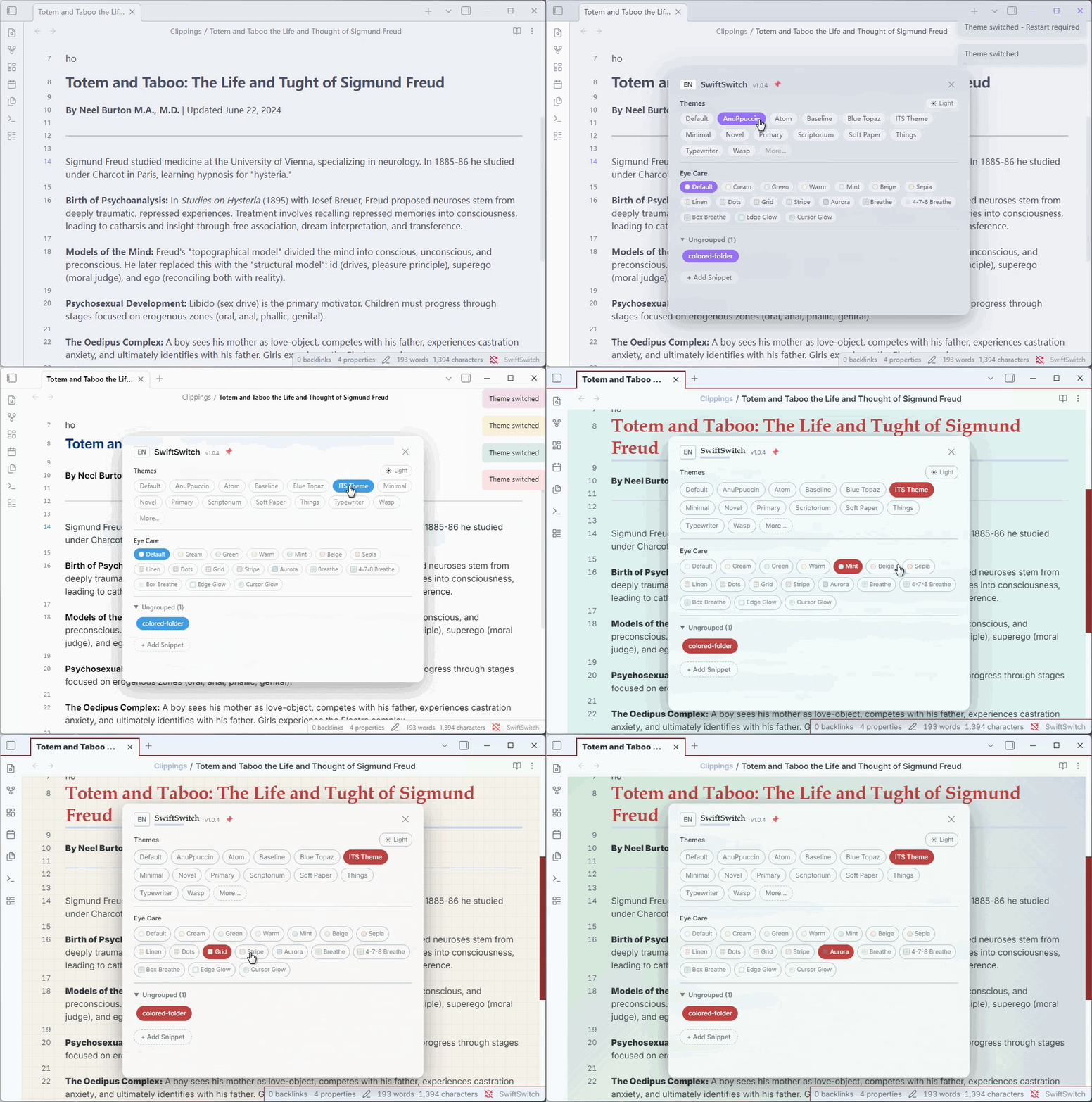
https://www.bilibili.com/video/BV17Ujk6tEZQ

https://www.bilibili.com/video/BV16Njy6vEdr

Demo

Features

  • Status Bar Button — Click the SwiftSwitch button in the status bar to open the management popup
  • Toggle Snippets — Click any snippet chip to enable/disable it instantly
  • Custom Groups — Right-click empty space to add groups, then drag snippets into them
  • Drag & Drop — Drag snippet chips between groups or back to "Ungrouped"
  • Fold/Expand Groups — Click group header to collapse/expand, state is persisted
  • i18n — Switch between Chinese and English via the CN/EN toggle in the popup header
  • Right-click Menu — Copy content, edit, edit (open externally), delete, move to group
  • Add New Snippet — Create new CSS snippets directly from the popup
  • Eye Care Colors& Patterns — Textured backgrounds: linen, dots, grid, stripe, aurora, breathe
  • Dark/Light Mode Auto-Switch — Eye care colors and floating button auto-adapt when switching modes
  • Floating Button — Pin a draggable floating button with tangerine (dark) / grey (light) gradient style

Floating Button

Installation

From GitHub

  1. Download main.js and manifest.json from the latest release
  2. Create a folder named SwiftSnippets in your vault's .obsidian/plugins/ directory
  3. Place the downloaded files inside that folder
  4. Enable the plugin in Obsidian Settings → Community Plugins

From Obsidian Community Plugins (pending review)

  1. Open Settings → Community Plugins
  2. Search for "SwiftSwitch"
  3. Click Install, then Enable

Usage

  1. After enabling the plugin, a "SwiftSwitch" button appears in the status bar
  2. Click it to open the snippet management popup
  3. Click a snippet chip to toggle it on/off
  4. Right-click a chip for more options (edit, delete, copy, move to group)
  5. Right-click empty space in the popup to add a new group
  6. Drag snippets between groups to organize them

Changelog

Changelog

v1.0.6 (2026-06-20)

  • Silent Page Switch — No more notification popups when switching between pages with style memory
  • Popup Scroll-through Fix — Mouse wheel properly passes through popup overlay to scroll the page beneath
  • Pull Cord Fix — Pull cord no longer stretches the popup layout; positioned absolutely below the indicator button
  • Indicator Button Redesign — Compact circular gradient button matching floating button style; click toggles floating button, pull cord switches dark/light mode
  • Stable Scrollbar — scrollbar-gutter: stable prevents chip reflow when scrollbar appears
  • Dialog Protection — Adding/deleting groups no longer accidentally closes the management popup

v1.0.5 (2026-06-20)

  • Page Style Memory — Remember each page's theme, dark/light mode, eye care color, and enabled snippets; auto-restore on page switch
  • Exclusive Groups — Snippets in exclusive groups (e.g. "标题") cannot be enabled simultaneously; toggle via group header ⊘ button or right-click menu
  • Floating Button Toggle — Dark/light indicator button in popup now toggles floating button visibility; pull cord switches dark/light mode
  • Popup Scroll-through — Mouse wheel events pass through the popup overlay to the page beneath
  • Stable Scrollbar — Popup uses scrollbar-gutter: stable to prevent chip reflow when scrollbar appears
  • Snippet Cache — In-memory cache for snippet enabled state, fixing stale chip status after toggling

v1.0.4 (2026-06-19)

  • Meditation Breathing Presets — Added 4-7-8 breathing (inhale 4s-hold 7s-exhale 8s) and Box breathing (4-4-4-4) guided visual animations
  • Edge Glow — Screen edge glow breathing effect via box-shadow overlay
  • Cursor Glow — Mouse-following radial glow with breathing animation
  • Scroll Wheel Swap — Scroll now cycles eye care colors; Ctrl/Shift+scroll switches themes
  • Breathing Chip Hints — Hover on breathing chips to see rhythm description

v1.0.3 (2026-06-19)

  • Pull Cord Fix — Fixed pull cord not hiding after drag, stale event listeners causing ghost pull cord on screen
  • Floating Button Cleanup — Properly cleanup global event listeners when recreating floating button on mode switch

v1.0.2 (2026-06-19)

  • Rename to SwiftSwitch — Plugin renamed from SwiftSnippets to SwiftSwitch (id unchanged)
  • Eye Care Patterns — Added 6 textured eye care presets: linen, dots, grid, stripe, aurora, breathe
  • Dark Mode Eye Care — All eye care presets now have dark mode counterparts with auto-switching
  • Floating Button Redesign — New default gradient style: tangerine (dark mode) / grey (light mode)
  • Popup Position Memory — Popup remembers its position after being dragged
  • Feedback Chip — Added a "Feedback" link to GitHub in the popup footer

Development

This plugin is desktop-only because it uses Node.js APIs for file operations.

License

MIT

Sponsor / 赞助

If you find this plugin helpful, consider buying me a coffee! / 如果这个插件对你有帮助,请考虑支持我!

HealthExcellent
ReviewSatisfactory
About
Tired of clicking through settings just to flip a snippet, switch themes, or change modes? SwiftSwitch puts all of it one scroll or click away. A status bar popup handles CSS snippets (with grouping and drag reorder), while a floating button lets you scroll through eye-care modes — including 5 breathing effects like 4-7-8 and Box breathing — and Ctrl+scroll through your installed themes. You can also set up auto-switching by page, so snippets, themes, and light/dark mode change on their own as you navigate. Multi-language UI included.
CSSStatus bar
Details
Current version
1.0.6
Last updated
Yesterday
Created
3 days ago
Updates
7 releases
Downloads
15
Compatible with
Obsidian 0.15.0+
Platforms
Desktop only
License
MIT
Report bugRequest featureReport plugin
Author
swiSwiftswiSwiftdlsdgj
GitHubdlsdgj
  1. Community
  2. Plugins
  3. CSS
  4. SwiftSwitch

Related plugins

Style Settings

Adjust theme, plugin, and snippet CSS variables.

CSS Editor

Edit CSS snippet files.

Lapel

Show the heading levels in the gutter of the editor.

Admonition

Admonition block-styled content.

Custom Frames

Turn web apps into panes using iframes with custom styling. Also comes with presets for Google Keep, Todoist and more.

Day Planner OG

Day planning from a simple task list in a Markdown note (bare bones, preserves the features and behavior of the original plugin).

Colored Text

Color the selected texts.

Snippetor

Create and tweak common snippets.

Better Word Count

Count the words of selected text in the editor.

Blur

Create obfuscated blocks of text.