Search...Search plugins and themes...
⌘K
Sign in
  • Get started
  • Download
  • Pricing
  • Enterprise
  • Account
  • Obsidian
  • Overview
  • Sync
  • Publish
  • Canvas
  • Mobile
  • Web Clipper
  • CLI
  • Learn
  • Help
  • Developers
  • Changelog
  • About
  • Roadmap
  • Blog
  • Resources
  • System status
  • License overview
  • Terms of service
  • Privacy policy
  • Security
  • Community
  • Plugins
  • Themes
  • Discord
  • Forum / 中文论坛
  • Merch store
  • Brand guidelines
Follow us
DiscordTwitterBlueskyThreadsMastodonYouTubeGitHub
© 2026 Obsidian

SummaryOnly

Tyler CarrolTyler Carrol36 downloads

Base view that shows summaries only.

Add to Obsidian
SummaryOnly screenshot
  • Overview
  • Scorecard
  • Updates2

Scc Count Badge

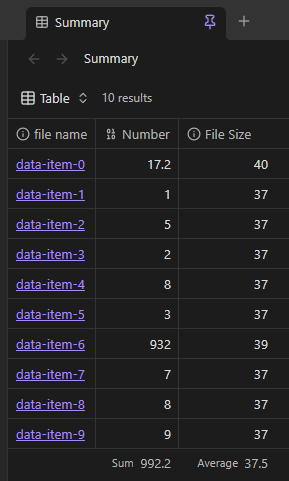
SummaryOnly adds a Summary only view to Obsidian Bases. The view hides the rows and instead, just displays the summaries as cards.

Examples

Summary
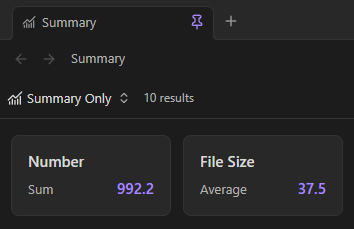
SummaryOnly-Example

Table

Source data

SummaryOnly-Example

Install for development

  1. Install dependencies:
    npm install
    
  2. Build the plugin:
    npm run build
    
  3. Copy main.js, manifest.json, and styles.css to:
    <Vault>/.obsidian/plugins/summary-only/
    
  4. In Obsidian, enable Settings → Community plugins → summary-only.

For watch mode during development:

npm run dev

Fastest way to try it

This repository includes a ready-made demo vault in /summary-only-demo-vault.

  • Windows/PowerShell:
    .\scripts\build-to-demo-vault.ps1
    
  • Any platform:
    1. Run npm run build
    2. Copy main.js, manifest.json, and styles.css to summary-only-demo-vault/.obsidian/plugins/summary-only/
    3. Open summary-only-demo-vault in Obsidian

See summary-only-demo-vault/README.md for a guided walkthrough.

Use the Summary only view

  1. Open a .base file in Obsidian.
  2. Open the view menu in the top-left corner.
  3. Add a view and select Summary only.
  4. Configure summaries for the properties that you want to display.

Each card shows the property name, the summary name, and the calculated value. Use the view settings menu to adjust Card width and Card height with sliders. Enable Show summary editor to display every property in the view and choose a summary for each card.

HealthExcellent
ReviewPassed
About
Display Bases as summary-only cards that hide rows and surface each property's summary. Show each card's property name, summary name, and calculated value, and tweak card size or enable the summary editor to pick summaries per card.
BasesVisualizationProperties
Details
Current version
0.1.1
Last updated
2 weeks ago
Created
2 weeks ago
Updates
2 releases
Downloads
36
Compatible with
Obsidian 1.13.0+
Platforms
Desktop, Mobile
License
MIT
Report bugRequest featureReport plugin
Sponsor
Buy Me a Coffee
Support
Author
Tyler CarrolTyler Carroltylercarrol
GitHubtylercarrol
  1. Community
  2. Plugins
  3. Bases
  4. SummaryOnly

Related plugins

Advanced Canvas

Supercharge your canvas experience. Create presentations, flowcharts and more.

Maps

Adds a map layout to bases so you can display notes as an interactive map view.

Bases CMS

Manage your notes in bases like a content management system.

TTRPG Tools - Timeline

Timeline-Renderer für Calendarium-Frontmatter (fc-date/fc-end). 200×315 Bild, Callout-Stil, native Popover, mobilfreundlich.

Life Tracker

Capture and visualize the data that matters in your life.

Heatmap Tracker

Visualize your activity and track goals, progress, habits, tasks, exercise, finances, and more—all in a single, interactive heatmap!

TaskNotes

Note-based task management with calendar, pomodoro and time-tracking integration.

Excalidraw

Visual PKM powerhouse. Create and edit Excalidraw drawings.

Meta Bind

Make your notes interactive with inline input fields, metadata displays, and buttons.

Breadcrumbs

Visualise the hierarchy of your vault using a breadcrumb trail or matrix view.