Study Flow Assistant
 dalvt1 downloads
Comprehensive academic study assistant: customizable Pomodoro timer, task and habit tracker, time blocking calendar, metrics, and distraction-free Zen mode.
- Overview
- Scorecard
- Updates2
An all-in-one study and academic productivity assistant for Obsidian. Seamlessly combines an interactive time-blocking calendar, a customizable Pomodoro focus timer, full-vault task management with an Icebox, flexible habit tracking with a 52-week consistency heatmap, spaced repetition, study performance analytics, and a distraction-free Zen mode.
All your data stays 100% local in plain Markdown and JSONL files within your vault. No external accounts, no cloud sync lock-in, no telemetry.
✨ Features
☀️ 1. Today Dashboard
Your central operational hub for each day:
- Now & Next: Instantly shows your current scheduled time block and what is coming next.
- Priority Tasks: Today's tasks and overdue items sorted by urgency and priority.
- Habit Checklist: Quick-toggle daily habits with live streak counters.
- Spaced Repetition Queue: Flashcard and note reviews scheduled for today.
- Customizable: Show or hide any section directly in the plugin settings.
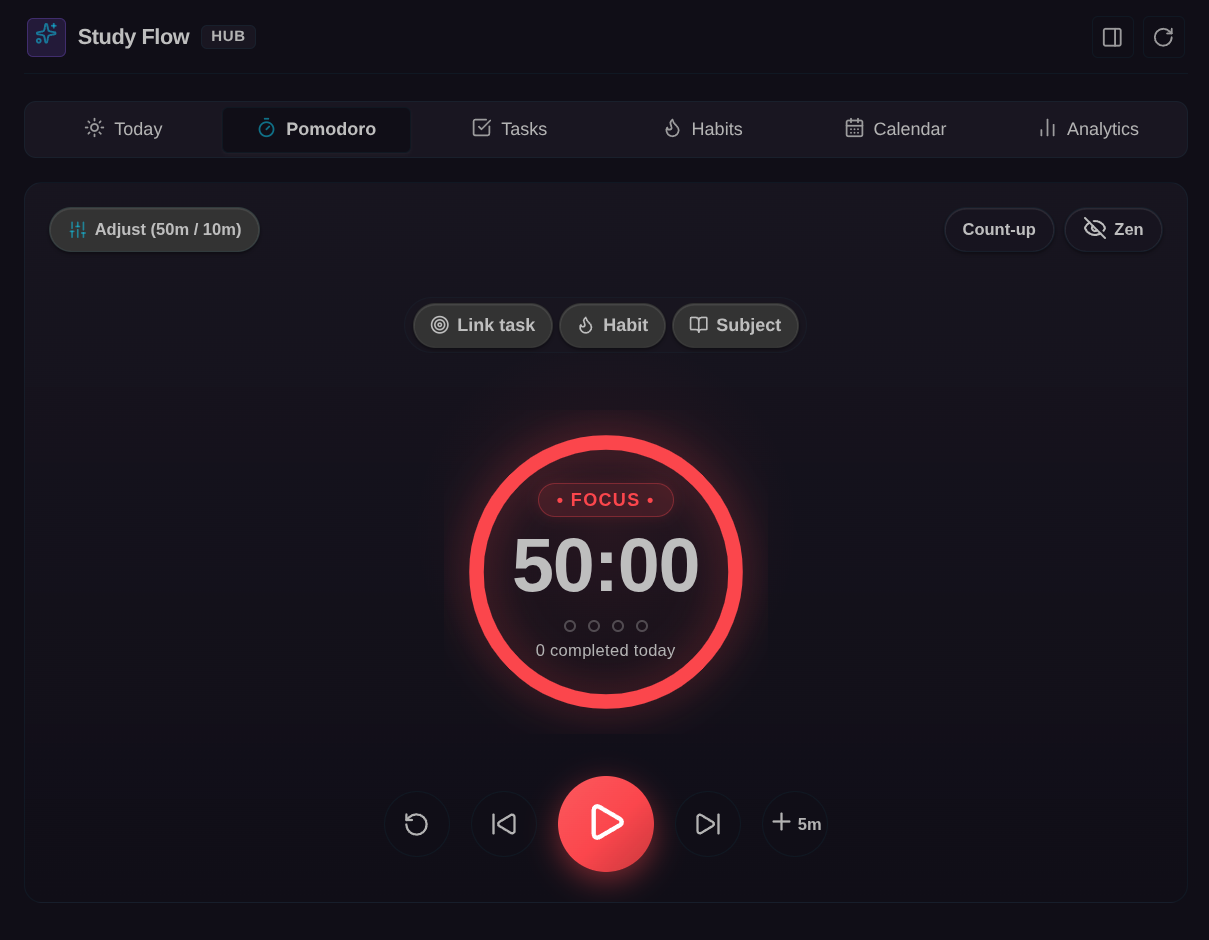
🍅 2. Focus & Pomodoro Engine
- Presets & Flow Mode: Built-in standard intervals (25/5, 50/10, 90/20) plus custom named presets. Supports an open-ended Flow Mode (count-up stopwatch) for uninterrupted deep work.
- Web Audio Chimes: Pure client-side synthetic audio cues (Harmonic Bell, Soft Tone, Tactile Click, or Mute) with volume control and live preview.
- Active Break Tips: Optional posture, hydration, and 20-20-20 visual rest reminders during breaks.
- Closing Reflection & Distraction Logging: Optional review prompt at the end of each session to record accomplishments and log distraction counts.
- Daily Note Auto-Logging: Automatically logs completed focus sessions under your daily note as bullet items (
- 🍅 14:30 · Study Calculus · #math). - Status Bar Integration: Persistent timer display with a right-click context menu to switch presets, toggle phases, or reset.
📅 3. Interactive Calendar & Time Blocking
- 15-Minute Grid Snapping: Drag blocks vertically to reschedule, or drag the top/bottom handles to resize duration with 15-minute increments.
- Recurring Class Schedule: Automatically loads recurring weekly lectures and labs from
StudyFlow/Schedule.mdand displays them as background blocks on your grid. - Subject Color Accents: Time blocks reflect the custom colors of your configured subjects.
- Vault-Native Storage: Scheduled blocks are saved directly to your daily notes under
## Time Blocks(or## Bloques de Tiempo), preserving your notes as the single source of truth. - Overlap Detection: Visual alerts when two blocks compete for the same time window.
- Tomorrow Planning: Quickly plan tomorrow's schedule and transfer unfinished tasks with one click.
📋 4. Task Management & Icebox
- 4 Dedicated Views:
- Today: Tasks due today and overdue items.
- Upcoming: Future scheduled tasks grouped by date.
- By Subject: Tasks categorized under your configured academic subjects, plus an Unclassified section.
- Icebox: Ideas, backlog items, and someday projects saved without checkbox pressure.
- Rich Task Metadata: Priority indicators (⏫ High, 🔼 Medium, 🔽 Low), Pomodoro estimates and progress (
🍅 1/3), deadlines (📅 YYYY-MM-DD), and subject tags. - Interactive Subtasks: Expandable nested checklist support with instant completion toggling.
- Fast Vault Indexing: Reactive caching across included/excluded folders with zero UI stutter.
- Quick Capture: Modal shortcut to capture a task or idea into
Inbox.mdor the active note from anywhere.
🔥 5. Habit Tracker & 52-Week Heatmap
- Flexible Frequencies: Support for daily habits, weekly targets ($N$ times per week), or specific days of the week (e.g., Mon-Wed-Fri).
- Rest Days: Mark a rest day (
💤) without penalty to pause a habit while protecting your streak. - Dynamic Streak Calculation: Evaluates continuous completion streaks tailored to habit frequency.
- 52-Week Consistency Matrix: GitHub-style full-year heatmap visualizing daily habit completions and volume.
- Clean Markdown Storage: All habits and metadata are stored in
StudyFlow/Habits.mdusing unobtrusive HTML comments.
🧠 6. Spaced Repetition
- Queue by Date: Identify study notes with a review tag (default:
#reviewor#repasar) and frontmatter properties (review_next,review_interval). - Review Grading: Rate your recall with Hard (1d) or Easy (+step) to automatically reschedule the next review date in the note's frontmatter.
- Note Initialization: Command to instantly initialize spaced repetition frontmatter on the active note.
🧘 7. Zen Mode
- Distraction-Free Focus: Conceals sidebars, toolbars, and clutter for an immersive study environment.
- Quick Toggle: Activate via ribbon icon, command palette, or press
Escapeto toggle in and out of Zen mode.
📊 8. Study Analytics & Performance
- Daily Focus Trend: Bar chart showing net focused hours over the last 7 days.
- Subject Distribution: Visual breakdown of focus time across your subjects.
- Weekly Subject Goals: Track actual study hours against target goals, monitor weekly goal streaks, and compare estimated vs. completed Pomodoros.
- KPI Summary: Overview cards for today's focus, daily averages, habit consistency, and task completion rates.
- Historical Vault Sync: Scan existing daily notes to rebuild or synchronize focus session history into
StudyFlow/Sessions.jsonl.
🔗 Obsidian URI Protocol Handler (obsidian://study-flow)
Automate and trigger Study Flow actions externally from Alfred, Raycast, iOS Shortcuts, Stream Deck, or terminal scripts:
| Action | URI Example | Description |
|---|---|---|
| Start Timer | obsidian://study-flow?action=start |
Starts or resumes the Pomodoro timer. Supports task=Text and subject=Name. |
| Pause Timer | obsidian://study-flow?action=pause |
Pauses the running timer. |
| Reset Timer | obsidian://study-flow?action=reset |
Resets the timer to default duration. |
| Skip Phase | obsidian://study-flow?action=skip |
Transitions to the next phase (work ↔ break). |
| Complete Task | obsidian://study-flow?action=complete-task |
Marks the currently active timer task as done. |
| Quick Capture | obsidian://study-flow?action=capture&text=Read%20Chapter%204 |
Appends a task to Inbox.md. Omitting text opens the capture modal. |
| Open View | obsidian://study-flow?action=open&tab=calendar |
Opens the hub to a specific tab (today, pomodoro, calendar, tasks, habits, analytics). |
Terminal examples:
# Start a 25-minute session focused on Linear Algebra
xdg-open "obsidian://study-flow?action=start&task=Solve%20problem%20set%202&subject=Math"

# Open the Habit Tracker in Obsidian
xdg-open "obsidian://study-flow?action=open&tab=habits"
📁 File Structure & Vault Conventions
Study Flow adheres to standard Markdown and vault file conventions:
YourVault/
├── StudyFlow/
│   ├── Inbox.md             # Default inbox for quick capture tasks
│   ├── Habits.md            # Habit definitions, frequencies, and streaks
│   ├── Schedule.md          # Weekly recurring class and lab timetable
│   └── Sessions.jsonl       # Historical focus log records
└── Daily/                   # Your daily notes folder
    └── YYYY-MM-DD.md        # Contains ## Tasks and ## Time Blocks
⌨️ Command Palette
Search for Study Flow in the Obsidian Command Palette (Ctrl + P / Cmd + P):
Open full interface (main tab)Open in sidebarOpen calendar and time blocksOpen task manager & InboxOpen daily habits trackerOpen study analytics & performanceOpen Pomodoro timerQuick capture taskPlan next dayToggle Zen modeStart spaced repetition on active noteStart / pause PomodoroReset PomodoroSwitch between work and breakReturn to previous phaseSkip to next phaseComplete active Pomodoro task
⚙️ Settings
- Pomodoro: Work duration, short break, long break, long break interval, auto-start next phase, system notifications, sound type and volume, session closing review, and break tips.
- Tasks & Conventions: Custom headers for tasks (e.g.
## Tasks/## Tareas), Icebox header, Time Blocks header, and folder inclusions/exclusions. - Notes & Paths: Folders for daily notes, inbox file path, habits file path, and schedule file path.
- Subjects: Define your academic subjects with custom colors, weekly hour goals, and matching tags.
- Spaced Repetition: Custom review tag (
#reviewor#repasar) and frontmatter property keys. - Appearance & Locale: Week start day (Monday or Sunday), language selection (English, Spanish, or Auto-detect), and today tab sections visibility.
🛠️ Development
# Install dependencies
npm install

# Type-check TypeScript code
npm run check-types

# Run unit test suite
npm test

# Build production bundle
npm run build
📄 License
MIT © dalt