Soma Search
 awesomedog107 downloads
Local-first AI search for Obsidian. Semantic, keyword & hybrid search across notes, PDFs, scanned docs, images (OCR + vision) and audio — 100% offline and private, powered by Soma.
- Overview
- Scorecard
- Updates3
Soma Search is an Obsidian plugin that adds private, offline, local-first search to your vault. It brings the Soma search engine into a familiar Obsidian sidebar and manages a dedicated Soma instance for the current vault.
Search Markdown notes, PDF documents, scanned pages, images, and recorded audio with semantic (vector), keyword (lexical), or hybrid search — without sending a single byte to the cloud.
[!WARNING] Memory-hungry by nature. Processing multimedia files — images, scanned pages/PDFs, and audio (OCR, vision, speech-to-text) can need up to 24 GB of RAM while extraction is active. On machines with less memory, multimedia files may fail to index or never show up in results. Markdown and text-based PDFs need far less. See Requirements.
Folders are not memory. Memory returns as a phrase, an image, or a half-formed question — rarely as a file path. Soma Search gives every fragment an honest way back.
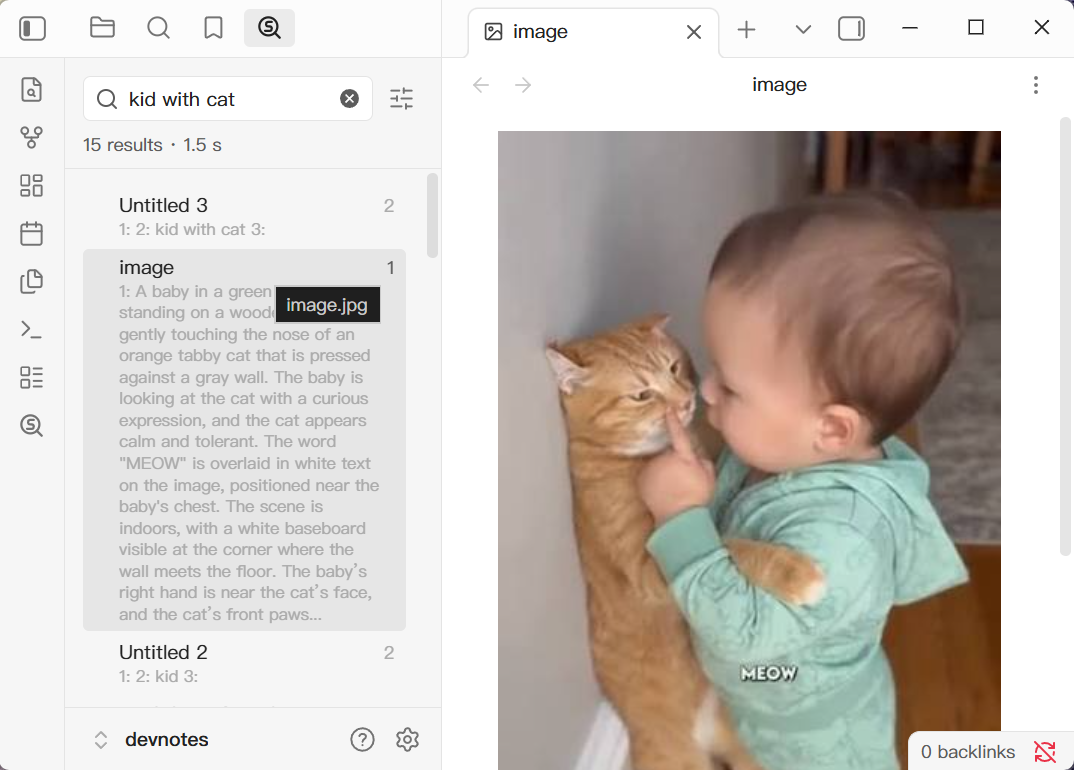
Table of contents
- Why Soma Search
- Features
- Soma Search vs. Obsidian built-in search
- Requirements
- Installation
- Getting started: index your vault
- Usage
- How it works
- Privacy and disclosures
- FAQ
- Troubleshooting
- Development
- Release
- Related projects
Why Soma Search
Obsidian's built-in search is fast, but it only matches literal text in Markdown. Everything else in a real vault — a scanned contract, a whiteboard photo, a research PDF, a meeting recording — is invisible to it. And if you can't remember the exact wording, keyword search can't help you either.
Soma Search fixes both problems:
- It makes non-text files searchable through text extraction, OCR, vision, and speech-to-text.
- It understands meaning, so "how do I cancel a subscription" can find a note titled "unsubscribe flow".
All of it runs locally on your machine.
Features
🔎 Three search modes
| Mode | Soma API | Best for |
|---|---|---|
| Semantic search | search.vector |
Related meaning, fuzzy recall, "the note about…" |
| Keyword search | search.lexical |
Exact words, names, IDs, code, quoted phrases |
| Hybrid search | search.hybrid |
Combines keyword precision with semantic recall |
Semantic search is the default. Your mode and result limit are remembered between sessions.
📄 Search more than Markdown
Soma indexes far more than plain text — everything lands in the same index and is reachable with any search mode:
- PDF documents — extracts embedded text
- Scanned or image-based content — reads text with OCR
- Images and visual content — understands content through vision extraction
- Recorded media — turns speech into searchable text
⚠️ Up to 24 GB of RAM may be needed while multimedia extraction (OCR, vision, speech-to-text) is running.
🔒 Private by design
- Extraction, indexing, and inference all happen on your machine
- The plugin talks only to a local Soma instance on
127.0.0.1over loopback HTTP - No cloud search service, no telemetry, no accounts, no ads, no payments
⚡ Built for the Obsidian workflow
- Native search sidebar, opened from the ribbon or command palette
- Debounced search (450 ms) or instant search with
Enter - Results show file title, preview snippet, and line number when available
- Keyboard accessible: focus a result and press
EnterorSpace - Markdown files open at the matching line
- Automatic sync on startup, then hourly
Soma Search vs. Obsidian built-in search
| Obsidian built-in search | Soma Search | |
|---|---|---|
| Markdown notes | ✅ | ✅ |
| PDF text | ❌ | ✅ |
| Scanned pages / image text (OCR) | ❌ | ✅ |
| Image content (vision) | ❌ | ✅ |
| Audio & recorded speech | ❌ | ✅ |
| Semantic / vector search | ❌ | ✅ |
| Hybrid ranking | ❌ | ✅ |
| Runs fully offline | ✅ | ✅ |
| Sends data to the cloud | ❌ | ❌ |
Requirements
- Obsidian desktop 1.13.0 or later with a local filesystem vault (mobile is not supported)
- Soma installed locally — when no full path is configured, the plugin tries common locations
- At least 8 GB of RAM; multimedia extraction may require 24 GB while active
- Network access only when Soma needs to download models or helper programs
Installation
1. Install Soma (the local search engine)
# Windows
winget install AwesomeDog.soma

# macOS
brew install AwesomeDog/tap/soma

# Linux
curl -fsSL https://github.com/AwesomeDog/soma/releases/latest/download/soma-linux-x64 -o soma
chmod +x soma && sudo mv soma /usr/local/bin/
Verify the installation before continuing:
soma sync
2. Install the Soma Search plugin
From Obsidian (recommended)
Settings → Community plugins → Browse → search "Soma Search" → Install → Enable
Manual install
- Download
main.js,manifest.json, andstyles.cssfrom the latest release. - Copy them into
<your-vault>/.obsidian/plugins/soma-search/. - Reload Obsidian and enable Soma Search under community plugins.
If Soma isn't found automatically, set the full path to the soma executable in the plugin settings.
Getting started: index your vault
- Open Soma Search from the ribbon icon or the command palette.
- If the vault is not yet part of its directory-local Soma workspace, click Initialize in the sidebar.
- Wait for indexing to finish.
The first initialization indexes the whole vault and may take a while on large vaults or vaults with many media files. The sidebar can stay on Initializing... during this process — let it complete before searching.
Under the hood the plugin runs:
soma init --no-color
soma project add --exclude=.obsidian/** --no-color .
Usage
- Open the Soma Search sidebar.
- Pick a mode: Semantic, Keyword, or Hybrid.
- Type your query.
- Search runs 450 ms after you stop typing, or immediately when you press
Enter. - The result limit defaults to
20and can be set anywhere from5to100. - Each result shows the file title, a preview, and a line number when available.
- Click a result — or focus it and press
Enter/Space— to open it in a new tab. - When Soma returns a matching line, Markdown files open directly at that location.
Mode and result limit are saved as preferences.
How it works
The plugin starts a dedicated Soma server for the vault when you initialize Soma, or on the first search in an already-initialized vault:
soma server --port=<available-port> --auto-sync --no-color
That instance:
- Listens only on
127.0.0.1on a dynamically selected port - Synchronizes immediately, then hourly
- Stops when the plugin is unloaded
All search requests go directly to this local instance over loopback HTTP.
Privacy and disclosures
- Plugin network use: the plugin communicates only with the local Soma instance over loopback HTTP at
127.0.0.1. It does not upload vault content or search queries. - Plugin data and access: the plugin runs the user-installed Soma executable and saves its configured path in Obsidian plugin data. It includes no telemetry, accounts, payments, or advertising.
- Plugin storage: initialization creates
.soma/local.ymland.soma/local.sqliteinside the vault. These hold Soma configuration and a plaintext search index, and are not removed when the plugin is disabled or uninstalled. - Soma itself: the open-source Soma engine may download local models and helper programs from GitHub and Hugging Face, keep cache and log data outside the vault, and follow linked files outside the vault.
FAQ
Does Soma Search send my notes or queries to the cloud?
No. The plugin only talks to a Soma instance running on 127.0.0.1. There is no cloud search service, no telemetry, and no account. Soma may reach the network only to download models or helper programs.
Can I search inside PDFs in Obsidian?
Yes. Soma extracts embedded PDF text, and uses OCR for scanned or image-based PDFs, so their contents become searchable alongside your Markdown notes.
Can I search images and screenshots?
Yes. Images are processed with OCR for text and with vision extraction for visual content, then indexed like any other document.
Can I search audio recordings?
Yes. Recorded media is transcribed to text with speech recognition and added to the same index.
Does it work offline?
Yes, once Soma has downloaded the models and helper programs it needs. Extraction, indexing, and inference then run entirely on your machine.
Does it work on Obsidian mobile (iOS / Android)?
No. Soma Search requires Obsidian desktop 1.13.0 or later and a local filesystem vault, because it launches a local Soma process.
Where is the search index stored?
In .soma/local.yml and .soma/local.sqlite inside your vault. If you use a sync service, consider excluding the .soma folder — the index is machine-local and can be rebuilt.
How do I fully remove Soma Search?
Disable and uninstall the plugin, then delete the .soma folder from your vault. Those files are intentionally left in place on uninstall.
How is this different from Obsidian's built-in search?
Built-in search matches literal text in Markdown. Soma Search adds semantic and hybrid ranking and indexes PDFs, scanned pages, images, and audio. See the comparison table.
Troubleshooting
| Symptom | Fix |
|---|---|
soma executable not found |
Set the full path to soma in the plugin settings |
Sidebar stuck on Initializing... |
First-time indexing of a large vault takes time — wait for it to complete |
| Searches return nothing | Confirm soma sync runs successfully in a terminal from the vault folder |
| Multimedia files never appear | Extraction can need up to 24 GB RAM while active; ensure models finished downloading |
Development
npm install
npm run build
npm run deploy -- "/path/to/vault"
After deployment, enable Soma Search under Obsidian's community plugins. Restart Obsidian after changing manifest.json; for source-only changes, rebuild and reload the plugin.
Release
npm version patch
git push origin main --follow-tags
npm version patch bumps package.json, syncs manifest.json and versions.json, and commits all three. Pushing with --follow-tags pushes that commit together with the new tag. Use minor or major instead of patch when appropriate.
The working tree must be clean, and the release flow requires no manual version edits — the version in manifest.json is what the workflow checks against the tag name.
The release workflow builds the plugin, attaches main.js, manifest.json, and styles.css, and creates a draft GitHub release. Review it, add release notes, then publish it manually.
Related projects
- Soma — the local-first search engine powering this plugin (semantic, lexical, and hybrid search with OCR, vision, and speech extraction)
License
See LICENSE.
Keywords: Obsidian plugin · Obsidian semantic search · Obsidian local search · Obsidian offline search · Obsidian AI search · vector search · hybrid search · full-text search · search PDF in Obsidian · OCR Obsidian · image search · audio transcription search · embeddings · RAG · local-first · privacy-first · personal knowledge management (PKM) · note-taking