Search...Search plugins and themes...
⌘K
Sign in
  • Get started
  • Download
  • Pricing
  • Enterprise
  • Account
  • Obsidian
  • Overview
  • Sync
  • Publish
  • Canvas
  • Mobile
  • Web Clipper
  • CLI
  • Learn
  • Help
  • Developers
  • Changelog
  • About
  • Roadmap
  • Blog
  • Resources
  • System status
  • License overview
  • Terms of service
  • Privacy policy
  • Security
  • Community
  • Plugins
  • Themes
  • Discord
  • Forum / 中文论坛
  • Merch store
  • Brand guidelines
Follow us
DiscordTwitterBlueskyThreadsMastodonYouTubeGitHub
© 2026 Obsidian

Tag Formatter

snsvrnosnsvrno2k downloads

Gives more options on how to display tags in preview mode.

Add to Obsidian
  • Overview
  • Scorecard
  • Updates6

A configurable obsidian plugin that changes the way tags are displayed in preview mode.

Preview

Editor

Settings
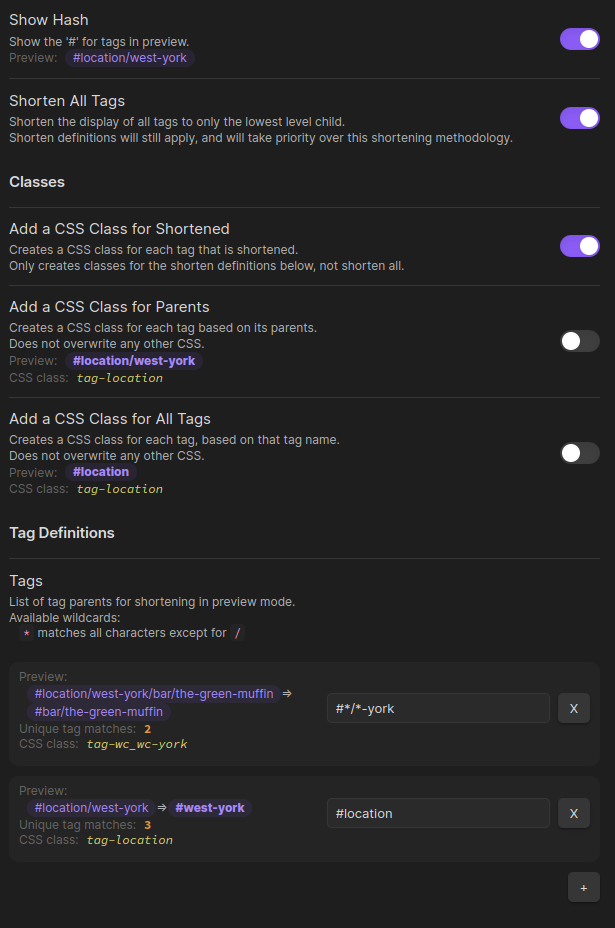
v0.1.5 Features

  • Hide the "#" on tags.
  • Hide parents for all nested tags.
  • Hide all parent tags.
  • Hide portions of tags based on a pattern.
  • Add CSS class for every shortened tag (per definitons).
  • Add CSS class for every tag based on parents.
  • Add CSS class for all tags.
80%
HealthFair
ReviewSatisfactory
About
Format tags in preview mode by hiding the leading # and collapsing or removing parent segments from nested tags. Shorten tags by pattern and assign CSS classes to shortened tags, parent-based tags, or all tags for custom styling.
TagsCSSAppearance
Details
Current version
0.1.5
Last updated
2 years ago
Created
3 years ago
Updates
6 releases
Downloads
2k
Compatible with
Obsidian 0.15.0+
Platforms
Desktop, Mobile
License
MIT
Report bugRequest featureReport plugin
Author
snsvrnosnsvrno
codeberg.org/snsvrno
GitHubsnsvrno
  1. Community
  2. Plugins
  3. Tags
  4. Tag Formatter

Related plugins

Style Settings

Adjust theme, plugin, and snippet CSS variables.

Lapel

Show the heading levels in the gutter of the editor.

Snippetor

Create and tweak common snippets.

Colored Bases Properties

Color property lists and formula properties in Bases.

Show Whitespace

CSS styles and CM6 extensions to highlight whitespace in Source and Live Preview modes.

Supercharged Links

Add attributes to internal links with the values of target note's frontmatter attributes.

Contextual Typography

Add a data-tag-name attribute to all top-level divs in preview mode containing the child's tag name, allowing contextual typography styling.

Focus Mode

Add a toggle to hide interface elements so you can focus on your note.

Colored Tags

Colorize tags in different colors to visually distinguish them from each other.

Better Bullets

Improves readability of bulleted notes.