Search...Search plugins and themes...
⌘K
Sign in
  • Get started
  • Download
  • Pricing
  • Enterprise
  • Account
  • Obsidian
  • Overview
  • Sync
  • Publish
  • Canvas
  • Mobile
  • Web Clipper
  • CLI
  • Learn
  • Help
  • Developers
  • Changelog
  • About
  • Roadmap
  • Blog
  • Resources
  • System status
  • License overview
  • Terms of service
  • Privacy policy
  • Security
  • Community
  • Plugins
  • Themes
  • Discord
  • Forum / 中文论坛
  • Merch store
  • Brand guidelines
Follow us
DiscordTwitterBlueskyThreadsMastodonYouTubeGitHub
© 2026 Obsidian

Smart HTML Select

isaiascopeisaiascope571 downloads

Create select that change the markdown on change adding an action button to the ribbon (left sidebar)

Add to Obsidian
  • Overview
  • Scorecard
  • Updates5

This plugin allows you to add an HTML select element to your note with configurable options. It includes backend logic to update the markdown dynamically when the selected value changes in view mode. In other words makes the changes for HTML selects, generated by this plugin, permanent.

How to use

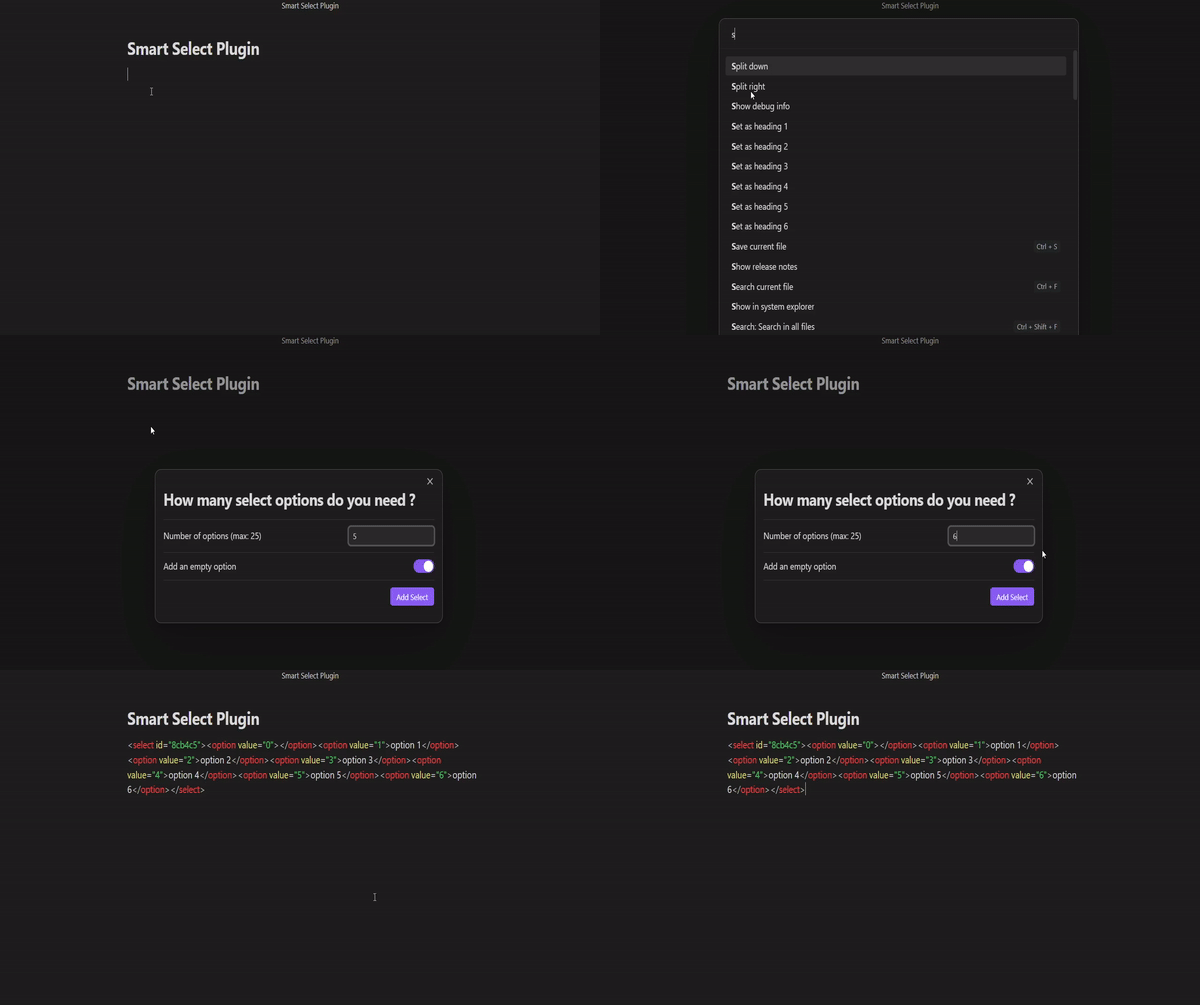
  • Simply enable the plugin and open command palette (default: Ctrl + P). Start typing 'Insert HTML select' in the search then fill the modal with desire select configuration or keep the default one. Confirm your choice selecting bottom right button.
  • Enabling the plugin also add a 'fire' icon to the ribbon (left sidebar) that on click open the previous modal.

Add the select with command palette
How the plugin works in deep

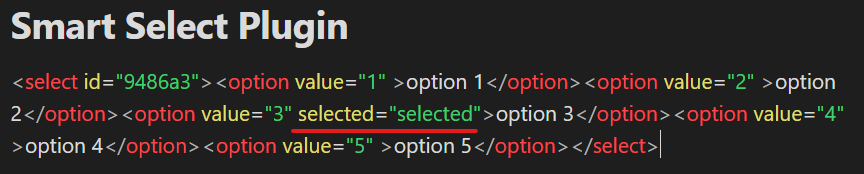
The plugin generates a select with the number of options you want. The options are generated with the following pattern: Option 1, Option 2, Option 3, ..., Option n. The plugin also adds a logic to the markdown file to make the changes permanent when the select value changes.

Just after select creation, the plugin adds a markdown code like the following:

After the select value changes, the plugin changes the markdown code to the following:
73%
HealthGood
ReviewSatisfactory
About
Insert configurable HTML select elements into your notes with custom-numbered options. Make selection changes permanent by updating the Markdown dynamically whenever the select value changes in view mode.
HTMLAutomationEditing
Details
Current version
0.0.5
Last updated
2 years ago
Created
2 years ago
Updates
5 releases
Downloads
571
Compatible with
Obsidian 0.15.0+
Platforms
Desktop, Mobile
License
MIT
Report bugRequest featureReport plugin
Author
isaiascopeisaiascope
GitHubisaiascope
  1. Community
  2. Plugins
  3. HTML
  4. Smart HTML Select

Related plugins

MetaEdit

Manage your metadata.

Filename Heading Sync

Keep the filename with the first heading of a file in sync.

Advanced Tables

Improved table navigation, formatting, and manipulation.

QuickAdd

Quickly add new notes or content to your vault.

Templater

Create and use dynamic templates.

Homepage

Open a note, base, or workspace on startup, or set it for quick access later.

BRAT

Easily install a beta version of a plugin for testing.

Meta Bind

Make your notes interactive with inline input fields, metadata displays, and buttons.

Outliner

Work with your lists like in Workflowy or Roam Research.

Various Complements

Complete words similar to auto-completion in an IDE.