
- Overview
- Scorecard
- Updates14
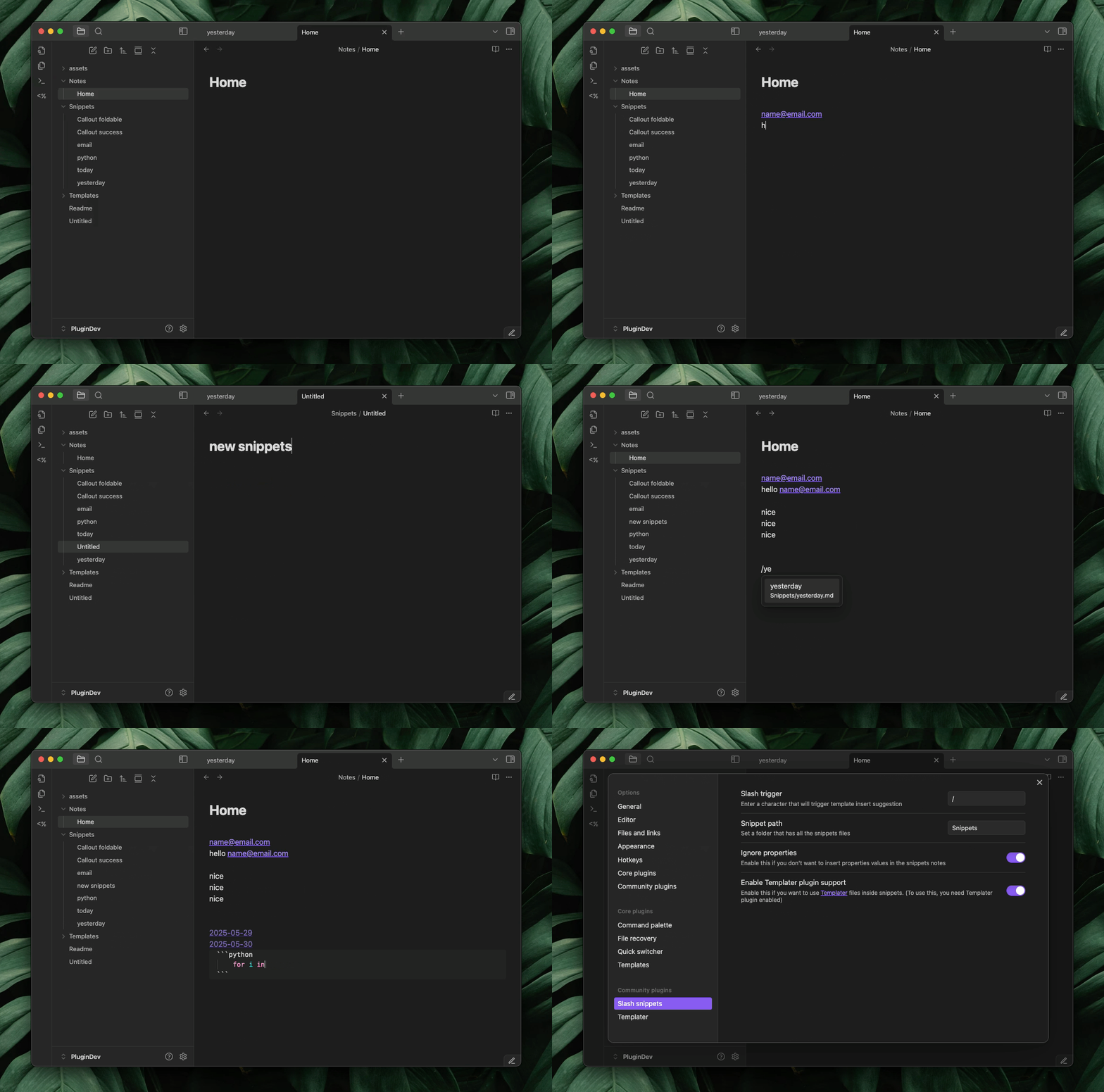
Quickly insert your most-used text snippets while writing in Obsidian. Perfect for things like Dataview blocks, callouts, templates, or any reusable text.
Setup
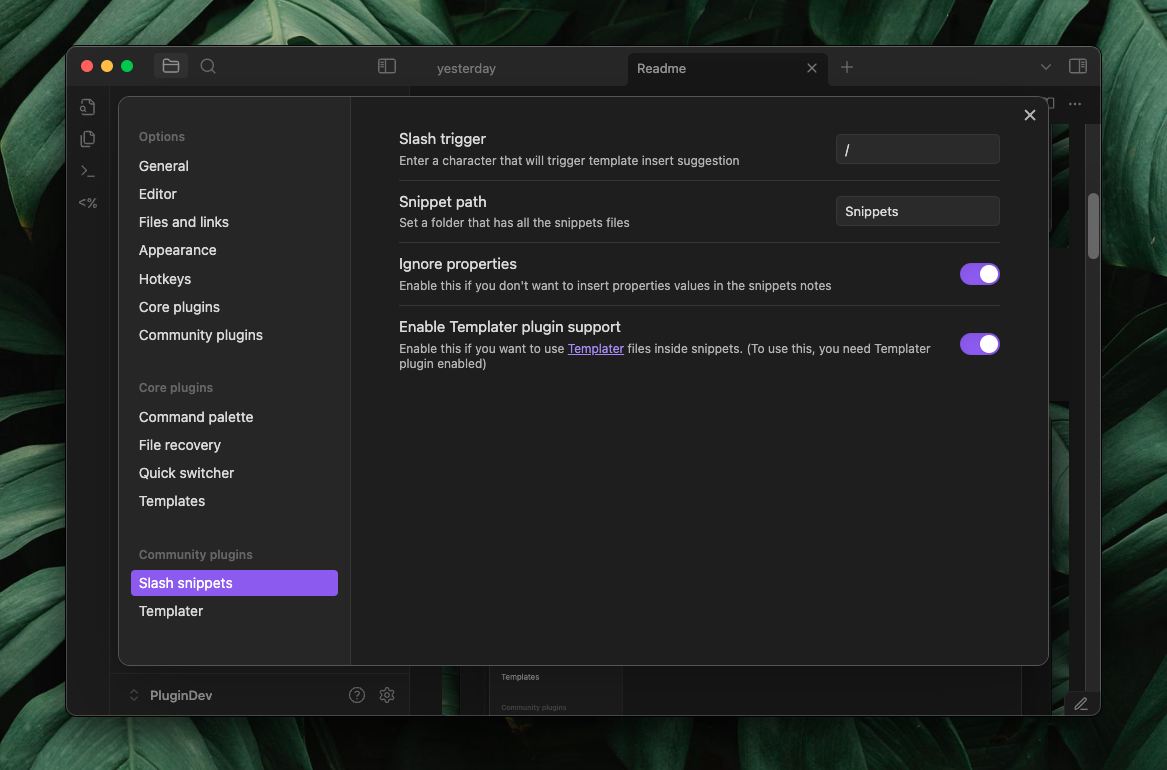
- Pick a trigger character, by default, it’s / (slash).
- Enter the folder path where you'll keep all your text snippets.
- Set a folder path where you will be store all your text snippets.
- Turn on Ignore properties if you don’t want property values included when inserting snippets.
- Enable Templater support if you want to use Templater syntax inside snippets.
- Add your snippets to the folder you specified.
How to install
Currently its under review , you can install using BRAT plugin or manually
Manual Installation
- Download
main.js,manifest.json,styles.cssthe latest release from the releases page - create a folder name
slash-snippets-pluginin.obsidian/plugins - put all the file you downloaded in your vault's
.obsidian/plugins/slash-snippets-plugin/directory - Reload Obsidian
- Enable the plugin in Settings -> Community Plugins
Text Variables
cursor position
use %%cursor%% in the snippet file to have a predefined position after the snippet is inserted.
Example:
<iframe src="%%cursor%%" height="400px" width="100%"></iframe>
Text selection insert
insert last selected text into snippet.
Example
> [!faq]- %%textSelection%%
>

Here are some inspirations for snippets
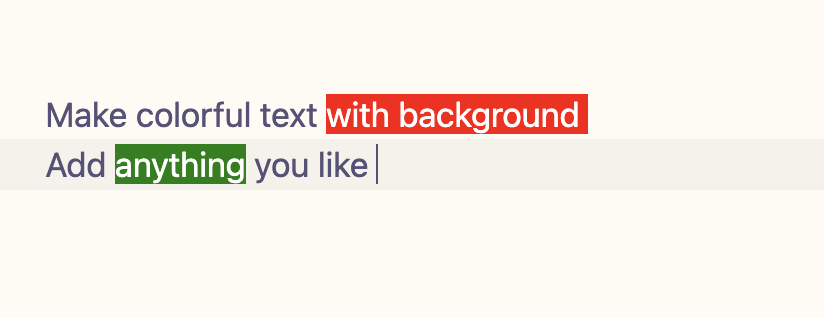
Colorful text
<span style='background:red; color: white'>%%cursor%%</span>
Or this, if you want text selection
<span style='background:red; color: white'>%%cursor%%%%textSelection%%</span>
Callouts
> [!faq]- Are callouts foldable?
> yes
> [!success]
> nice!
2 col table
| 1   | 2   |
| --- | --- |
|     |     |
3 col table
| 1   | 2   | 3   |
| --- | --- | --- |
|     |     |     |
4 col table
| 1   | 2   | 3   | 4   |
| --- | --- | --- | --- |
|     |     |     |     |
|     |     |     |     |
Html snippets
</br> </br>
<iframe src=" " height="400px" width="100%"></iframe>
mermaid chart
```mermaid
flowchart LR
    Start --> Stop
```
Also you can mix with templater code to make powerful snippets**
Iframe
<iframe src="<% await tp.system.prompt("Ifram Url") %>" height="400px" width="100%"></iframe>
Markdown comment
<!-- <% tp.file.cursor() %> -->
You can create some snippets named as today, yesterday and so on
today
[[<%tp.date.now("YYYY-MM-DD")%>]]
tomorrow
[[<% tp.date.now("YYYY-MM-DD" ,1) %>]]
yesterday
[[<% tp.date.now("YYYY-MM-DD" ,-1) %>]]
last week
[[<% tp.date.now("YYYY-MM-DD" ,-7) %>]]
Quick dataview
```dataview
LIST FROM "<%tp.file.cursor()%>"
SORT file.mtim DESC
```
```dataview
TABLE
<%tp.file.cursor(1)%>
FROM "<%tp.file.cursor()%>"

WHERE
<%tp.file.cursor(2)%>

SORT file.mtim DESC
```
Progress bar for tasks in a note with inline dataview
`= "<progress value='" + (length(filter(this.file.tasks.completed, (t) => t = true)) / length(this.file.tasks)) * 100 + "' max='100'></progress>" + "<br>" + round((length(filter(this.file.tasks.completed, (t) => t = true)) / length(this.file.tasks)) * 100) + "% completed"`
List all backlinks
## Backlinks
```dataview
LIST FROM [[<%tp.file.title%>]]
```
List all outgoing links
## Outlinks
```dataview
LIST
WITHOUT ID
file.link
FROM  "/"

WHERE
contains(file.inlinks ,[[<%tp.file.title%>]] )

```
AI Templates with obsidian-ai-templater plugin
Answer question about the note
<%*_
const content = tp.file.content
const userInput = await tp.system.prompt("What you want to write?")

let cleanContent = content.replace(/^-{3}[\s\S]*?-{3}\s*/gm, '');
cleanContent = cleanContent.replace(/<%\*_[\s\S]*?_%\>/g, '');
cleanContent = cleanContent.replace(/<%[\s\S]*?%\>/g, '');
cleanContent = cleanContent.trim();

const prompt = `
${userInput}
Do this based on the note bellow ,
---
${cleanContent}
--

Do not add any yaml for notes, only do or asked as user said. keep it simple and short
`
const aiWrite = await tp.ai.chat(prompt)

_%>
<% tp.file.cursor() %>
<% aiWrite %>
Make summery of current note
<%*_
const content = tp.file.content

let cleanContent = content.replace(/^-{3}[\s\S]*?-{3}\s*/gm, '');
cleanContent = cleanContent.replace(/<%\*_[\s\S]*?_%\>/g, '');
cleanContent = cleanContent.replace(/<%[\s\S]*?%\>/g, '');
cleanContent = cleanContent.trim();

const prompt = `
Make a summery of the text bellow
---
${cleanContent}
--

Only make summery dont make heading or anything else, your output will be inserted into a note , so write it as a note's summery sections.
`
const summery = await tp.ai.chat(prompt)
_%>
<% tp.file.cursor() %>
## Summery
<% summery.trim() %>
Make tasks list for notes
<%*_
const content = tp.file.content
let cleanContent = content.replace(/^-{3}[\s\S]*?-{3}\s*/gm, '');
cleanContent = cleanContent.replace(/<%\*_[\s\S]*?_%\>/g, '');
cleanContent = cleanContent.replace(/<%[\s\S]*?%\>/g, '');
cleanContent = cleanContent.trim();

const prompt = `
Read this notes bellow carefully and make markdown tasks list based on what the notes talking about doing or planning
---
${cleanContent}
--

Only make tasks dont make heading or anything else, your output will be inserted into a note , so write it as a note's ## Todo's sections, so you dont have to write heading for todo's, Only markdown task
ex:
- [ ] something
`
const tasks = await tp.ai.chat(prompt)
_%>
<% tp.file.cursor() %>
## Todo's
<% tasks %>
Mermaid chart
<%*_
const content = tp.file.content
let cleanContent = content.replace(/^-{3}[\s\S]*?-{3}\s*/gm, '');
cleanContent = cleanContent.replace(/<%\*_[\s\S]*?_%\>/g, '');
cleanContent = cleanContent.replace(/<%[\s\S]*?%\>/g, '');
cleanContent = cleanContent.trim();


const prompt = `
Read this notes bellow carefully and make top down mermaid flowchart based on what the notes talking about, include key points the note says
---
${cleanContent}
--
`
const mermaidChart = await tp.ai.chat(prompt)
_%>
<% tp.file.cursor() %>
<% mermaidChart %>
Answer question about note
<%*_
const content = tp.file.content
const userInput = await tp.system.prompt("What you want to write?")

let cleanContent = content.replace(/^-{3}[\s\S]*?-{3}\s*/gm, '');
cleanContent = cleanContent.replace(/<%\*_[\s\S]*?_%\>/g, '');
cleanContent = cleanContent.replace(/<%[\s\S]*?%\>/g, '');
cleanContent = cleanContent.trim();

const prompt = `
${userInput}
Do this based on the note bellow ,
---
${cleanContent}
--

Do not add any yaml for notes, only do or asked as user said. keep it simple and short
`
const aiWrite = await tp.ai.chat(prompt)

_%>
<% tp.file.cursor() %>
<% aiWrite %>