Shiju
 realfash295 downloads
拾句(Shiju),一个面向移动端的 Obsidian 速记插件,可将内容快速写入每日笔记指定位置。A mobile-first Obsidian quick capture plugin for sending notes into a chosen place in your daily note.
- Overview
- Scorecard
- Updates9
一个面向移动端的 Obsidian 快速记录插件,用来把灵感、事项和短句迅速写入每日笔记。
Shiju is a mobile-first Obsidian plugin for capturing a thought quickly and appending it to your daily notes.
拾句 这个名字,取的是“随手拾起一句”的意思。它适合这样的场景:手机上忽然冒出一个想法,先记下来,稍后再整理。
The name 拾句 means "pick up a line". It is built for the moment when an idea appears on your phone and you want to save it first, then organize it later.
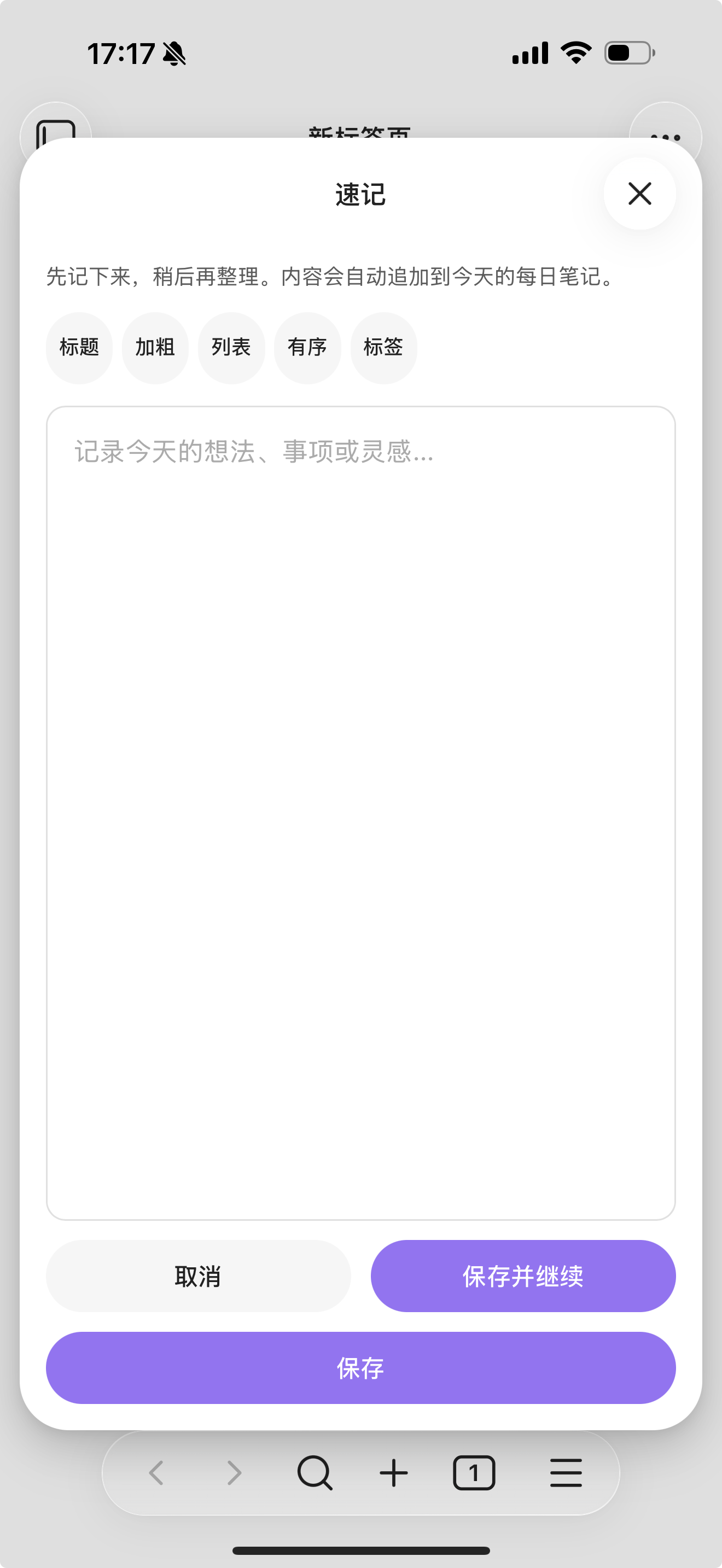
图标与截图 Icon and Screenshot

功能 Features
在手机端打开一个大号速记面板
将输入内容自动追加到今天的每日笔记
可插入到指定标题下,例如
## Inbox或## 日常记录如果今日日记不存在,可自动创建
可选从模板初始化当日笔记
内置简洁的 Markdown 工具条,支持标题、加粗、列表、有序列表和标签
Opens a large quick-capture modal that works well on mobile
Appends the captured text to today's daily note
Inserts under a target heading such as
## Inboxor## 日常记录Creates today's note automatically when it does not exist
Can initialize a new daily note from a template
Includes a small Markdown toolbar for headings, bold text, lists, ordered lists, and tags
适合什么场景 Best For
手机端快速捕获
把零散想法集中写入每日笔记
想保留轻量记录入口,而不是每次都先打开完整笔记编辑
Mobile capture into daily notes
Personal inbox-style note collection
Users who want a lighter alternative to opening and editing a full note first
工作方式 How It Works
默认情况下,拾句会把内容写入一个 vault 相对路径模板,例如:
By default, Shiju writes into a vault-relative path template such as:
YYYY-MM-DD.md
你也可以改成更有结构的形式,例如:
You can also change it to a structured layout such as:
Daily/YYYY/MM/YYYY-MM-DD
如果目标笔记不存在,拾句可以先从模板创建笔记,然后再把内容追加到你配置的目标标题下。
When the target note does not exist, Shiju can create it from a template note and then append the captured content under the heading you configured.
设置项 Settings
Daily note path format:每日笔记路径模板,不需要写.mdTemplate path:当今日日记不存在时使用的模板路径Target heading:要插入到哪个标题下,不带前导#Markdown heading level:工具条里标题按钮插入几级标题Create heading if missing:目标标题不存在时是否自动创建Write mode:以普通文本、无序列表或任务列表写入Capture prefix:每条记录前追加固定前缀Open note after save:保存后自动打开今日日记Daily note path format: vault-relative path template without.mdTemplate path: vault-relative template note used when today's note does not existTarget heading: heading text without the leading#Markdown heading level: which heading level the toolbar标题button insertsCreate heading if missing: automatically add the target heading when neededWrite mode: plain text, bullet list, or task listCapture prefix: prepend fixed text before each saved captureOpen note after save: open today's note after saving
当前支持的路径 token:
Supported path tokens:
YYYYYYMMDD
移动端说明 Mobile Notes
拾句从一开始就是按手机端优先设计的:
Shiju is designed with mobile use as the primary target:
更大的输入区域,方便手机输入
一排紧凑的 Markdown 工具按钮
当前交互文案以中文为主
A larger text area for phone input
A compact one-line Markdown toolbar
Interaction copy is currently Chinese-first
已知限制 Known Limits
当前不是完整嵌入 Obsidian 正文编辑器,而是轻量速记面板
路径模板故意只支持少量日期 token,避免目录名被误替换
当前主要聚焦“写入一个目标笔记位置”,不追求复杂路由规则
Shiju does not embed the full Obsidian editor inside the modal
Path templates intentionally support only a small set of date tokens
The plugin currently focuses on one-note capture rather than more advanced routing rules
开发 Development
npm install
npm run build
手动安装 Manual Install
把以下文件复制到:
Copy the release files into:
.obsidian/plugins/shiju/
  manifest.json
  main.js
  styles.css
然后在 Obsidian 的社区插件中启用 拾句 Shiju。
Then enable 拾句 Shiju in Community Plugins.
发布文件 Release Files
在 GitHub Release 中需要上传:
For an Obsidian release, the GitHub release assets should include:
manifest.jsonmain.jsstyles.css