Settings Assistant
 Johannes Kaindl36 downloads
Change app and plugin settings through reviewed profiles or a local-LLM chat — with secrets left out, a diff before every write, and snapshots to roll back.
- Overview
- Scorecard
- Updates4
🇬🇧 English · 🇩🇪 Deutsch
Change app and plugin settings through reviewed profiles or a local-LLM chat — with secrets left out, a diff before every write, and snapshots to roll back.
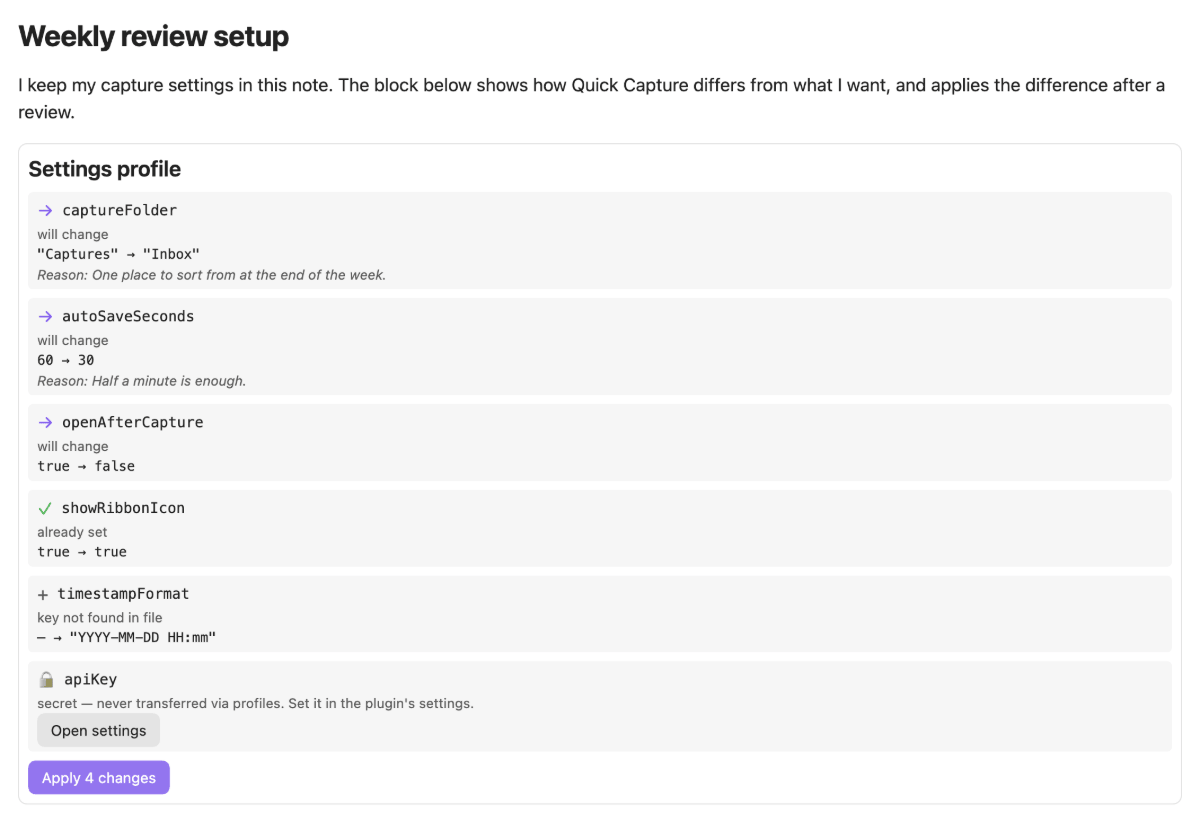
Settings live in JSON files inside your configuration folder, and changing them by hand is easy to get wrong and hard to undo. Settings Assistant puts a review step in between: you describe the change as a profile (or ask the chat to draft one), the plugin compares it with the current state, shows every difference, and writes only what you tick — after saving a snapshot you can restore later.
What it does
- Profiles as notes. A fenced block with the language
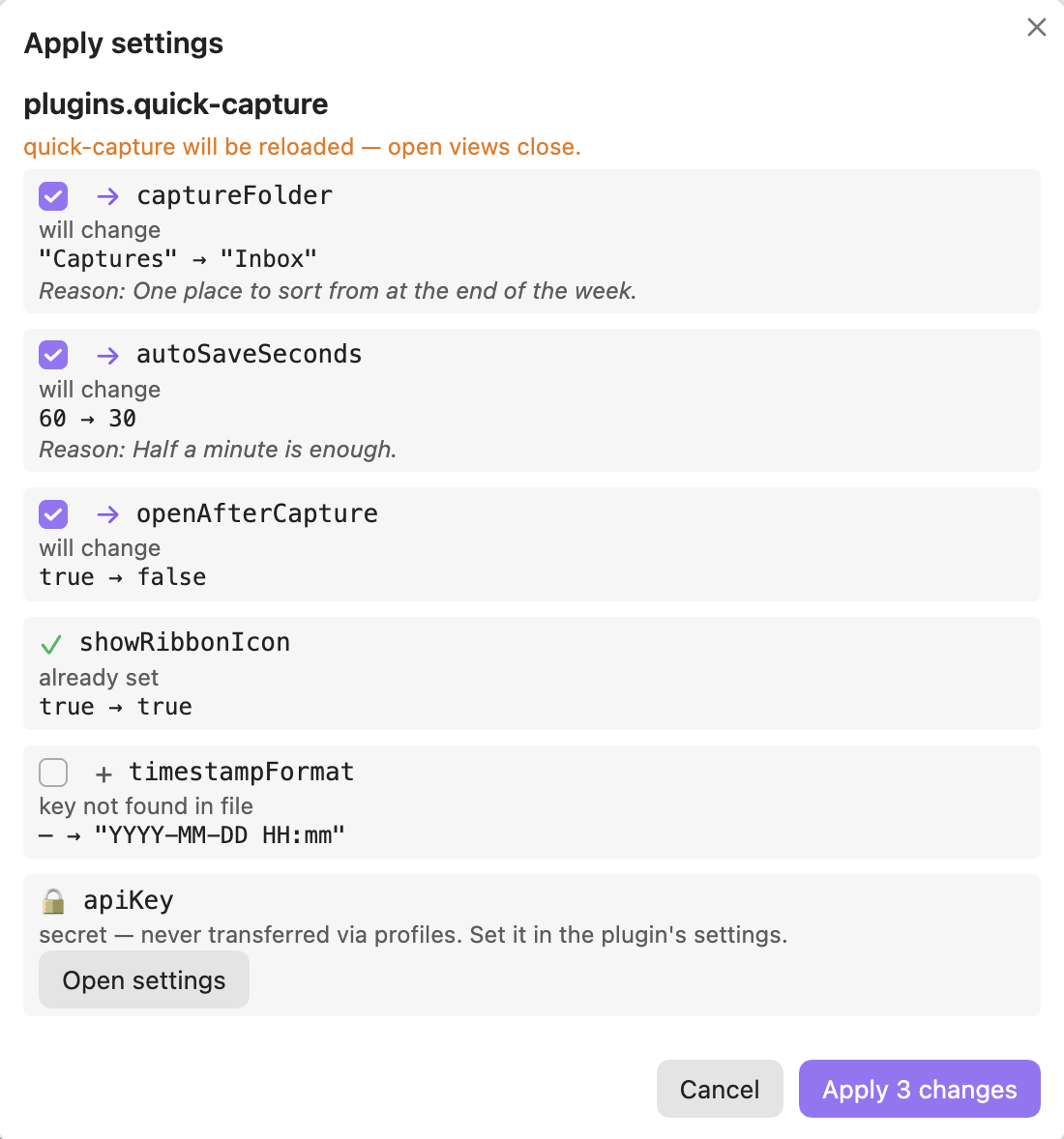
settings-profileholds the settings you want. In reading view it shows a live comparison with the current state and an apply button. The same profile applied in another vault brings two vaults in line. - A diff before every write. Each key becomes a check row: will change, already set, key not found, plugin not installed, and so on. Rows that would change something are ticked, everything else is not. Nothing is written until you confirm.
- Secrets never travel. Values under names like
apiKey,token,passwordorauthorizationare left out of profiles, chat context, saved notes and the API. They appear as a locked row with a button to the plugin's own settings. Snapshots copy a file unchanged, secrets included, and stay in your configuration folder; see Why secrets never travel. - Snapshots and undo. Before any write the affected files are saved. The command Undo last apply and the snapshot list in the settings restore them, with a per-file check whether the file changed since.
- A settings chat. A sidebar chat with your local model drafts a profile from a question. You see exactly what was sent, which keys were withheld, and the raw profile block. The chat never writes by itself.
- Hotkeys too. Besides each plugin's
data.json, version 1 can writehotkeys.json. The other Obsidian files can be read and appear as read-only rows. - For other plugins. A small, versioned API offers redacted reading, a plan, and a write path with its own confirmation dialog. See
docs/API.md. - Model-agnostic and local. No model name is hard-coded. Endpoints come from the LLM Endpoint Manager if it is installed, otherwise from a local list in the settings. API keys of that list are stored in Obsidian's secret storage, not in
data.json. - Bilingual interface. English is canonical; the interface follows Obsidian's display language and ships a full German translation.
Requirements
- Obsidian 1.11.4+ (desktop or mobile; the chat has not been measured on mobile yet). The version is the floor because API keys are kept in Obsidian's secret storage.
- For the chat only: an OpenAI-compatible local server with a chat model loaded, such as LM Studio, Ollama or MLX — or the LLM Endpoint Manager plugin, which supplies the endpoints. New to local LLMs? The local LLM setup guide walks you through server, model and access end to end. Profiles in notes work without any model.
- Not covered in version 1: appearance and CSS, and writing
app.json,appearance.json,core-plugins.jsonorcommunity-plugins.json. See Known limits.
Install
Manual
The plugin is not in the Community Store yet. Download main.js, manifest.json and styles.css from the latest release into <vault>/.obsidian/plugins/settings-assistant/ (use your configuration folder if it is not .obsidian), then enable Settings Assistant under Settings → Community plugins.
From source
git clone https://github.com/johannes-kaindl/settings-assistant
cd settings-assistant
npm install
npm run build   # produces main.js
Usage
Write a profile in any note. Reading view then shows the comparison:
```settings-profile
{
  "version": 1,
  "plugins": {
    "my-plugin": { "maxRounds": 20 }
  },
  "notes": {
    "plugins.my-plugin.maxRounds": "Shorter runs on the work machine."
  }
}
```
Press Apply N change(s). A dialog lists the rows grouped by file; untick what you do not want, then confirm. A plugin that is switched on is turned off, written and turned on again, so open views of it close.
To ask instead of write: run Open settings chat (or use the ribbon icon), name a plugin in your question, and read the answer. A proposed profile appears with the same rows and the same apply button; Save as profile note keeps it for another vault.
To undo: run Undo last apply, or pick a snapshot in the settings under Snapshots. A file that changed since the apply is shown as such and is not ticked.
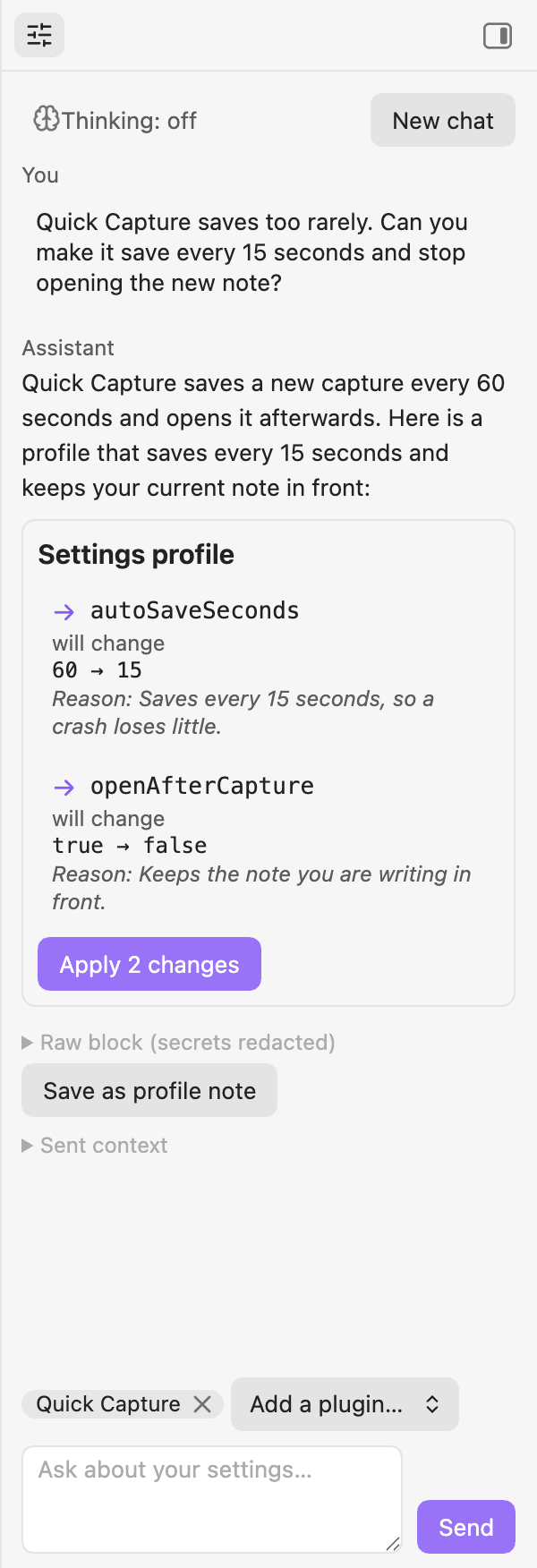
Click the preview for the full-size chat
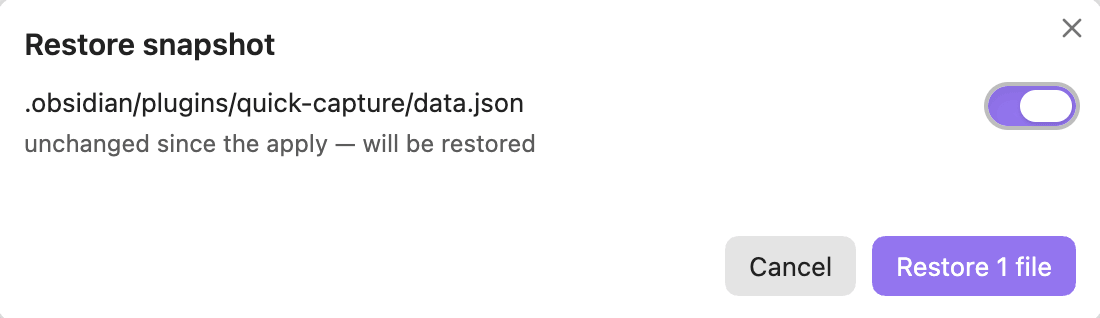
The walk-through First profile does all of this once, step by step.
Configuration
Settings → Community plugins → Settings Assistant, from top to bottom:
| Setting | What it does |
|---|---|
| Help | Opens the documentation and the issue tracker. |
| Endpoint | With the LLM Endpoint Manager installed: choose an endpoint or let the first reachable one win. Without it: an ordered list of OpenAI-compatible servers, each with an optional API key and model, a connection status and a Test connection button |
| Request | The sampling values, thinking level and token budget actually sent for the current model family, with the last request and any deviations of the session. |
| Retention | How many snapshots stay: Keep from today, Keep per day, Keep per week, Keep per month. Defaults 6, 7, 4 and 6; 0 keeps none for that period. |
| Saved snapshots | The list of snapshots, newest first. Selecting one opens the restore dialog. |
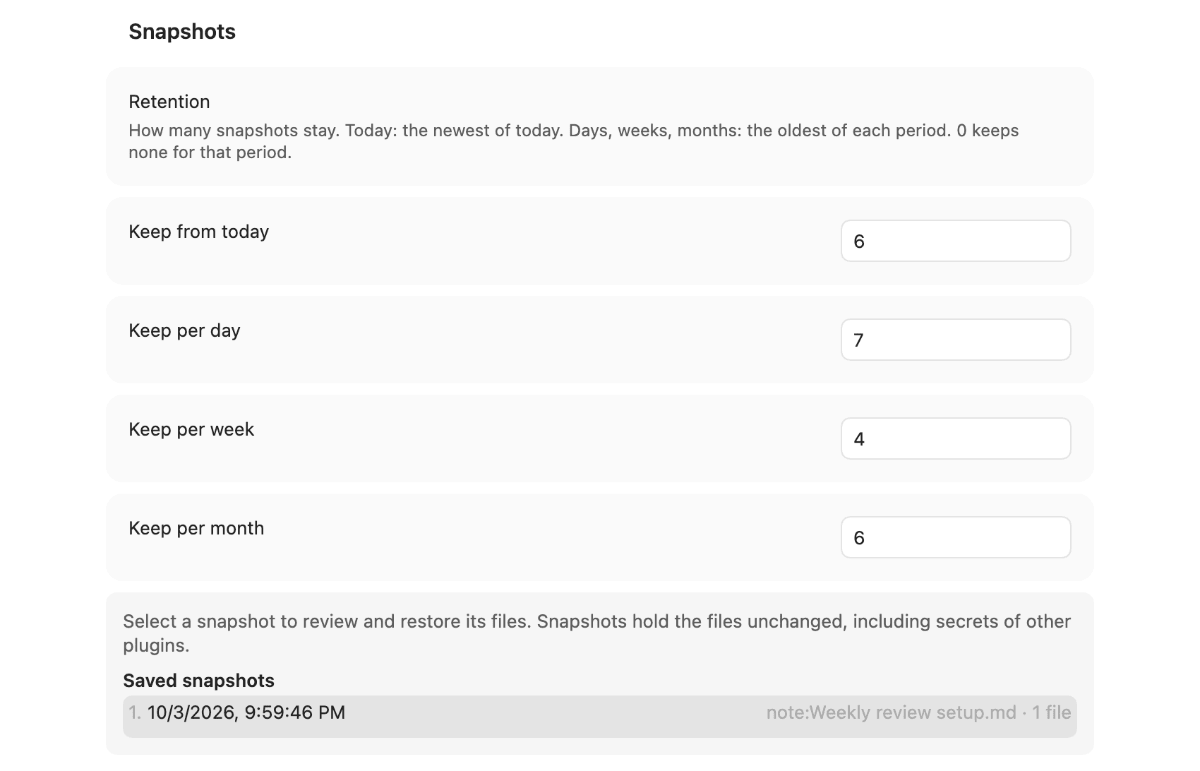
Click the preview for the full-size section
How it works
Everything that is about settings lives in a pure core without any Obsidian import: parsing a profile, comparing it with the files, finding secrets, patching JSON while keeping unknown keys, order and indentation, and deciding what a restore may touch. A gate keeps that boundary, so the core is tested in plain Node.
All three entrances — a note, the chat and the API — deliver a profile and an origin to one write path: read the files, compare, show the dialog, save a snapshot (if that fails, nothing is written), write each file, read it back and report what the plugin corrected. On an error it stops and offers a restore instead of rolling back on its own. Only one apply runs at a time.
Writing is limited to plugins/<id>/data.json of other plugins and hotkeys.json. The plugin's own data.json is never written through a profile, and the plugin never switches itself off or on.
Documentation
- Documentation index — all pages in one place.
- Getting started: First profile — from the install to your first applied change.
- Troubleshooting — the exact message, its cause and the fix.
- Align two vaults and Ask the chat — task-oriented guides.
- Profile format, Check rows and Known limits — reference.
- Why secrets never travel and Snapshots and retention — explanation.
- Plugin API v1 — for plugin authors.
Contributing
AGENTS.md— architecture, conventions and gotchas for contributors and AI agents.CHANGELOG.md— what changed per release.
License
Code AGPL-3.0-or-later (LICENSE), documentation CC BY-SA 4.0 (LICENSE-DOCS).
Acknowledgements
Lessons learned from Config Sync (MIT, xooooooooox/obsidian-config-sync) informed several edge cases. No code was copied.