rsn habit calendar one b
 Rajendra Singh Negi1 downloads
Track habits with monthly calendars, manual completion marks, custom header colors, and retained monthly statistics.
- Overview
- Scorecard
- Updates4
Monthly habit calendars for Obsidian by harharhari. Version 1.1.4, licensed under GPL-3.0-only.
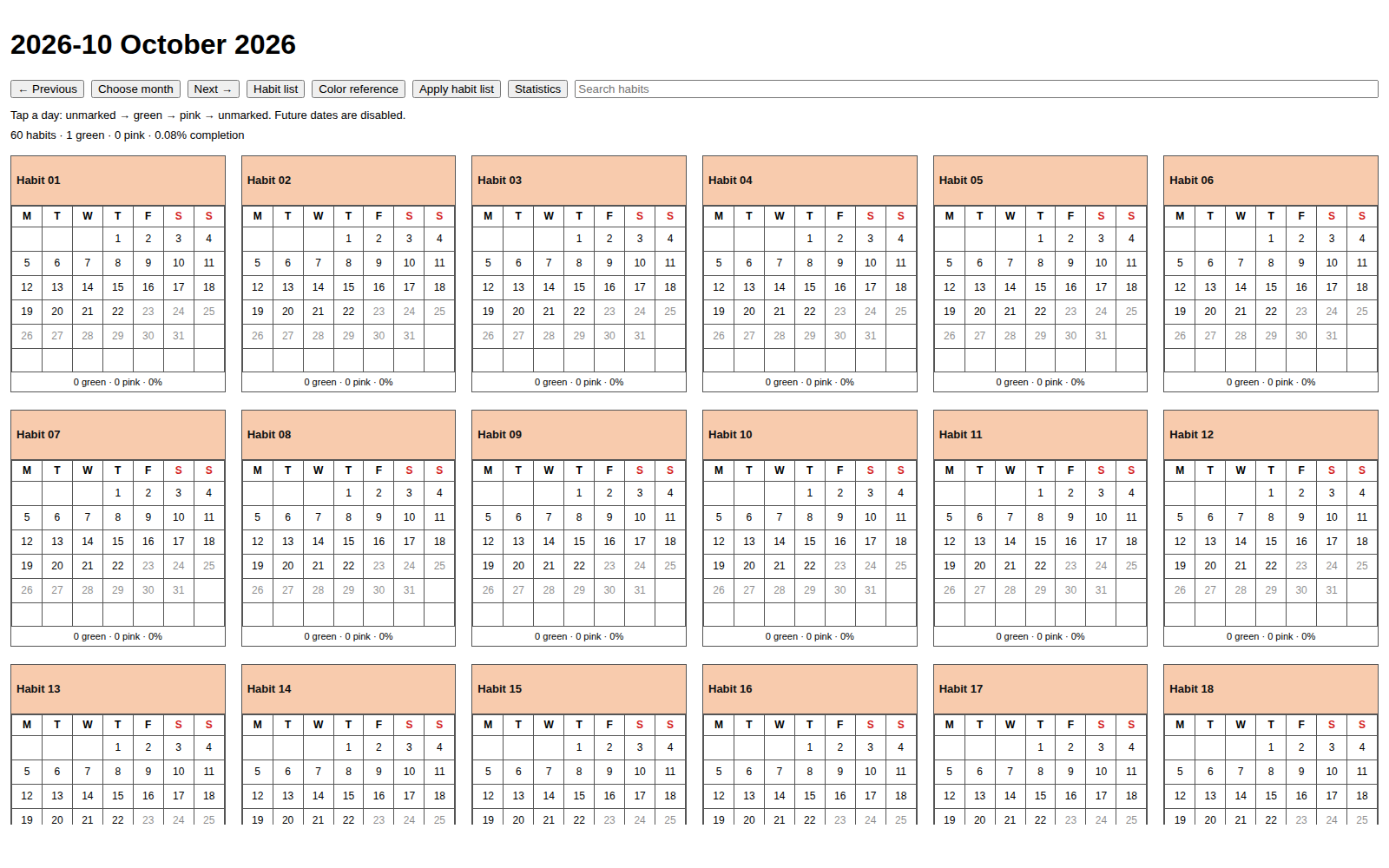
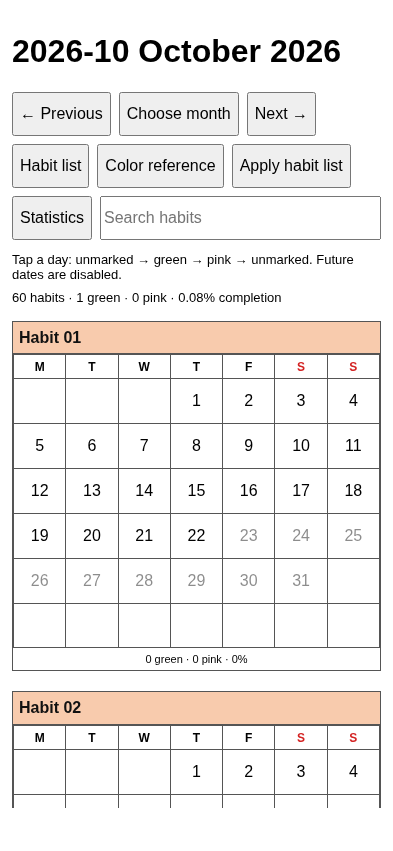
Track daily activities with a named calendar for each habit. Wide desktop views show six calendars per row; phones and tablets show one. Click or tap a date to cycle unmarked → green → pink → unmarked. Weeks start Monday. The monthly title follows 2026-10 October 2026.
Layout examples
These browser-rendered examples use generic habits and mocked Obsidian APIs; they are not device screenshots.
Download and install
Download the assets from GitHub Releases. This link becomes available when the maintainer publishes the release and grants access. The repository may remain private during testing.
- Back up your vault. Use
rsn-test-vaultfor the first trial. - Download the six release assets and verify their checksums using the platform-specific instructions.
The following file-copy steps apply to desktop and accessible Android vaults. For iPhone/iPad, follow the Obsidian Sync or Mac-assisted iCloud setup instead.
- Close Obsidian. Extract
rsn-habit-calendar-one-b-1.1.4.zipand copy itsrsn-habit-calendar-one-bfolder into<vault>/.obsidian/plugins/. For an upgrade from 1.1.1/1.1.2, follow the identity migration guide: disable the old plugin and copy wanted data.json into the new folder. - Reopen Obsidian. Under Settings → Community plugins, allow community plugins and enable rsn habit calendar one b.
- Run rsn habit calendar one b: Open current month in the command palette. A new vault starts with an empty habit list. Follow the tutorial to add your own rows.
Use the individually attached installation ZIP, not GitHub's automatically generated Source code ZIP. No Node.js or Python is required for normal use. Android manual installation requires a vault in accessible device storage.
After Community acceptance, users can instead search for rsn habit calendar one b by harharhari in Settings → Community plugins → Browse, then install and enable it. This package does not claim directory acceptance.
Habit list and colors
Edit Habit Tracker/habit-tracker-list.md:
| Habit | Generate calendar | Header color |
|---|---|---|
| Walking | Y | #90EE90 |
| Reading | Y | #ADD8E6 |
| Yoga | N | #FFDAB9 |
Y displays a calendar, N excludes it when you apply the list. Keep the hidden habit-ID comments that the plugin adds. Copy a six-digit hex code from Habit Tracker/hex-color-list.md, which has 147 CSS3 colors and supports custom rows. View the color note in Reading view to see its swatches.
Applying a habit-list change with Yes clears every current-month mark, including marks for unchanged habits. No keeps the displayed month and marks unchanged, while leaving your edited list in place. Use Apply habit list to reconsider a declined change. Previous months stay read-only and keep their saved statistics and calendar snapshot. Late synced entries do not alter frozen history.
Monthly behaviour
Earlier dates within the current month are editable. Future dates are disabled. Completion uses green days divided by elapsed calendar days; pink and blank dates break month-local streaks. There are no schedules or automatic missed-day marks.
A new month appears while Obsidian is running, or on its next opening. The optional Linux helper supports desktop scheduling. There is no Android background scheduler. The initial timezone is Asia/Kolkata; keep Habit Tracker/System/config.md consistent across devices.
Guides
- Windows, Ubuntu, Mac, Android, iPhone and iPad tutorial (PowerPoint)
- Migration from the old plugin ID
- First-use tutorial
- Install, upgrade and download guide
- Android and optional Sync
- Maintainer testing and Community submission
- Acceptance checklist and test evidence
- Final design and open questions
- Exact repository inventory
Compatibility and data
Version 1.1.4 targets Windows 11, Ubuntu 24.04.3, current stable macOS, Android, iOS and iPadOS with the same plugin bundle. Phones and tablets show one calendar per row. Wide desktop panes show six; narrow panes show one. The month picker uses a Month dropdown and Year field on every platform.
The maintainer previously reported 1.1.1 working on Ubuntu/Android. Version 1.1.4 device acceptance is pending. Exact Apple OS, Android and Obsidian versions must be recorded during testing. The manifest minimum 1.7.2 is an API compatibility floor, not a completed minimum-device test.
No plugin network requests, telemetry or runtime Node/Electron imports. Sync is a separate service. Use optional Obsidian Sync across all platforms, or a separate Apple-only iCloud vault. Follow MIGRATION-1.1.3.md to preserve data.json and Habit Tracker across the ID change. Do not run old Habit Calendar 001 with the same records.
See all-platform installation, platform testing and release notes.
Build
Developers need Node.js 22+ with npm. Python 3.9+ is needed only for helper tests.
npm ci --ignore-scripts
npm run check
npm run test:helper
npm run build is the production build command. npm run check runs official Obsidian ESLint checks, builds, tests, verifies metadata and creates the six release assets under release/. GitHub Actions runs these checks on pushes and pull requests. It does not publish a release.
Repository-root SHA256SUMS verifies this prepared source snapshot. The separate release SHA256SUMS verifies the four loose installation files and installation ZIP. These are different inventories. See checksum instructions.
Support and license
Report reproducible problems through GitHub Issues. Include plugin/app versions, OS, steps and error text, but remove personal vault content. GPL-3.0-only. Copyright © 2026 harharhari. See NOTICE.
Version 1.1.4 build repair
For the npm 404 on Ubuntu, Windows or macOS, follow CI troubleshooting. Upload the repaired root lockfile and run the new commit. See release notes and validation. An upgrade from 1.1.3 keeps the same plugin folder, data.json and Habit Tracker records.