Repo Board

A board of your GitHub repos in a tab: open issues as tasks you can tick off, and whether each plugin or theme release is ready for the directory.
- Overview
- Scorecard
- Updates2
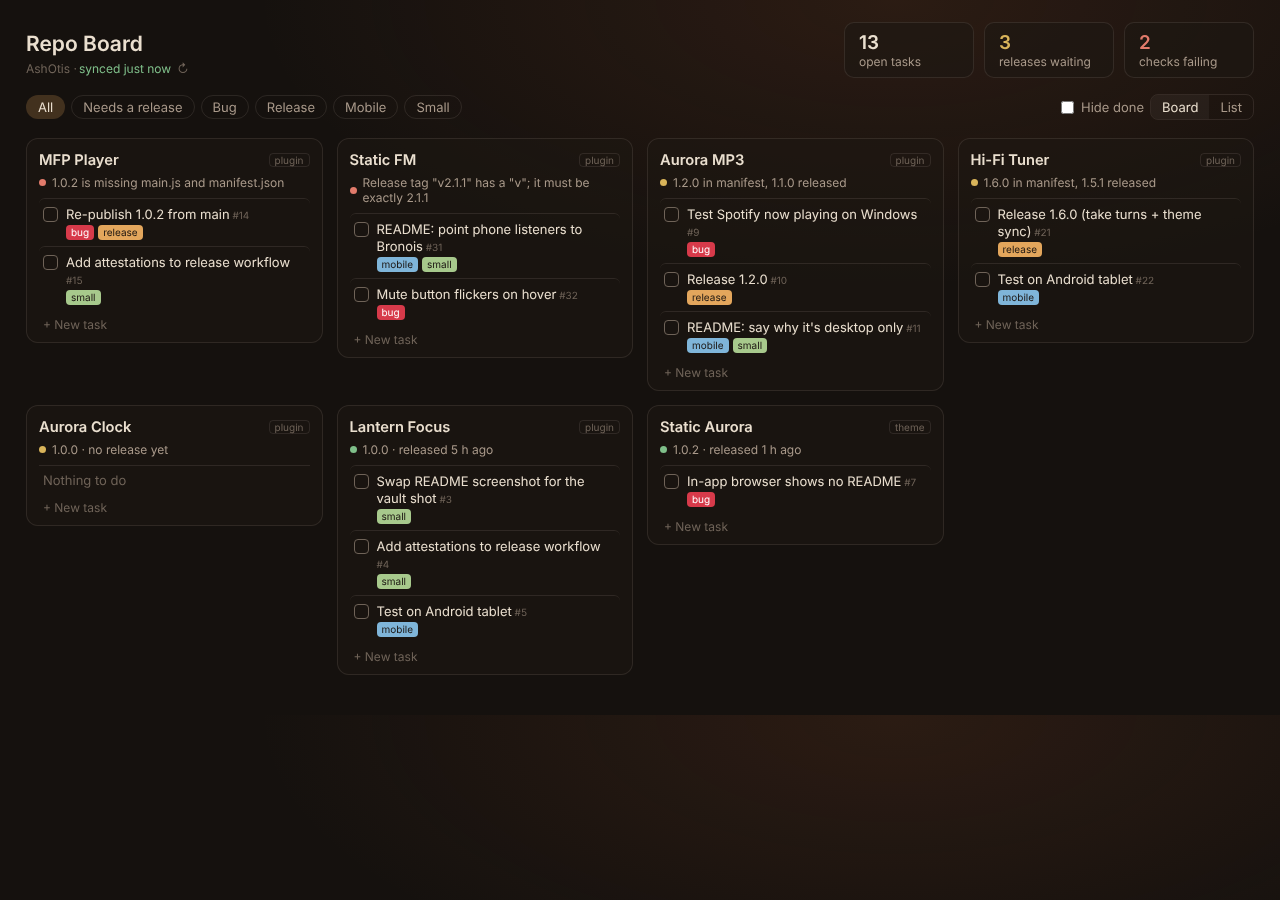
A board of your GitHub repos in an Obsidian tab. Every repo gets a card with its open issues as tasks you can tick off, and a line telling you whether its latest release is ready for the Obsidian community directory.
Made for people who publish Obsidian plugins and themes, but it works for any public repos.
What it shows
- One card per repo with its open issues. Click a title to open it on GitHub; tick the box to close it; tick again to reopen.
- Release health, worked out the way the directory checks it:
- 🟢 released, and the release has the files the directory needs
- 🟡 the version in
manifest.jsonis newer than the last release, or there's no release yet - 🔴 the release is missing
main.js/theme.css/manifest.json, or the tag doesn't match the version (for examplev1.0.2instead of1.0.2)
- Totals for open tasks, releases waiting and checks failing.
- Filters by label (bug, release, mobile, small, idea and your own), a Needs a release filter, Hide done, and a List view.
- + New task adds an issue to that repo, with labels.
Problem repos sort to the top. Forks, archived repos and pull requests are left out, and by default so are repos that aren't Obsidian plugins or themes.
Setup
- Settings → Repo Board → enter your GitHub user or organisation name.
- Open the board from the ribbon or the command Repo Board: Open the board.
- To tick tasks off and add new ones, add a token (below). Without one the board is read only.
- Optional: turn on Open when Obsidian starts to make the board your home page, and choose a Background: None (your theme shows through), two built-in aurora pictures, or any picture from your vault, with Darken and Blur sliders.
The token
Make a fine-grained personal access token on GitHub (Settings → Developer settings → Fine-grained tokens) with Issues: Read and write on the repos you want. Paste it into the plugin's settings.
The token is stored in this plugin's data.json inside your vault. Don't include it in a vault you share or publish.
A token also raises GitHub's limit from 60 to 5,000 requests an hour. Without one, refresh by hand or every hour.
Privacy and network
Repo Board talks only to api.github.com, and only to read your repos, issues, releases and manifest.json, and to close, reopen or create issues when you ask it to. Nothing else is sent anywhere. Results are cached in the plugin's data.json so the board opens instantly.
Support
If it saves you time, you can buy me a coffee. Bugs and ideas: issues.
GNU AGPL v3 or later © AshOtis.