Search...Search plugins and themes...
⌘K
Sign in
  • Get started
  • Download
  • Pricing
  • Enterprise
  • Account
  • Obsidian
  • Overview
  • Sync
  • Publish
  • Canvas
  • Mobile
  • Web Clipper
  • CLI
  • Learn
  • Help
  • Developers
  • Changelog
  • About
  • Roadmap
  • Blog
  • Resources
  • System status
  • License overview
  • Terms of service
  • Privacy policy
  • Security
  • Community
  • Plugins
  • Themes
  • Discord
  • Forum / 中文论坛
  • Merch store
  • Brand guidelines
Follow us
DiscordTwitterBlueskyThreadsMastodonYouTubeGitHub
© 2026 Obsidian

Replace All

patrickchiangpatrickchiang2k downloads

Adds replace all functionality into search.

Add to Obsidian
  • Overview
  • Scorecard
  • Updates5

Replace All is an Obsidian plugin that injects replace all functionality directly into the core file plugin.
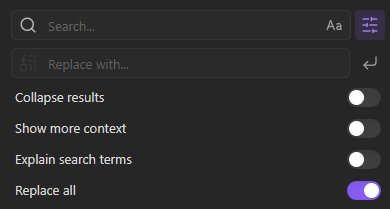
Replace All

Usage

  1. Use the built-in Obsidian find to find instances to replace.
  2. Enter the replacement string in the input box.
  3. Press Enter.

Undo replace all: Use the command palette (Ctrl+P or Cmd+P) and search for "Undo replace all" to undo all changes applied by the previous replacement.

Installing

  1. Install the Plugin:
    • (Recommended) If installing through Obsidian, go to Settings > Community plugins > Browse and search for "Replace All".
    • If downloading manually, place the plugin files in your Obsidian plugins folder.
  2. Enable the Plugin: Go to Settings > Community plugins, find "Replace All" and toggle it on.

Development

If you want to contribute or modify the plugin, follow these steps:

  • Clone this repo.
  • Make sure your NodeJS is at least v16 (node --version).
  • npm i or yarn to install dependencies.
  • npm run dev to start compilation in watch mode.
  • Feel free to file a pull request with any improvements.
69%
HealthGood
ReviewCaution
About
Add replace-all support to the core file search, letting you perform batch replacements across files using Obsidian's built-in find. Revert the last batch operation with the "Undo replace all" command.
SearchEditingFiles
Details
Current version
1.0.5
Last updated
2 years ago
Created
2 years ago
Updates
5 releases
Downloads
2k
Compatible with
Obsidian 1.7.2+
Platforms
Desktop, Mobile
License
MIT
Report bugRequest featureReport plugin
Author
patrickchiangpatrickchiang
github.com/patrickchiang
GitHubpatrickchiang
  1. Community
  2. Plugins
  3. Search
  4. Replace All

Related plugins

Omnisearch

Intelligent search for your notes, PDFs, and OCR for images.

Remember cursor position

Remember cursor and scroll position for each note.

Thino

Quickly capture memos and display them in the sidebar with a heatmap. (Closed source)

Gemini Scribe

Allows you to interact with Gemini and use your notes as context.

Note Refactor

Extract note content into new notes and split notes.

Home tab

A browser-like search tab for your local files.

Code Space

Professional code file management with visual dashboard, syntax highlighting editor, and Markdown embedding.

Advanced Tables

Improved table navigation, formatting, and manipulation.

Notebook Navigator

A better file browser and calendar inspired by Apple Notes, Bear, Evernote and Day One.

Local REST API & MCP Server

Unlock your automation needs by interacting with your notes over a secure REST API.