
- Overview
- Scorecard
- Updates10
A simple plugin for Obsidian that transforms date references in your task lists into color-coded elements that show relative dates.
Features
- Converts date references in the format
@ YYYY-MM-DD(with optional timeHH:MM) into relative dates - Supports changing the default
@prefix through the plugin settings - Works in both Reading mode and Live Preview mode
- Color-coded elements based on date proximity (overdue, today, tomorrow, this week, future)
- Customizable colors through the plugin settings
Usage
Add dates in your task lists using the format:
@ 2025-08-12for dates@ 2025-08-12 14:30for dates with time
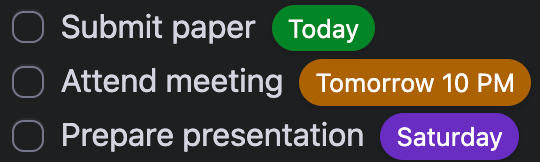
The plugin will automatically convert these into easy-to-read elements such as:
Installation
- Go to the latest release.
- Download
main.js,manifest.json, andstyles.cssfrom the release assets. - Create this folder in your vault:
.obsidian/plugins/obsidian-relative-dates - Move the downloaded files into that folder.
- Enable the plugin in Obsidian.
Install from source
- Clone the repository to
.obsidian/plugins/:git clone https://github.com/Munckenh/obsidian-relative-dates.git - Install the dependencies and compile:
npm install npm run build - Enable the plugin in Obsidian.
Release
To release a new version of the plugin:
- Update the
minAppVersioninmanifest.jsonif the new release requires a higher minimum Obsidian version. - Run
npm version patch,npm version minor, ornpm version major. This automatically updates the version correctly, creates a version commit, and adds the corresponding git tag. - Push the commit and the new tag to GitHub:
git push --follow-tags - A GitHub Action will automatically run, build the plugin, and create a release draft containing the required binary attachments (
manifest.json,main.js,styles.css). - Go to the GitHub repository's Releases page, review the drafted release notes, and publish the release.
Scripts
To manage the plugin, you can use the following scripts:
- Build the plugin by running
npm run buildor with live reload by runningnpm run dev. - Improve code quality (optional) by running
npm run lint.
HealthGood
ReviewPassed
About
Convert date references in task lists into color-coded relative date elements. Customize the prefix and colors to highlight overdue, today, tomorrow, this week, and future dates.Details
Current version
1.4.2
Last updated
4 months ago
Created
Last year
Updates
10 releases
Downloads
617
Compatible with
Obsidian 1.2.7+
Platforms
Desktop, Mobile
License
MIT
Sponsor