Recursive Fold
 rogerfan4838 downloads
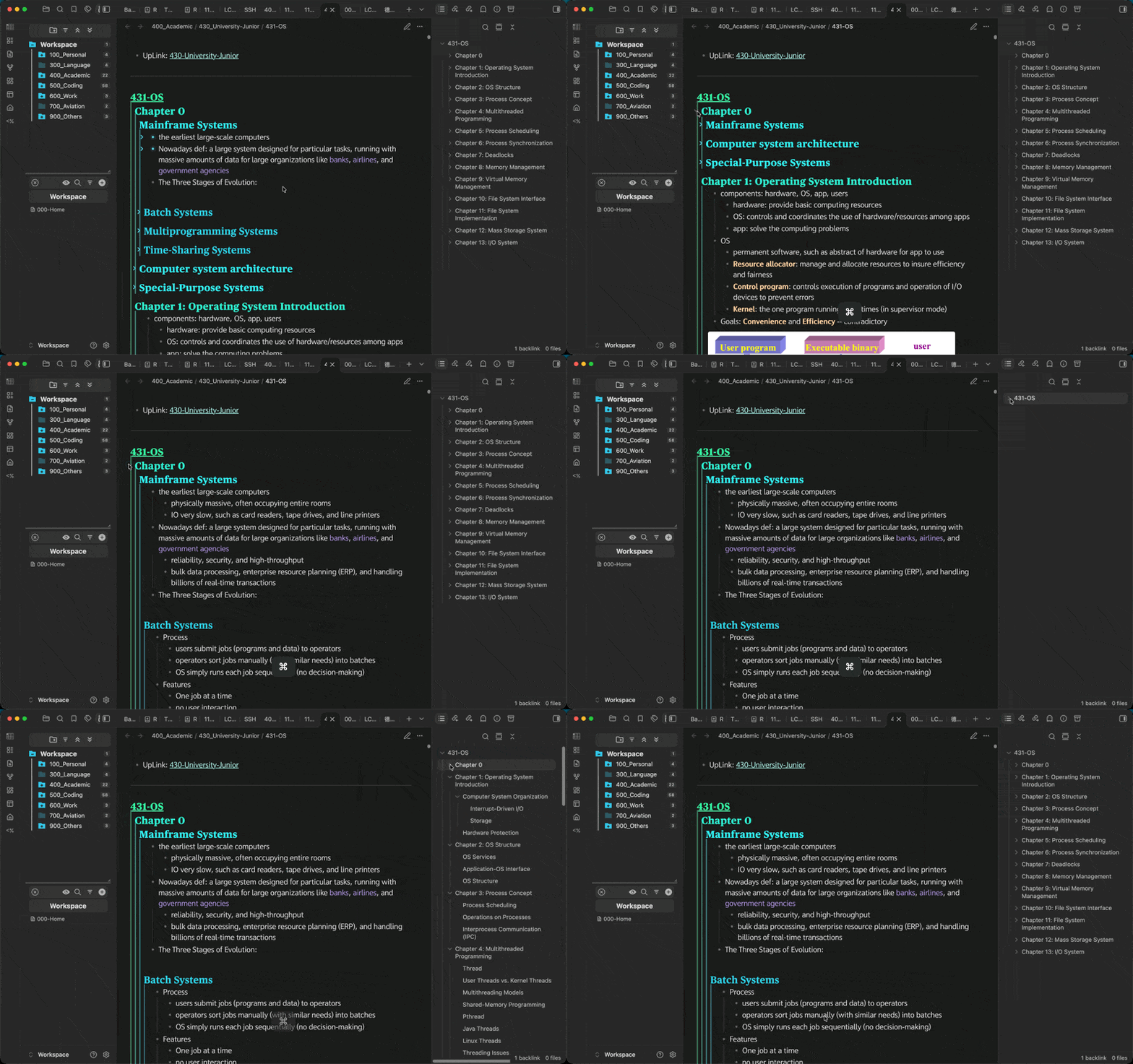
Fold or unfold a heading or list item together with everything nested under it, with a modifier-click on its fold arrow.
- Overview
- Scorecard
- Updates2
Expand or collapse an entire branch in Obsidian with one click, instead of one level at a time.
Obsidian's fold arrows toggle a single level. Reaching a heading five levels deep takes five
clicks, and collapsing a section keeps every level inside it as it was, so tidying up means closing
each one separately. Recursive Fold adds a modifier-click: Cmd-click (macOS) or Ctrl-click
(Windows, Linux) any fold arrow, and the item opens or closes together with everything nested
under it.
Where it works
| Location | What folds |
|---|---|
| Notes, in Reading view, Live Preview and Source mode | Headings and list items |
| File explorer | Folders |
| Bookmarks | Bookmark groups |
| Tags | Nested tags |
| Outline | Headings |
Usage
| Action | Result |
|---|---|
| Modifier-click a collapsed arrow | Expands the item and every level beneath it. |
| Modifier-click an expanded arrow | Collapses the item and every level beneath it. |
| Toggle fold recursively command | The same, for the section at the cursor, or at the top of the page in Reading view. Bind it under Settings → Hotkeys. |
Plain clicks keep Obsidian's single-level behavior. Folds in notes are saved like any other fold and carry over between Reading view and the editor.
Tip: to open just the next level, modifier-click to collapse the whole branch, then plain-click the same arrow. Its children appear with everything beneath them still folded.
Settings
| Setting | Default | Options |
|---|---|---|
| Modifier key | Cmd on macOS, Ctrl elsewhere |
Option/Alt, Shift, or off |
Installation
From Obsidian (recommended)
Settings → Community plugins → Browse, search for Recursive Fold, then install and enable it. Or open the plugin page and click Add to Obsidian.
Manually
Download main.js and manifest.json from the
latest release and place them in
<your vault>/.obsidian/plugins/recursive-fold/, then reload Obsidian and enable the plugin.
Limitations
- Embedded notes, hover previews and Canvas cards are not supported.
- Mobile devices have no modifier keys; use the command instead.
- The plugin builds on parts of Obsidian outside its public API. If an update changes them, modifier-clicks fall back to a single-level toggle until the plugin is updated.
Related
Also by me: Better Heading Hierarchy, which draws guide lines that make the nesting of headings visible at a glance.
Contributing
Bug reports and pull requests are welcome; see CONTRIBUTING.md.
License
MIT © rogerfan48