Recall Check
 Zhi Fu15 downloads
Review checkbox questions in the current note with hidden answers and readable local progress.
- Overview
- Scorecard
- Updates4
Turn checkbox notes into quick self-tests. Keep your questions and progress in Markdown.
Recall Check is a lightweight Obsidian plugin for reviewing the note you already have open. Write a question as a checkbox, wrap answers in ==double equals==, and start practicing. Reveal answers when you need them, rate your recall, and move on.
Try it in a minute
Add a few questions to a note, with a blank line between cards:
- [ ] The capital of France is ==Paris==.

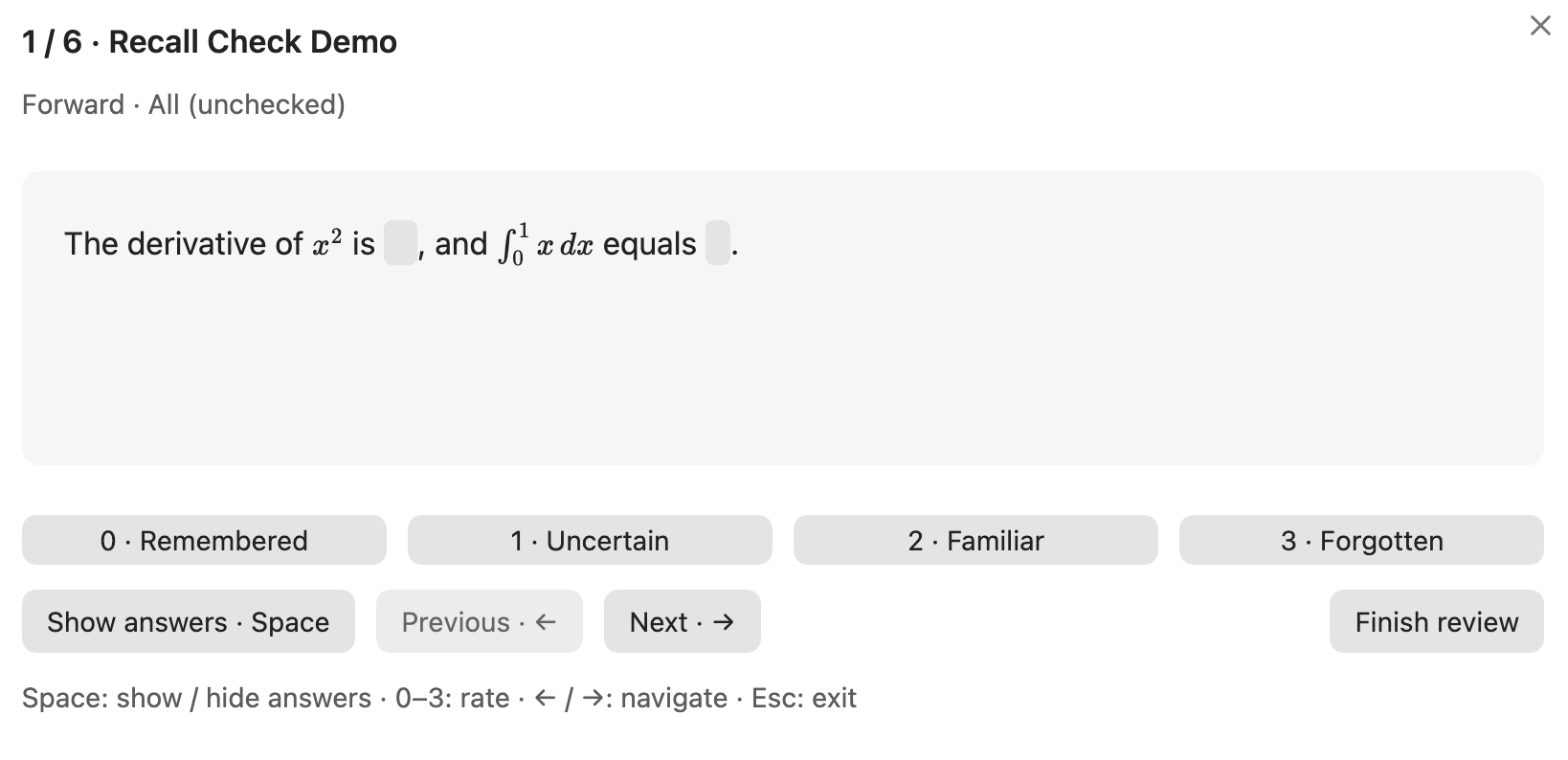
- [ ] The derivative of $x^2$ is ==$2x$==.

- [ ] A card can have ==multiple answers==,
      continue on another line, and include **bold text** or [[wikilinks]].
- Open the note and click the brain icon in the left ribbon, or run Recall Check: Review current note from the command palette.
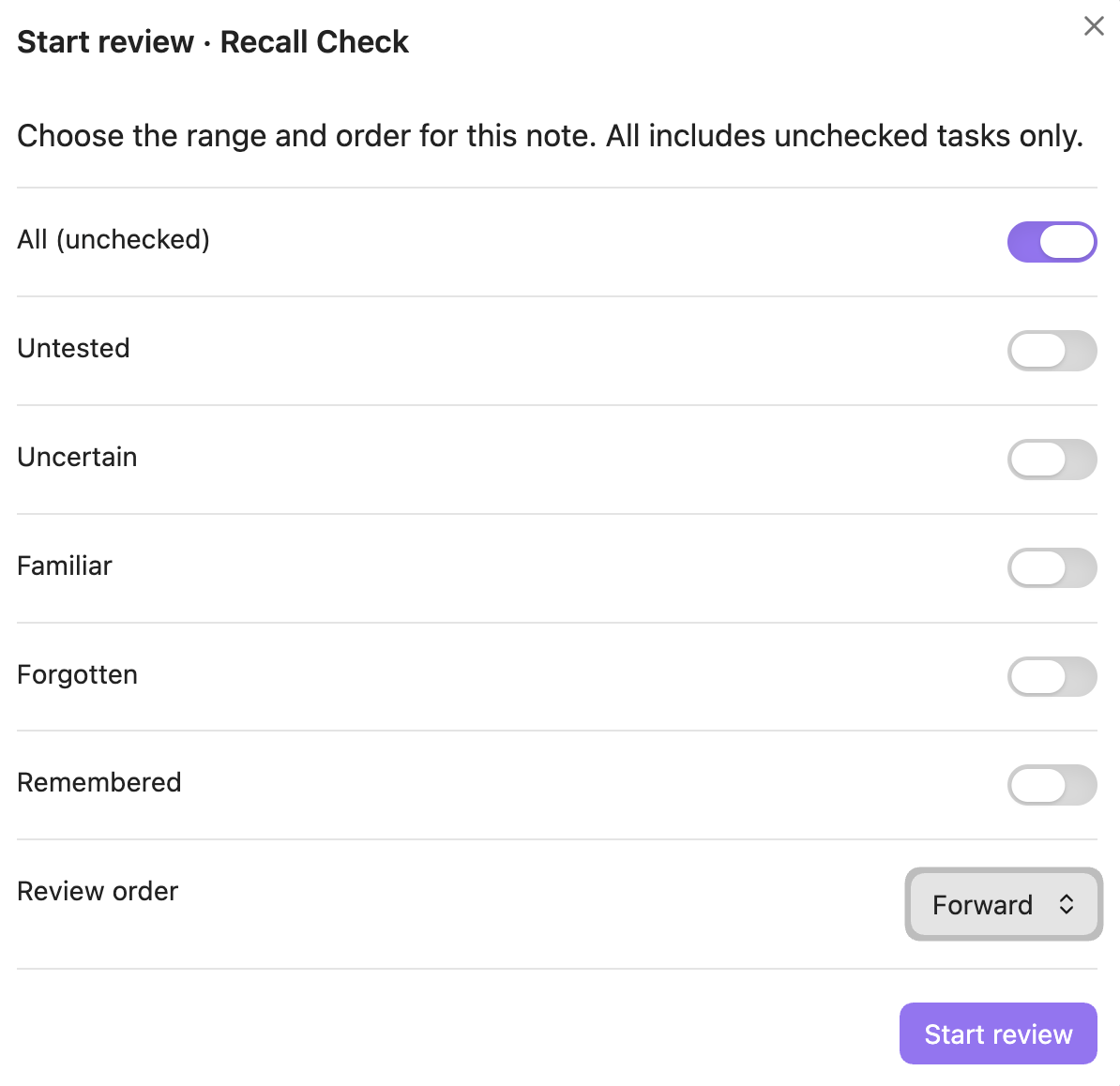
- Choose your review range and order. Your previous choices are remembered; Enter starts with them immediately.
- Press Space to reveal or hide answers. Press 0–3 to rate the card, or ← / → to move without grading.
You can rate a card before revealing its answers. Each saved rating advances to the next card, with answers hidden again.
Made for quick practice
- Review what you need. Select untested, uncertain, familiar, forgotten or remembered cards. Combine specific filters, or choose All for unchecked tasks.
- Choose your order. Follow the note, work backward, or shuffle once at the start of a session.
- Keep Markdown expressive. Use multiple blanks, multiline text, math, bold, italics, inline code, links and wikilinks. Questions without blanks work too.
- Stay in the flow. Keyboard controls, buttons, previous/next navigation and answers that keep their layout when hidden.
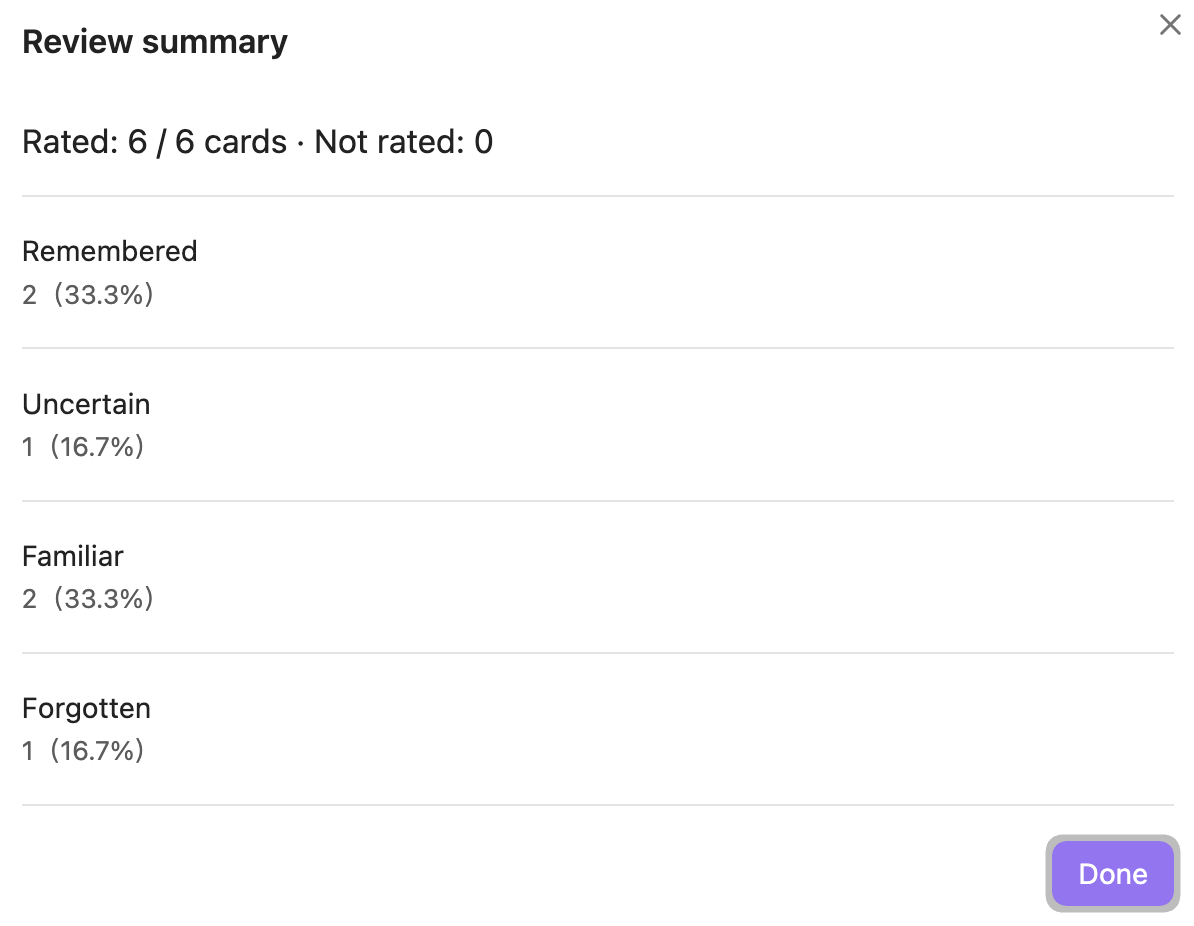
- See what you practiced. The summary counts each rated card once and shows how many you skipped. Regrading replaces the earlier session rating.
- Keep notes readable. Progress lives in a readable comment above each task; editor annotations can be hidden without removing them from the file.
The UI follows Obsidian’s language: Chinese for Chinese locales, English otherwise. It uses Obsidian theme variables for light and dark themes.
Screenshots
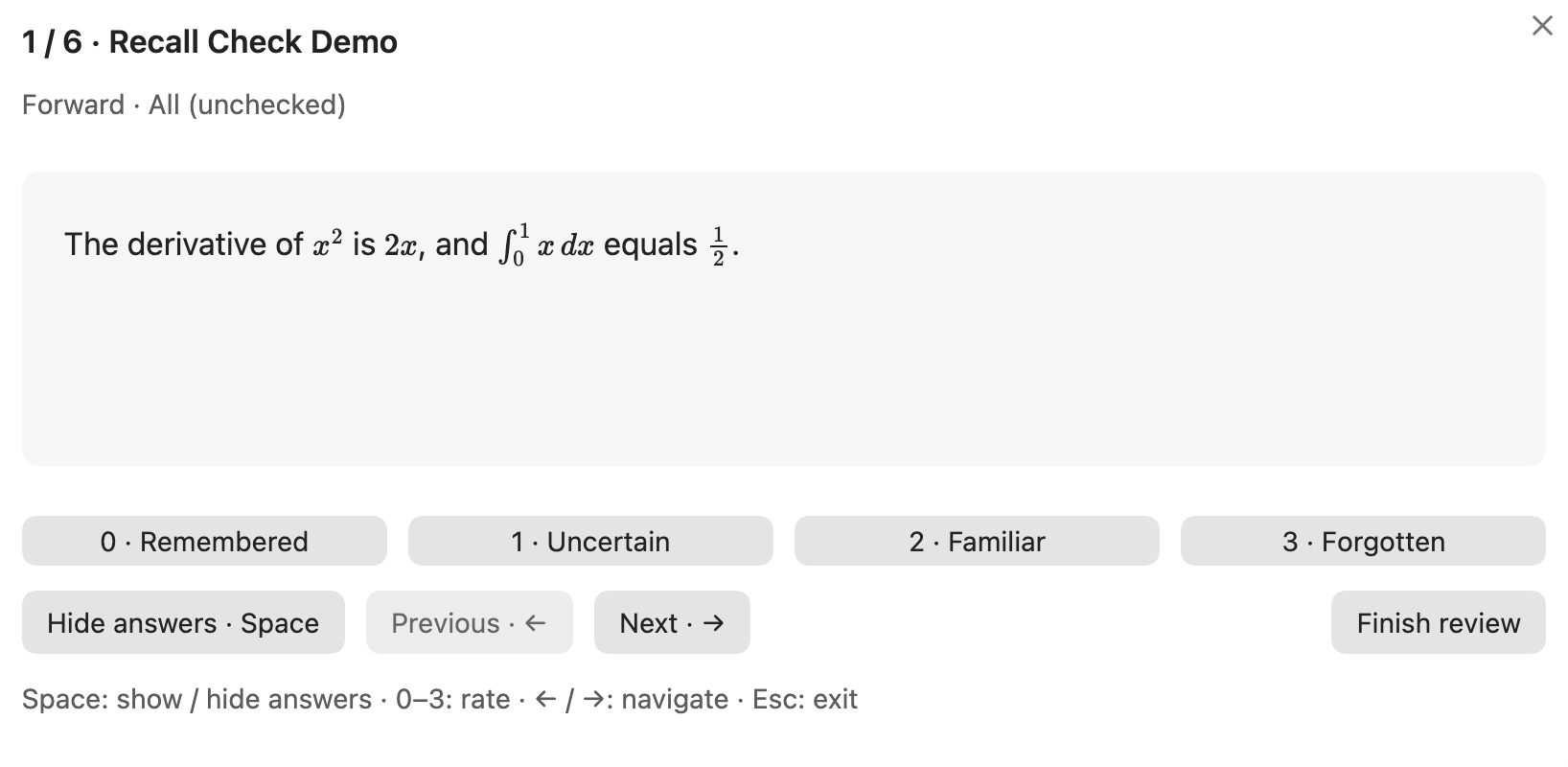
Reveal answers without changing the layout
Press Space to reveal the same card. The answers keep their space, so text and formulas stay in place.
Choose your review range and order
Review unchecked cards with All, combine specific status filters, or select Remembered to retest checked questions.
See your review summary
The summary reports unique rated cards, ungraded cards and the distribution of your ratings.
Keyboard shortcuts
| Key | Action |
|---|---|
| Enter | Start review from the range dialog’s focused Start button |
| Space | Show / hide the current card’s answers |
| 0 | Remembered — mark the task [x] |
| 1 | Uncertain — mark the task [ ] |
| 2 | Familiar — mark the task [ ] |
| 3 | Forgotten — mark the task [ ] |
| ← / → | Previous / next card without changing its status |
| Esc | Exit; retain saved ratings and leave ungraded cards untouched |
Review shortcuts are active only inside the review dialog. Typing controls retain their normal keyboard behavior. You can assign a global shortcut to Review current note in Obsidian’s hotkey settings.
Your notes are the record
Rating a question updates its checkbox and one status comment:
<!-- RecallCheck: 不确定 -->
- [ ] The capital of France is ==Paris==.
The four saved values are 记住了 (remembered), 不确定 (uncertain), 有印象 (familiar) and 没记住 (forgotten). These Chinese values remain stable in both UI languages. A task without a status comment is untested.
All includes only [ ] tasks. Use Remembered to retest [x] or [X] tasks, including those without a comment. Giving a remembered question a rating of 1–3 reopens its checkbox.
Cards run from a task checkbox to the next blank line; adjacent task starts also separate cards. Leave a blank line between questions for predictable formatting. Frontmatter and fenced code blocks are ignored, and inline code remains literal. Unmatched cloze delimiters remain ordinary text.
Review range counts
Each range shows its card count and percentage of all cards in the current note, including checked tasks. All still counts unchecked tasks only; Remembered counts checked tasks. Counts follow the same rules as the review queue.
Underline revealed answers
Enable Settings → Recall Check → Underline revealed answers to draw lines below the revealed blanks, including math. It is off by default and does not change answer layout.
Clear status comments
Run Clear status comments in current note from the command palette, or use the corresponding button in Settings → Recall Check. Confirm the note name before clearing. This removes only RecallCheck comments above tasks, preserving checkboxes (including [x]), note content, code examples and other plugins’ comments. Unchecked tasks whose comments are removed become Untested; checked tasks remain Remembered.
Show or hide annotations
Status comment lines are hidden in the editor by default. Move the cursor onto a comment line to reveal and edit it. Toggle visibility in Settings → Recall Check, or run Toggle status comment visibility from the command palette. Reading view hides HTML comments through normal Markdown rendering.
Only RecallCheck’s task comments are affected. Other comments, including Easy Recall’s <!--SR:...-->, are preserved.
Safe saves and privacy
Each rating uses Obsidian’s atomic Vault.process() API and checks the latest task sequence before saving. Duplicate questions are tracked separately, and unrelated prose edits are retained. If a question or its status is edited, inserted, removed or reordered during a session, grading pauses and asks you to restart from the latest note.
Recall Check has no database, account, cloud service, telemetry or analytics. It makes no network requests of its own and does not upload your notes. Ratings stay in local Markdown; only your filter, order, annotation and answer underline preferences are saved in the plugin’s local configuration. Session history stays in memory. Your notes remain readable after uninstalling the plugin.
Installation
Requires Obsidian 1.8.7 or newer. Desktop is the primary tested target; mobile compatibility has not been verified.
Install from the Obsidian Community directory, or open Settings → Community plugins → Browse, search for Recall Check, then install and enable it.
Manual installation
To install from a GitHub release:
- Download
main.js,manifest.jsonandstyles.cssfrom a GitHub release, or build them from source. - Create
<Vault>/.obsidian/plugins/recall-check/and put the three files inside it. - Reload Obsidian, then enable Recall Check under Settings → Community plugins.
Development and contributions
npm ci
npm run verify
verify checks formatting, runs the tests, builds the production bundle and validates release metadata. Use npm run dev for watch mode.
See the development guide for architecture and build commands, TESTING.md for in-app checks, and the release guide for publication. Bug reports are most useful with your Obsidian version, reproduction steps and a small synthetic note.
License
MIT · Created by Zhi Fu.