Readside
 Oleksandr Bilskyi46 downloads
Read PDFs and EPUBs with highlights, margin notes and a notebook kept as a note in your vault. Translate text offline with downloadable language models.
- Overview
- Scorecard
- Updates8
Read PDFs and EPUBs inside Obsidian, and keep what you think about them in your vault.
Highlights, margin notes and thoughts, a notebook that lives as a Markdown note, and offline translation.
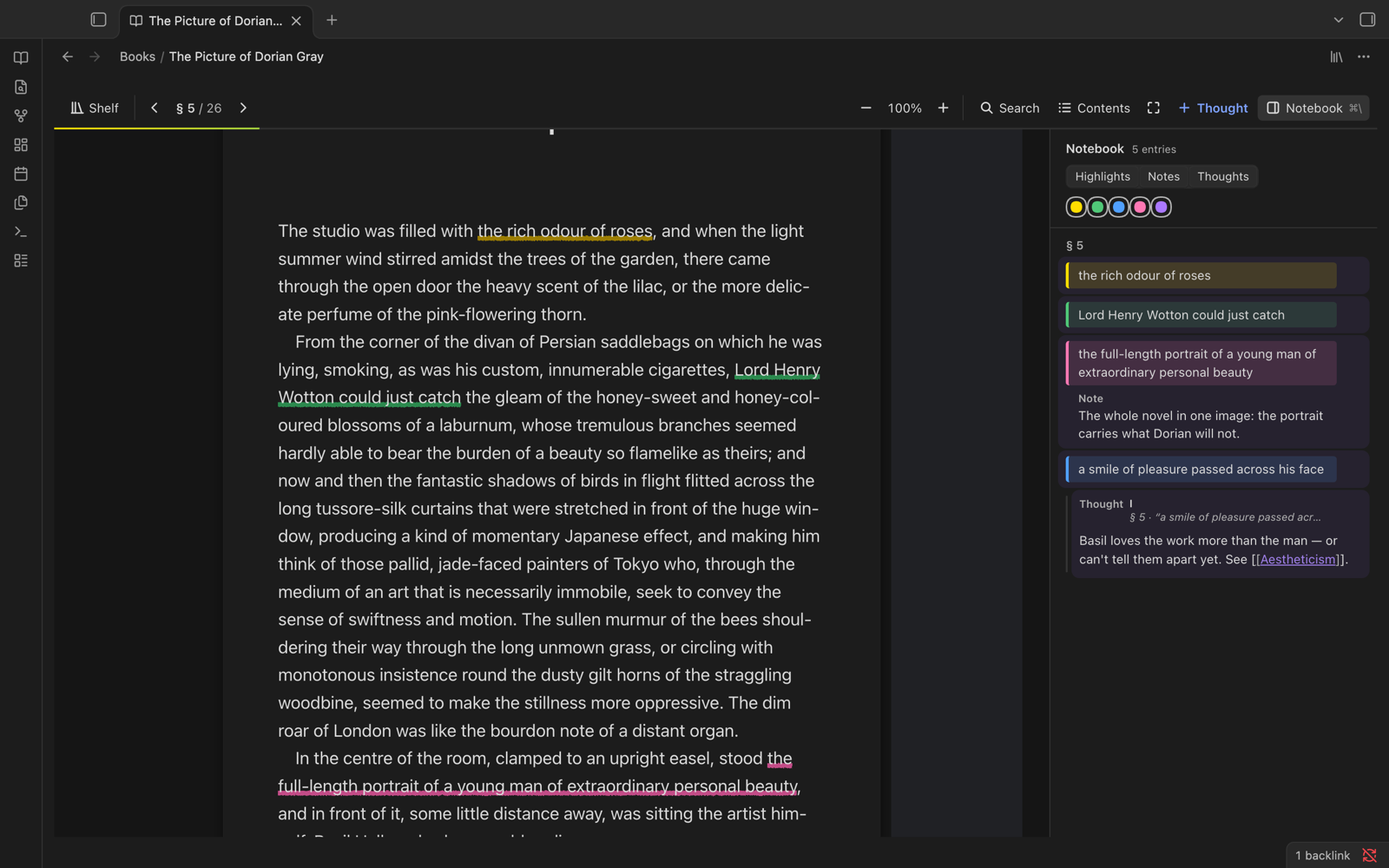
Features
- 🖍️ Highlight and underline in five colours, add a note to any highlight, or write a thought in the margin.
- 📓 A notebook for every book: a side panel of everything you marked, filterable by kind and colour.
- ✍️ A writing sheet for longer thoughts. Press ⌘E in a thought to write it at full size, with its highlight above, its links beside it, and Bold, Italic, Link and Quote buttons. Type
#for your vault's tags, or drag a highlight from the notebook into a thought to quote it. - 🔗 Your notes stay in your vault. Each book's notebook is also written as a Markdown note, with every quote linking back to its exact place in the book.
- ↩️ Backlinks in the margin. Notes that link into a book show up right where they point. Type
[[in a thought to link any note. - 📚 A shelf of your books with covers, reading progress and your recent thoughts, plus search across every highlight.
- 🗂️ A notes hub on the shelf: an Inbox of highlights you haven't written about yet, a few older ones to reread each day, your
[[links]]and#tagsas topics across books, and related entries beside each one. Write thoughts right there. - 🔎 Search, contents, zoom and focus mode, with keyboard shortcuts for all of them.
- 🌍 Offline translation. Select text and press L, or hold ⌥ over a word. It runs on your computer with Firefox's translation models.
- 🔒 Private by design. No accounts, no telemetry. The only network requests are translation downloads you confirm.
A closer look
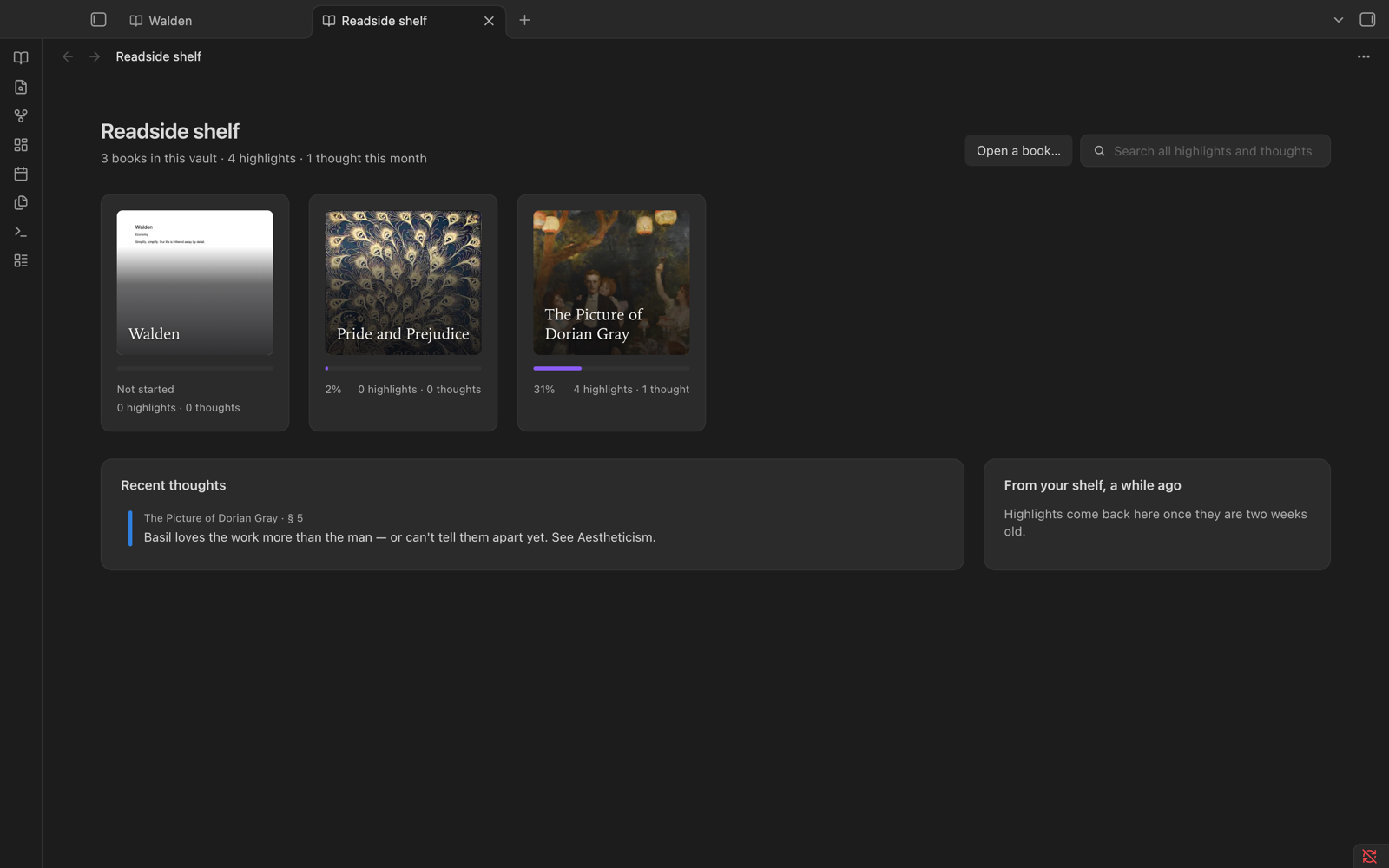 The shelf Every book in your vault with its cover and progress, your recent thoughts, and one search box for all your highlights. |
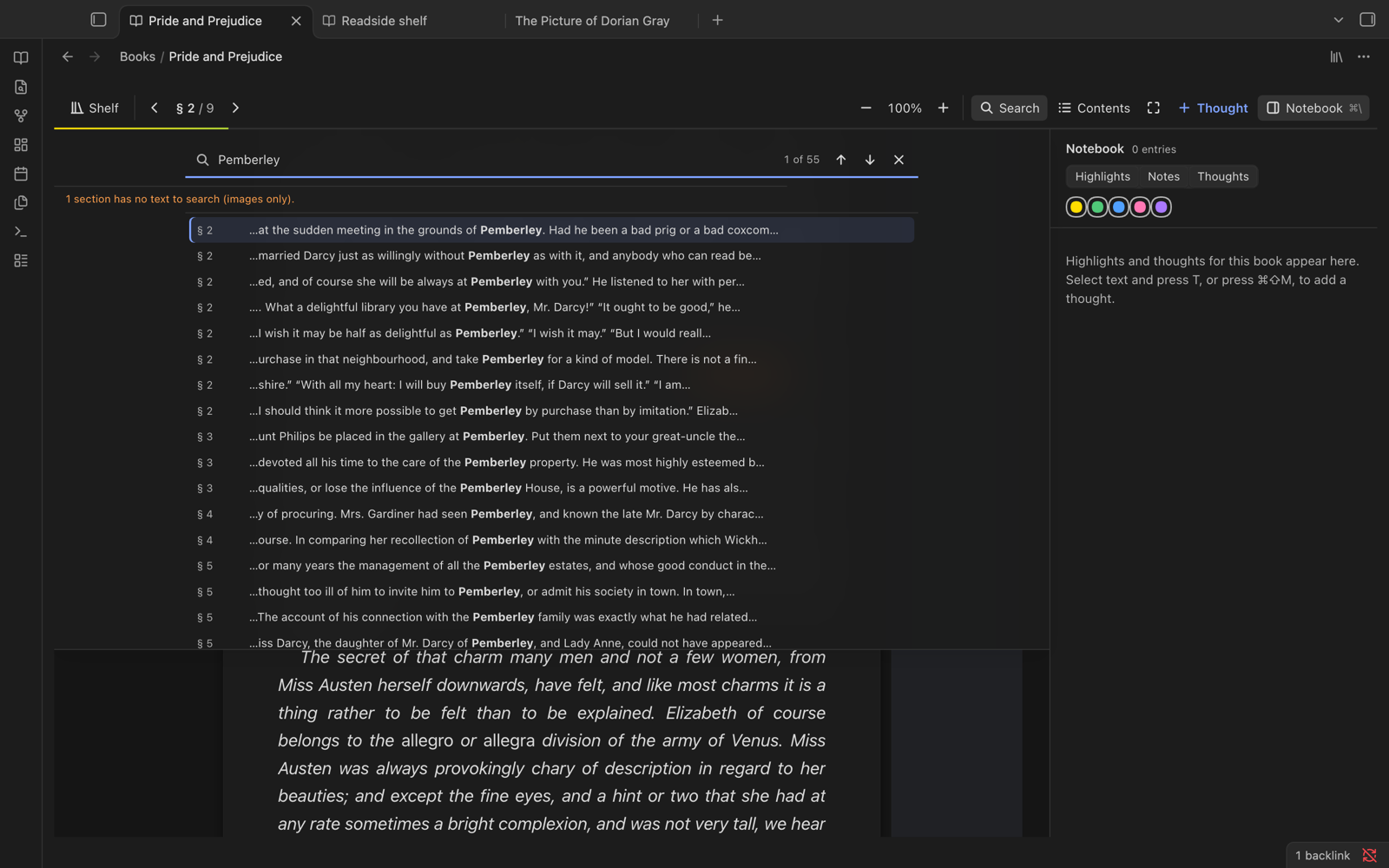 Search the whole book Every match with its context and section. Jump to one and it's marked in the text. |
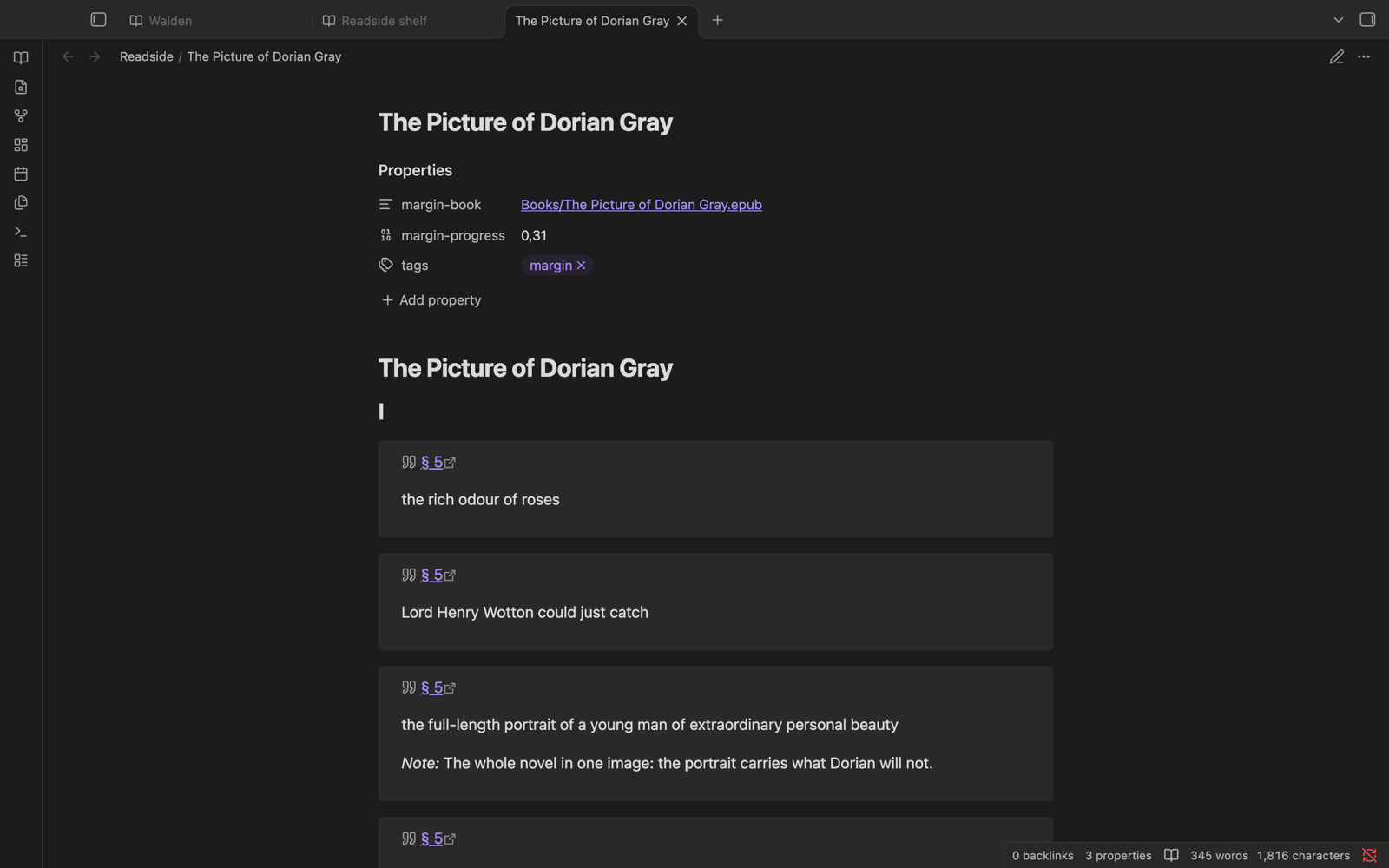 A notebook note in your vault Highlights, notes and thoughts as plain Markdown, grouped by chapter. Each quote links back to the page. |
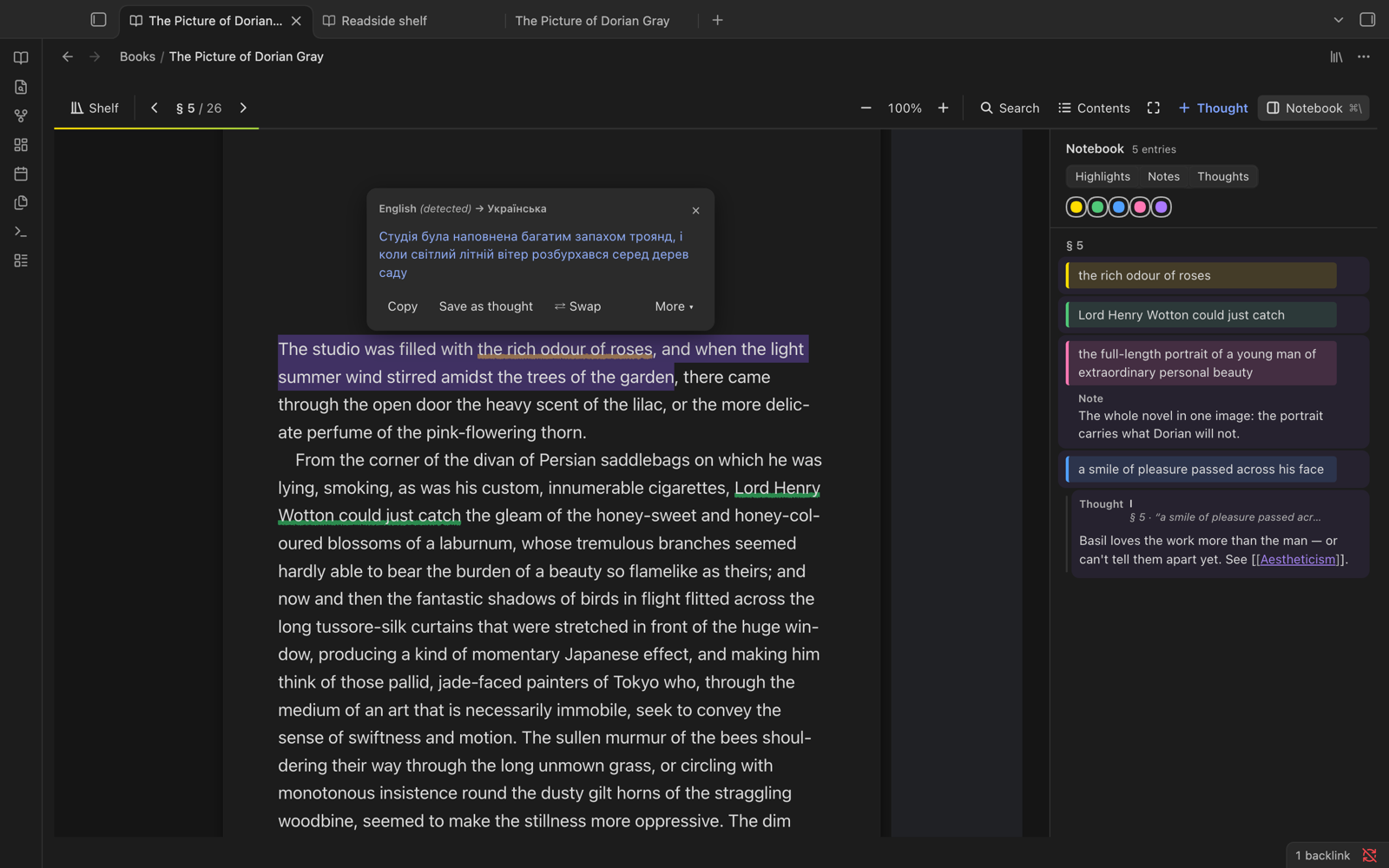 Translate on your device Select a sentence, press L. Save the translation as a thought if you want to keep it. |
Install
[!WARNING] Back up your vault first (at least its
.obsidianfolder). Requires Obsidian 1.15.0 or later: desktop (Windows, macOS, Linux), iPhone, iPad and Android.
Community plugins (once listed): Settings → Community plugins → Browse → search "Readside" → Install → Enable.
BRAT (beta): install BRAT, choose "Add beta plugin", enter bilskyi/obsidian-readside, then enable Readside.
Manually: download main.js, manifest.json and styles.css from the latest release and copy them into <vault>/.obsidian/plugins/readside/. To update, replace those three files only, never the folder.
[!CAUTION] Uninstalling deletes your highlights. Obsidian's Uninstall removes the whole plugin folder, including
books/andbackups/: every highlight, note and thought. To stop using Readside, disable it instead. If you must uninstall, copybooks/andbackups/out of<vault>/.obsidian/plugins/readside/first.
Readside used to be called Margin. Turn Margin off, then enable Readside: your books and notes are imported on the first run. See Coming from Margin.
Getting started
- Click the 📖 book icon in the ribbon to open the shelf, or right-click a PDF or EPUB → Open in Readside.
- Select text: press 1–5 to highlight, N for a note, T for a thought, L to translate.
- Press ⌘\ for the notebook. Its Markdown copy is in the
Readside/folder of your vault.
On a phone or tablet, long-press to select text; the colours and actions appear below the selection. The toolbar's buttons open the notebook and contents.
| Action | Key (macOS) |
|---|---|
| Toggle notebook | ⌘\ |
| Add thought at reading line | ⌘⇧M |
| Open a thought in the writing sheet | ⌘E (in the thought) |
| Bold / italic in a thought | ⌘B / ⌘I |
| Undo deleting a thought | ⌘Z |
| Contents | ⌘⇧C |
| Find in book | ⌘F |
| Zoom in / out / fit | ⌘+ / ⌘− / ⌘0 |
| Next / previous page | PageDown / PageUp |
On Windows and Linux, bind the commands under Settings → Hotkeys. PDFs keep opening in Obsidian's own viewer unless you turn on Open PDFs in Readside in settings.
Privacy and network use
- Everything stays in your vault: books, highlights, notes and the text you translate are processed locally.
- No telemetry, no analytics, no accounts, no update checks of its own.
- The only network requests are translation files, and only after you confirm. The first time you translate a language pair, Readside shows what it will download and its size (about 5 MB for the engine plus 21–70 MB per pair). Files come from Mozilla's CDN (
firefox-settings-attachments.cdn.mozilla.net) and are checked against sha256 hashes fixed insrc/translate/catalog.ts. Mozilla's CDN sees your IP address, as with any download.
Learn more
The guide covers everything in detail:
- Opening books and EPUB support
- Links and backlinks
- Commands and keys
- Settings
- The notebook note
- Translation
- Where your data lives
- Known limits
- Building from source
License
MIT © 2026 bilskyi. Bundled third-party code keeps its own licence. The Bergamot translator glue and the downloaded translation engine and models are MPL-2.0, used unmodified; see THIRD_PARTY_NOTICES and translation licences.