Random Task Selector
 Jay85 downloads
Randomly draws a task from the checklist at your cursor and stamps tasks with selected-at / completed-at datetimes.
- Overview
- Scorecard
- Updates1
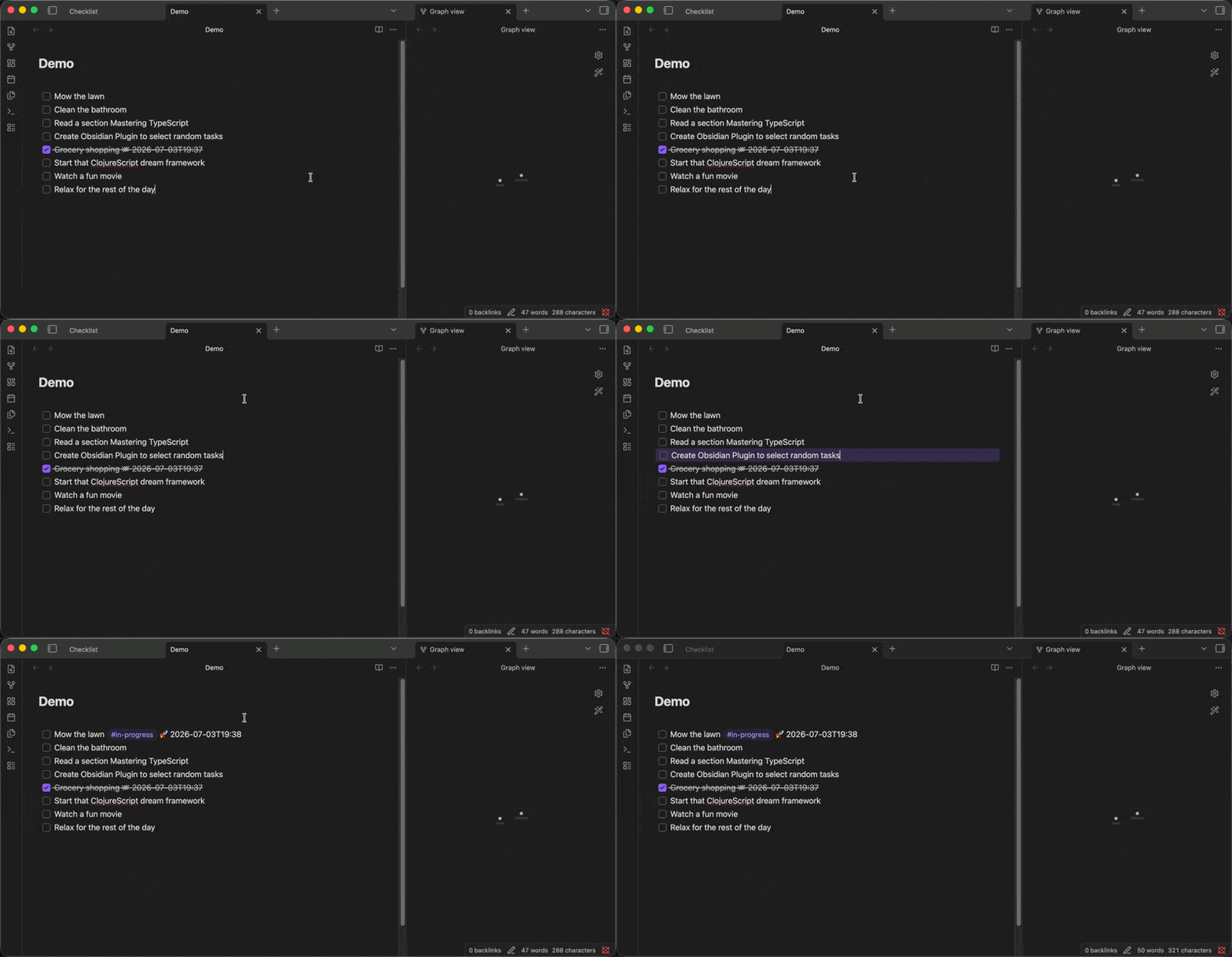
An Obsidian plugin that picks your next task for you.
Put your cursor in a Markdown checklist, run one command, and the plugin spins through the unchecked items and randomly lands on one — marking it active and stamping it with the time it was selected. When you later check the task off, it stamps the completion time too. No more staring at a list deciding what to do next.
Features
- Draw a random task. Scoped to the checklist at your cursor — a run of task items at the same indentation. The draw is uniform (every candidate is equally likely) and refuses to run if the checklist has no unchecked tasks or already has one in progress.
- In-progress marking. The winning task gets an active tag (
#in-progressby default) plus a start glyph (🚀) and a selected-at timestamp. A checklist holds at most one active task at a time. - Completion stamping (always on). Checking off any hyphen task anywhere
in the vault appends a completed glyph (✅) and a completed-at timestamp. This
intentionally absorbs and replaces the Tasks plugin's done-date behavior,
using minute-precision local datetimes (
YYYY-MM-DDTHH:mm) instead of date-only stamps. - Reactivation. Un-checking a completed task refreshes its start timestamp and returns it to the candidate pool.
- Configurable. The active tag and both glyphs are editable in settings.
See CONTEXT.md for the precise vocabulary (checklist, candidate,
active, timestamps) the plugin is built on.
Install
From the community plugin list
(Pending review.) Once published: Settings → Community plugins → Browse, search for "Random Task Selector", install, and enable.
Manually
- Download
main.js,manifest.json, andstyles.cssfrom the latest release. - Copy them into
<your-vault>/.obsidian/plugins/random-task-selector/. - Reload Obsidian and enable the plugin under Settings → Community plugins.
Usage
Open a note with a Markdown checklist:
- [ ] write the tests
- [ ] fix the flaky build
- [ ] update the changelog
Put your cursor on any line of the checklist.
Run Pick for me from the command palette (⌘/Ctrl-P). Optionally bind it to a hotkey.
The highlight spins and lands on the winner, which is marked active:
- [ ] write the tests
- [ ] fix the flaky build #in-progress 🚀 2026-07-03T14:22
- [ ] update the changelog
Check it off when done — the completed timestamp is stamped automatically and the active tag is removed:
- [x] fix the flaky build 🚀 2026-07-03T14:22 ✅ 2026-07-03T15:40
Settings
| Setting | Default | Meaning |
|---|---|---|
| Active tag | #in-progress |
Tag marking the one active task in a checklist |
| Start glyph | 🚀 | Written with the selected-at datetime |
| Completed glyph | ✅ | Written with the completed-at datetime |
Contributing
Contributions are welcome — bug reports, feature ideas, and pull requests.
Prerequisites
- Node.js 18+ (
node --version) - npm
Setup
git clone <your-fork-url>
cd obsidian-random-task
npm install
For a live-reload workflow, clone directly into a test vault's
.obsidian/plugins/random-task-selector/ folder.
Develop
npm run dev # esbuild watch: recompiles src/ → main.js on save
Reload Obsidian (or use a hot-reload plugin) to pick up changes. The production build (type-checks first) is:
npm run build
Lint
npm run lint # ESLint + eslint-plugin-obsidianmd
CI lints every commit on every branch.
Architecture
The codebase follows two decisions that any change should respect (full
rationale in docs/adr/):
- Pure core, thin adapter (ADR-0002). All domain logic — finding the
checklist, filtering candidates, planning the draw, rewriting a line, stamping
a completion — lives as pure functions in
src/core/with no Obsidian imports. Thesrc/commands/,src/reconcile/, andsrc/animation/layers are thin adapters that read from Obsidian, call the core, and write back. New logic belongs in the core so it can be unit-tested exhaustively. - Observe and reconcile (ADR-0001). Completion stamping detects check-offs by observing document changes, not by intercepting checkbox clicks, so it works regardless of how a task's state changed.
src/
  main.ts          plugin lifecycle only (load, settings, register)
  settings*.ts     settings interface, defaults, and settings tab
  core/            pure domain logic (checklist, draw, task-line, datetime, transition)
  commands/        Draw command adapter
  reconcile/       completion-stamping editor extension
  animation/       in-editor spin/highlight
  ui/              modals (emoji picker)
Tests
Two seams, no Obsidian mocks:
Unit (Vitest) — the pure core. Fast and exhaustive:
npm testEnd-to-end (
wdio-obsidian-service) — the Obsidian adapter (change listener, command wiring, committed draw result, Notices) driven against a real, sandboxed Obsidian. Build first: the service loads the bundledmain.js, not the TypeScript source.npm run build && npm run test:e2eBy default the service downloads a pinned Obsidian into
.obsidian-cache(git-ignored, cached in CI). This is the supported path and what.github/workflows/test.ymlruns headlessly on Linux.<details> <summary>Optional: run E2E against your installed Obsidian (fragile)</summary>export OBSIDIAN_BINARY_PATH="/Applications/Obsidian.app/Contents/MacOS/Obsidian" export OBSIDIAN_INSTALLER_VERSION="latest" # must match the installed app npm run test:e2eOBSIDIAN_INSTALLER_VERSIONselects the ChromeDriver, which must match the installed app's Electron/Chrome version. Obsidian auto-updates its app JS ahead of the launcher's ChromeDriver database, so a freshly-updated install can have no matching driver and the session dies at creation. If it fails, unsetOBSIDIAN_BINARY_PATHand use the download path.
Pull requests
- Keep changes focused; match the style of the code you touch.
- Add or update tests — new domain logic goes in
src/core/with unit tests. - Run
npm run lint,npm test, and (for adapter changes) the E2E suite before opening a PR.
Releasing
Maintainer steps for cutting a release:
- Update
minAppVersioninmanifest.jsonif it changed. - Bump the version —
npm version patch | minor | major— which updatesmanifest.json,package.json, and adds the entry toversions.json. npm run buildto producemain.js.- Create a GitHub release whose tag is the exact version (no
vprefix) and attachmain.js,manifest.json, andstyles.cssas binaries. - For the first listing, submit a PR to obsidianmd/obsidian-releases per the plugin guidelines.