Quick Zoom
 熊猫别熬夜1k downloads
Quickly zoom into headings and lists, with a sticky navigation bar.
- Overview
- Scorecard
- Updates12
中文说明
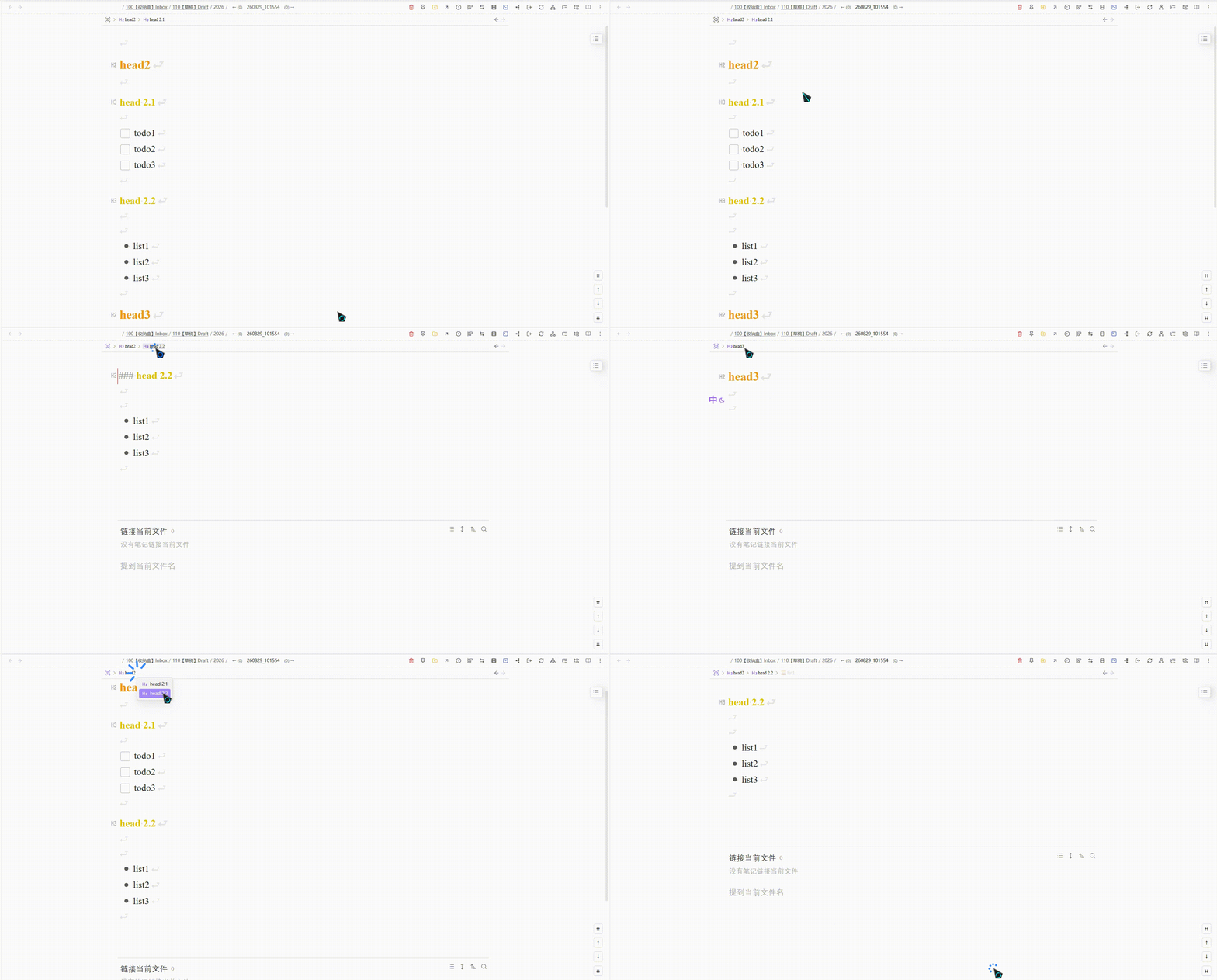
Quick Zoom 支持快速缩放到标题与列表,提供顶部粘性导航栏、大纲菜单,以及父节点 / 同级 / 标题等快捷键导航。
参考来源
本插件基于 Viacheslav Slinko 的 Obsidian Zoom 二次开发。
演示
安装
使用 BRAT(推荐)
- 安装社区插件 Obsidian42 - BRAT
- 打开 设置 → BRAT → Beta Plugin List → Add Beta plugin
- 填入仓库地址:
https://github.com/PandaNocturne/obsidian-quick-zoom - 在 设置 → 第三方插件 中启用 Quick Zoom
手动安装
从 最新发布 下载 main.js、manifest.json、styles.css,放入:
<vault>/.obsidian/plugins/quick-zoom/
在 设置 → 第三方插件 中启用 Quick Zoom。
需在 设置 → 编辑器 中启用 折叠标题 与 折叠缩进。
功能
核心缩放
- 缩放到标题、列表、段落或选区,隐藏其余内容
- 点击列表标记缩放(可关闭)
- 缩放前进 / 后退历史(仅在缩放状态间跳转,不会退出缩放)
导航栏
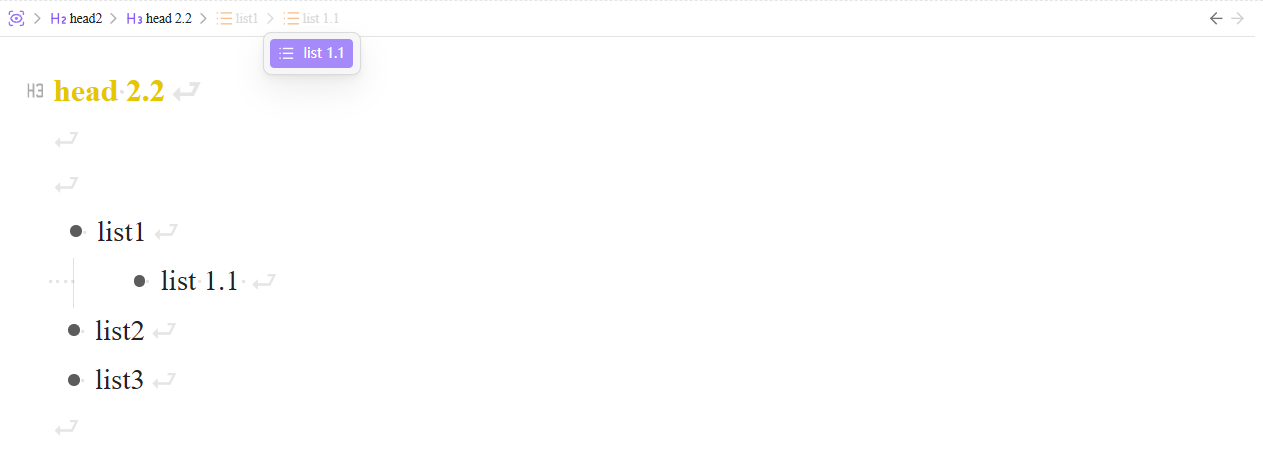
- 缩放时顶部粘性面包屑;可选默认模式显示
- 大纲子菜单浏览同级与子级
- 缩放时跟踪光标(低于缩放根的层级虚色显示)
- 可配置导航栏宽度、标题最大宽度与 Markdown 渲染
大纲列表
- 识别无序、有序、任务列表(可分别开关)
缩放状态记录
- 按笔记保存最近一次缩放范围到插件目录
data/zoom-state.json - 可选:打开笔记时自动恢复上次缩放
- 可配置最大记录笔记数(默认 200,超出淘汰最旧;已删除笔记自动清理)
- 设置中可一键重置全部记录
导航命令
| 命令 | 默认快捷键 |
|---|---|
| 放大 | Ctrl/Cmd + Shift + . |
| 退出全部缩放 | Ctrl/Cmd + Shift + / |
| 缩放过中后退 / 前进 | — |
| 缩放到上 / 下一个标题 | — |
| 缩放到父节点 | — |
| 缩放到上 / 下一个同级 | — |
在 设置 → 快捷键 中搜索 “Zoom” 自行绑定。
设置
打开 设置 → Quick Zoom。页面底部标注了原插件来源。
许可
MIT — 见 LICENSE。
基于 Obsidian Zoom(MIT)。
English
Quickly zoom into headings and lists in Obsidian, with a sticky top navigation bar, outline menus, and keyboard commands for parent / sibling / heading navigation.
Source
This plugin is a fork of Obsidian Zoom by Viacheslav Slinko.
Demo
Install
Via BRAT (recommended)
- Install the community plugin Obsidian42 - BRAT
- Open Settings → BRAT → Beta Plugin List → Add Beta plugin
- Enter:
https://github.com/PandaNocturne/obsidian-quick-zoom - Enable Quick Zoom under Settings → Community plugins
Manual install
Download main.js, manifest.json, and styles.css from the latest release, then place them in:
<vault>/.obsidian/plugins/quick-zoom/
Enable Quick Zoom under Settings → Community plugins.
Requires Fold heading and Fold indent under Settings → Editor.
Features
Core zoom
- Zoom into a heading, list, paragraph, or selection — hide everything else
- Click a list bullet to zoom (optional)
- Zoom back / forward history (stays zoomed; does not exit zoom mode)
Navigation bar
- Sticky top breadcrumbs while zoomed; optional breadcrumbs in default mode
- Outline submenu for siblings and children
- Track cursor while zoomed (dimmed levels below zoom root)
- Configurable bar width, title max width, and Markdown rendering
Outline lists
- Recognize unordered, ordered, and task lists (each toggleable)
Zoom state
- Persist the last zoom range per note under the plugin folder
data/zoom-state.json - Optionally restore that zoom when reopening a note
- Cap how many notes are kept (default 200; oldest dropped; missing notes cleaned up)
- Reset all saved records from Settings
Navigation commands
| Command | Default hotkey |
|---|---|
| Zoom in | Ctrl/Cmd + Shift + . |
| Zoom out | Ctrl/Cmd + Shift + / |
| Zoom back / forward | — |
| Zoom to previous / next heading | — |
| Zoom to parent | — |
| Zoom to previous / next sibling | — |
Assign hotkeys under Settings → Hotkeys (search “Zoom”).
Settings
Open Settings → Quick Zoom. A link to the original plugin is shown at the bottom.
License
MIT — see LICENSE.
Based on Obsidian Zoom (MIT).