Quick Initiative
 Walker Brown34 downloads
A light initiative tracker that keeps the whole fight as plain text in your note. Reads HP, AC and Dex from Fantasy Statblocks creature notes.
- Overview
- Scorecard
- Updates4
A light initiative tracker for Obsidian. The whole fight lives as plain text in your note, so it syncs, survives restarts, and still reads fine if you ever uninstall the plugin.
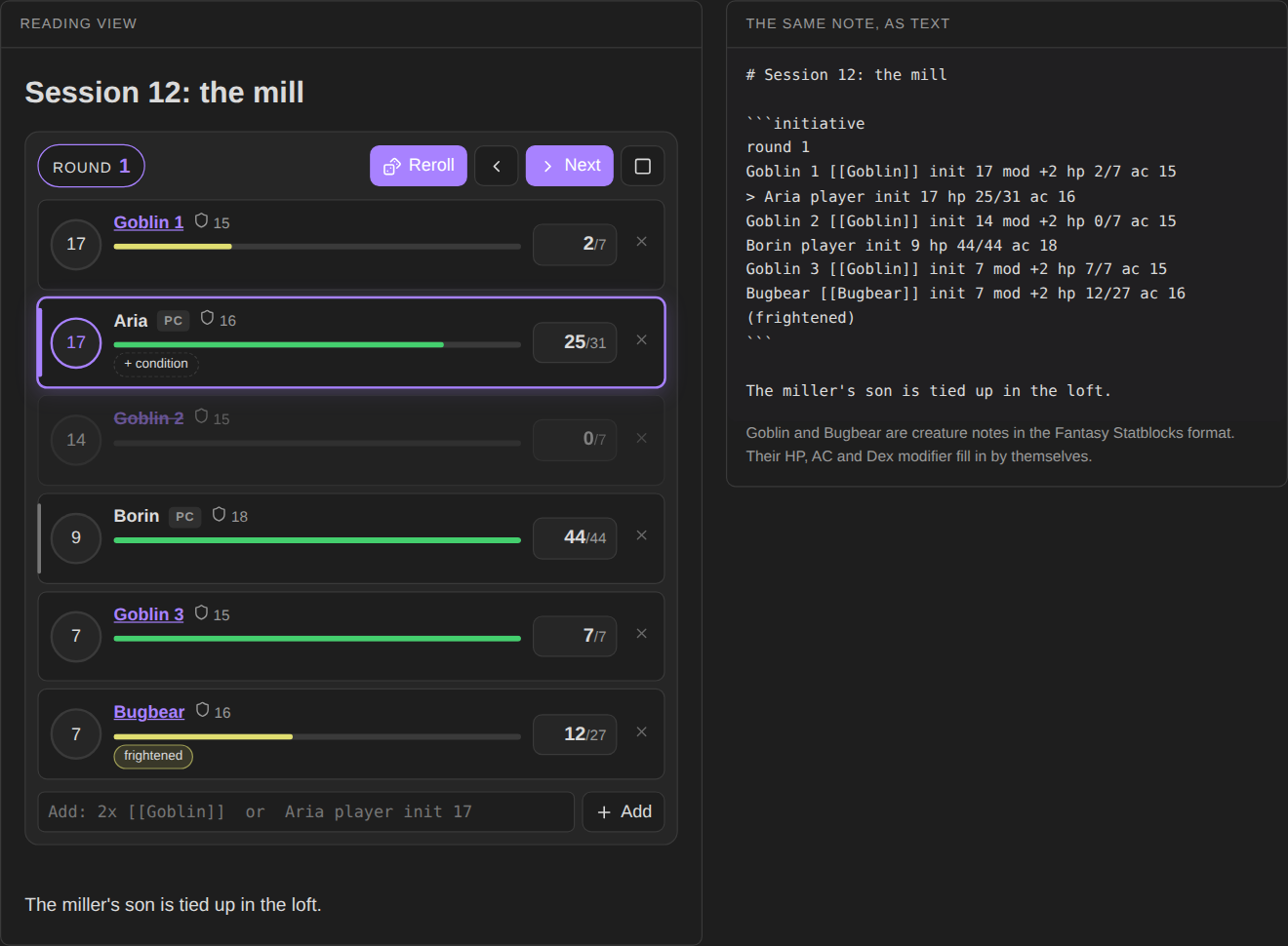
Try it in your browser before installing: https://bulkhead.bananafest-destiny.com/press/quick-initiative/ runs the real plugin code over a sample note and shows the note's text changing as you play.
Start a fight
Write an initiative block, one combatant per line:
```initiative
Aria player init 17 hp 31 ac 16
Borin player hp 44 ac 18
3x [[Goblin]]
[[Bugbear]]
```
Switch to reading view (or live preview) and the block becomes a tracker. Press Roll initiative: creatures roll d20 plus their modifier, players keep the number you gave them, and everyone is sorted. Next moves the turn and counts rounds.
The command Insert initiative block drops a starter block at the cursor.
Your party
Write your players once, under Settings → Quick Initiative → Party, one per line in the same format:
Aria hp 31 ac 16 init +3
Borin hp 44 ac 18
Then a line that says party in any initiative block brings them all in, as players:
```initiative
party
3x [[Goblin]]
```
On the first change (rolling initiative, say), the players are written into the note in place of party, so the fight records who was there. A player with an init +3 modifier is rolled with the creatures; give one a plain number at the table (init 17) and it's kept. When you have a party, Insert initiative block starts with party.
Creature notes
Link a creature note and its numbers fill in by themselves. Quick Initiative reads the frontmatter that Fantasy Statblocks uses:
---
statblock: true
hp: 7
ac: 15
hit_dice: 2d6
stats: [8, 14, 10, 10, 8, 8]
---
HP comes from hp, AC from ac, and the initiative modifier from Dex (the second of stats), or from an initiative or modifier field if the note has one. Turn on Roll creature HP in settings to roll hit_dice instead of taking the average. Creatures kept only in Fantasy Statblocks' own bestiary (not as notes) are not read; give them hp and ac on the line.
At the table
| Do | How |
|---|---|
| Damage or heal | click the HP box, type an amount, press Damage (or Enter) or Heal |
| Set a player's roll | click the initiative circle |
| Add a condition | hover a row and click + condition; click a condition to remove it |
| Add mid-fight | type in the add box: 2x [[Goblin]], Cleric player init 14 hp 22, Wolf hp 11 ac 13 init +2 |
| Open a creature's note | click its name |
| Remove someone | the × on the row |
Creatures at 0 HP are greyed out and skipped on their turn. Players are never skipped.
The text format
Every change is written back into the block, so you can also just edit the text:
round 2
> Goblin 2 [[Goblin]] init 14 mod +2 hp 5/7 ac 15 (prone, poisoned)
Aria player init 12 hp 31/31 ac 16
| Write | Meaning |
|---|---|
round 2 |
the round; leave it out before the fight starts |
> at the start |
whose turn it is |
[[Note]] |
the creature note to read numbers from |
3x or x3 |
that many copies, numbered |
player |
a player character: keeps their initiative, never skipped |
init 14 / init +2 |
the initiative roll / the modifier |
mod +2 |
the modifier |
hp 5/7 or hp 7 |
current and max HP |
ac 15 |
armor class |
(prone, poisoned) |
conditions |
Opening a note never changes it. Numbers read from creature notes are written into the block the first time you change something.
For other plugins
Each change fires a workspace event with the round, whose turn it is, and everyone's initiative, HP and conditions:
this.registerEvent(this.app.workspace.on('quick-initiative:change', (e) => console.log(e.round, e.current)));
Privacy
Quick Initiative does not use the network, has no accounts, collects nothing and sends nothing. It only edits the initiative block it is drawing.
Install
From Obsidian: Settings → Community plugins → Browse → search "Quick Initiative".
By hand: copy main.js, manifest.json and styles.css from the latest release into <your vault>/.obsidian/plugins/quick-initiative/, then enable it under Community plugins.
Also from this maker
- Dice Tray: rolls dice, random tables and note sections inline, and reads Dice Roller's
dice:syntax. - Session Log: a quick log for game night. With it installed, fights log themselves: when they start, each round, every hit, heal and condition, who goes down, how many rounds.
- Encounter Builder: plan fights against the 5E XP budget, then start them in Quick Initiative.
- Tabletop Clocks: segmented clocks for danger, plans and factions, ticked with a click and kept as text in the note.
Source
On your players' phones
DM Screen, from the same maker, shows this turn order on your players' phones as you play: whose turn it is, the round, hit points and conditions. They open a link or a QR code in any phone browser, with nothing to install. DM Screen is paid ($12 once, on itch.io) with a free one-hour trial. Quick Initiative stays free.
Playing alone
Solo Oracle, from the same maker, is for games with no GM: ask it yes or no, frame scenes, keep threads and people, and roll on your own tables, with every answer written into the note. It's free.
https://github.com/walkertbrown/quick-initiative
Build
npm install
npm test
npm run build
MIT licensed.