QuestSound
 Artem3 downloads
Play music, ambience and sound effects for tabletop RPGs: a mood wheel, scenes, weather and sound buttons right in your notes. Russian and English.
- Overview
- Scorecard
- Updates1
Music, ambience and sound effects for tabletop RPG sessions, right next to your campaign notes.
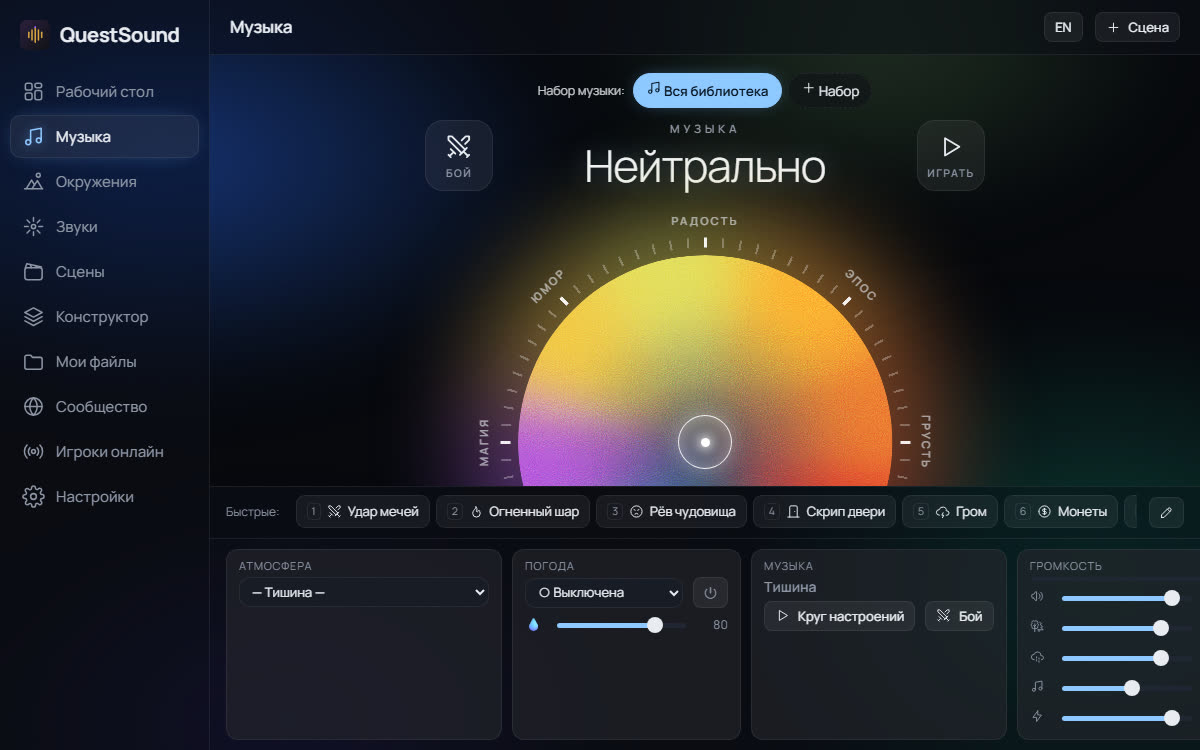
QuestSound opens in the right side bar and keeps playing while you write. Your notes control it:
- Mood wheel: pick joy, epic, sorrow, tension, dread, mystery, magic or humour, and how strong it should be. A separate set of combat tracks is one button away.
- 81 environments (tavern, dungeon, forest, ship, city, Call of Cthulhu, sci-fi…), 10 kinds of weather and 76 sound effects, all real recordings.
- Scenes: save the current sound and switch to it with one click, a command or a hotkey.
- Buttons in notes and note sound: a note can start its scene when you open it.
- Online rooms: players hear the same sound in their browser by a link or a 6-digit code.
The interface follows Obsidian's language (English or Russian). Note commands accept names in either language.
Buttons in notes
```questsound
scene: Tavern
env: Forest | Into the woods
mood: epic 0.9
mood: dread fight
set: Dark fantasy
fight: off
sfx: Sword clash
weather: Rain
stop
```
Each line is a button; text after | is its caption. mood takes a wheel zone, a strength from 0 to 1 and the word fight for combat music. Also: cue: Villain theme (a theme for a key moment) and turn (next turn in the initiative tracker).
Note sound
Add a questsound property to a note and its sound starts when the note is opened:
---
questsound:
  - scene: Tavern
  - weather: Rain
---
A bare name (questsound: Tavern) is a scene. Turn it off in the plugin settings; the command “Play this note’s sound” starts it by hand.
Commands
Open the panel, play a scene / environment / mood / sound / theme, wheel track set, combat music on/off, music on/off, next combat turn, stop everything, and “Scene #1…9”. Assign hotkeys to any of them in Settings → Hotkeys.
Network use and privacy
- The panel is the QuestSound web app (https://questsound.ru by default; the address can be changed in the plugin settings) loaded in a frame, so the plugin needs an internet connection. Music and sounds stream from that server.
- The plugin does not read or send your notes. It only sends the command of a button or note property you use to the panel.
- Your scenes and settings are stored inside the panel (browser storage of Obsidian), not in the vault. Cloud sync, online rooms and community uploads happen only when you use them in the panel. Details: https://questsound.ru/privacy/
- No analytics run inside the Obsidian panel.
- If you add YouTube or SoundCloud tracks in the panel, their players load from those services.
Credits
Music by Alexander Nakarada, Scott Buckley and Kevin MacLeod (CC BY 4.0). Sounds from freesound.org (CC0).
По-русски
QuestSound — музыка, звуки окружения и эффекты для НРИ в боковой панели Obsidian. Круг настроений и боевая музыка, 81 окружение, 10 видов погоды, 76 эффектов, сцены, кнопки в заметках и звук при открытии заметки, комнаты для игры по сети.
Кнопки пишутся и по-русски:
```questsound
сцена: Таверна
окружение: Лес | Входим в чащу
музыка: эпос 0.9
музыка: жуть бой
звук: Удар мечей
погода: Дождь
стоп
```
Плагину нужен интернет: панель — это сайт https://questsound.ru во фрейме. Заметки плагин не читает и никуда не отправляет. Подробнее: https://questsound.ru/obsidian/