QiuQiu WeChat Editor
 wangsiji71 downloads
Turn Markdown into WeChat-friendly rich HTML with live preview and one-click copy.
- Overview
- Scorecard
- Updates10
秋秋公众号编辑器 · QiuQiu WeChat Editor
Markdown → 公众号精美排版,一键所见即所得。
English / Description. QiuQiu WeChat Editor turns Markdown into WeChat-friendly rich content with a live preview and a one-click export. It renders numbered sections, multi-image carousels, portrait-aware image sizing, nested lists, data tables and callout blocks, then inlines every style so pasting into the WeChat editor keeps the layout exactly as previewed. The same rendering kernel powers both the web workbench and the Obsidian plugin, so what you see is what you publish. Fully open source (MIT) — installable in Obsidian from Community Plugins, or used in any browser.
自动章节号 · 图片轮播 / 竖图自适应 · 嵌套列表 · 数据表格 · Callout —— 生成全内联样式,粘贴微信后台不丢格式。
在线体验 wangsiji.github.io/qiuqiu-wechat-editor · 网页版 & Obsidian 插件
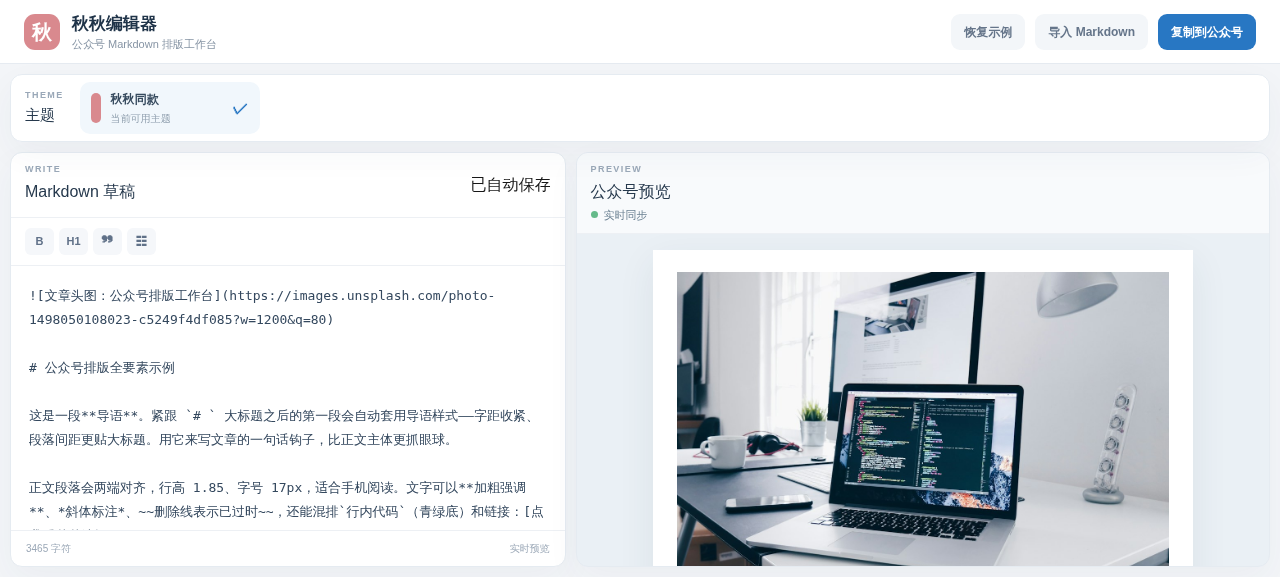
为什么有这个项目? 公众号后台排版费时又丑,字体颜色全靠手工,且微信粘贴时会清掉 class 样式。这套内核把所有样式直接写进 style,一行命令、一种语法,换来的是一份粘贴即终稿的公众号文章。预览和复制走同一份 HTML——看到什么,粘贴出来就是什么。
目录
快速开始
git clone https://github.com/wangsiji/qiuqiu-wechat-editor.git
cd qiuqiu-wechat-editor
npm install
npm run dev        # 本地预览:网页工作台 → http://localhost:5173/qiuqiu-wechat-editor/
npm run test       # 渲染内核单元测试
打开浏览器进入工作台,左边写 Markdown、右边实时渲染,点 「复制到公众号」 去微信后台 Ctrl+V —— 完成。写的内容自动存 localStorage,不怕丢。
前置要求:Node ≥ 22。
核心功能
- 自动章节号:一级标题 → 大数字章节;二级标题 →
1.1|小节号;检测到手写编号 / 旧模板时沿用原样式。 - 图片自适应:单图通栏居中;竖图自动缩到 75% 宽;连续多行图自动并成可左右滑动的相册(默认只显示首张,横图 100% / 竖图 75%)。Obsidian 本地图自动转 base64 内联。
- 所见即所得:预览与「复制到公众号」走同一渲染管线,粘贴后样式全保真。
- 结构化排版:嵌套列表 / 数据表格 / 引用快讯 / Callout 提示条 / 代码块 / 居中线。
- 防坑 & 安全:只用微信稳定标签、样式写进
style不依赖 class;链接 URL 白名单防javascript:;分隔线不用<section>(微信会误判容器)。
两个入口
同一套 lib/ 渲染内核,网页与插件共用:
Web 工作台
浏览器直接排版,适合快速试玩、临时拖稿。
npm run dev # → http://localhost:5173/qiuqiu-wechat-editor/
Obsidian 插件
在 Obsidian 笔记里就地渲染,本地图自动内联传送。
cd obsidian-plugin
npm install && npm run build           # 产出 main.js

mkdir -p ~/你的vault/.obsidian/plugins/qiuqiu-wechat-editor
cp main.js manifest.json styles.css ~/你的vault/.obsidian/plugins/qiuqiu-wechat-editor/
启用后 Cmd/Ctrl+P → 秋秋编辑器,或点左侧滑轮图标;当前笔记自动载入、随编辑实时刷新,点「复制到公众号」一键导出。详见 obsidian-plugin README。
架构
单一渲染内核,杜绝两端漂移:
lib/                 ← 唯一渲染内核(网页 + 插件共用)
  render.ts          预览 DOM 渲染(真 <ul>/<ol>、章节号、表格、轮播)
  wechat.ts          公众号导出(全内联 HTML,只依赖微信稳定标签)
  client.ts          浏览器侧工具(竖图检测、富文本复制)
      │
      ├── app/                      Web 工作台(Vinext)
      │     page.tsx  ← 编辑器交互 + 预览
      └── obsidian-plugin/          Obsidian 插件
            input.ts  ← ItemView 入口,复用同一个 lib/
网页与插件都用同一份
renderWechat管线做预览和复制——所以你没有"两套 WYSIWYG 对不齐"的坑。改lib/一处,两端同更。
开发
npm run lint               # ESLint
npm test                     # 渲染内核单测(tests/*.test.mjs)
cd obsidian-plugin && npm test   # 插件侧冒烟
- 新功能改
lib/,加测试到tests/,npm test覆盖。 - 发布:网页
npm run build+ GitHub Actions(deploy-pages.yml);插件发版走release-obsidian-plugin.yml。