Qing Shan Workbench
 许青山14 downloads
Interactive Mermaid diagram lightbox (GPU zoom, minimap, node search, styled SVG/PNG export) and virtualized wide-table workbench (freeze, filter, sort, row detail drawer, TSV/CSV/Markdown copy).
- Overview
- Scorecard
- Updates3
青山 · 图表与宽表工作台 — Interactive Mermaid diagram lightbox and virtualized wide-table workbench for large technical notes.
Built as a standalone companion to Qing Shan Typography, working cleanly with any theme across desktop, popout windows, and mobile (isDesktopOnly: false) without ever modifying your Markdown files.
Features
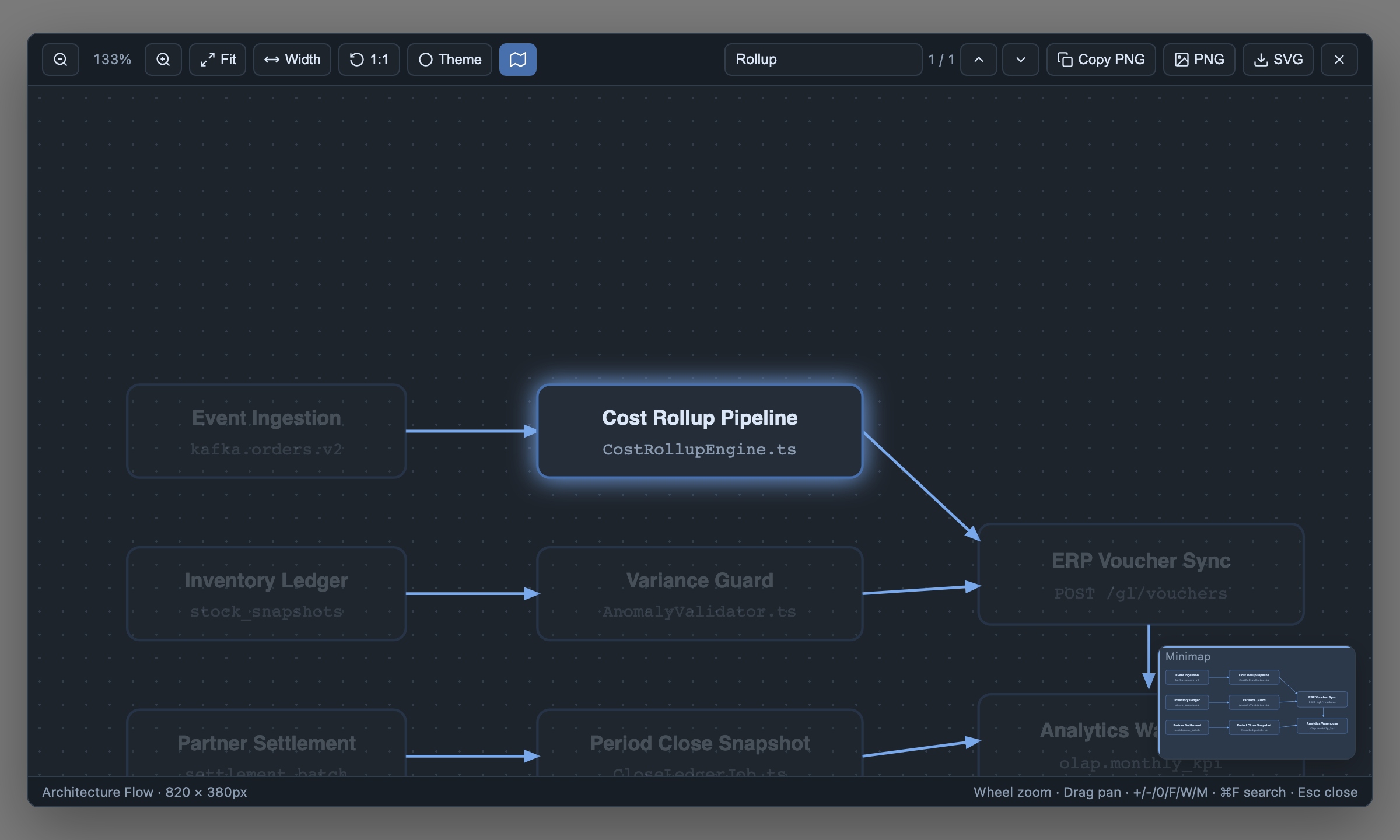
Mermaid Immersive Lightbox
- 60fps GPU pan & zoom (
10%–800%): Pointer-centered wheel zoom, touch pinch-to-zoom, Fit / Fit Width / 1:1 controls, and keyboard shortcuts (+,-,0,F,W,M,Cmd/Ctrl+F,Esc). - Interactive Minimap: Real-time viewport indicator in the bottom-right corner with click/drag panning for huge
erDiagramandflowchartcanvases. - In-diagram Node Search: Indexes both SVG
<text>and<foreignObject>HTML labels, dims unrelated nodes, highlights matches, and smoothly centers each result withEnter/Shift+Enter. - High-Fidelity Export (SVG & 2×/3× Retina PNG):
- Rewrites scoped
#mermaid-*IDs and inlines computed styles (preservingfill: noneon curved edges) so exported diagrams look identical outside your vault. - Supports Theme, Pure White, and Transparent backgrounds — including luminance-aware Dark-to-White adaptation that automatically converts bare dark-mode labels and pale connectors to WCAG AA+ contrast on white paper while preserving light text inside dark node boxes.
- Safely clamps oversized diagrams to browser canvas limits (
8192px) and gracefully falls back to file download if clipboard image write is unavailable.
- Rewrites scoped
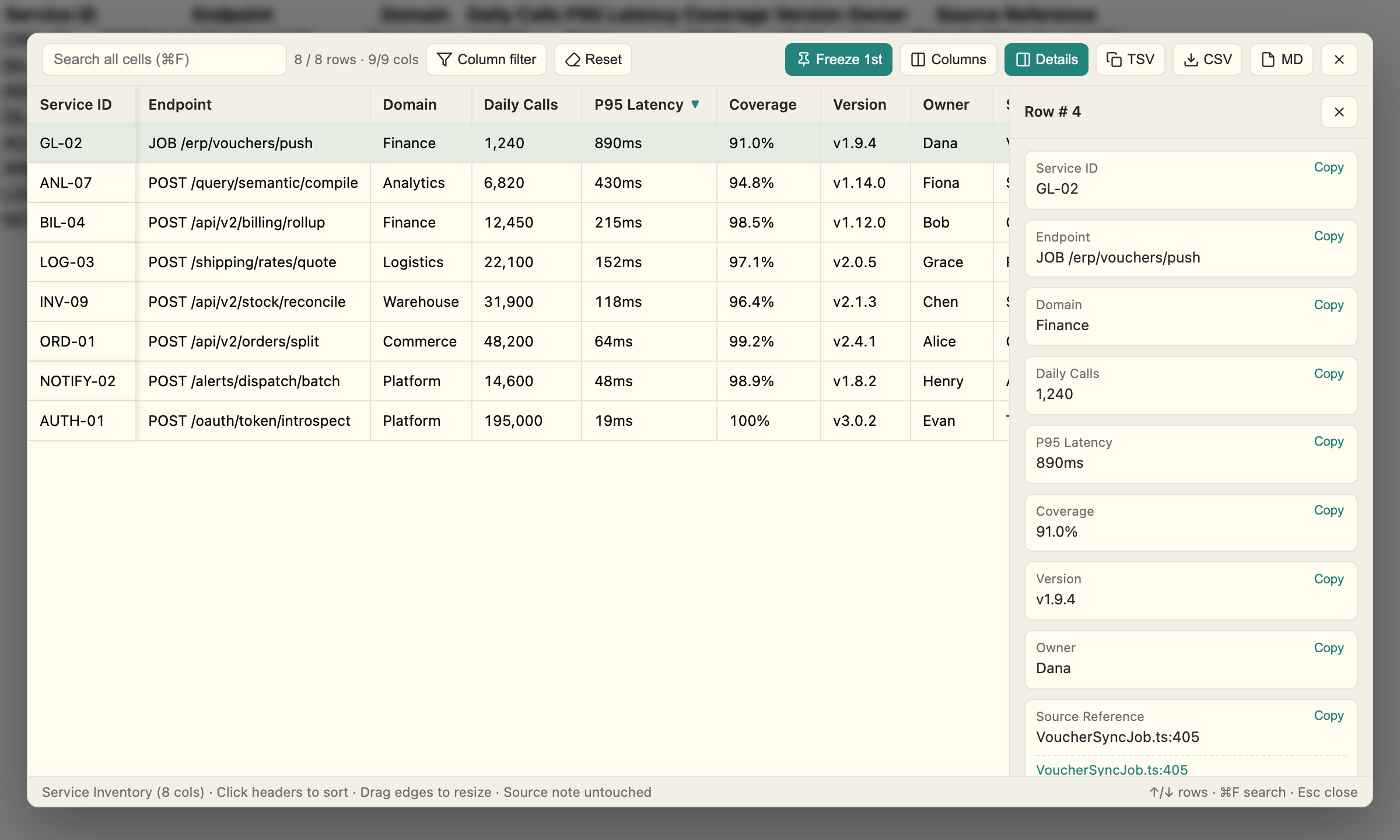
Virtualized Wide-Table Workbench
- Reading View Inline Enhancement: Activates only when a table exceeds configurable thresholds (default
≥ 5columns or≥ 12rows), keeping small tables untouched. Includes a sticky quick filter bar, sticky header & first-column toggle, one-click TSV copy, and fullscreen launch. - Zero-Conflict Live Preview: Places a subtle read-only trigger safely offset from the native
</>edit icon without touching CodeMirror cells or editing flow. - Virtualized Fullscreen Grid: Handles 1,000–10,000+ row tables smoothly via windowed rendering (
< 40mounted DOM rows during scroll), automatic multi-type sorting (numbers, currency/units, percentages, dates, semantic versions, Chinese/English locale with empty values anchored last), global & per-column filtering (supports!exclude), column visibility picker, drag-to-resize columns (double-click to reset), and keyboard row navigation (↑/↓). - Row Detail Drawer: Click any row to inspect all columns vertically (including hidden columns) with per-field one-click copy and clickable internal
[[wikilinks]]. - Clean Multi-Format Export: Copy TSV (paste directly into Excel / Sheets / DingTalk / Feishu), download UTF-8 BOM CSV (Excel-safe CJK), or copy filtered Markdown sub-tables.
Safety, Isolation & Privacy
- Zero note mutation: Never writes to your Markdown files.
- Zero network requests / zero telemetry: Everything runs 100% locally in memory.
- Configurable exclusions: Add sensitive folder prefixes in Settings (e.g.,
Secrets/,Credentials/), or exempt individual notes with frontmattercssclasses: [qs-off]orqs-no-workbench. Automatically skips.bases-view,[data-password-toggle]tables, and hides all controls during print / PDF export.
Installation
Community plugins
Once approved in the Community Directory:
- Open Settings → Community plugins → Browse.
- Search for Qing Shan Workbench (or 青山).
- Install and enable the plugin.
Manual
- Download
main.js,manifest.json, andstyles.cssfrom the latest GitHub release. - Place them in
<vault>/.obsidian/plugins/qing-shan-workbench/. - Reload plugins and enable Qing Shan Workbench.
Commands
Open diagram / wide-table picker for active note— Pick any Mermaid diagram or table in the current note without relying on hover.Toggle Mermaid lightbox— Instantly enable or disable Mermaid lightbox triggers across all open views.Toggle wide-table workbench— Instantly enable or disable wide-table enhancements across all open views.
中文简介
青山 · 图表与宽表工作台是一款零侵入、不改动笔记原文的独立插件,支持桌面端、多窗口与移动端:
- Mermaid 沉浸式灯箱:60fps 指针中心缩放/拖拽与双指捏合、右下角可拖拽小地图、图内节点搜索居中、深色切纯白底自动 WCAG 对比度适配,以及高保真内联样式
.svg与 2×/3× 高清.png复制导出。 - 千行级宽表工作台:阅读视图按行列阈值自动增强(小表不打扰),实时预览零干涉单元格编辑;全屏工作台支持虚拟滚动、智能多类型排序(数值/货币/百分比/日期/版本号/中文)、全表与列级
!排除筛选、列显隐与调宽、单行竖排详情抽屉(支持双链跳转与单字段复制)以及 TSV / UTF-8 BOM CSV / Markdown 子表导出。 - 隐私与隔离:纯本地运行、零网络请求;支持在设置中配置排除目录及单笔记
qs-off/qs-no-workbench豁免,打印与 PDF 导出自动隐藏全部交互控件。
Development
npm install
npm run typecheck
npm run build
npm test
License
HealthExcellent
ReviewCaution
About
Open Mermaid diagrams in an immersive lightbox with GPU-accelerated pan and zoom, an interactive minimap, in-diagram node search, and high-fidelity SVG/retina PNG export that preserves styling and clamps oversized canvases. Transform large Markdown tables into a virtualized wide-table workbench with sticky headers and first-column locking, quick filtering, one-click TSV copy, and a fullscreen grid that runs read-only beside the editor without changing files.Details
Current version
1.0.2
Last updated
14 hours ago
Created
Yesterday
Updates
3 releases
Downloads
14
Compatible with
Obsidian 1.8.7+
Platforms
Desktop, Mobile
License
MIT
Author