Search...Search plugins and themes...
⌘K
Sign in
  • Get started
  • Download
  • Pricing
  • Enterprise
  • Account
  • Obsidian
  • Overview
  • Sync
  • Publish
  • Canvas
  • Mobile
  • Web Clipper
  • CLI
  • Learn
  • Help
  • Developers
  • Changelog
  • About
  • Roadmap
  • Blog
  • Resources
  • System status
  • License overview
  • Terms of service
  • Privacy policy
  • Security
  • Community
  • Plugins
  • Themes
  • Discord
  • Forum / 中文论坛
  • Merch store
  • Brand guidelines
Follow us
DiscordTwitterBlueskyThreadsMastodonYouTubeGitHub
© 2026 Obsidian

Properties to Graph

Clint BirdClint Bird23 downloads

Adds property based grouping to Obsidians graph view

Add to Obsidian
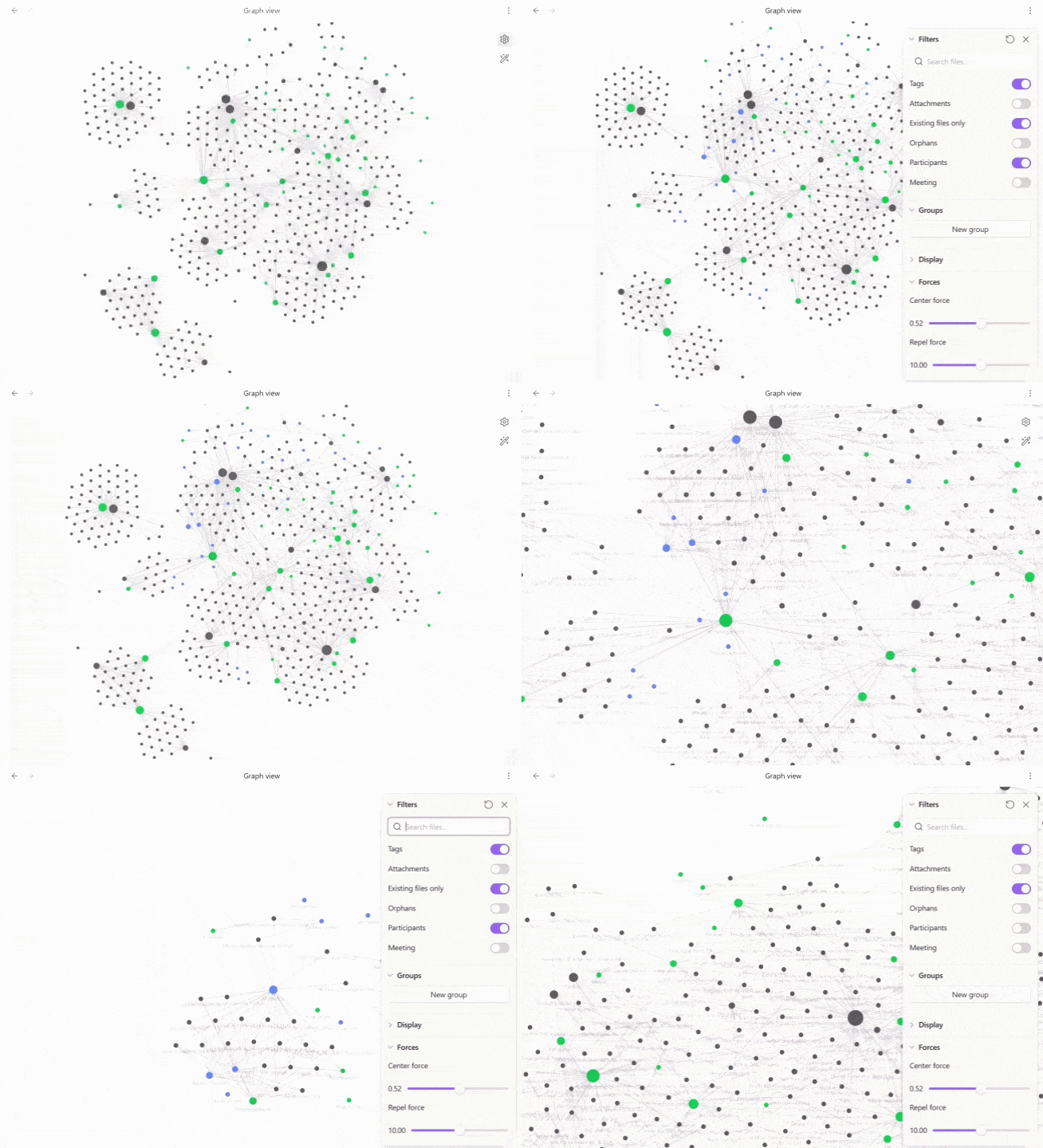
Properties to Graph screenshot
  • Overview
  • Scorecard
  • Updates5

Demo

This plugin allows you to choose frontmatter properties and add them as virtual nodes in Obsidian's graph view - basically notes can be grouped visually by properties instead of only by tags or links.

Features

  • Pick one or more frontmatter properties; each unique value becomes its own graph node, in its own colour.
  • Click a property node to filter the graph, just like clicking a tag.
  • Shift+click a property node to fold its notes; shift+click again to unfold.
  • Rename a property's display name and toggle it on/off from the graph's own Filters panel.
  • Optional node sizing based on how many notes are grouped underneath.

Example

As an example adding department creates a Digital node in that property's colour. Adding topics creates Data and AI nodes in its own colour, both connected to the note.

---
department: Digital
topics:
  - Data
  - AI
---

Installation

  1. Download main.js and manifest.json from the latest release.
  2. Place both files in <your-vault>/.obsidian/plugins/properties-to-graph/.
  3. Enable Properties to Graph under Settings → Community plugins.
  4. Open Settings → Properties to Graph.
  5. Click Add property for each frontmatter property you want to visualize, choosing a property, name and colour for each.
  6. Open Graph View.

Development

npm install
npm run build

npm run dev starts an esbuild watcher. npm run build type-checks and produces main.js

Notes

This plugin relies on Obsidian's internal Graph View renderer APIs, which are not part of the public obsidian package types and can change between Obsidian releases.

This project was originally inspired by the graph-injection approach used by Folders to Graph although the codebase has since been rewritten independently around frontmatter properties rather than folders.

HealthExcellent
ReviewPassed
About
Pick any frontmatter property and turn its values into virtual nodes in the graph view - basically notes can be grouped visually by property instead of just tags or links. Each property gets its own node and colour, click one to filter the graph the same way clicking a tag does, and shift-click to fold or unfold its notes. Rename a property's display name or toggle it on and off right from the graph's Filters panel, with an option to size nodes by how many notes they group.
PropertiesGraphVisualization
Details
Current version
0.1.4
Last updated
Yesterday
Created
2 days ago
Updates
5 releases
Downloads
23
Compatible with
Obsidian 1.13.0+
Platforms
Desktop, Mobile
License
MIT
Report bugRequest featureReport plugin
Author
Clint BirdClint Birdclintjb
clintbird.com
GitHubclintjb
  1. Community
  2. Plugins
  3. Properties
  4. Properties to Graph

Related plugins

Advanced Canvas

Supercharge your canvas experience. Create presentations, flowcharts and more.

Excalidraw

Visual PKM powerhouse. Create and edit Excalidraw drawings.

Meta Bind

Make your notes interactive with inline input fields, metadata displays, and buttons.

Breadcrumbs

Visualise the hierarchy of your vault using a breadcrumb trail or matrix view.

Smart Second Brain

Chat with an agent that knows your notes, search by meaning, and see your vault grouped into topics. Runs on Ollama, OpenAI, Anthropic, and more.

Maps

Adds a map layout to bases so you can display notes as an interactive map view.

Mermaid Tools

Improved Mermaid.js experience: visual toolbar with common elements and more.

Pretty Properties

Makes note properties look more fun: adds side image, banners, list property colors and allows to hide specific properties.

Update modified date

Automatically update a frontmatter modified date field when the file is modified.

ExcaliBrain

An interactive, structured mind-map of your Obsidian vault.