Proletarian Wizard Task Manager
 cfe8417k downloads
Track your tasks across all the notes in your workspace. Organize your day. Plan your work
- Overview
- Scorecard
- Updates24
Track your tasks across all the notes in your workspace. Organize your day. Plan your work.

Table of Contents
Overview
This is Proletarian Wizard's task board:
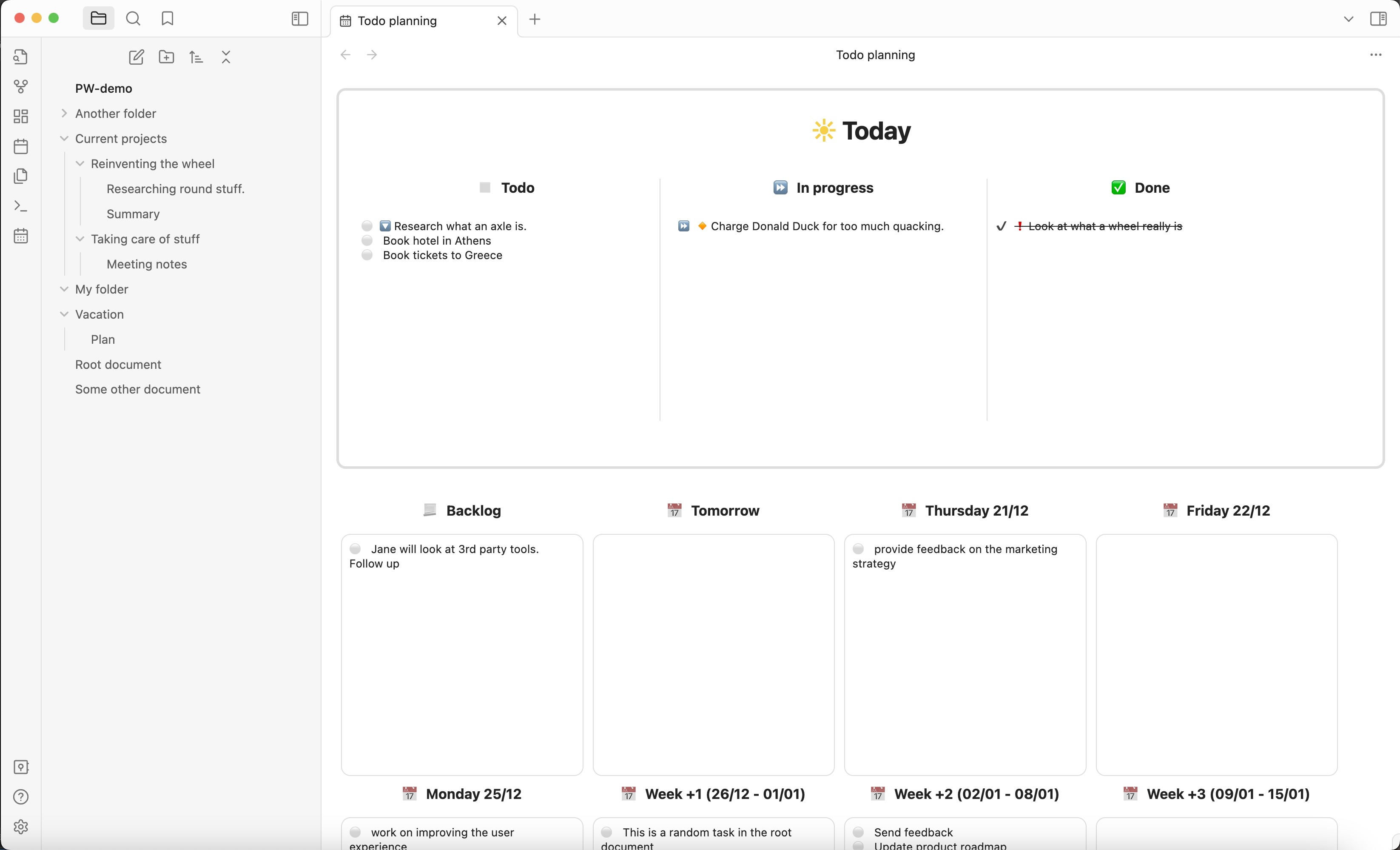
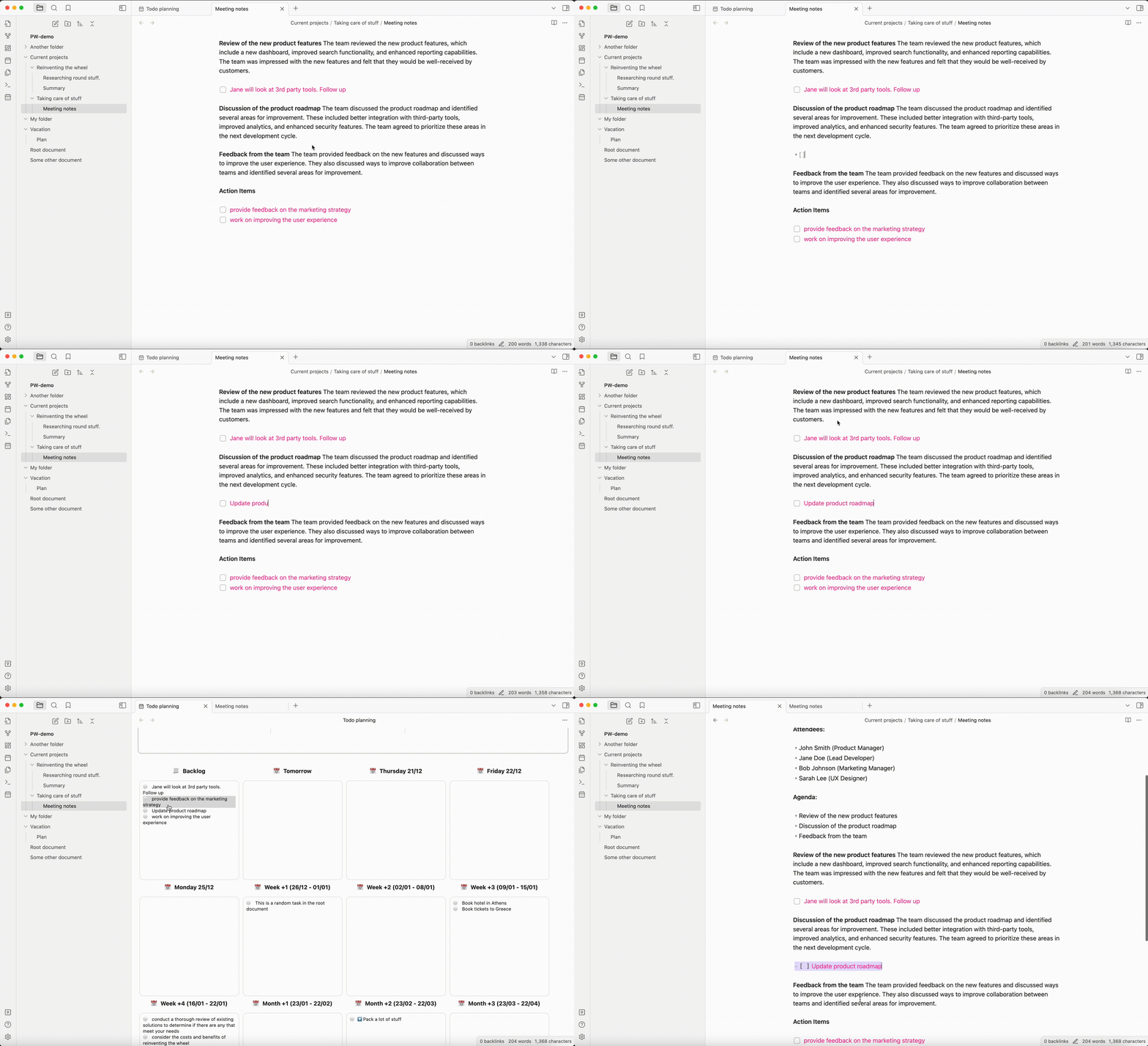
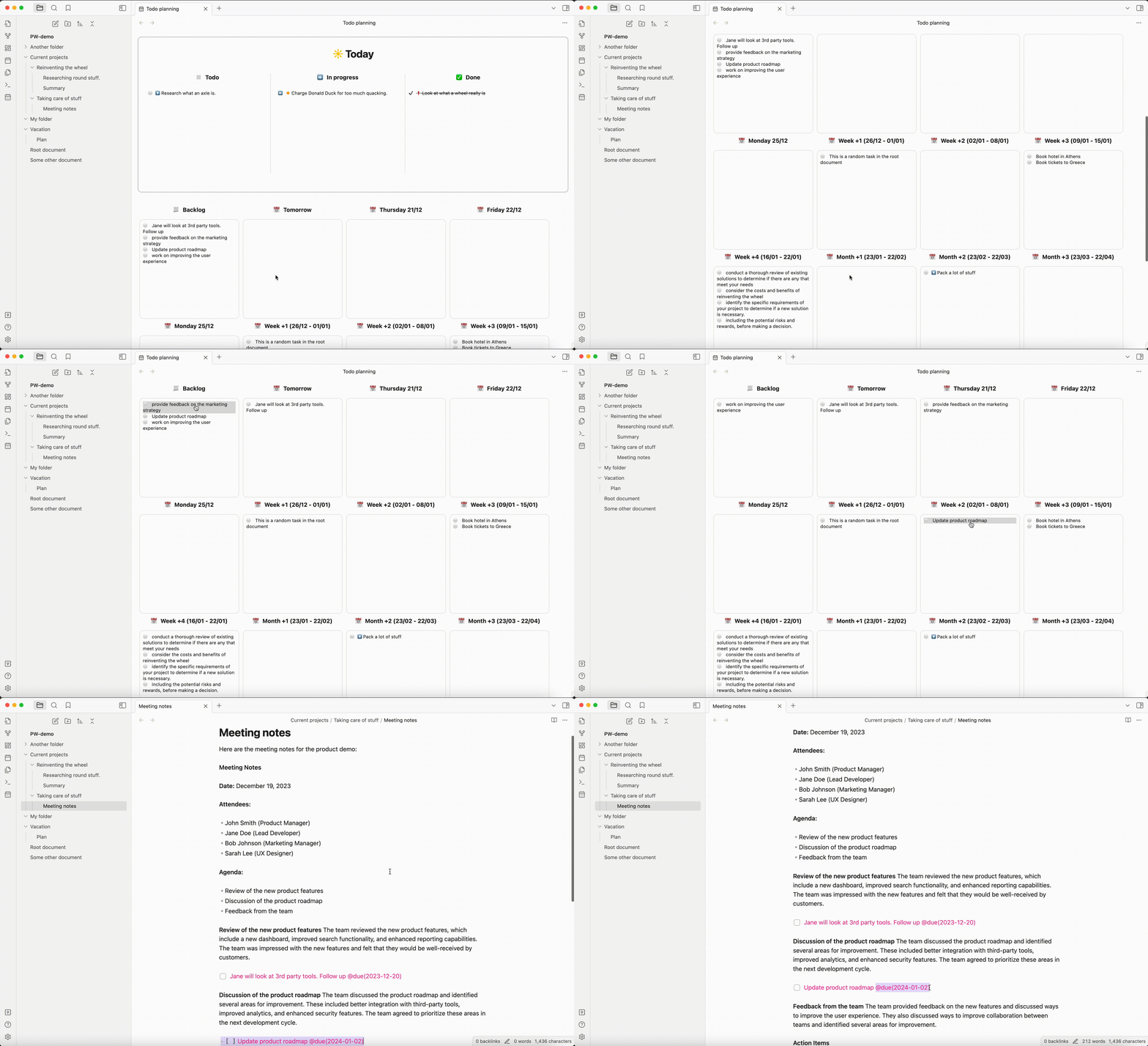
Enter tasks directly in your notes. Everything goes together, you can keep your to-dos right at their source, alongside everything else. When you enter a todo, it magically appears in PW's task board.
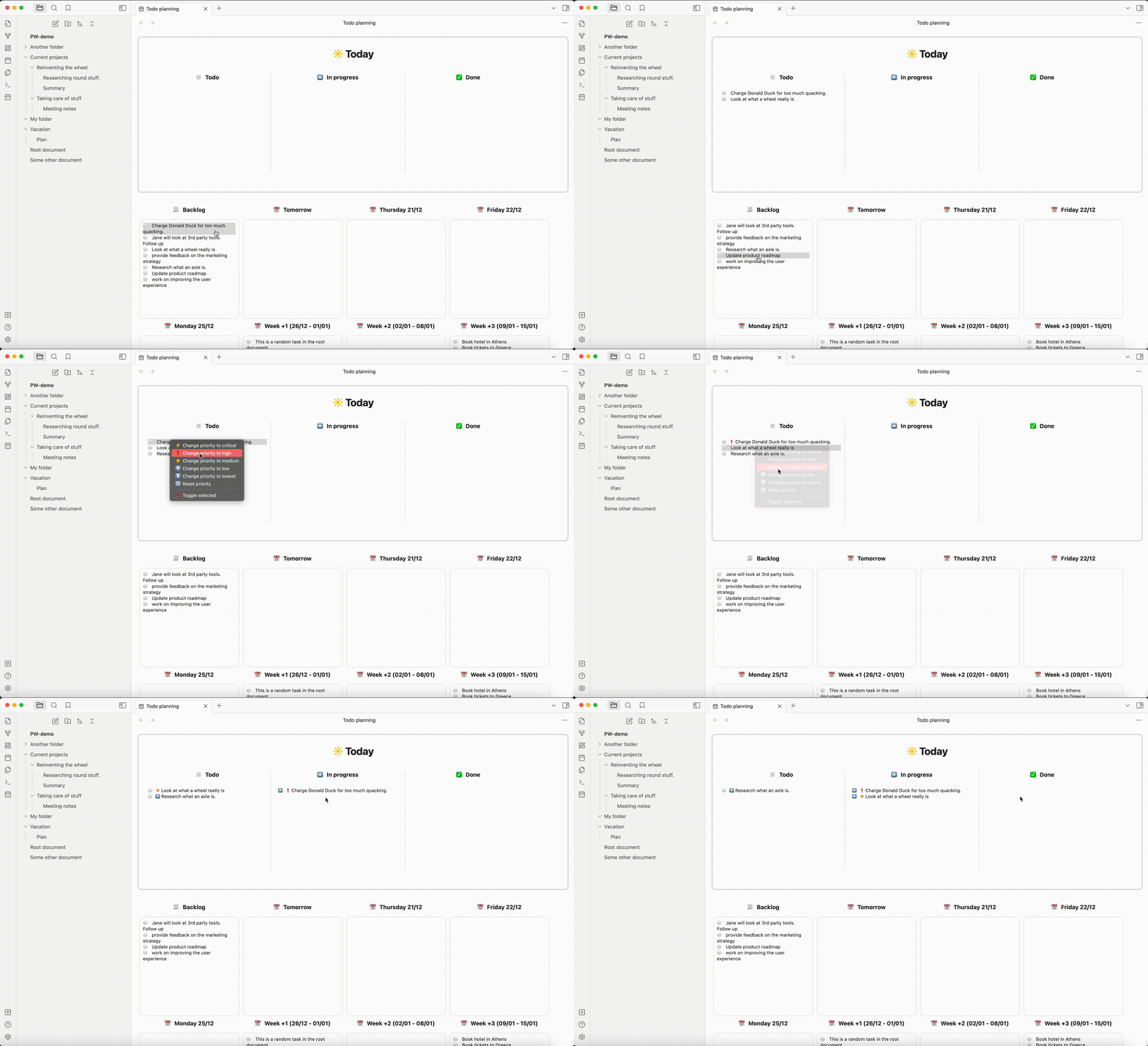
The top thread panels allow you to track your day. You start by selecting the tasks you want to do, optionally prioritize them. Then as you work on them, you can change their status, and finally mark them done.
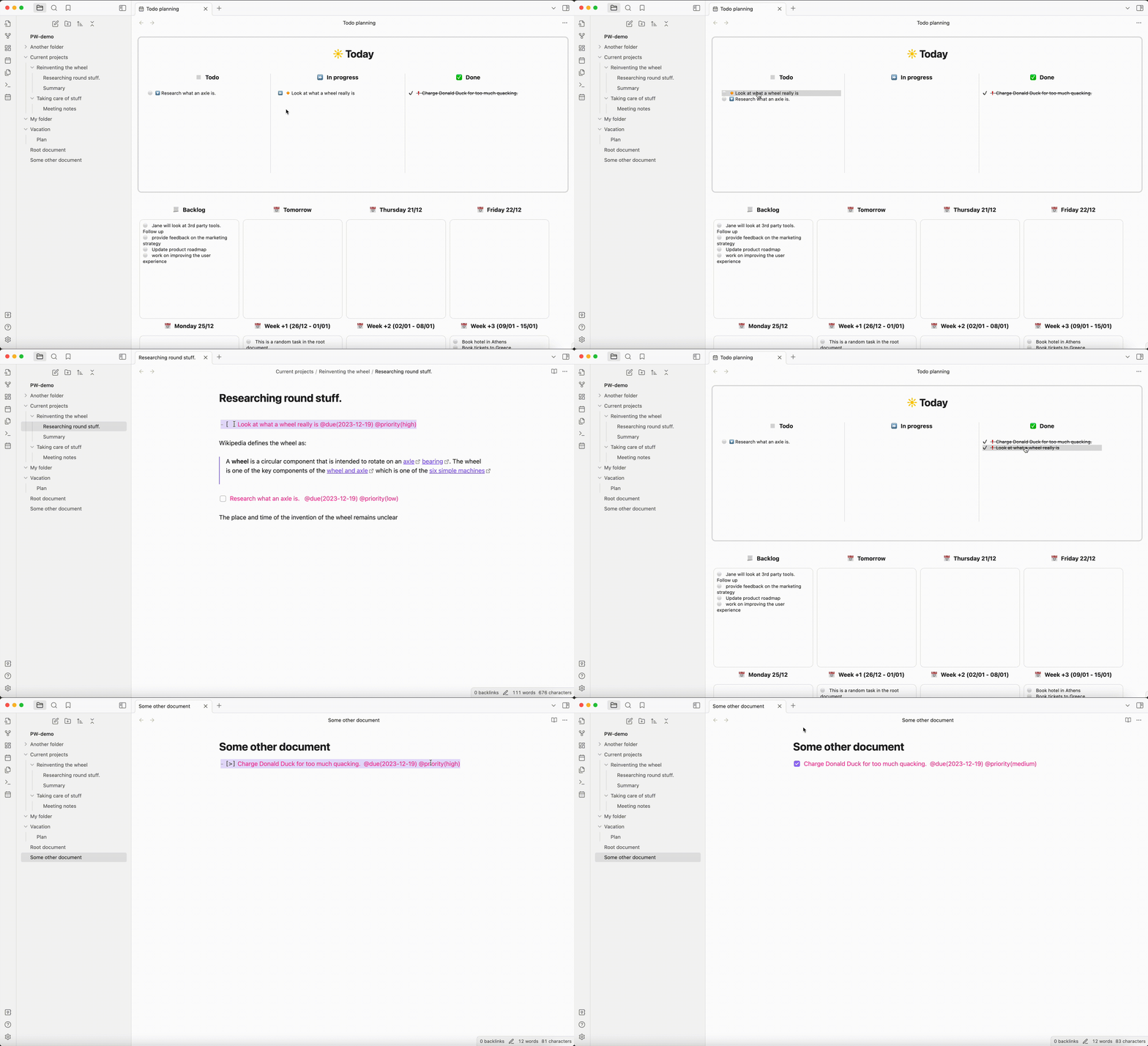
Updates are working in both directions. Changing tasks on the board updates them in your notes, and vice-versa. Click on a task to see it in its note.
The panels below allow you to plan your work. When we get to that date, the tasks will automatically show up in the "Todo" column of today. If you don't complete tasks, they will show in a new panel called "Past". You can decide what to do with these later.
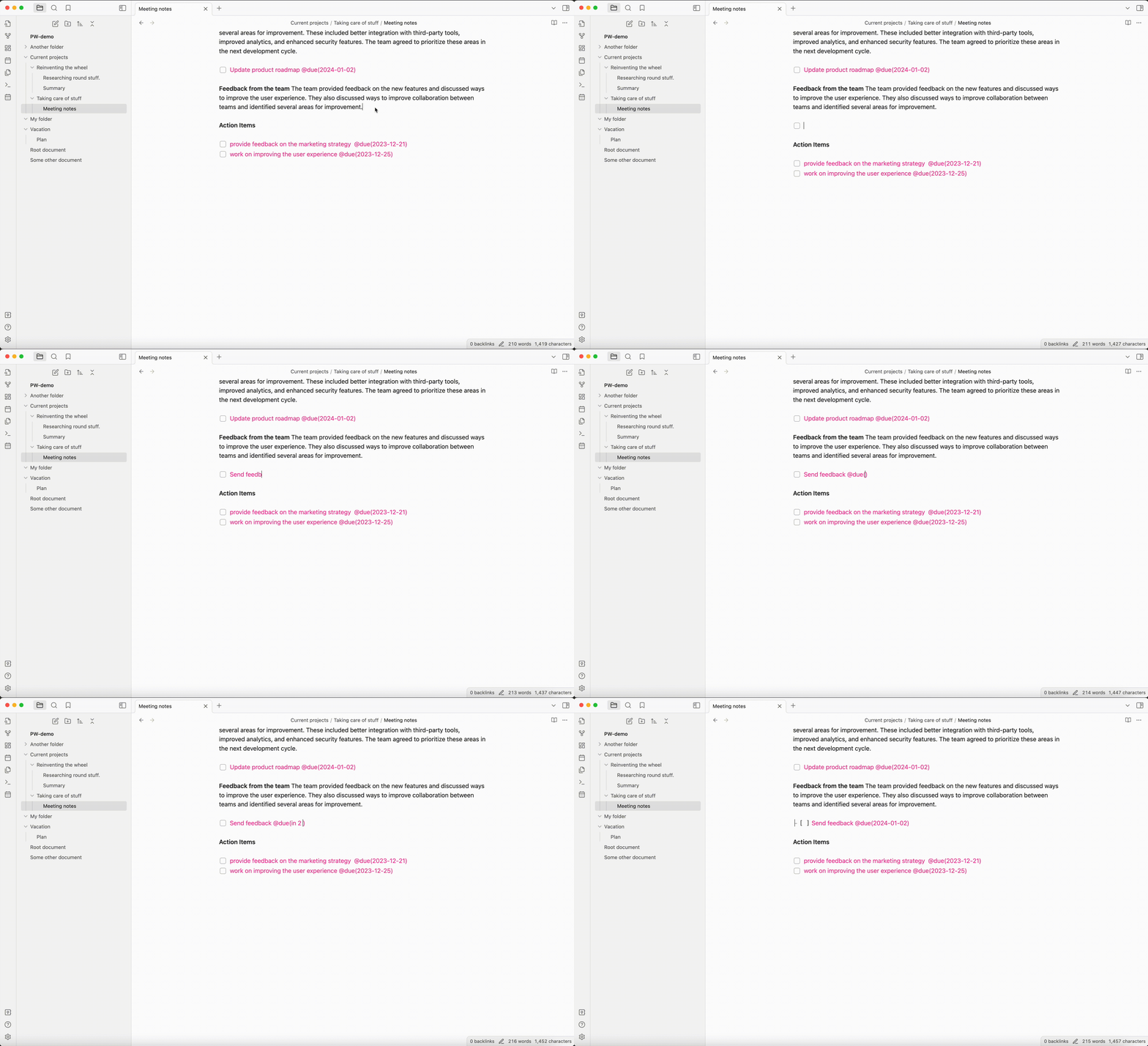
You can also use the auto-expand command (I recommend adding a hotkey, for example: alt+.) to replace natural language to an actual date (e.g. try tomorrow, next monday, or next month). Easier than having to calculate dates.
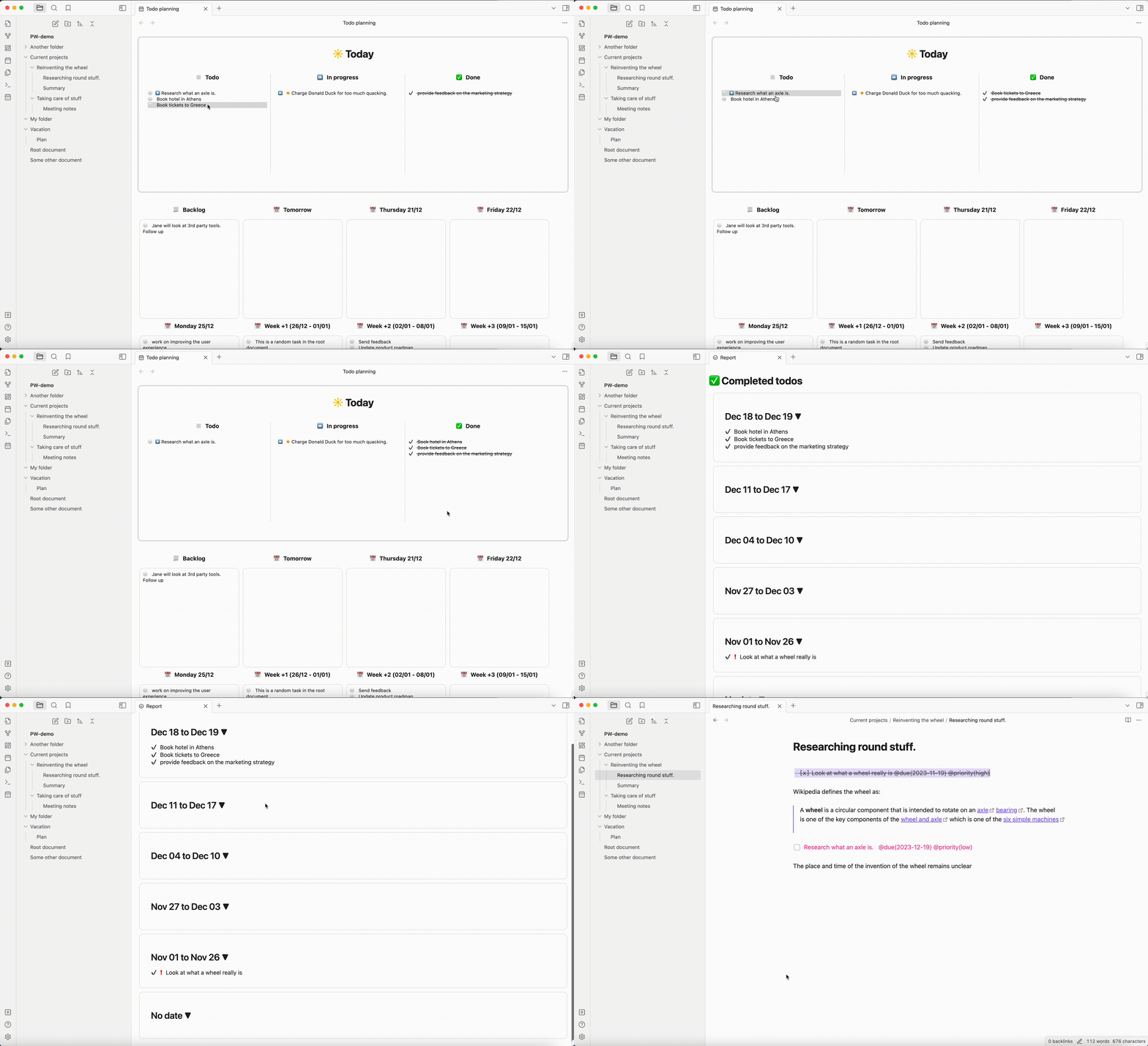
Produce a report of all the work you did, to help with status reports, and annual reviews.
Installation
From Obsidian Community Plugins
- Open Obsidian Settings
- Go to Community Plugins and disable Safe Mode
- Click Browse and search for "Proletarian Wizard"
- Install and enable the plugin
Manual Installation
- Download the latest release from GitHub Releases
- Extract the files to your vault's
.obsidian/plugins/proletarian-wizard/folder - Reload Obsidian and enable the plugin in settings
Quick Start
Create your first todo in any note:
- [ ] My first task @due(2025-01-02)Open the task board using the command palette (
Ctrl+PorCmd+Pon Mac):- Search for "Open Planning View"
- I advise using a shortcut to make this easier (I use
Ctrl+Pon Mac,Alt+Pon PC)
Select tasks for today by dragging on todos in the board
Track progress by changing task statuses as you work
Plan ahead by adding due dates to future tasks
Use attributes to sort your tasks: @due date, @started date, @completed date, @priority, @list name and #tags.
Use autocomplete to make input easier. Map command "Complete line attribute" to transform
@todayinto@due(2025-01-02), or@criticalinto@priority(critical)
Manual
Getting Started
Proletarian Wizard automatically scans all your notes for todo items and displays them in an organized task board. Simply create todos in your notes using standard Markdown syntax, and they'll appear in the plugin interface.
Todo Syntax
Basic Todos
-   [ ] This is a basic todo
-   [x] This is a completed todo
-   [-] This is a cancelled todo
Todo Statuses
Proletarian Wizard supports multiple todo statuses beyond the basic complete/incomplete:
[ ]- Todo (pending)[x]- Complete[-]- Canceled[>]- In Progress[!]- Attention Required[d]- Delegated (waiting for someone else)
Nested Todos (Subtasks)
You can create subtasks by indenting todos:
-   [ ] Main project task
    -   [ ] Subtask 1
        -   Some notes about that subtask
    -   [x] Completed subtask
        -   [ ] Sub-subtask
-   [ ] Another main task
Attributes and Tags
Due Dates
Add due dates to your todos using the @due() attribute:
-   [ ] Review quarterly report @due(2023-12-31)
-   [ ] Call client @due(tomorrow)
-   [ ] Weekly meeting @due(next monday)
Use the Complete line attribute command to replace "tomorrow" or other text by the actual date.
Supported date formats:
- Exact dates:
2023-12-31,Dec 31, 2023 - Natural language:
tomorrow,next week,next monday,in 3 days - Relative dates:
+7d(7 days from now),+2w(2 weeks from now)
Completion Dates
Track when tasks were completed using the @completed() attribute:
- [x] Finished project @completed(2023-12-20)
When clicking the checkbox from the planner view, the completed attribute gets added automatically.
Selection and Priority
Mark tasks as selected for today's work and set priority levels:
-   [ ] Important task @selected @priority(high)
-   [ ] Medium priority task @priority(medium)
-   [ ] Low priority task @priority(low)
Marking a task as selected adds it to today automatically. This is useful if you want something to stay in today from one day to the next. It also appears in its own sub-section of the todo/in-progress sections, which you can use to identify them even more (e.g. task you're actually currently working on, vs. all in progress.)
Custom Lists
You can create and add todos to custom lists:
- [ ] Custom List @list(custom)
- [ ] Meeting with Bob @list(meetings) @due(2026-05-05) @priority(high)

#### Custom Attributes

You can add any custom attributes to your todos:

```markdown
-   [ ] Development task @project(website) @estimate(4h) @assigned(john)
-   [ ] Meeting preparation @category(admin) @location(conference-room-a)
Boolean Attributes
For simple flags, you can use boolean attributes:
- [ ] Urgent task @urgent @blocking @important
Dataview Syntax (Optional)
If you prefer Dataview syntax, you can enable it in settings and use:
- [ ] Task with dataview syntax [due:: 2023-12-31] [priority:: high]
Due date using wikilinks (Optional)
You can also use wikilink syntax to set the due date. This is useful if you use daily notes, to link directly to that daily note.
- [ ] Task with wikilink date [[2025-01-05]]
If several dates are present for a todo, the latest is used as the due date. This can be useful if you want to keep track of all the days you worked on a task, and corresponding notes.
Task Organization
Today's View
The top section shows your daily workflow:
- Selected: Tasks you've chosen to work on today
- In Progress: Tasks you're currently working on
- Todo: All pending tasks
- Complete: Tasks finished today
Planning View
The bottom section helps you plan future work:
- Future dates: Tasks scheduled for specific dates
- Past: Overdue tasks that need attention
- No Date: Tasks without due dates
Commands and Shortcuts
Available Commands
- Toggle Todo: Convert between different todo statuses
- Toggle Ongoing Todo: Quickly mark tasks as in progress
- Complete Line: Mark the current line's todo as complete
- Open Planning View: Open the task planning interface
- Open Report View: Generate work reports
- Auto-expand Due Date: Convert natural language to actual dates
Auto-expand Due Date
Use the auto-expand command (recommend binding to Alt+.) to convert natural language:
tomorrow→ actual tomorrow's datenext monday→ date of next Mondayin 2 weeks→ date 2 weeks from nownext month→ first day of next month
Reports
Generate comprehensive reports of your work:
- Daily reports: See what you accomplished each day
- Time period reports: Generate reports for specific date ranges and export as markdown.
Settings and Configuration
Attribute Configuration
Customize which attributes to use for:
- Due dates (default:
due) - Custom list (default:
list) - Completion dates (default:
completed) - Selection marker (default:
selected)
Folder Settings
- Ignored folders: Exclude certain folders from task scanning
- Archive handling: Choose whether to include archived todos
Display Options
- Date formats: Customize how dates are displayed
- Task sorting: Configure default sorting options
- Panel layouts: Adjust the task board appearance
Tips and Best Practices
Organizing Your Workflow
- Start your day by selecting tasks to work on
- Use statuses to track progress throughout the day
- Plan ahead by setting due dates on future tasks
- Review regularly using the report feature
Effective Task Management
- Keep todos close to related content in your notes
- Use consistent attribute naming across your vault
- Leverage natural language date entry for quick planning
- Review past due tasks regularly to stay on track
Integration with Other Plugins
Proletarian Wizard works well with:
- Daily notes plugins for day-specific planning
- Calendar plugins for date visualization
- Project management plugins for larger workflows
Troubleshooting
Common Issues
- Tasks not appearing: Check that your todo syntax is correct
- Date parsing errors: Verify date format or use the auto-expand command
- Performance with large vaults: Consider excluding unnecessary folders
Performance Optimization
For large vaults with many notes:
- Use folder exclusions to limit scanning scope
- Archive completed projects to separate folders
- Consider splitting very large notes into smaller ones
Development
Prerequisites
- Node.js 18.x or higher
- Yarn package manager
- TypeScript knowledge
Setting Up Development Environment
Clone the repository:
git clone https://github.com/cfe84/obsidian-pw.git
cd obsidian-pw
Install dependencies:
yarn installRun tests:
yarn test
# Or with coverage
yarn test:coverage
# Or in watch mode
yarn test:watch
Build the plugin:
yarn buildDevelopment with hot reload:
yarn dev
Testing
The project includes some test coverage:
- Unit tests for core business logic (LineOperations, FileTodoParser)
- Integration tests for component interactions (TodoIndex)
Run tests with:
yarn test           # Run all tests
yarn test:coverage  # Run with coverage report
yarn test:watch     # Run in watch mode
Project Structure
src/
├── domain/          # Core business logic
│   ├── LineOperations.ts      # Todo parsing and manipulation
│   ├── FileTodoParser.ts      # File-level todo parsing
│   ├── TodoIndex.ts           # Todo management and indexing
│   └── ...
├── ui/              # React components
├── Commands/        # Obsidian commands
├── Views/           # Obsidian views and modals
└── infrastructure/ # Platform adapters

tests/
├── domain/          # Unit tests for business logic
├── integration/     # Integration tests
└── mocks/          # Test utilities and mocks
Building and Deployment
The build process:
- TypeScript compilation with strict type checking
- esbuild bundling for optimized output
- Automated testing in CI
- Release automation via GitHub Actions
Contributing
We welcome contributions! Here's how to get started:
Reporting Issues
- Use the GitHub Issues page
- Include steps to reproduce the problem
- Mention your Obsidian version and operating system
Submitting Changes
- Fork the repository on GitHub
- Create a feature branch:
git checkout -b feature/my-new-feature - Write tests for your changes
- Ensure tests pass:
yarn test - Commit your changes:
git commit -am 'Add some feature' - Push to the branch:
git push origin feature/my-new-feature - Submit a pull request
Development Guidelines
- Write tests for new functionality
- Follow TypeScript best practices
- Keep the UI responsive and accessible
- Document new features in the README
- Maintain backward compatibility when possible
Areas for Contribution
- New todo status types or attributes
- UI/UX improvements for better usability
- Performance optimizations for large vaults
- Integration with other Obsidian plugins
- Documentation and examples
- Bug fixes and stability improvements
Code Review Process
- All changes go through pull request review
- Automated tests must pass
- Code coverage should be maintained or improved
- Documentation should be updated for user-facing changes
License
This project is licensed under the GNU GPLv2 License - see the LICENSE file for details.
Acknowledgments
- Built for the Obsidian community
- Inspired by productivity workflows and task management best practices
- Thanks to all contributors and users who provide feedback and improvements