Search...Search plugins and themes...
⌘K
Sign in
  • Get started
  • Download
  • Pricing
  • Enterprise
  • Account
  • Obsidian
  • Overview
  • Sync
  • Publish
  • Canvas
  • Mobile
  • Web Clipper
  • CLI
  • Learn
  • Help
  • Developers
  • Changelog
  • About
  • Roadmap
  • Blog
  • Resources
  • System status
  • License overview
  • Terms of service
  • Privacy policy
  • Security
  • Community
  • Plugins
  • Themes
  • Discord
  • Forum / 中文论坛
  • Merch store
  • Brand guidelines
Follow us
DiscordTwitterBlueskyThreadsMastodonYouTubeGitHub
© 2026 Obsidian

Pocketbook Cloud Highlight Importer

lenalebtlenalebt4k downloads

Import notes and highlights from your Pocketbook Cloud account.

Add to Obsidian
  • Overview
  • Scorecard
  • Updates8

This is a plugin for Obsidian (https://obsidian.md) to import highlights that you made on your Pocketbook E-Ink reader, or in the Pocketbook App on your phone, using a Pocketbook Cloud account.

Requires the "dataview" plugin to work correctly - and does not check that it's installed ;-). Only works for "login with password".

How it works

It will

  • read all highlights from your pocketbook account
  • dump them into small markdown files with yaml frontmatter
  • create dataview queries to grab all comments together

Setup

After installing, go to the settings page:
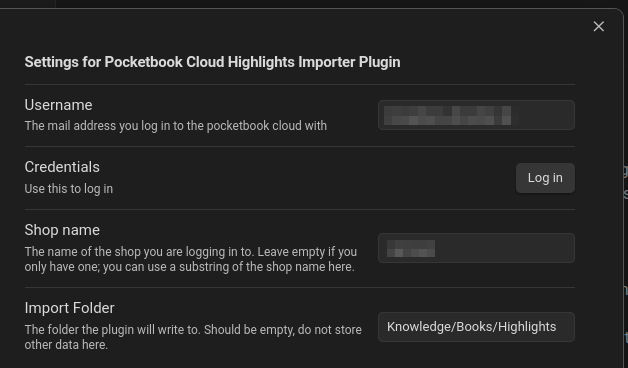
settings page

You need to fill your user name. After that, click "Log in" to start the login process. This will ask you for a password, but the password will not be saved (a refresh token will be, though).

In case you have multiple shops under your pocketbook account, you can fill the "Shop name" you want to use (substring of the name is enough). The "Import Folder" is where your highlights will be saved to.

Usage

After setup, you can find the pocketbook cloud highlight import in the command palette.

License

It's AGPL-3.0 licensed, since the used library "epub-cfi-resolver" is AGPL-3.0. I would have made it ISC-licensed otherwise.

72%
HealthGood
ReviewCaution
About
Import highlights from your Pocketbook Cloud account into Obsidian as individual Markdown files with YAML frontmatter. Generate Dataview-ready queries to gather comments and metadata for easy searching and review. Require the Dataview plugin and use password-based login only.
ImportAnnotationFiles
Details
Current version
0.1.7
Last updated
12 months ago
Created
3 years ago
Updates
8 releases
Downloads
4k
Compatible with
Obsidian 1.1.16+
Platforms
Desktop, Mobile
License
AGPL-3.0
Report bugRequest featureReport plugin
Sponsor
Buy Me a Coffee
Author
lenalebtlenalebt
github.com/lenalebt
GitHublenalebt
  1. Community
  2. Plugins
  3. Import
  4. Pocketbook Cloud Highlight Importer

Related plugins

Image Converter

Convert, compress, resize, annotate, markup, draw, crop, rotate, flip, align, drag-resize, rename with variables, and batch process images: WEBP, JPG, PNG, HEIC, TIF

Kindle Highlights

Sync your Kindle book highlights using your Amazon login or uploading your My Clippings file.

Telegram Sync

Transfer messages and files from Telegram to Obsidian.

Epub Importer

Import EPUB files as Markdown.

Notebook Navigator

A better file browser and calendar inspired by Apple Notes, Bear, Evernote and Day One.

Local REST API & MCP Server

Unlock your automation needs by interacting with your notes over a secure REST API.

QuickAdd

Quickly add new notes or content to your vault.

Recent Files

Display a list of recently opened files.

Importer

Import data from Notion, Evernote, Apple Notes, Microsoft OneNote, Google Keep, Bear, Roam, and HTML files.

Omnisearch

Intelligent search for your notes, PDFs, and OCR for images.