Download Pulse
 Elliott Park277 downloads
Analytics for authors with several plugins. Track every plugin's downloads, rank and milestones in one dashboard, see when you'll pass rivals, and share it as a card.
- Overview
- Scorecard
- Updates8
Analytics for Obsidian plugin authors who ship more than one plugin. Every plugin's downloads, rank and milestones in one dashboard, the insights worth acting on, and a live watch on the plugins you compete with. When there's something to celebrate, share it as an image card for a post or a story.
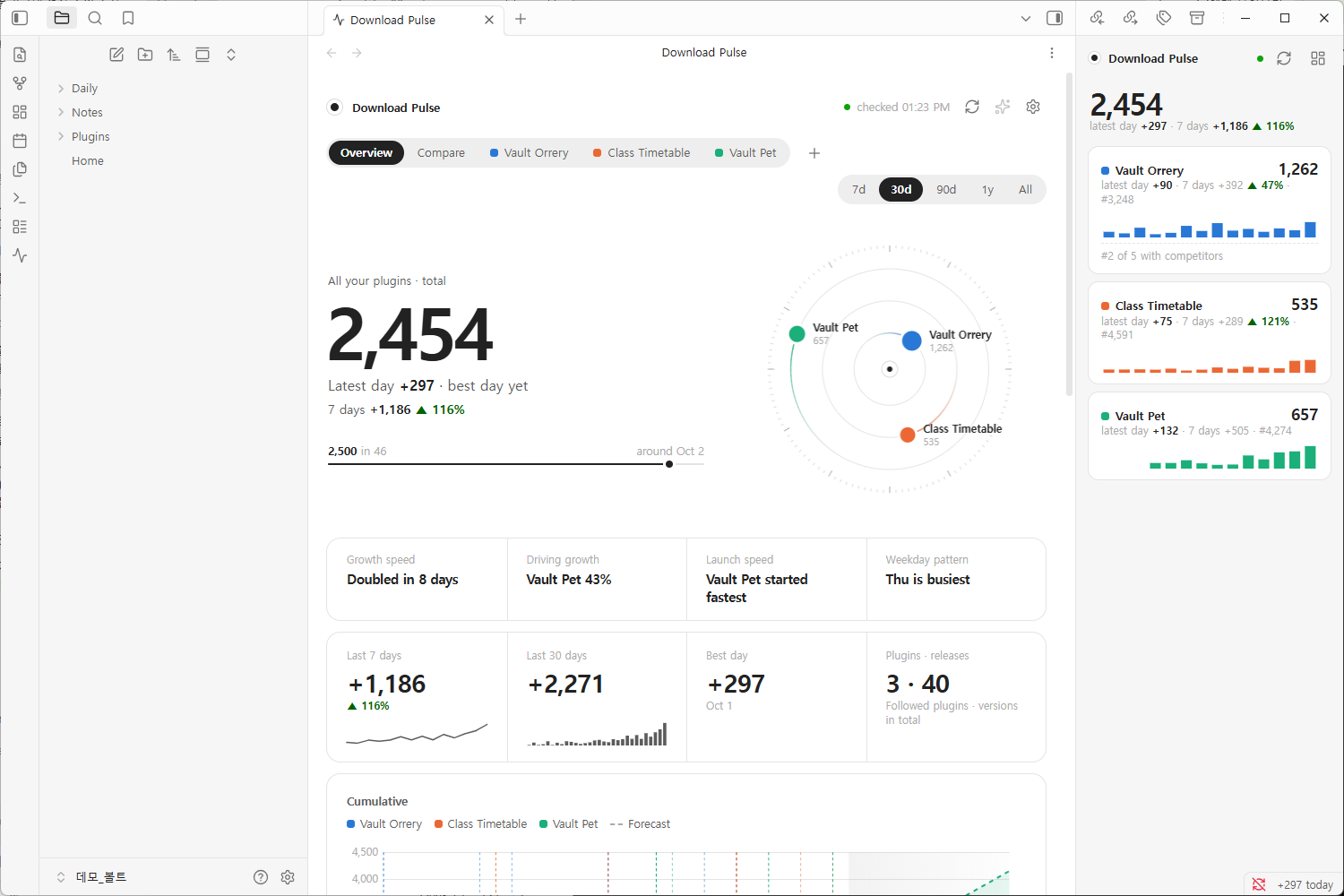
The community directory gives you one number per plugin: a lifetime total. Once you maintain a few plugins, that number stops answering the questions you actually have:
- Which of my plugins is growing, and which has stalled? One overview for all of them, plus side-by-side comparison by date or by days since listing.
- Did that release move anything? Downloads in the three days before and after every release, and how each version launched.
- Am I gaining on the competition, or falling behind? Your share of the group's new downloads, the gap to the plugin ahead and the day you'd pass it, and whoever is closing in from behind.
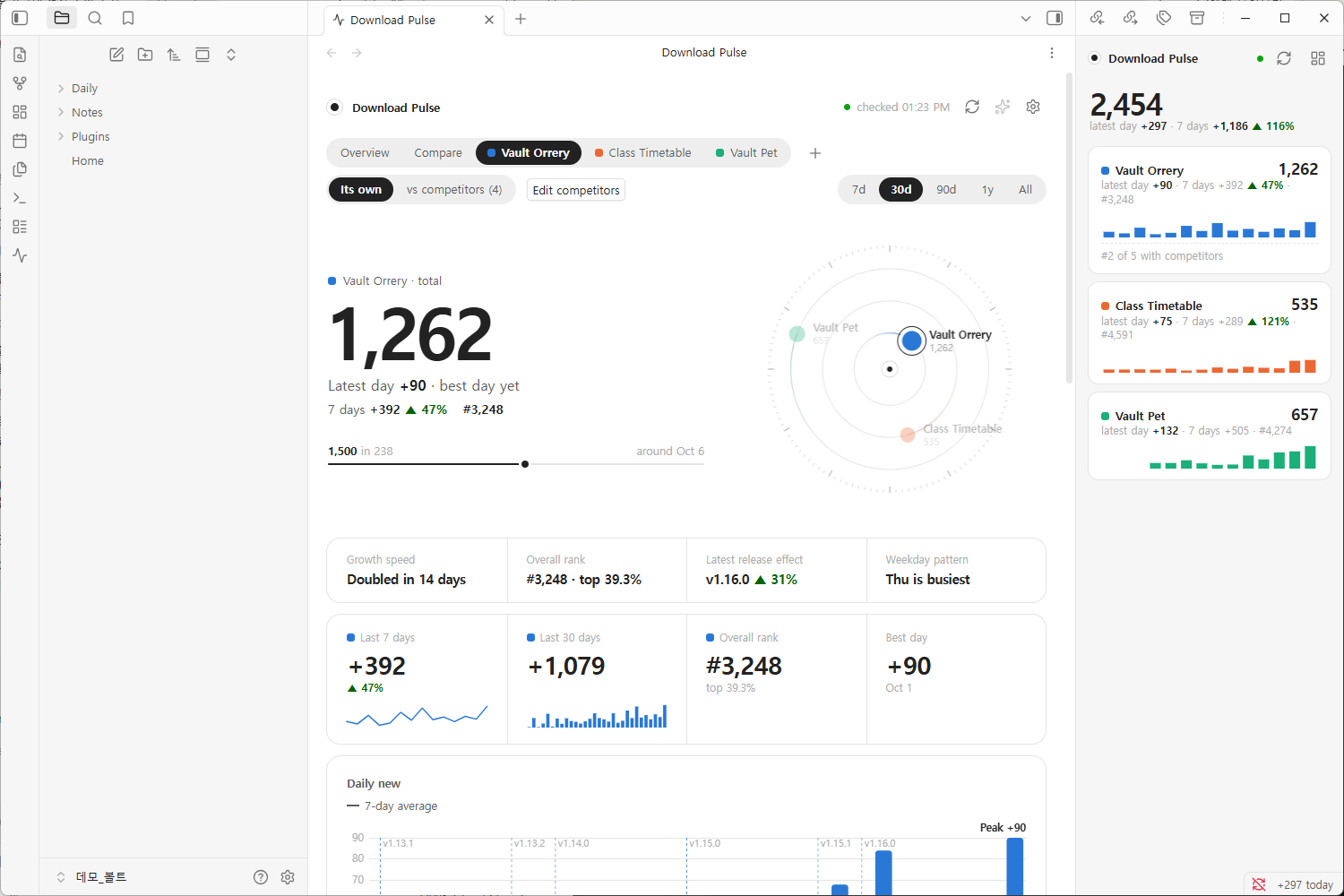
Download Pulse records the official numbers every day and answers those questions in plain sentences: "Driving growth: Vault Pet 43%", "Galaxy View is pulling away", "1,500 around Oct 6".
Who it's for
- Authors with a portfolio. Five plugins means five numbers to check. Here they're one page, ranked by momentum.
- Authors in a crowded niche. If there are four other graph views or task managers, you want to know who's winning the new users, and why.
- Authors about to build. Follow the leaders of a niche before you write a line, and see if it's growing at all.
What it shows
Your plugins, one by one and together. For each plugin you get the total with a forecast, daily new downloads with a 7-day average, rank among all community plugins, the first three days of every release, and downloads by version. You also get a weekday pattern, a calendar and the milestones it has passed. With more than one plugin, Overview adds them up and Compare puts them side by side, by date or by days since listing.
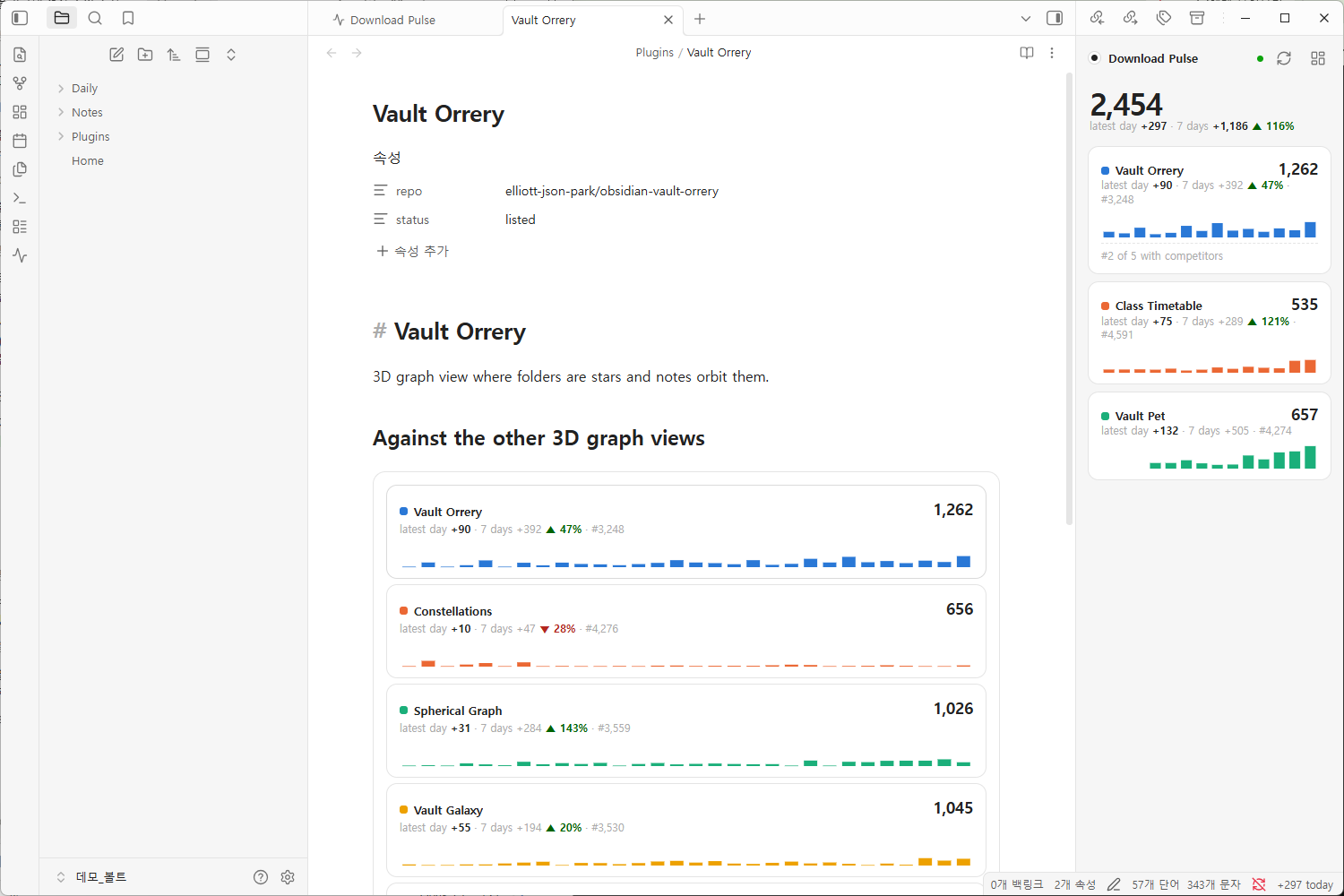
Your plugin against its competitors. Pick the plugins you compete with (it suggests similar ones from the directory) and switch a plugin's page to vs competitors:
- Share of new downloads: your part of the group's last 7 days, and how it moved.
- Next to pass: the plugin just ahead of you, the gap, and at both 14-day paces how many days until you pass it. Or that it is pulling away.
- Behind you: whether anyone below is closing in, and when they'd pass you.
- Fastest growing: growth relative to size, so a small plugin on the rise stands out.
- At the same age: everyone's total on the same day after listing.
- Release pace: how often you ship compared with the group.
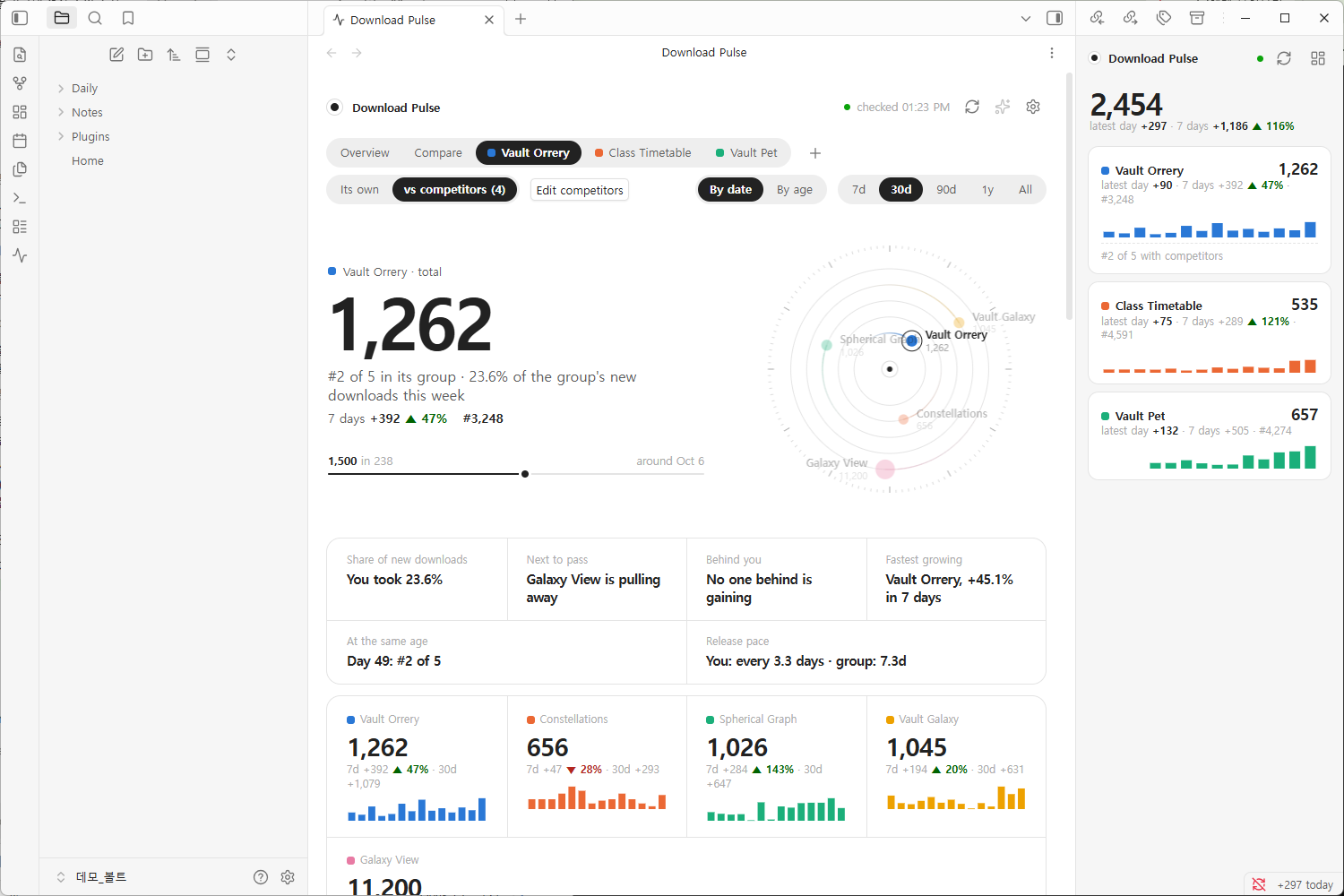
Plugins of very different sizes switch the cumulative chart to a log scale on their own, so a plugin with 600 downloads isn't a flat line under one with 11,000.
Your theme, light or dark. The dashboard uses your theme's colors and fonts, and keeps a deliberately quiet look: one big number, hairlines, and color only where it means a plugin.
Share your numbers
Passed 1,000 downloads, or had your best month yet? Turn it into an image card and post it. The card shows your plugins' total, what they gained in the last 7, 30 or 90 days, a chart of new downloads a day with each plugin in its color, and one line per plugin: its total, its gain and where it ranks among all community plugins. Long names and big numbers are measured and fitted, so text never runs into the next column.
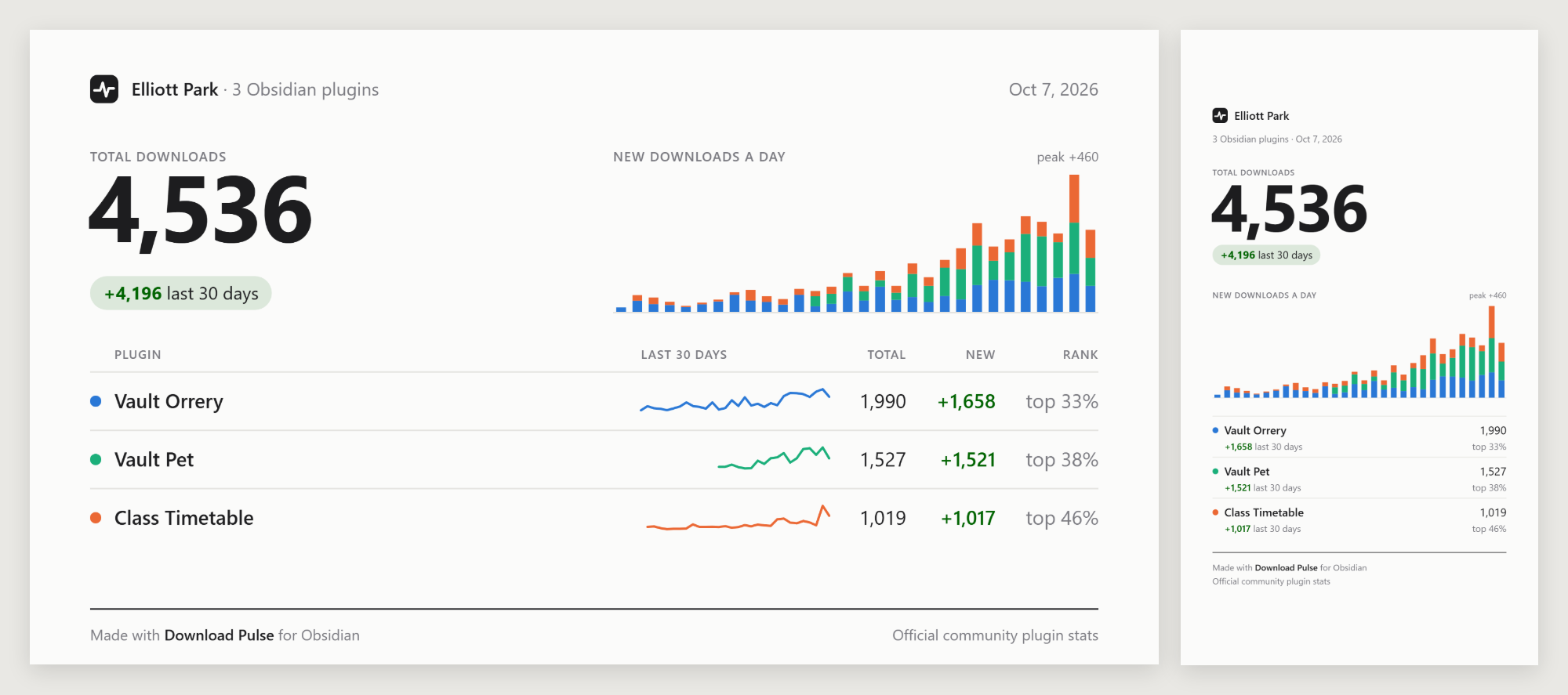
- Post 16:9: 1200×675, saved at twice the size. For X, Discord, Reddit and the forum.
- Story 9:16: 1080×1920 for Instagram and other stories. The top and bottom are left clear for the story's own buttons.
- Light or dark, whatever your Obsidian theme is.
- Copy image to paste it straight into a post or a message, Save to vault to keep it as a PNG in your attachment folder, or Download PNG (desktop) to pick a place on your computer.
Open it with the image button at the top of the dashboard, Share a card of your plugins in the command palette, or Share on a milestone notice. The card is drawn on your device and nothing is uploaded until you post it.
Three ways to look at it
| Where | For | |
|---|---|---|
| Dashboard | A tab in the main area. Move it to its own window from the tab menu. | Reading the charts. It needs width, so it opens as a tab, not in a sidebar. |
| Glance | The right sidebar | A widget that stays in view: totals, the latest day, two weeks of bars, and where you stand against your competitors. Click a plugin to open it in the dashboard. |
| Code block | Any note | A summary in a daily note or a homepage. |
```plugin-pulse
```
Shows all your plugins. Options, one per line:
```plugin-pulse
plugin: vault-orrery
rivals: true
days: 30
```
plugin:— one or more plugin ids, comma-separated. Default: all of yours.rivals: true— the plugin and its competitors, one card each.days:— how many days of bars, 7 to 60. Default: 14.
Links into the dashboard. obsidian://plugin-pulse?view=vault-orrery&mode=rivals
opens a page of the dashboard from anywhere: a note, a bookmark, a launcher.
view is overview, compare or a plugin id; mode is self or rivals;
range is 7, 30, 90, 365 or all.
An optional status bar item shows your plugins' new downloads on the latest day.
Getting started
- Install Download Pulse from Settings → Community plugins.
- Open the dashboard with the pulse icon in the ribbon, or Download Pulse: Open dashboard in the command palette.
- Follow your plugins. Type your author name or GitHub username and every plugin listed under it is found at once. Or search any plugin by name.
- Add competitors with Add competitors on a plugin's page.
Past daily totals are filled in right away (see Where the numbers come from), so the charts aren't empty on day one. Rank history starts the day you install, because only the official file has it.
Any plugin works, not only your own. Follow the leaders in a niche before you build in it, or watch a plugin you depend on.
Commands
Open dashboard · Open glance in the sidebar · Refresh now · Follow a plugin · Add a competitor · Share a card of your plugins
Settings
- Your plugins: reorder, remove, and edit each one's competitors.
- Check for new stats: by default right after Obsidian publishes the day's file (around 00:25 UTC), and every 30 minutes while it is late; or every 1 to 6 hours, or only when you refresh. It also checks when you open the dashboard or return to Obsidian. The dashboard header shows when the next file is due.
- Fill in past history, Catch up on missed days, Read official history: see below.
- GitHub token: optional, for release dates and stars beyond GitHub's anonymous limit.
- Motion, Status bar, Milestone notices, Language (English, 한국어).
- Export / import history as JSON, for backup or another device. Import also reads the
history.jsonof the standalone HTML dashboard this plugin grew out of.
Where the numbers come from
Obsidian publishes every community plugin's total downloads once a day in
community-plugin-stats.json.
That number counts installs and updates, so it isn't a count of users. A
plugin that ships often collects downloads from its existing users too.
Download Pulse reads that file and keeps each day's value in its own data file. A "day" is the UTC day the downloads happened: the file published just after midnight UTC holds the day before, so that is the date it gets. Forecasts and "around Oct 6" estimates assume the last 7 days' pace continues.
Network use
Download Pulse makes only anonymous GET requests for public data, and sends
nothing about your vault:
| Request | Why | When |
|---|---|---|
api.github.com/repos/obsidianmd/obsidian-releases/commits |
Has a new stats file been published? One small call. | Each check (right after the daily publish by default, when you open the dashboard, and when you return to Obsidian; at most once per 5 minutes) |
raw.githubusercontent.com/obsidianmd/obsidian-releases/…/community-plugin-stats.json |
The official numbers, about 2.5 MB | Only when Obsidian has published a new file, about once a day |
raw.githubusercontent.com/obsidianmd/obsidian-releases/HEAD/community-plugins.json |
Plugin names, authors and repos for search and suggestions | When you search or add competitors |
api.github.com/repos/<owner>/<repo> and …/releases |
Stars and release dates of followed plugins | At most twice a day per plugin |
yulei-chen.github.io/obsidian-plugin-download-stats/data/plugins/<id>.json |
Earlier daily totals from a public, third-party archive of the official file. Not affiliated with Obsidian. | When you follow a plugin, then every few days. Turn off with Fill in past history. |
With Fill in past history off, history starts the day you follow a plugin. Read official history can instead download the official file for each of the past 14 or 30 days. That's about 2.5 MB a day, and you also get each day's rank. Catch up on missed days does the same for up to 7 days (3 on mobile) when Obsidian was closed.
There is no telemetry, and the GitHub token, if you add one, stays in Obsidian's secret storage.
Development
npm install
npm run build      # type-check and bundle main.js
npm test           # storage, analysis and the refresh engine against a fake network
npm run harness    # the real plugin in a browser page at http://localhost:5178
The harness runs src/ with a small stand-in for the obsidian module and
live data. Add ?demo&bare&motion=off&view=vault-orrery&mode=rivals to open a
given page. The screenshots above are of the plugin running in Obsidian 1.13. npx eslint . runs the
same rules as Obsidian's plugin review.
Chart.js is bundled into main.js. See THIRD-PARTY-NOTICES.md.
License
MIT © Elliott Park