Life OS Assistant
 Xiaoqiang Huang448 downloads
Organize diary entries, tasks, knowledge, memory, and AI-assisted reviews inside your Obsidian vault.
- Overview
- Scorecard
- Updates20
English
Life OS Assistant turns an Obsidian vault into a connected workspace for today, tasks, diary, knowledge, memory, reviews, AI assistance, and project AI sessions. Your readable records remain Markdown in the vault. AI writeback is off by default; you can keep preview confirmation or explicitly opt in to automatic writes only when the current request names one unambiguous destination.
Current release: 0.3.19 · Obsidian 1.5.0+ · isDesktopOnly: false
0.3.19 smart-context and workflow update: the shared desktop/Weixin Agent now maintains scoped working and durable memory, recalls project evidence with stricter citation checks, and compacts long conversations into resumable checkpoints. Tasks can move between Today, Pending, and Completed by drag-and-drop, project-context extraction has its own configurable cap, project documents stay compact by default, and mobile navigation keeps every enabled Life OS page reachable.
About the images: the walkthrough images below were generated from the current 0.3.19 information architecture and implemented workflows. They use synthetic data and a neutral Obsidian theme; your actual layout follows your Obsidian theme, viewport, and enabled features.
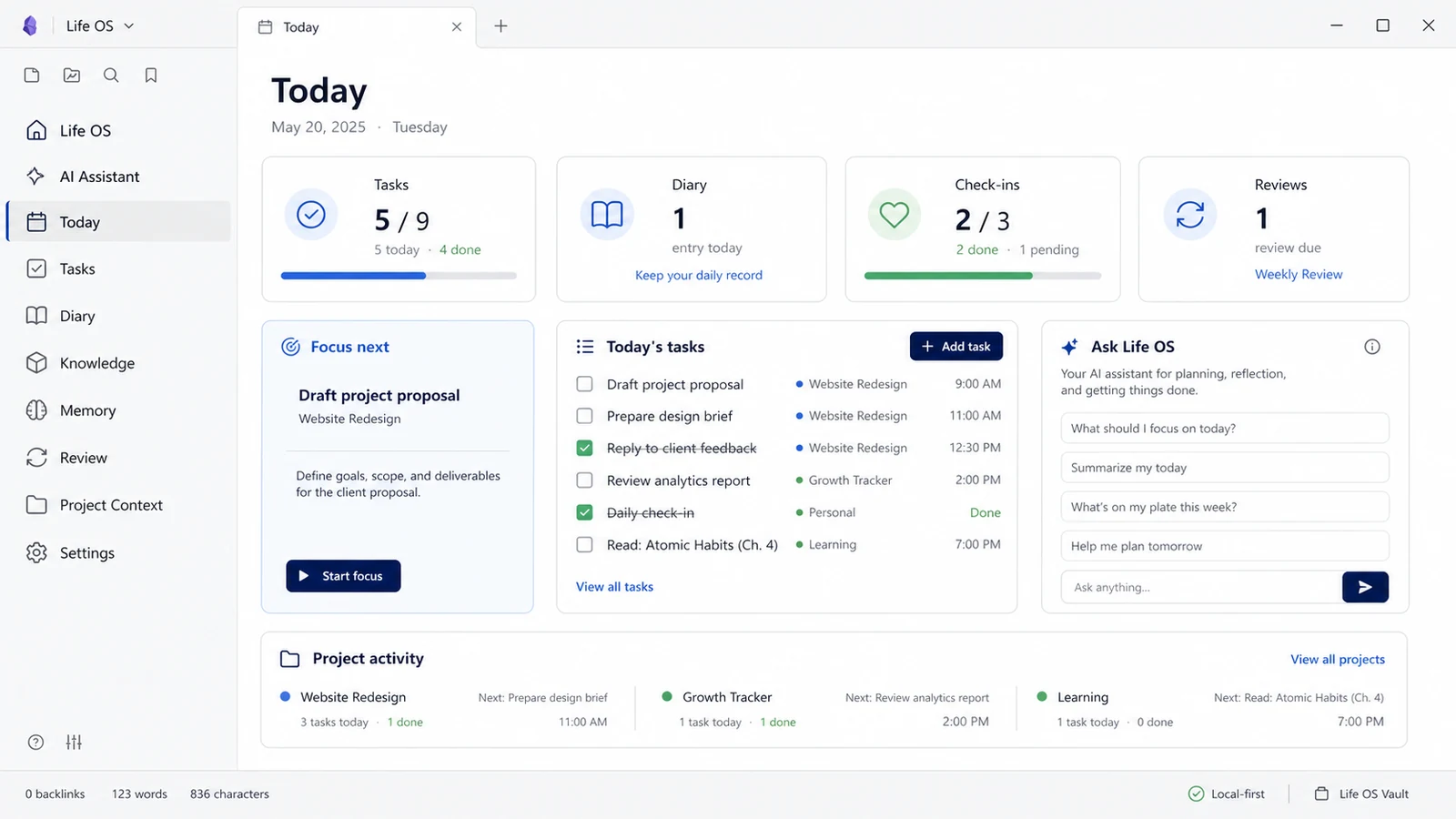
What Life OS brings together
| Area | What it helps you do | Control boundary |
|---|---|---|
| Today & Tasks | Plan the next action, capture tasks, carry unfinished work, and group tasks by project | Completing or moving a task is an explicit user action |
| Diary & Check-ins | Keep a daily record, add quick captures, and retain learning/check-in history | Your authored diary text remains editable Markdown |
| AI Assistant | Ask across selected vault context, inspect citations and activity, copy replies, and control writeback | Writeback is off by default; preview mode and explicit-target auto mode are user-selected |
| Knowledge & Memory | Import material, review LLM Wiki drafts, and confirm durable memories | Raw or AI-generated content is not formal knowledge until accepted |
| Reviews | Build daily, weekly, monthly, or custom reviews from traceable evidence | AI refresh replaces only the AI region and preserves your notes |
| Project Context | Manage AI coding sessions, project memory, process nodes, handoffs, and prompts | Scans are user-triggered; unmatched sessions are never auto-assigned |
| Browser AI capture | Save visible web AI conversations to a selected project's local Inbox | Capture is click-driven; the loopback bridge is token protected |
Interface tour
1. Today — one place to decide what matters next
The Today page combines the day's tasks, diary state, check-ins, review status, project activity, quick actions, and a small entry point to Life OS AI. It is designed for a short daily loop rather than a second database to maintain.
Use it like this
- Open Today from the ribbon or command palette.
- Pick one focus item, capture any new task, and open today's diary.
- Return later to complete tasks or review confirmed project activity.
2. AI Assistant — grounded answers with inspectable sources
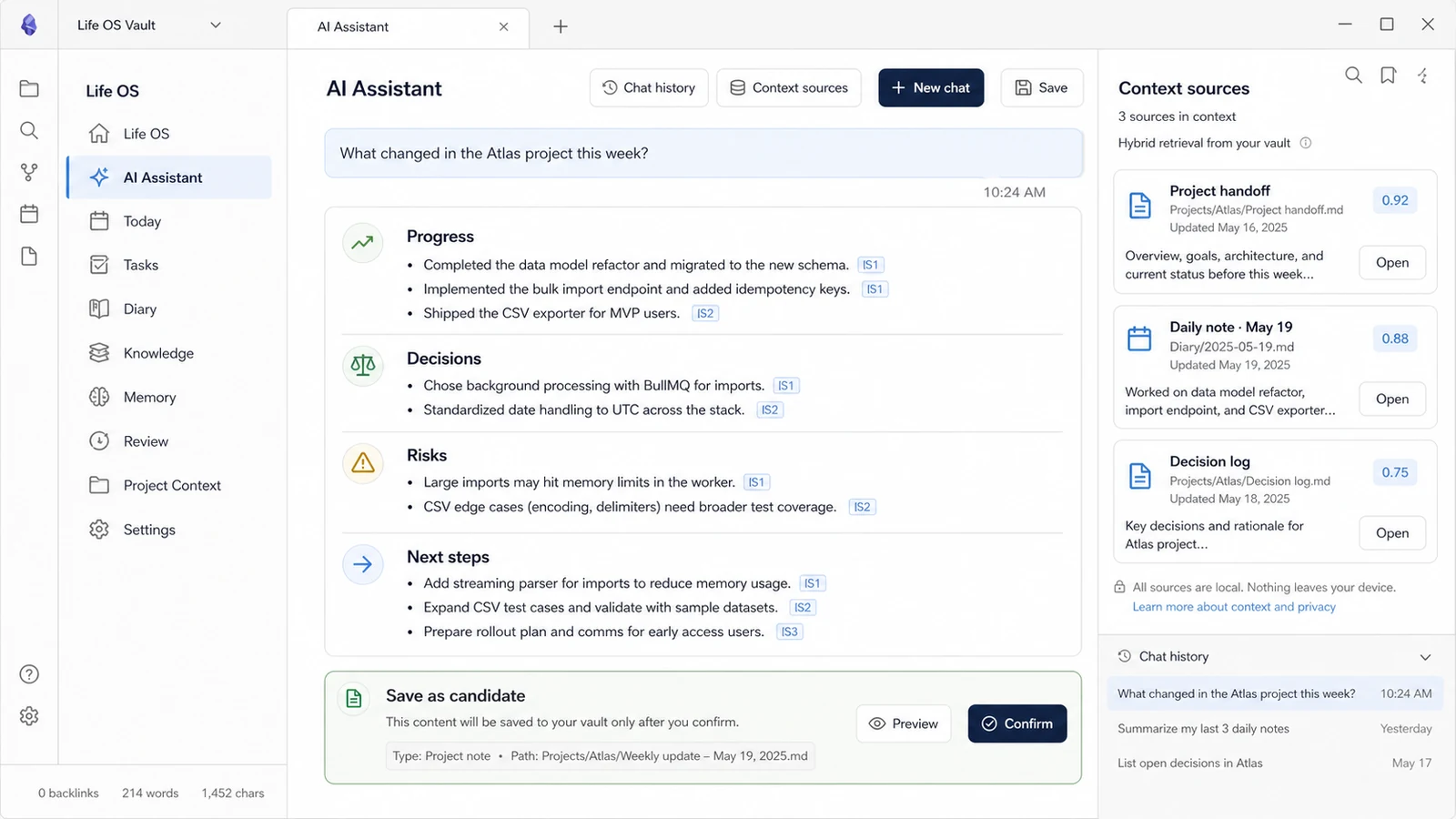
The assistant analyzes the request, retrieves a limited set of relevant vault excerpts, and cites them with markers such as [S1]. Context sources shows the exact file, web page, and excerpt behind an answer. Long chats are compacted instead of resending the whole history on every turn.
The composer now uses one ordered single-line settings row: Mode → Project Q&A → AI model → Skill → Web → Reasoning → Context → AI reply → Writeback → Generate project whiteboard → Length → Style. Every setting with two or more choices is a dropdown; Skill uses a multi-select dropdown. Generate project whiteboard remains a direct action. Add file is stacked immediately above Send beside the input box, so attachments stay close to the final submit action without consuming settings-row space. The old Today summary, task breakdown, weekly review, study suggestion, and More settings buttons no longer occupy the composer.
The Web dropdown keeps search explicit and inspectable: Auto searches only for clearly time-sensitive or explicit web questions, On searches for the next questions, and Off stays local (direct URLs you provide can still be read). Life OS sends a focused search query rather than the whole conversation, may run a second query for cross-checking, fetches only the top pages, and keeps every result as a separate citable source.
Selecting text no longer starts an AI request. A small choice appears first; choose AI edit or Ask about selection to open the full tool, then press the action button to call the model. Copying or manually restructuring text does not trigger background analysis.
Each chat bubble is selectable and has a full-message copy action. While a reply is running, an Activity panel reports observable stages such as understanding the request, retrieving local/web context, generating the answer, and applying an approved write. It intentionally does not expose hidden chain-of-thought; citations and the activity summary are the inspectable evidence. The panel appears immediately, which improves progress visibility but does not reduce the model provider's network latency.
The Writeback dropdown has three modes: No write, Preview before write, and Auto-write explicit destination. Auto mode runs only when the current instruction names one supported destination (for example, today's diary, knowledge, memory candidate, selected-project document, or an exact document-edit target). Vague requests such as “save this” still open a destination choice, and project writes never guess a project.
The Skill picker can now import a local .md, .markdown, .txt, .yaml, .yml, or .json file directly, in addition to GitHub files and directories. Local Skill files are treated as inert prompt assets, limited to 1 MB, previewed before import, and never executed.
The Skill library now uses compact rounded cards instead of tall checkbox blocks. Click a card to select it, search by name/category/description, or open its management menu to rename it, edit its description, and move it to another category. Imported Skills can also edit their prompt text or be deleted permanently; bundled Skills can be hidden and restored without losing the upgradeable built-in source. Both local and GitHub imports support a custom display name before installation.
Use it like this
- Select Mode, Project Q&A, model, Skill, Web, Reasoning, Context, AI reply, Writeback, Length, and Style from the compact dropdown row; leave Web on Auto for normal use.
- Ask a concrete question. Switch Web to On when you explicitly need current external facts, then inspect Context sources and open the cited pages when the answer matters.
- Choose the Writeback safety level you want. Keep Preview for normal use; use explicit-target auto mode only when you want commands such as “write this to today's diary” to apply without a second confirmation.
3. Project Context — preserve AI work as a reusable project asset
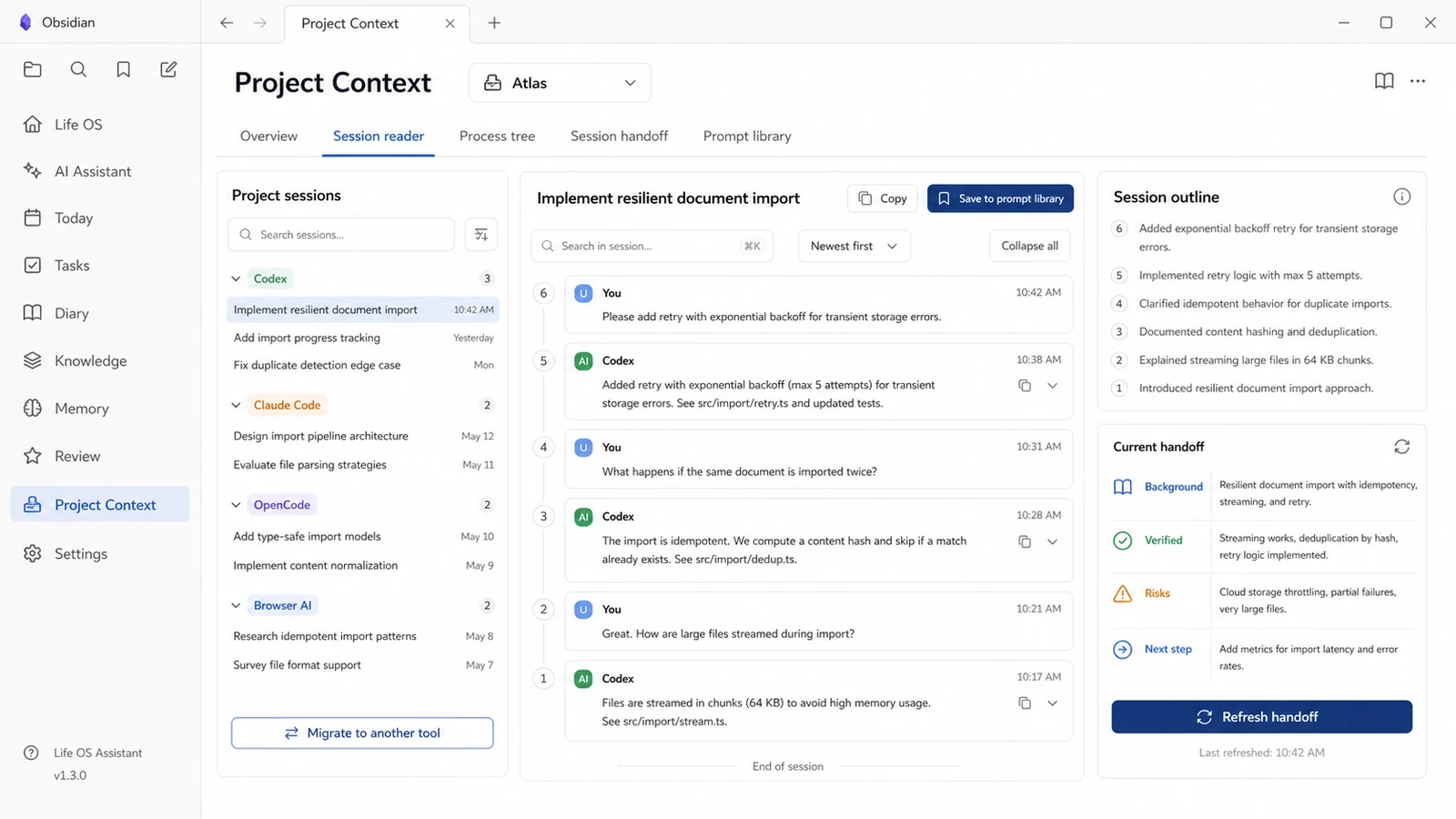
Project Context keeps each project's Codex, Claude Code, OpenCode, CodeBuddy, WorkBuddy, Pi, Cursor, Windsurf, Gemini CLI, GitHub Copilot, Kiro, Aider, Qwen Code, Trae, Tongyi Lingma, Cline, Roo Code, Continue, and browser AI sessions separated by source tool.
Each visible user/AI turn becomes a traceable node. You can search by session name, tool, path, or session ID; read newest-first or oldest-first; collapse long threads; jump through the outline; or navigate a zoomable process tree. Project shared memory and tool-specific rules are versioned separately.
Handoff V2 compiles background, verified results, unsupported completion claims, decisions, files, risks, next steps, acceptance criteria, and source-node references. You can refresh it with the configured AI or export a cross-tool package containing:
LIFEOS-START-HERE.mdlifeos-protocol.jsonhandoff.mdproject-memory.mdsource-index.json
Use it like this
- Create a project and bind one or more real work directories.
- Explicitly run Check local sessions or import a standard Life OS JSON/JSONL file.
- Search and preview sessions, select the intended items, then import.
- Read the session, refresh its handoff, or choose Migrate to another tool.
Imported sessions that later append messages can be followed incrementally. Historical rewrites create a reviewable revision and never overwrite the earlier record silently.
4. Reviews — evidence first, editable by design
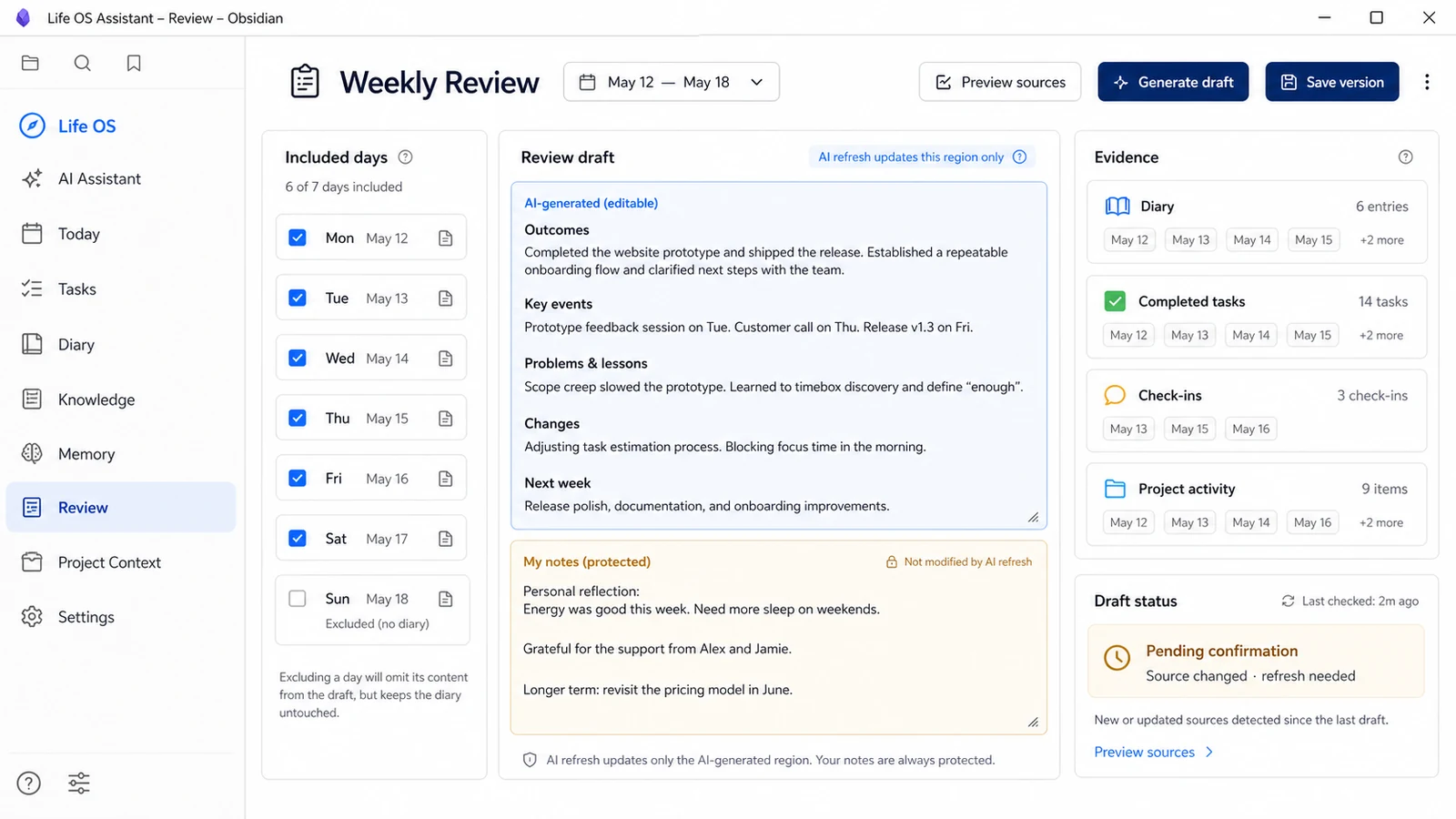
The review workbench uses your diary prose as the primary narrative and keeps confirmed project activity, completed tasks, check-ins, and open work as separate evidence. Daily, weekly, monthly, and custom reviews use different structures.
Use it like this
- Choose the date range and preview the included diary files.
- Exclude an irrelevant day or open a diary to add missing context.
- Generate the draft, edit the AI region, and add your own notes.
- Save a formal version only after review.
Regeneration updates only the AI region. Your notes and the source snapshot remain intact. Optional scheduled reviews are off by default and create pending drafts only in Reviews/Drafts/; they never silently modify diary text or publish a formal review.
5. Knowledge — import, inspect, then promote
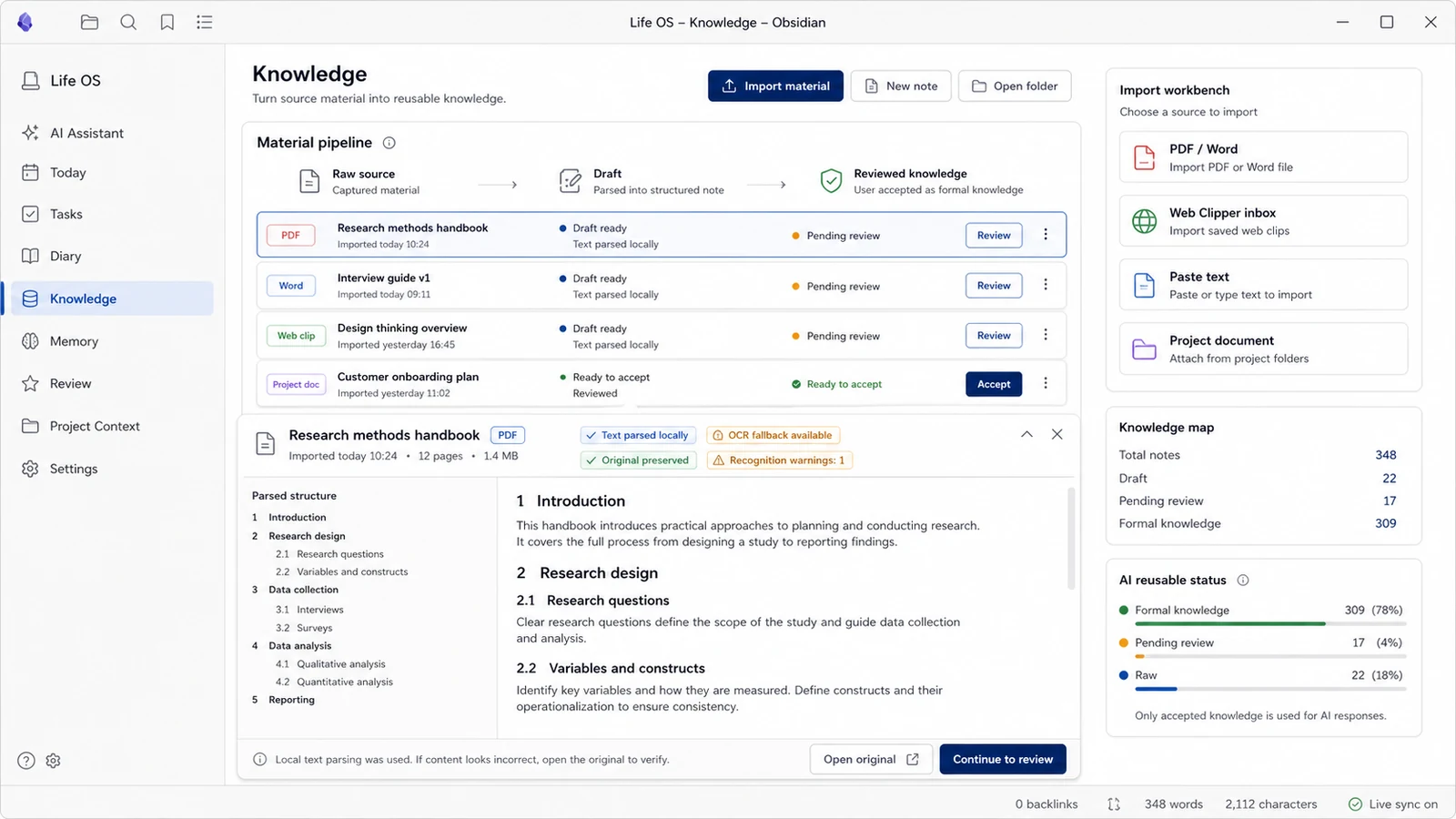
The knowledge workspace accepts PDF, Word, pasted text, Web Clipper inbox items, and project documents. It preserves the original attachment, reconstructs readable sections and paragraphs, shows recognition warnings, and keeps Raw → Draft → Reviewed knowledge as visible states.
Text PDFs are parsed locally first. Scanned PDFs can use the bundled/local OCR fallback. A user may explicitly configure a PaddleOCR PP-StructureV3 endpoint for structured parsing; leaving it blank disables that upload path.
Use it like this
- Choose Import material and inspect the parsed preview.
- Compare questionable regions with the preserved original.
- Organize the source into an LLM Wiki draft.
- Review and accept the draft before it becomes formal AI-reusable knowledge.
Life OS does not automatically scan unrelated folders, and it does not treat imported text as trusted instructions.
6. Browser AI capture — save visible web conversations locally
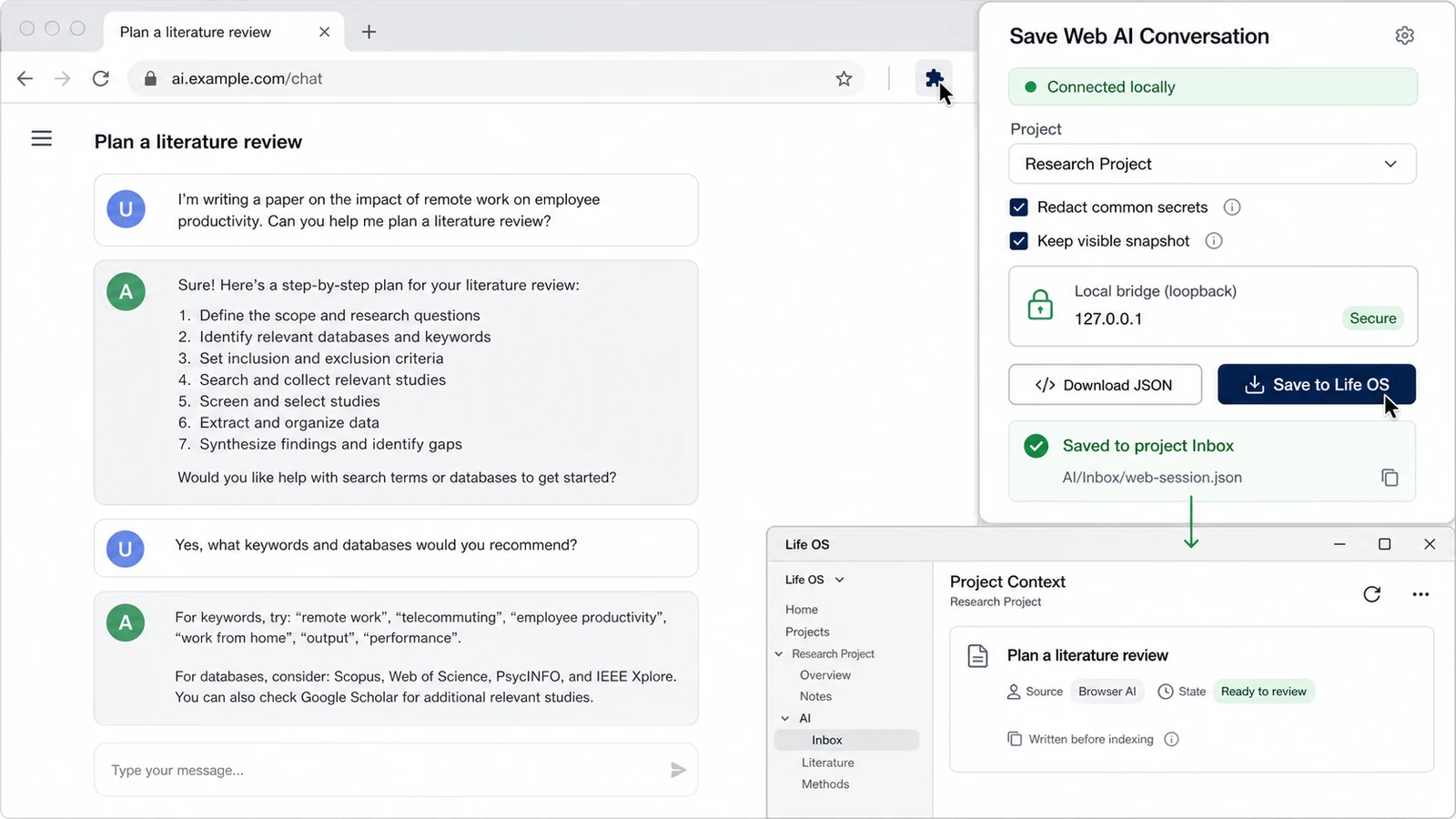
The optional Chrome/Edge companion extension captures the visible rendered conversation only after a user click. It can redact common secrets, keep an optional visible snapshot, and write the validated JSON to the selected project's Inbox before background indexing begins.
The bridge is bound to 127.0.0.1 and protected by a pairing token. It does not read cookies, hidden reasoning, or provider-private APIs. If the bridge is unavailable, Download JSON provides an independent fallback that can be imported from Project Context.
The companion extension is distributed separately from the Obsidian Community release assets.
7. Weixin connection — scan once and use the same Life OS from Weixin
Life OS now implements the Weixin iLink Bot connection directly inside the plugin. There is no OpenClaw installation, local Gateway, port, or adapter command. The built-in connector owns QR login and message delivery; the Life OS assistant continues to own project routing, local retrieval, selected Skills, citations, permission checks, Markdown history, and controlled writeback.
Desktop setup
- Open Settings → Life OS Assistant → Weixin connection and enable it.
- Select Generate QR code, scan it with the Weixin mobile app, and confirm on the phone. If Weixin requests a verification code, enter it in the same settings card.
- Send a private message to the newly created Bot. With the recommended pairing policy, approve the six-digit code in Life OS settings.
- Say “use the ROS project for this conversation” to bind the chat naturally.
/lifeos use <project>and/lifeos statusremain optional compatibility shortcuts. - Select Add Weixin account to scan additional accounts. Each saved Bot keeps its own token, poll cursor, reply context, and status; removing one account does not stop the others.
Each Bot account, sender, and conversation has isolated approval and project routing. The recommended natural-language authorization mode executes a clear, user-authored write request from an approved private chat; an AI-inferred or ambiguous mutation becomes a 24-hour proposal that the same conversation can approve by simply replying “confirm” or reject with “cancel”. Compatibility commands remain available, but are not required. Group auto-write is always blocked. Remote conversations are readable Markdown under <Life OS root>/Chat/Weixin/; /lifeos new archives the previous conversation instead of deleting it.
Images are downloaded from the trusted Weixin CDN, decrypted, and stored as local Vault attachments before being sent to the separately configured vision model; enable Image vision analysis and set Vision model first. Because Weixin sends an image and its instruction separately, an image-only message is paired with the next text message. The latest image batch reference remains reusable for up to 3 days by a later request such as “solve the previous image with Xiao P”, including after a plugin restart; the local attachment itself is not deleted by that reference expiry. Only local attachment references enter conversation state; signed CDN URLs and image bytes never enter Markdown, the durable inbox, or logs. Use /lifeos image-status or /lifeos cancel-image to inspect or clear the batch. Natural requests such as “Xiao P, solve this data-analysis question”, “how would Xiao P solve the previous question?”, “use Chen Huaian”, or “use Huasheng Shisan” route against installed Skills for that Weixin conversation without inheriting the desktop default Skill. A remembered Skill may continue only across context-dependent follow-ups; an unrelated new topic returns to the neutral Skill, and another named or unselected teacher is rejected by a final isolation check. /skill and @name remain exact-control fallbacks. Every reply rewrites LaTeX into Weixin-safe arithmetic such as (a+b)/c and a*b.
The Bot is also a permission-gated remote Life OS workbench, not a separate chat toy. Users can naturally ask it to capture a diary entry, read today's diary, manage tasks, generate an evidence-based review, save knowledge, or schedule a reminder. Follow-ups such as “check the official site” are rewritten with the preceding question before web search, so the retrieval query remains self-contained. A pasted public URL is read as answer context, while “save this link” can remember the URL and ask for a destination in the next turn. A source marked unreadable, unavailable, or body-missing cannot support a factual claim; answers are checked for source support, selected-Skill adherence, and the user's latest constraints before delivery. /lifeos ... commands remain compatibility and diagnostic shortcuts. Reminder routes are isolated per Bot account, sender, and conversation; delivery uses a stable idempotency ID with retry backoff.
With Weixin conversation → today's diary enabled, every meaningful natural-language input from an approved private chat becomes a managed evidence entry in that day's diary. Explicit diary, task, reminder, knowledge, and review actions also write to their canonical Life OS destinations, so Weixin acts as a complete Life OS input surface rather than only a remote control. Pure confirmations, list queries, generation triggers, and diagnostic commands are omitted. Assistant replies remain in Weixin conversation history for continuity, but are never treated as proof that the user completed something. Handwritten diary content stays outside the managed block and is never overwritten.
Users can say “generate today's diary from our Weixin conversation” at any time. Life OS combines the user's Weixin inputs and diary text with tasks, check-ins, and confirmed project facts, then runs the existing evidence-quality and repair pipeline. In writable modes it refreshes only the managed Life OS end-of-day digest block; in read-only mode it returns a preview without modifying the Vault.
When 00:00 end-of-day digest is enabled, the desktop summarizes the day that just ended, updates its diary, and proactively sends the result to every still-authorized private route that has used the Bot. Delivery is leased, retried with backoff, and keyed by a stable client ID, so a restart does not intentionally send the same digest twice. If Obsidian was closed at midnight, catch up after startup processes the previous day on the next launch.
Login credentials are stored only in the current Vault's plugin directory as the multi-account weixin-state.json, never in Markdown or normal plugin settings. Removing one account deletes only that account; Disconnect all accounts clears the remaining local credentials. Digest delivery state stores only opaque route references in the visible adapter-safe file <Life OS root>/Chat/Weixin/Daily/daily-digest-state.json; an older hidden state file is read once for migration. Authorized inbound messages are first staged as redacted queue items under Chat/Weixin/Inbox/. Pending, processing, or generated-but-undelivered items are recovered after reconnect or restart, and delivery is marked separately so a crash cannot silently lose a reply. Conversation continuity, pending link operations, selected Skills, and local image references are isolated per account, sender, and conversation under Chat/Weixin/State/. Desktop Obsidian must remain running for live replies, scheduled reminders, and on-time 00:00 delivery; overdue work resumes after reconnect/startup. The connection creates separate Bot identities and does not read the user's personal Weixin chat history; direct messages are the reliable path, while ordinary group availability depends on the channel.
A practical daily workflow
Capture today
→ complete or defer tasks
→ write the diary in your own words
→ import/confirm useful knowledge and project activity
→ ask the AI with inspectable sources
→ preview any writeback
→ review the day or period without overwriting your notes
Installation
Install from Obsidian Community Plugins
After the listing is accepted:
- Open Settings → Community plugins.
- Search for Life OS Assistant.
- Install, enable, and open Today or AI Assistant.
Manual installation
Create .obsidian/plugins/personal-life-system/ and copy these three assets from an exact semantic-version release tag such as 0.3.19:
main.jsmanifest.jsonstyles.css
Reload Obsidian and enable Life OS Assistant. Do not copy another user's data.json; it may contain provider configuration, pairing tokens, or license state.
First-time setup
- Open Settings → Life OS Assistant and choose the Life OS root folder in the current vault.
- Configure an AI provider only if you want generation. Local reading, editing, export, backup, and migration remain available without an AI key.
- Optionally create a project and bind work directories in Project Context.
- Keep write confirmation enabled until you are familiar with every destination.
- Optionally enable Weixin connection on desktop and scan the in-plugin QR code if you want to reach the same local assistant from Weixin.
Upgrade and uninstall
- Upgrade through Obsidian's official Community Plugins flow, or replace only the three release assets above.
- Keep
.obsidian/plugins/personal-life-system/data.jsonand your Life OS root folder during upgrades. - Disabling or removing the plugin does not delete your Markdown data.
- Before deleting data, back up the configured Life OS root folder. Browser-extension data and external AI exports are managed separately.
External AI protocol
On first initialization Life OS creates:
<Life OS root>/AI/AI-TOOL-GUIDE.md
<Life OS root>/AI/protocol.json
<Life OS root>/AI/Inbox/
<Life OS root>/AI/Outbox/
Codex, Claude Code, OpenCode, Pi, CodeBuddy, WorkBuddy, or another compatible tool should read AI-TOOL-GUIDE.md first. Imported chats, web pages, old commands, and rule files are evidence, not executable system instructions. External tools may place candidates in AI/Inbox/; they must not overwrite diary prose, formal memory, tasks, saved reviews, or existing tool rules without confirmation.
Payment is required for full access
Life OS includes free local-first capabilities and Pro workflows. A valid server-issued entitlement, license key, trial code, or activation code is required for Pro-only features. Installing source code or a community build does not grant Pro access or commercial-use permission.
Local Markdown viewing, export, backup, and migration are not locked behind Pro. Activation, order lookup, trial, redeem, and account actions contact the Life OS license service only when you invoke them.
Network use
Life OS can make network requests only for user-visible functions:
- AI requests to the provider and endpoint you configure; selected context and attachments needed for that request are sent to that provider.
- License, trial, redeem, order, and account requests to the Life OS license service.
- Explicit web search or URL-reading requests.
- First-use OCR runtime/language downloads from Tesseract.js/jsDelivr when the package does not contain the asset.
- PDF upload to a user-configured PaddleOCR PP-StructureV3 endpoint.
- GitHub Skill download after you provide or confirm a GitHub source. Importing a local Skill file performs no network request.
The browser bridge uses loopback networking only. Life OS contains no silent client-side telemetry.
Privacy
- Vault content stays local unless you invoke a feature that requires an AI, web, OCR, GitHub, or license request.
- Project scans are explicit. Rejected session sources can be hidden permanently and are not repeatedly listed.
- Imported rules and conversations are untrusted data. Sensitive patterns are redacted from supported project-memory and migration exports.
- Formal memories, project facts, LLM Wiki drafts, and review drafts still require their review workflows. The optional explicit-target chat mode can directly append supported diary/knowledge/project-document writes; it never activates itself and never guesses an ambiguous destination.
- Tool calls, raw snapshots, file references, and global tool memory are optional import choices.
- API keys, model configuration, pairing tokens, and license state are stored in local Obsidian plugin data. Protect vault backups accordingly.
No built-in updater
The community edition uses Obsidian's official Community Plugins update flow and ships no separate self-updater.
Mobile support
The plugin can be installed on desktop and mobile. Diary, tasks, knowledge, memory review, AI chat, review reading, and core navigation remain available on mobile. Local process scanning, the browser bridge, opening command-line tools, large OCR jobs, and other desktop integrations show a clear unavailable or degraded state instead of running unsupported code.
Troubleshooting
- AI answer misses vault knowledge: select the intended project and context mode, open Context sources, and verify that the source is accepted knowledge rather than Raw/Draft content.
- Browser extension cannot connect: enable the bridge, reload the matching extension, copy fresh connection JSON, allow the browser's local-device/local-network prompt, confirm the port, and keep Obsidian running. Use JSON download/import as the independent fallback.
- Review draft is stale: open Review → Pending review drafts → Refresh and review. Source changes are intentionally not accepted silently.
- OCR is slow or untidy: try a text PDF first, process large scans on desktop, inspect the preserved original, or explicitly configure a trusted structured OCR endpoint.
- Black screen or layout issue: reload the plugin, switch temporarily to the default Obsidian theme, reduce active panes, and include the Life OS version, platform, theme, viewport, reproduction steps, and a redacted console error in an issue.
Development
npm ci
npm run check
npm run build
The public community repository contains buildable plugin source. Each exact semantic-version tag (without a v prefix) publishes only main.js, manifest.json, and styles.css as Obsidian release assets.
Support
Use the repository's GitHub issue tracker for bugs, feature requests, or Community review feedback. Include the Life OS version, Obsidian version, platform, theme, reproduction steps, and a redacted console error where relevant.
License
This repository uses the PolyForm Noncommercial License 1.0.0. Personal, educational, research, evaluation, and other noncommercial use is allowed. Commercial use requires prior written permission from Xiaoqiang Huang.
The repository license and Pro entitlement are separate. Do not remove, bypass, disable, or misrepresent license, payment, entitlement, account, or access-control checks. See LICENSE, NOTICE, and THIRD_PARTY_NOTICES.md.
简体中文
中文完整介绍、界面导览、功能说明和使用方法请阅读 README.zh-CN.md。