Search...Search plugins and themes...
⌘K
Sign in
  • Get started
  • Download
  • Pricing
  • Enterprise
  • Account
  • Obsidian
  • Overview
  • Sync
  • Publish
  • Canvas
  • Mobile
  • Web Clipper
  • CLI
  • Learn
  • Help
  • Developers
  • Changelog
  • About
  • Roadmap
  • Blog
  • Resources
  • System status
  • License overview
  • Terms of service
  • Privacy policy
  • Security
  • Community
  • Plugins
  • Themes
  • Discord
  • Forum / 中文论坛
  • Merch store
  • Brand guidelines
Follow us
DiscordTwitterBlueskyThreadsMastodonYouTubeGitHub
© 2026 Obsidian

Paste Image As

jffaustjffaust227 downloads

Allows pasting images as JPEG or WebP format, with configurable quality settings.

  • Overview
  • Scorecard
  • Updates3

Header

This is a simple plugin for Obsidian that allows pasting images as JPEG or WebP.

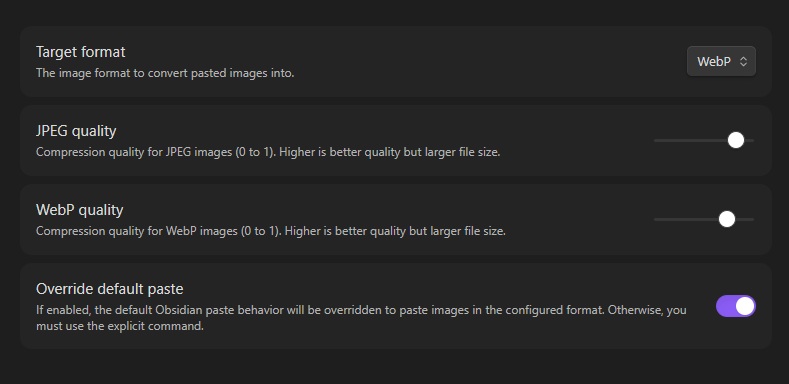
The plugin adds a command called Paste Image As: Configured format for which you can bind whatever hotkey you want.

You can choose your prefered format, level of quality and also override the default Obsidian paste in the plugin's settings:
Settings

Manually installing the plugin

  • Head over to the latest release and download main.js and manifest.json
  • Copy those files to your vault VaultFolder/.obsidian/plugins/paste-image-as/.
56%
HealthExcellent
ReviewRisks
About
Paste images as JPEG or WebP directly into your vault using the configurable "Paste Image As" command. Choose output format and compression quality and replace Obsidian's default paste behavior.
ImagesAttachmentsCommands
Details
Current version
0.1.3
Last updated
3 months ago
Created
3 months ago
Updates
3 releases
Downloads
227
Compatible with
Obsidian 0.15.0+
Platforms
Desktop, Mobile
License
GPL-3.0
Report bugRequest featureReport plugin
Sponsor
Ko-fi
Author
jffaustjffaust
github.com/jffaust
GitHubjffaust
  1. Community
  2. Plugins
  3. Images
  4. Paste Image As

Related plugins

Image Context Menus

Image context menus (mostly on right click): Copy to clipboard, Open in default app, Show in system explorer, Reveal file in navigation, Open in new tab.

Ink

Hand write or draw directly between paragraphs using a digital pen, stylus, or Apple pencil.

Local Images Plus

A reincarnation of Local Images to download images in Markdown notes to local storage.

Attachment Management

Customize attachment path, auto-rename attachments, etc.

Paste image rename

Rename image after pasting, support name pattern and auto renaming.

Image auto upload

Upload images from your clipboard by PicGo.

Imgur

Upload images from your clipboard to imgur.com and embeds uploaded image to your note.

Unofficial Supernote by Ratta Integration

View Supernote notes, generate markdown from note and capture screen mirror.

Image Manager

Insert, rename, and sort images within your notes.

Quick Switcher++

Enhanced Quick Switcher, search open panels, and symbols.