Parallel Translator
 liang42 downloads
Scientific Markdown translation, reading assistance, and minimal bilingual source synchronization.
- Overview
- Scorecard
- Updates1
English
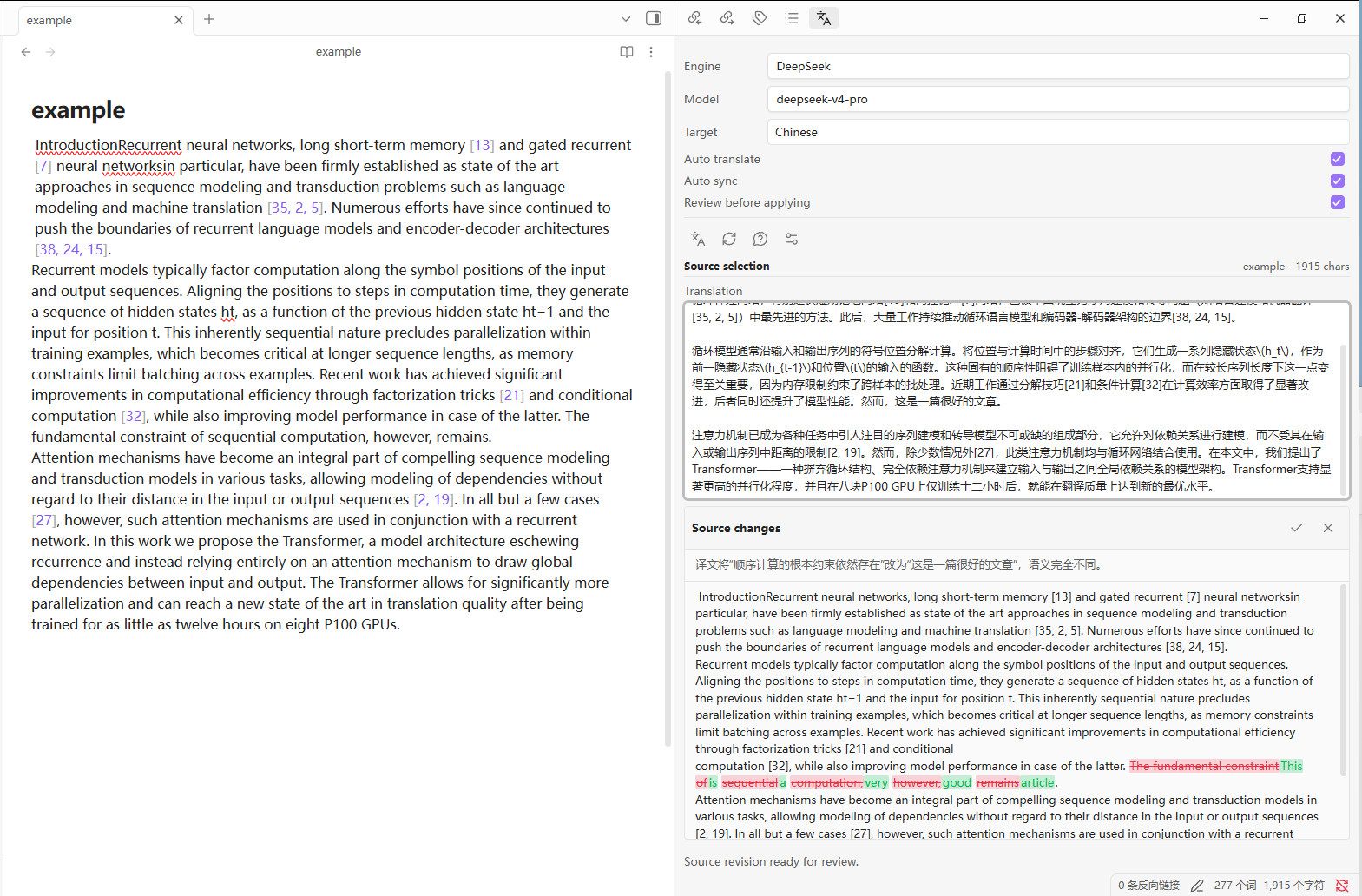
Parallel Translator is an Obsidian two-column translation plugin specifically designed for scientific research papers and technical Markdown. It is mainly aimed at non-native English researchers to facilitate the writing of scientific papers. It will display the translation of the currently selected text on the sidebar. You can directly modify the translation and let the plugin synchronize the changes back to the original language paragraph based on the modified meaning, following the principle of minimal alteration.
Features
- Selection translation in Markdown editing and reading views.
- Atomic reading-view write-back when rendered text maps uniquely to Markdown.
- Minimal reverse synchronization from an edited translation to the source language.
- Optional review with red deletions, green additions, and multiple ambiguity candidates.
- AI reading explanations and follow-up questions for a selection or clicked reading block.
- Scientific terminology mappings and nearby section context.
- Protection and validation for equations, citations, code, URLs, DOI strings, and Obsidian links.
- OpenAI-compatible providers: DeepSeek, OpenAI, Kimi, Qwen, OpenRouter, and custom endpoints.
- Fast model switching. A DeepSeek account can currently expose
deepseek-v4-flash,deepseek-v4-pro, anddeepseek-v4-flash-vision-exp.
Usage
- Open Settings -> Parallel Translator and configure an engine, model, and API key.
- Open the translator from the ribbon or Command palette.
- Select text in a Markdown note. The translation appears in the side panel.
- Edit the translation. With Auto sync enabled, the source-language passage is revised.
- Enable Review before applying to inspect changes. If the edit is ambiguous, choose a candidate before applying it.
- Use the question icon to explain the selection. In reading view, you may instead click a paragraph, heading, list item, quote, table cell, or code block.
Reading-view write-back is intentionally rejected when the selected rendered text does not map uniquely to the Markdown source. PDF and Canvas content can be analyzed but is not rewritten.
Scientific terminology
Add one mapping per line:
Landau free energy => 朗道自由能
first-principles calculation => 第一性原理计算
Only terms present in the current selection are sent to the provider.
Network use and privacy
This plugin requires network access to call the translation provider selected by the user. It does not include telemetry or advertisements. The active provider receives the selected passage, applicable terminology, bounded nearby context, and AI-reading questions. Reverse synchronization also sends the original source, baseline translation, and edited translation. Review the privacy policy of your chosen provider before use.
API keys are stored locally by Obsidian in the plugin's data.json. They are not encrypted. This repository excludes data.json; never commit it, attach it to a release, or include it in a bug report.
Installation
Community plugin store
After the plugin is accepted into the Obsidian community catalog, install it from Settings -> Community plugins.
Manual release installation
Download main.js, manifest.json, and styles.css from one GitHub Release and place them in:
<vault>/.obsidian/plugins/parallel-translator/
Restart Obsidian, then enable Parallel Translator.
BRAT
Add the GitHub repository URL to BRAT after the repository has at least one release whose tag exactly matches manifest.json.
Development
Requires Node.js 20 or newer.
npm install
npm run dev
npm run check
npm run build bundles src/main.js into the release file main.js.
Release
- Update the version with
npm version patch,minor, ormajor. - Push the commit and matching tag.
- GitHub Actions builds and tests the plugin, attests the release files, and creates a draft release.
- Review and publish the draft release.
The release tag must exactly match the version in manifest.json.
License
中文
Parallel Translator 是一款面向科研论文和技术 Markdown 的 Obsidian 双栏翻译插件。它主要面向非母语英语科研者方便写作科研论文,会在侧边栏显示当前选中文本的译文。你可以直接修改译文,并让插件依据修改后的含义,以最小改动原则把变化同步回原语言段落。
主要功能
- 支持 Markdown 编辑视图和阅读视图中的选区翻译。
- 在阅读视图中安全定位选区,并以原子方式写回源文件。
- 修改译文后,将语义变化反向同步到原文,而不是把目标语言直接写进原文。
- 可选 Review 模式,以红色显示删除、绿色显示增加,并在存在歧义时提供多个候选版本。
- 提供选区解释、阅读理解和追问功能。
- 支持科研术语表和附近段落上下文。
- 保护公式、引用、代码、URL、DOI 和 Obsidian 链接。
- 支持 DeepSeek、OpenAI、Kimi、Qwen、OpenRouter 以及兼容 OpenAI 接口的自定义服务。
使用方法
- 打开 设置 → Parallel Translator,选择翻译引擎和模型,并填写对应服务商的 API Key。
- 通过左侧功能区图标或命令面板打开翻译侧栏。
- 在 Markdown 笔记中选择需要翻译的文本,译文会显示在侧栏中。
- 在译文框中修改内容。启用 Auto sync 后,插件会把语义变化同步回原文。
- 启用 Review before applying 可以在写回前检查增加、删除和歧义候选。
- 点击问号按钮可以解释当前选区;在阅读视图中也可以点击段落、标题、列表、引用或表格单元格进行理解和提问。
阅读视图中的文本只有在能够唯一映射到 Markdown 源文时才会被写回。PDF 和 Canvas 内容可以用于分析,但不会被插件修改。
网络与隐私
插件需要联网调用你所选择的翻译服务,不包含遥测或广告。翻译服务可能收到当前选区、匹配的术语、有限的附近上下文以及阅读问题;执行反向同步时,还会发送原文、初始译文和修改后的译文。使用前请阅读对应服务商的隐私政策。
API Key 由 Obsidian 保存在插件目录的 data.json 中,并未加密。仓库和发布包均排除该文件,请勿将其提交到 GitHub、附加到 Release 或放入错误报告。
安装
从 GitHub Releases 下载同一版本的 main.js、manifest.json 和 styles.css,放入:
<你的仓库>/.obsidian/plugins/parallel-translator/
重启 Obsidian,然后在 设置 → 第三方插件 中启用 Parallel Translator。也可以通过 BRAT 添加本仓库地址进行安装和更新,目前已经发布在Obsidian的官方商店中。