Pahlavan
 Saeed Ghorbani35 downloads
Plan, log and review your training in your own notes: today's session, how ready you feel, your week, an eating plan and daily habits with reminders, with an optional AI coach in Claude Code.
- Overview
- Scorecard
- Updates4

Pahlavan
A science-based AI fitness coach that lives in your Obsidian vault. Pahlavan is an Obsidian plugin for strength training, workout logging and daily habits, with an AI coach in Claude Code that plans your training from your own goals, time and equipment, and looks back with you every week. Everything sits in plain files in your vault, so your data stays yours.

Shown with Isfahan Look, my free plugin for Obsidian's look: Persian tilework, palettes that follow the sun and a book-like page. Pahlavan works with any theme.
[!NOTE] Pahlavan is a free beta. I use it every day, and it may still change. Bug reports and ideas are welcome in GitHub issues.
The name is Persian for a champion, the wrestlers and heroes of the old stories. The logo's two meels are the clubs pahlavans swing in the zurkhaneh, the traditional house of strength.
What it does
Pahlavan has two parts that work on the same files: a plugin, the screens you see in Obsidian, and a coach you talk to in Claude Code. Under both sits one engine. The coach designs your plan; the engine does the numbers and checks the plan against the safety rules and the evidence.
Today: what to do now
The session to do, with how to do each movement and why it's in your plan, the sets and reps to aim for, swaps when a lift doesn't suit you today, and a checklist that ticks itself when you log. Around it: how ready you feel from the morning check-in, what's due today, and your week so far.
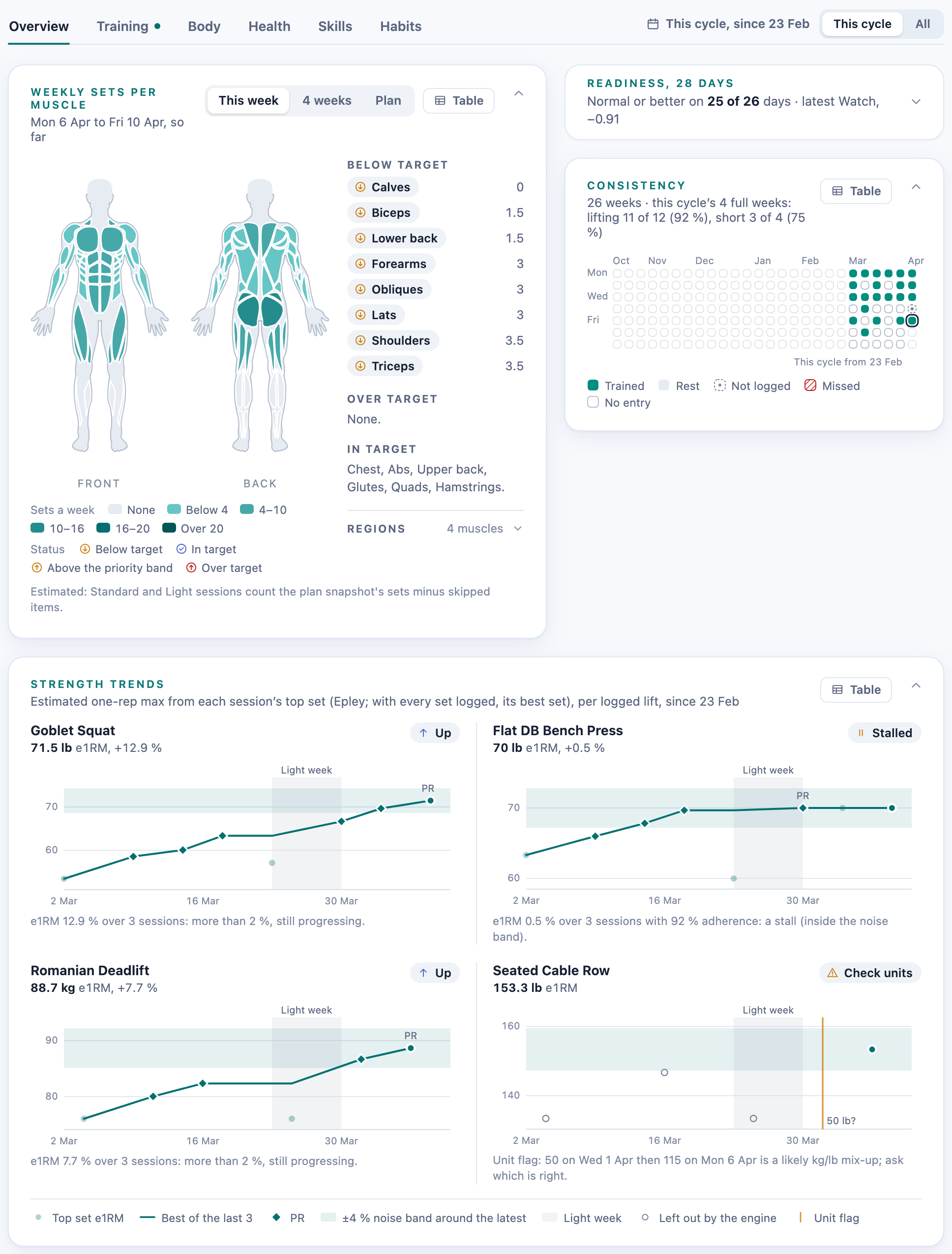
Progress: how it's going
A body map of the sets each muscle got this week against its target (split into direct sets and half credit from helping lifts, with the parts of a muscle that training studies support, such as the side delts or the hamstrings at the knee), your strength trend for each logged lift, your consistency over the months, your weight trend, your body record and progress photos.
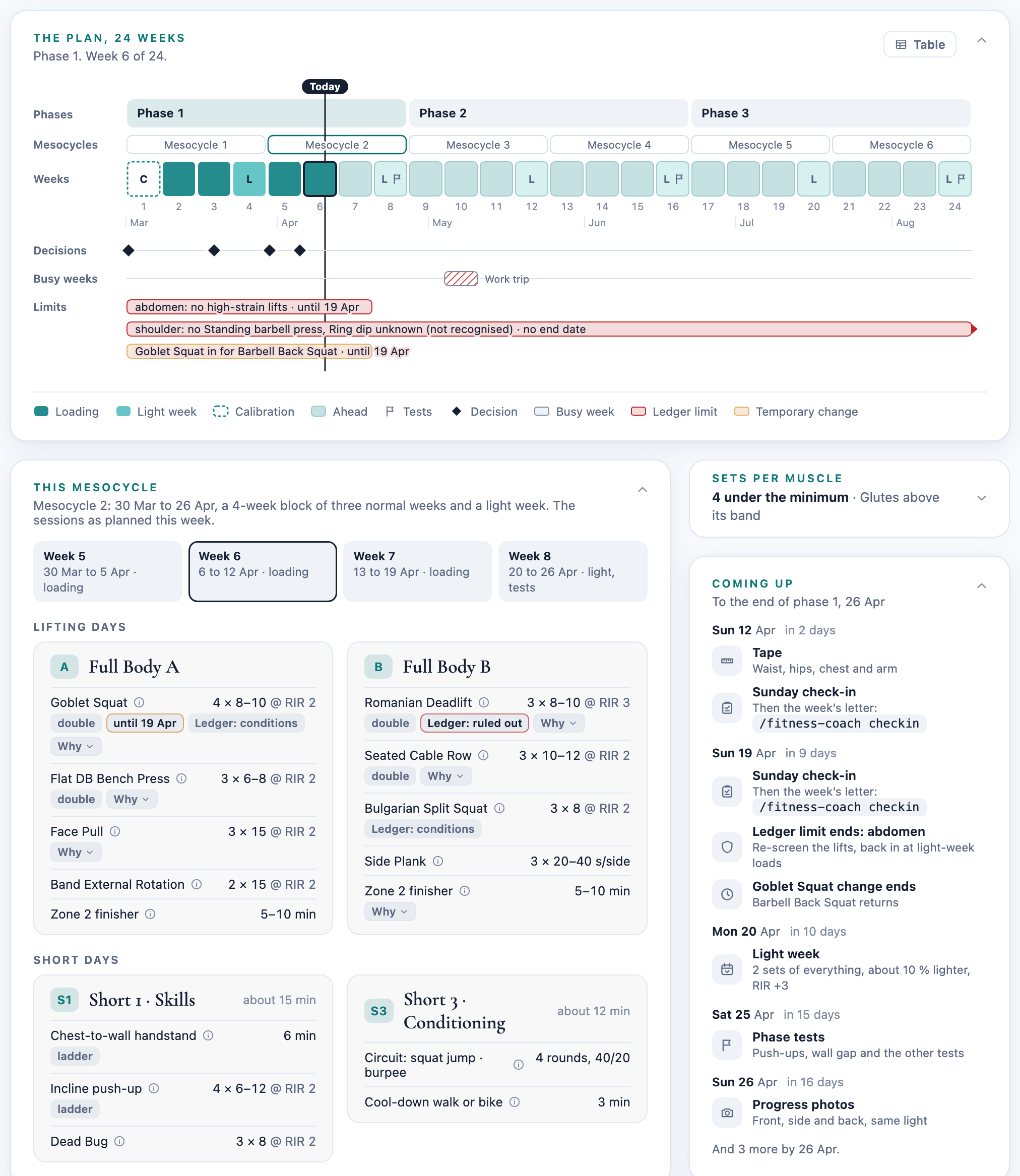
Plan: 24 weeks, block by block, with its reasons
Your plan as phases, each made of two mesocycles that end in a light week (by default 4-week blocks of three loading weeks and a light week, so 8-week phases), with tests at the end of each phase. Below it, this block's sessions with their sets, reps and effort, the plan's standing rules (how each lift progresses, when the light weeks fall, what a bad day does), what's coming up, and the reason behind every exercise.
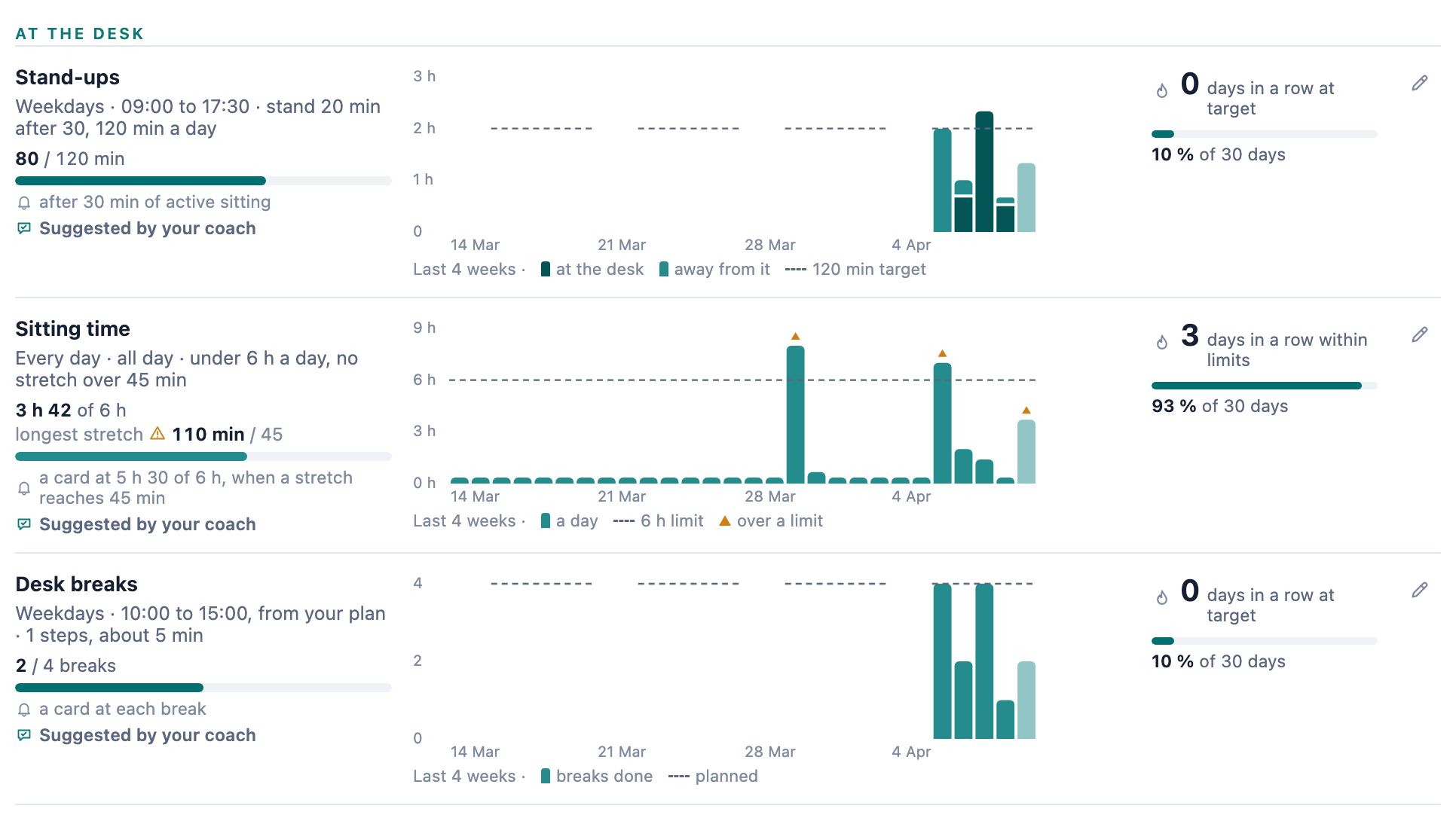
Habits: the small daily things
Supplements, water, protein and your own ticks, each with its reminder and its history. For desk work there are stand-ups, sitting time and desk breaks, with a chart of each day against your target.
The coach: the thinking the screens can't do
The /fitness-coach skill in Claude Code:
- Intake: a safety screen, a short interview and an optional body assessment from photos.
- Plan: the coach designs your plan from your answers and the evidence: at least three options, each measured and checked by the engine, with the evidence and its grade for each choice, and the plan's standing rules written with it.
- Sunday check-in: reads your week and writes you a short letter with one thing to focus on.
- Reviews, progress reports, an eating plan and habit suggestions, when you want them.
- Logging and questions: tell it what you did, or ask how things are going.
The coach in action
Recorded from real sessions in a demo vault, with a made-up athlete: Sam, 34, at a desk all day, three gym days a week. Everything the coach says is its own words; long answers are cut where you see "…", and the notes between rounds (⋯ ⋯) are mine.
Intake: a safety screen, goals, priority muscles and a movement self-check, then a profile the engine has checked.
Plan: the open questions first (a movement finding, which priorities come first, the start date, what could derail it), then three candidate plans the coach designed and checked with the engine, and the plan written on a yes.
Eating plan: a screen first, then a plan built around the athlete's own meals and day.
Built on research, and honest about it
The coach's rules live in one file, each with where it comes from: 98 linked sources, most of them from 2020 or later, from meta-analyses and reviews to trials. The rules that shape a plan (volume per muscle, effort in reps in reserve, load, rest, exercise order, progression, light weeks, cardio alongside lifting) were checked against 62 sources, each one read. Rules are graded: strong (consistent meta-analyses), moderate or weak, and a rule that's only a sensible default is called a heuristic, not dressed up as science. When the coach proposes your plan, each major choice comes with its evidence and its grade.
- The evidence is data. The engine holds the graded rules and the exercises to choose from, and the coach designs from them; the numbers the engine checks a plan with are the ones it gives the coach, and a self-check, run each time the coach is built, fails when its docs say otherwise.
- Muscle regions only where studies show them. Parts of a muscle are modelled only where MRI and ultrasound training studies support them (none is graded strong). Popular ideas without that support, such as the inner chest or the VMO, are explained with the nearest supported option, not planned for, and a lagging part is your word, never read from a photo.
- The engine checks; it doesn't decide. A movement your injury limits rule out always blocks a plan. Going outside an evidence range is allowed only with a reason you can read, and anything the coach takes from outside Pahlavan's library is labelled so and needs your yes.
How it works

The plugin and the coach read and write the same files in your vault, and both get their numbers from one engine, so a number on a screen and a number in a letter always agree. Every number comes with its reason: why this weight, why a light week now, why this exercise is in your plan. The coach designs the plan and its standing rules; the engine calculates, checks every plan before it is written, and follows the coach's rules, naming the rule behind each target.
What you need
- Obsidian on a computer, version 1.7.2 or later. Pahlavan is desktop only, built and tested on macOS. Sitting time from your keyboard and mouse, and turning dropped photos into JPEG, work only on a Mac.
- For the coach: Claude Code, which needs a Claude plan that includes it, and Node.js 18 or later.
Install
- In Obsidian, open Settings → Community plugins, turn them on if you haven't, choose Browse, search for Pahlavan, then Install and Enable.
- Or by hand: download
main.js,manifest.jsonandstyles.cssfrom the latest release into a folder namedpahlavaninside your vault's.obsidian/plugins/, then enable it under Community plugins.
Your first run
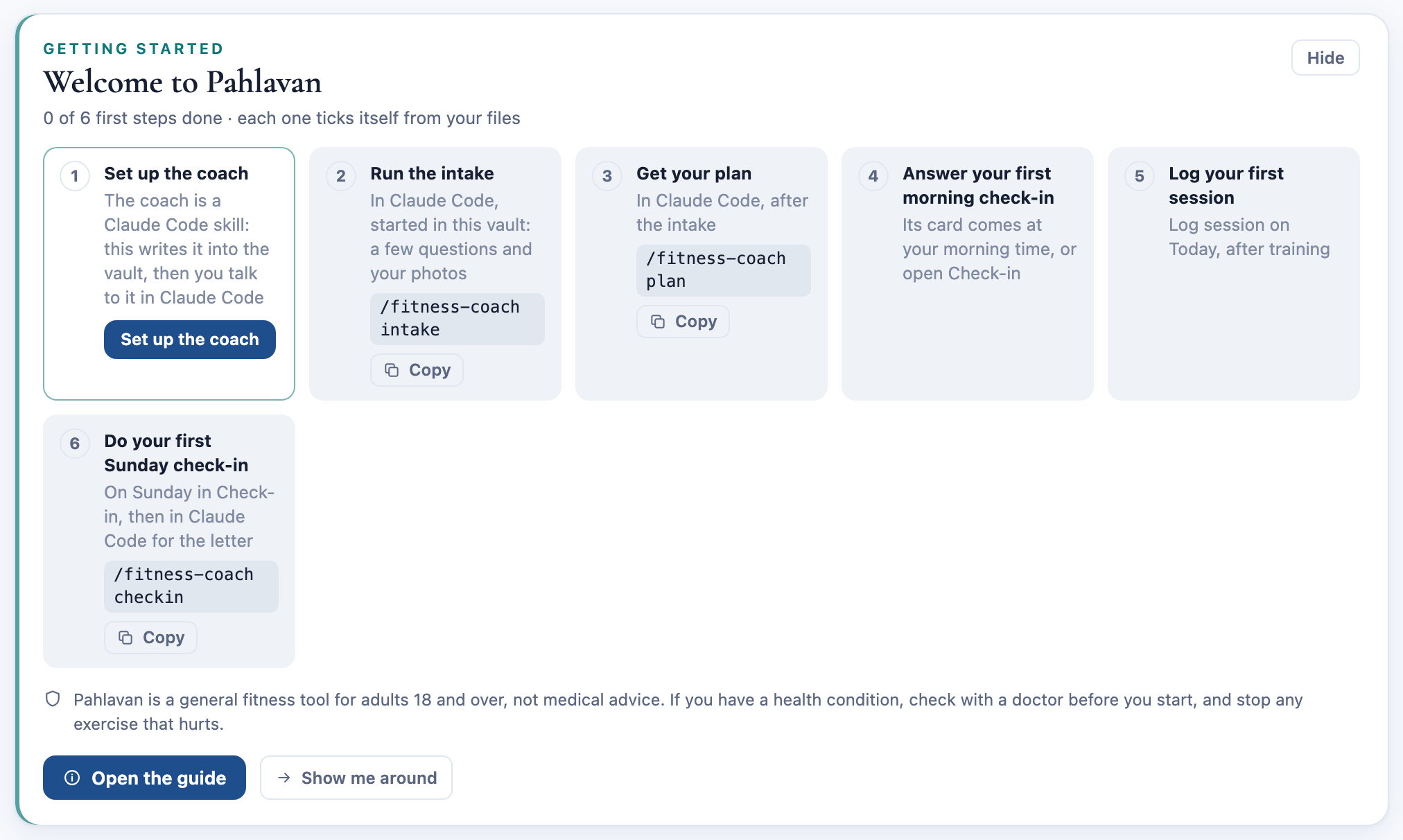
- Open Pahlavan from the ribbon or the command palette (Pahlavan: Open). Today shows a welcome card with your first steps.
- Set up the coach: the first step's button copies the coach into your vault (
.claude/skills/fitness-coach/). It's also under Settings → Pahlavan → Coach. - Open Claude Code in your vault's folder and type
/fitness-coach intake. Answer its questions; it writes your profile. - Type
/fitness-coach plan. The coach designs your plan and, once you say yes, writes it. Today shows your first session.
Each step ticks itself once its file is there. The user guide walks through every screen, and the exercise catalogue lists the 244 movements the coach chooses from, with how to do each (the command Pahlavan: Write the exercise catalogue puts the same list in your vault).
Questions
Do I need Claude Code? The screens open without it, but your plan comes from the coach's intake and plan steps, so you need it to use Pahlavan fully.
What does it cost? Pahlavan is free during the beta. 1.0 will be paid, and everyone who installs before 1.0 keeps it free: Pahlavan records the day it was first installed in your vault (nothing leaves your Mac), and its Settings tab shows it. Claude Code comes with Anthropic's Claude plans, which are separate from Pahlavan.
Where does my data go? Into plain JSON and Markdown files in your vault, nowhere else. The plugin makes no network requests. When you talk to the coach, Claude Code sends your messages and the files it reads to Anthropic under your own account, as it does for anything you do in Claude Code.
Does it work on my phone? No, Pahlavan is desktop only. On Windows and Linux the screens should work, but they aren't tested there yet.
Is it medical advice? No. See Safety below.
Safety
Pahlavan is a general fitness tool for adults 18 and over, not medical advice. If you have a health condition, check with a doctor before you start, and stop any exercise that hurts.
The coach screens for risks before it plans anything. It doesn't coach anyone under 18, refers pregnancy and the warning signs it asks about to a clinician, and never diagnoses.
Privacy and what Pahlavan touches
- No network. The plugin makes no network requests of its own. No analytics, no telemetry, no ads.
- The coach runs in Claude Code. When you talk to the coach, Claude Code sends your messages and the files it reads to Anthropic under your own Claude account, as it does for anything you do in Claude Code. Pahlavan adds no other service.
- An account for full use. The coach needs Claude Code, and Claude Code needs a Claude plan that includes it. Pahlavan itself is free.
- Programs it runs, outside your vault.
- Set up the coach looks for Node.js by running
node --version: from Obsidian's search path, then Homebrew's and Volta's usual folders, then your login shell. - On a Mac it runs
ioregto read how long the keyboard and mouse have been idle, for sitting time. It never sees what you type. - It runs
sipsto turn photos you drop in (HEIC and others) into JPEG, at most 1600 pixels on the long side. It copies the photo into a temporary folder, converts it there, and removes the folder.
- Set up the coach looks for Node.js by running
- Files it writes, all inside your vault.
- Your plan, log, body record and habit check-ins:
plan-data.json,fitness-log-data.json,body-data.jsonandhabits-data.json, in your fitness folder (Fitness/unless you choose another in the settings). - The coach's files in
Fitness/Coach/: your profile, check-ins, letters, decisions, eating plan and tracked items. Sitting time is kept per computer inFitness/Coach/sitting.json, under each computer's name. - Progress photos in
Fitness/Progress Photos/. - The coach skill in
.claude/skills/fitness-coach/, when you set it up. - Its own settings, in
.obsidian/plugins/pahlavan/.
- Your plan, log, body record and habit check-ins:
Support
Pahlavan is free during the beta, and stays free for everyone who installs before 1.0. If it helps you, you can buy me a coffee on Ko-fi. Bugs and ideas go in GitHub issues.
License
Copyright 2026 Saeed Ghorbani. Pahlavan is source-available under the Elastic License 2.0: you may use it, read its code and change it. You may not offer it to others as a hosted or managed service, get around or remove a licence key, or remove its licence and copyright notices. It's free during the beta.
The Progress body map draws the outlines and muscle shapes of react-native-body-highlighter, in plugin/src/ui/body-map.ts, under its MIT License:
MIT License. Copyright (c) 2022 ELABBASSI Hicham. Permission is hereby granted, free of charge, to any person obtaining a copy of this software and associated documentation files (the "Software"), to deal in the Software without restriction, including without limitation the rights to use, copy, modify, merge, publish, distribute, sublicense, and/or sell copies of the Software, and to permit persons to whom the Software is furnished to do so, subject to the following conditions: The above copyright notice and this permission notice shall be included in all copies or substantial portions of the Software. THE SOFTWARE IS PROVIDED "AS IS", WITHOUT WARRANTY OF ANY KIND, EXPRESS OR IMPLIED, INCLUDING BUT NOT LIMITED TO THE WARRANTIES OF MERCHANTABILITY, FITNESS FOR A PARTICULAR PURPOSE AND NONINFRINGEMENT. IN NO EVENT SHALL THE AUTHORS OR COPYRIGHT HOLDERS BE LIABLE FOR ANY CLAIM, DAMAGES OR OTHER LIABILITY, WHETHER IN AN ACTION OF CONTRACT, TORT OR OTHERWISE, ARISING FROM, OUT OF OR IN CONNECTION WITH THE SOFTWARE OR THE USE OR OTHER DEALINGS IN THE SOFTWARE.
For developers
How the engine, the plugin and the coach fit together, and how to build and test them: docs/development.md. Release notes: CHANGELOG.md.