packUp4AI
 shuxueshuxue1k downloads
Collect related notes based on links/backlinks to provide focused context for external AI chatbots. Explore note relationships visually and export the bundle.
- Overview
- Scorecard
- Updates9
Collect related notes based on links/backlinks to provide focused context for external AI chatbots. Explore note relationships visually and export the bundle.
Developed by Jeffry.
🤔 What it Does
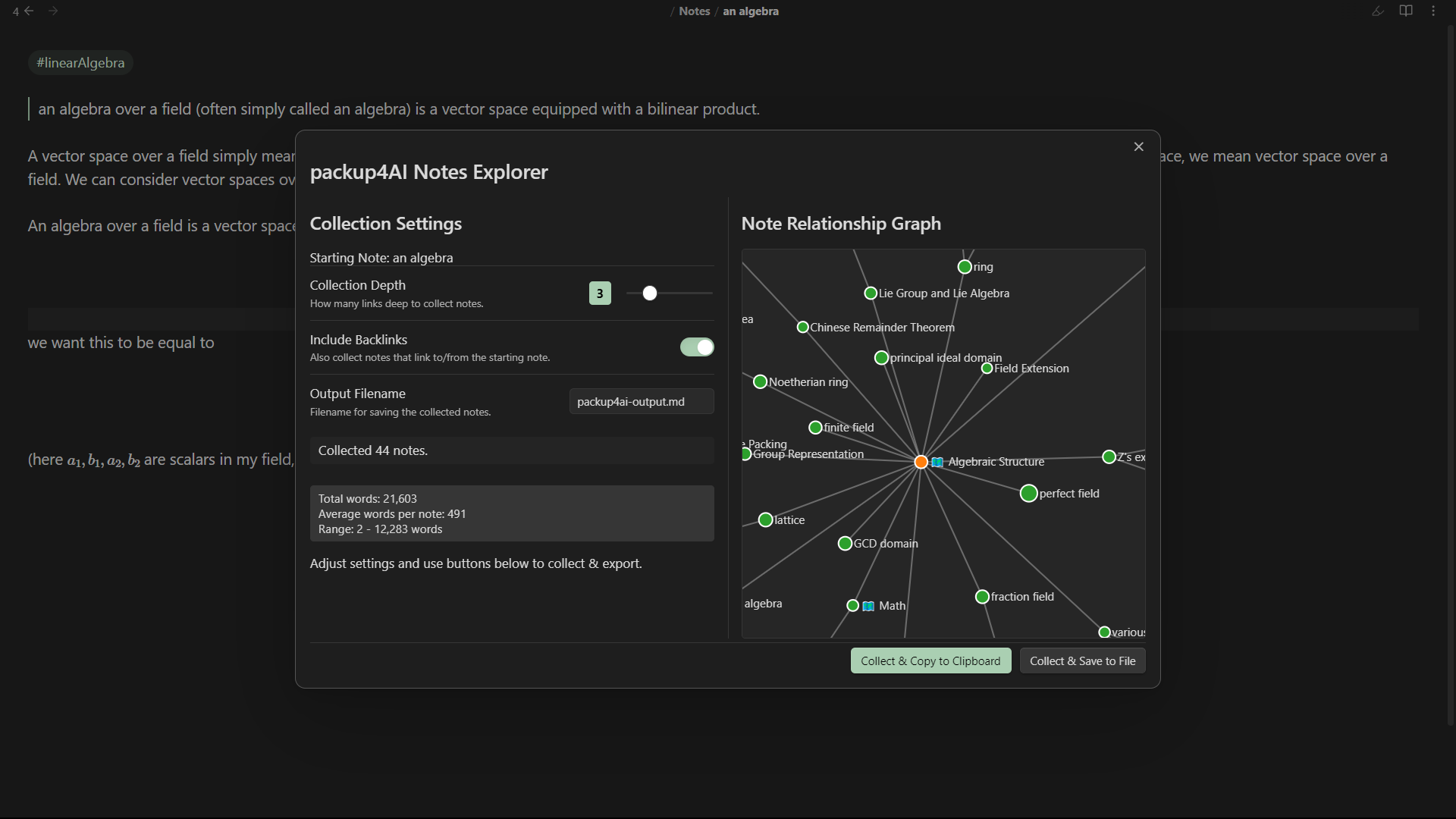
When interacting with Large Language Models (LLMs) or AI chatbots, providing relevant context is crucial for getting good results. packUp4AI helps you gather this context directly from your Obsidian vault.
Starting from your currently open note, it:
- Collects: Finds notes linked from and optionally to your starting note, going out to a specified number of "hops" (Collection Depth).
- Visualizes: Displays an interactive graph showing the relationships between the collected notes. Nodes are sized based on their word count.
- Stats: Shows you how many notes were collected and provides basic word count statistics (total, average, range).
- Exports: Allows you to easily copy this context bundle to your clipboard or save it as a new Markdown file in your vault.
This makes it much easier to copy-paste relevant information from your vault into your favorite AI tool.
✨ Features
- Interactive Relationship Graph: Uses D3.js (included locally) to visualize how collected notes are connected.
- Configurable Collection:
- Set Collection Depth (1-10 hops).
- Toggle Include Backlinks.
- Specify Excluded Files/Folders.
- Set the Output Filename for saving.
- Real-time Updates: See the number of collected notes and word count update as you adjust settings.
- Word Count Statistics: Get a quick overview of the collected content size.
- Node Sizing: Graph nodes are sized proportionally to their word count.
- Easy Export:
- Copy to Clipboard: Get the formatted bundle ready to paste.
- Save to File: Create a Markdown file containing the context bundle.
- Quick Access: Open via Command Palette.
- Settings Tab: Configure default values for depth, backlinks, output filename, and exclusions.
🚀 How to Use
- Open a Note: Navigate to the note you want to use as the starting point for context collection.
- Activate the Plugin:
- Open the Command Palette (
Ctrl+PorCmd+P). - Search for and select
packUp4AI: Open packup4AI Notes.
- Open the Command Palette (
- Use the Modal:
- The
packUp4AI Notes Explorermodal will appear. - Left Pane: Adjust
Collection Depth,Include Backlinks, andOutput Filename. You'll see the collection status and word count update here. - Right Pane: See the interactive relationship graph of the collected notes. Hover over nodes for titles and word counts. Click nodes to open them in Obsidian.
- Bottom Buttons:
Collect & Copy to Clipboard: Gathers the notes based on current settings and copies the formatted bundle to your clipboard.Collect & Save to File: Gathers the notes and saves the bundle to the specifiedOutput Filenamein your vault.
- The
HealthGood
ReviewPassed
About
Collect linked and optionally backlinking notes from the open file across multiple hops to assemble a focused context bundle for AI chatbots. Visualize relationships in an interactive graph sized by word count, view stats, and export the bundle to clipboard or Markdown.Details
Current version
1.2.4
Last updated
11 months ago
Created
Last year
Updates
9 releases
Downloads
1k
Compatible with
Obsidian 1.6.7+
Platforms
Desktop, Mobile
License
MIT