Search...Search plugins and themes...
⌘K
Sign in
  • Get started
  • Download
  • Pricing
  • Enterprise
  • Account
  • Obsidian
  • Overview
  • Sync
  • Publish
  • Canvas
  • Mobile
  • Web Clipper
  • CLI
  • Learn
  • Help
  • Developers
  • Changelog
  • About
  • Roadmap
  • Blog
  • Resources
  • System status
  • License overview
  • Terms of service
  • Privacy policy
  • Security
  • Community
  • Plugins
  • Themes
  • Discord
  • Forum / 中文论坛
  • Merch store
  • Brand guidelines
Follow us
DiscordTwitterBlueskyThreadsMastodonYouTubeGitHub
© 2026 Obsidian

Ownsync

Mrithyunjay KMrithyunjay K10 downloads

End-to-end encrypted, real-time sync between your own devices through your own Cloudflare Worker.

Add to Obsidian
Ownsync screenshot
Ownsync screenshot
Ownsync screenshot
Ownsync screenshot
Ownsync screenshot
Ownsync screenshot
  • Overview
  • Scorecard
  • Updates5

Real-time sync for Obsidian, end-to-end encrypted, through a server you own.

The Ownsync dashboard, and the page a phone opens to join

I wanted my notes on my laptop and my phone, in sync as I type, without handing them to anyone. Ownsync runs on a free Cloudflare Worker in your own account. Every edit is encrypted on your device before it leaves, so the server only ever holds scrambled data. It couldn't read a note if it tried.

Work in progress. Ownsync is very new, and I'm the only one testing it so far, on my own vault and phone. Expect rough edges, and keep a backup of your vault while you try it.

  • Live. Edits show up on your other devices in under a second.
  • Yours. Only your devices hold the key. No account with me, nothing collected.
  • Offline first. Edit anywhere. It merges when you're back.
  • Tested hard. 500,000 random crashes, renames and reconnects, and not one note lost. Results.
  • Free. Runs on Cloudflare's free plan. Open source.
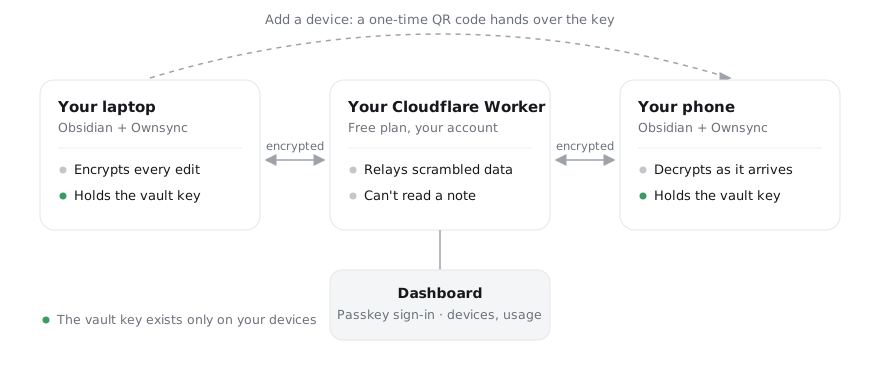
How Ownsync works: your devices encrypt and hold the key; your Cloudflare Worker only relays scrambled data

Get started

Deploy to Cloudflare

  1. Deploy. Press the button and choose a setup key.
  2. Sign in. Open your server's address within 10 minutes, enter the setup key, and add a passkey.
  3. Connect. Install Ownsync from Obsidian's community plugins, then press Open in Obsidian on your dashboard.

To add your phone, scan the QR code under Settings → Ownsync → Add a device. The setup guide has every step, with screenshots.

Good to know

  • It needs a free Cloudflare account, and the free plan is plenty for one person's notes. For more, Workers Paid is $5 a month. Cost and limits.
  • The plugin only talks to your server. It reads every file in your vault to sync it, and uses the clipboard only when you press Copy. No telemetry, no ads.
  • Your server sees when your devices connect and how much is stored, never what you wrote. What it can and can't see.
  • I built Ownsync with AI. The calls on what it should be, and how it keeps notes safe, were mine. How it was built.

Setup guide · Security · Cost and limits · Updating · Stress test results · How it was built · Design notes · Protocol · Development

MIT © humanglitch191

HealthExcellent
ReviewSatisfactory
About
Sync notes in real time across devices with end-to-end encryption using a Cloudflare Worker you control. Encrypt every edit on-device so the server only stores scrambled data, enable offline-first editing with automatic merges and sub-second propagation. Run on a free Cloudflare Worker, open-source and no telemetry.
SyncingIntegrations
Details
Current version
0.1.4
Last updated
Yesterday
Created
Yesterday
Updates
5 releases
Downloads
10
Compatible with
Obsidian 1.11.4+
Platforms
Desktop, Mobile
License
MIT
Report bugRequest featureReport plugin
Author
Mrithyunjay KMrithyunjay Khumanglitch191
mithun.zip/
GitHubhumanglitch191
ownsync.dev
  1. Community
  2. Plugins
  3. Syncing
  4. Ownsync

Related plugins

Self-hosted LiveSync

Sync vaults securely to self-hosted servers or WEBRTC.

Fast Note Sync

Real-time sync of your vaults across server, mobile, and web; shareable with anyone; supports REST and MCP integrations to build your personal AI knowledge base.

Google Drive Sync

Syncs a vault into Google Drive for cross-platform use (works for iOS).

Sync Engine

The extensible vault synchronization engine: Fast · Free · Reliable. Supports WebDAV, S3, Google Drive, and Dropbox.

OneDrive Sync

Sync your Obsidian vault with OneDrive Personal/Consumer

Nextcloud Sync

Bidirectional sync between Obsidian and Nextcloud using hash-based change detection.

Air Sync

Keep your vault in sync across devices without managing sync—sync only what changed, preserve conflicting edits, and use your own Google Drive, OneDrive, or Dropbox.

GitHub

Git Sync

Sync your vault across all devices using your own GitHub account. Free forever.

BRAT

Easily install a beta version of a plugin for testing.

LanguageTool Integration

Advanced grammar and spell checking, powered by LanguageTool.