Search...Search plugins and themes...
⌘K
Sign in
  • Get started
  • Download
  • Pricing
  • Enterprise
  • Account
  • Obsidian
  • Overview
  • Sync
  • Publish
  • Canvas
  • Mobile
  • Web Clipper
  • CLI
  • Learn
  • Help
  • Developers
  • Changelog
  • About
  • Roadmap
  • Blog
  • Resources
  • System status
  • License overview
  • Terms of service
  • Privacy policy
  • Security
  • Community
  • Plugins
  • Join the community
  • Discord
  • Forum / 中文论坛
  • Merch store
  • Brand guidelines
Follow us
DiscordTwitterBlueskyThreadsMastodonYouTubeGitHub
© 2026 Obsidian

Open files with commands

lostpaullostpaul5k downloads

Create commands that only open one file at the time and that can be used with the commander plugin.

Add to Obsidian
  • Overview
  • Scorecard
  • Updates20

Create commands that only open one file at the time and that can be used with the commander plugin.

Table of contents

  • How to create commands
  • How to rename and delete commands
  • How to install the plugin
  • Showcase and how to use with commander

How to create commands

Right click on file names

Left click on the three dots
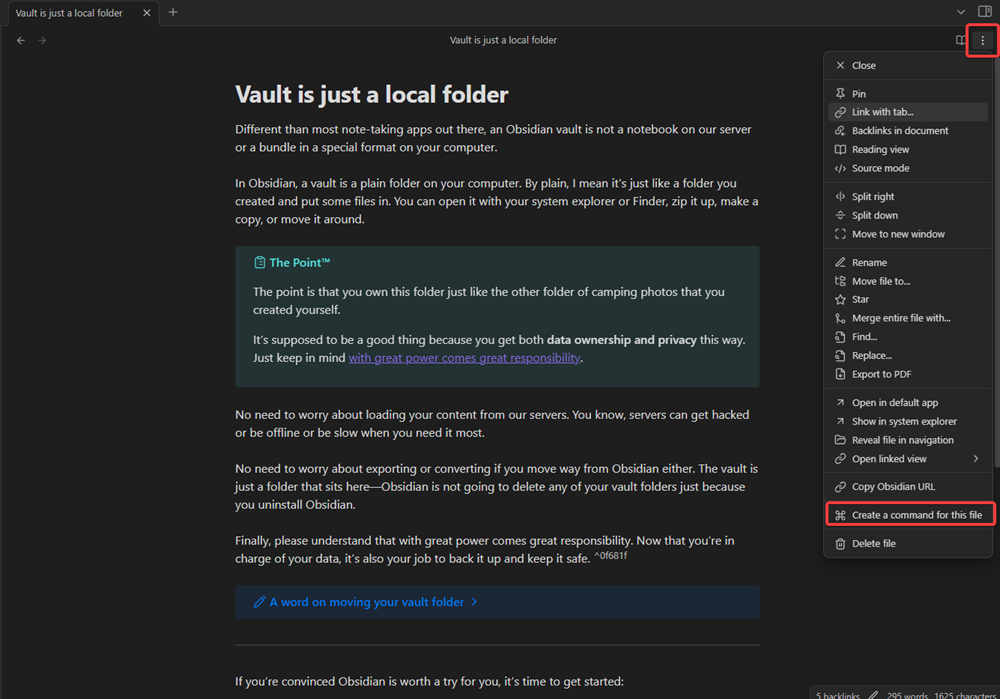
8xYC9y5LnRgf3iKpCjtJ

In the settings

j1OG4HxERzWXDIwMxYrt

How to rename and delete commands

Open the settings in the obsidian setting category "Community plugins" by clicking on the settings symbol. CfADbGkeh7ig6sH3Iw2b

After you opened you can easily delete, rename and also change the file path of commands. Y2KfHEI6hBPK8k5lEbbz

How to install the plugin

Download it from the community plugins store https://obsidian.md/plugins?id=open-files-with-commands

More detailed description: How to install plugins in obsidian

  1. Download main.js, manifest.json, styles.css from the latest release (see releases)
  2. Create a new folder in Vault-name/.obsidian/plugins and put the downloaded files in there
  3. Reload your plugins and enable the plugin image zhWUnifj86Q2KlZTOtfU

Showcase and how to use it with commander

Link to the command plugin: https://obsidian.md/plugins?id=commander

Plugin showcase

Plugin combined with commander

59%
HealthFair
ReviewCaution
About
Create single-file commands by right-clicking notes to open specific files from the command palette or via Commander. Manage, rename, or delete those commands from the Community Plugins settings. Invoke a named command to jump directly to its mapped file.
CommandsFilesNavigation
Details
Current version
1.2.3
Last updated
3 years ago
Created
3 years ago
Updates
20 releases
Downloads
5k
Compatible with
Obsidian 0.15.0+
License
AGPL-3.0
Report bugRequest featureReport plugin
Sponsor
Ko-fi
Author
lostpaullostpaul
github.com/LostPaul
GitHublostpaul
  1. Community
  2. Plugins
  3. Commands
  4. Open files with commands

Related plugins

Notebook Navigator

Alternative file browser with folders, tags, properties, shortcuts, previews, keyboard navigation, drag and drop, and pinned notes.

Recent Files

Display a list of recently opened files.

Remember cursor position

Remember cursor and scroll position for each note.

Home tab

A browser-like search tab for your local files.

Reveal Active File Button

Add a button to the top of the File Explorer, to reveal the active file.

Find orphaned files and broken links

Find files that are not linked anywhere and would otherwise be lost in your vault. In other words: files with no backlinks.

Quick Explorer

Perform file explorer operations (and see your current file path) from the title bar, using the mouse or keyboard.

Commander

Customize your workspace by adding commands everywhere, create macros and supercharge your mobile toolbar.

Omnisearch

Intelligent search for your notes, PDFs, and OCR for images.

Creases

Tools for effectively folding Markdown sections.