Simple Mindmap
 creative7814k downloads
A powerful keyboard-centric mind map plugin with bi-directional link support.
- Overview
- Scorecard
- Updates12
Simple but powerful — a fast mind map built for effective writing!
An Obsidian plugin for creating mind maps quickly and easily. A clean, no-frills mind-mapping tool optimized for writing.
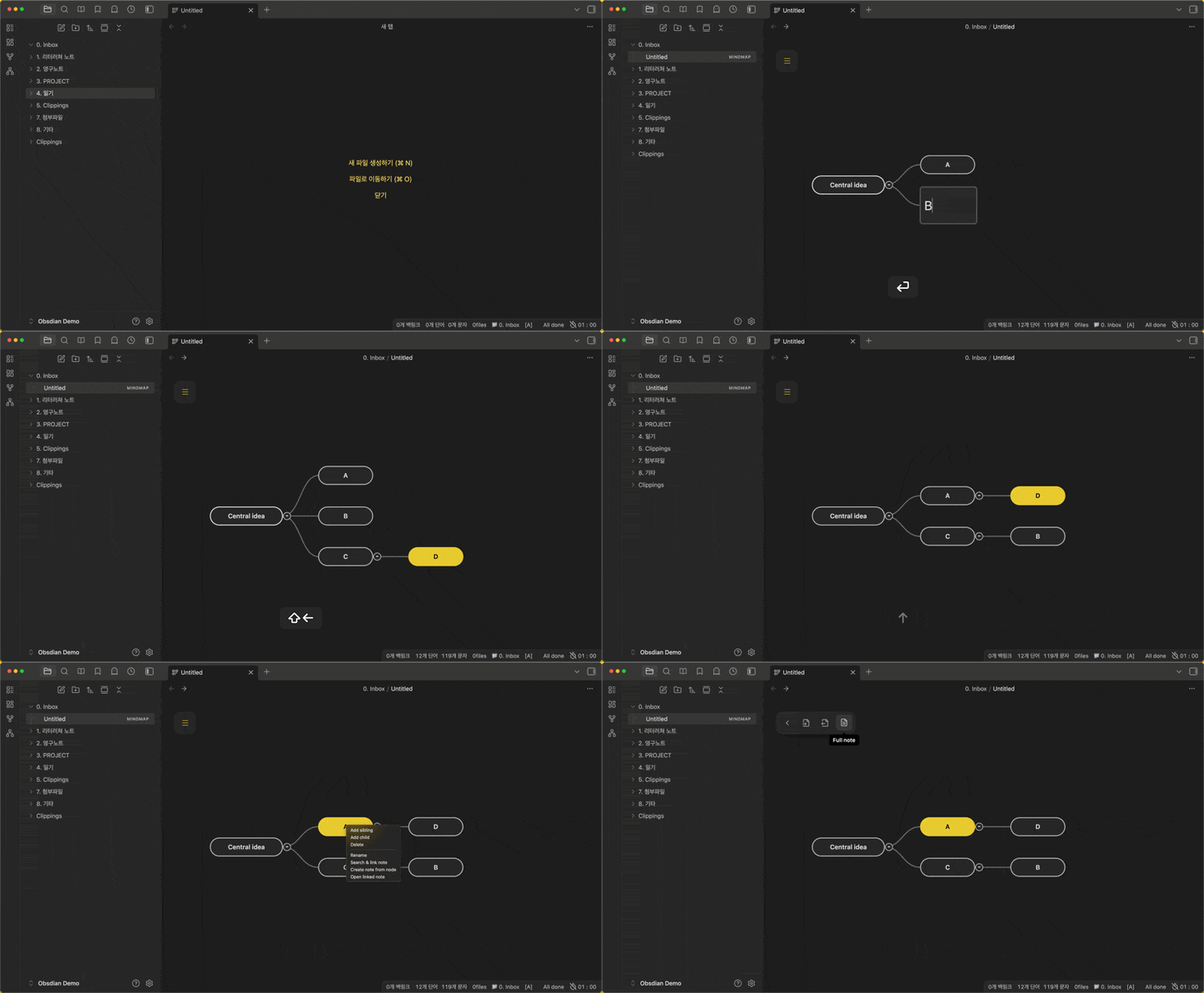
Key features
- Mind map editing — Create, rename, delete, collapse, and reorder nodes, with multi-select and undo — every essential covered.
- Layout modes — Outline (rightward list) or radial (balanced left/right of the center topic).
- Every action on a hotkey — Assign customizable shortcuts to every feature in settings for fast keyboard-driven work.
- Note integration — Search your vault to link existing notes to a node, or create a new Obsidian note from a node.
- Mouse-friendly — Drag-and-drop to move nodes, freely adjust the map's size and position, and reach every feature from the right-click menu.
- Markdown — Turn an existing note list into a mind map, export a mind map as an outline, or merge linked notes (Full note).
- Full-note compile — Combine a map's outline with its linked notes into a single, finished document.
- Tablet support — Works on tablets without a keyboard (finger long-press for context actions).
Default hotkeys
| Action | Hotkey |
|---|---|
| Create child | Tab |
| Create sibling | Enter |
| Edit node text | Shift + Enter |
| Delete node | Delete |
| Search and link note | Shift + Ctrl + Enter |
| Create new note from node | Ctrl + Shift + N |
| Open linked note | Ctrl + Shift + L or double-click |
| Navigation | Arrow keys |
| Reorder nodes | Shift + Arrow keys |
Installation
Community plugins (after approval)
Search for ObsiMap in Obsidian Settings → Community plugins.
Manual installation
- Download
main.js,manifest.json, andstyles.cssfrom the latest release. - Create a folder named
obsimapinside your vault's.obsidian/plugins/directory. - Place the downloaded files in that folder.
- Enable the plugin in Obsidian settings.
BRAT (beta)
- Install the BRAT plugin.
- Go to Plugins → BRAT → Add Beta plugin.
- Use:
https://github.com/Creative781/obsimap
License
MIT
Connect
- YouTube: Creative781
- Blog: Creative781 Blog
Support
- Buy me a coffee: Support the developer
Update history
Your support helps updates faster.
- ☑ Community review fixes (2026-07-19) — CSS classes for static styles, safer timers, typed settings load, and declarative settings search support.
- ☑ Sidebar paint bleed fix (2026-07-18) — Clip the map view so nodes and selection glow no longer show through adjacent panes.
- ☑ Radial mind map (2026-07-18) — Choose outline or radial layout in settings; place topics on both the left and right of the center node.
Coming next
- Node highlight — Emphasize selected nodes with a different color or shape
Simple Mindmap (한국어)
심플하지만 강력하다! 효과적인 글쓰기를 위한 빠른 마인드맵!
옵시디안에서 쉽고 빠르게 마인드맵을 만들 수 있는 플러그인입니다. 글쓰기에 최적화되어 군더더기를 제거한 깔끔한 마인드맵 도구입니다.
주요 기능
- 마인드맵 편집 — 노드 생성·이름 변경·삭제·접기·순서 변경, 다중 선택, 실행 취소 등 마인드맵 필수 기능 제공
- 레이아웃 — 목록형(오른쪽) 또는 방사형(중심 기준 좌우 균형)
- 모든 기능 단축키 제공 — 모든 기능을 설정에서 단축키에 배당해 빠르게 작업
- 노트 연동 — 보관함에 있는 노트를 검색해 마인드맵에 연결하거나, 마인드맵의 노드를 옵시디안 노트로 생성
- 마우스 활용 — 드래그앤 드롭으로 노드를 옮기고, 마인드 맵의 크기와 위치를 손쉽게 조정. 마우스 우클릭만으로 모든 기능 사용 가능
- Markdown — 기존 노트 목록 가져와 마인드맵으로 바꾸거나, 마인드맵을 아웃라이너로 내보내기, 연결 노트 통합(Full note)
- Full note 생성 — 마인드 맵의 개요와 연결된 노트로 하나의 완성된 글 생성
- 태블릿 지원 — 키보드 없는 태블릿에서도 동작(손가락 롱프레스)
기본 단축키
| 기능 | 단축키 |
|---|---|
| 자식 노드 생성 | Tab |
| 형제 노드 생성 | Enter |
| 노드 텍스트 편집 | Shift + Enter |
| 노드 삭제 | Delete |
| 노트 검색 및 연결 | Shift + Ctrl + Enter |
| 노드에서 새 노트 생성 | Ctrl + Shift + N |
| 연결된 노트 열기 | Ctrl + Shift + L 또는 더블 클릭 |
| 노드 간 이동 | 방향키 |
| 노드 위치 재정렬 | Shift + 방향키 |
설치
커뮤니티 플러그인 (승인 후)
설정 → 커뮤니티 플러그인에서 ObsiMap 검색.
수동 설치
- 최신 릴리즈에서
main.js,manifest.json,styles.css다운로드 - 보관함
.obsidian/plugins/obsimap폴더 생성 후 파일 복사 - 설정에서 플러그인 활성화
베타 (BRAT)
- BRAT 설치
- Plugins → BRAT → Add Beta plugin
- URL:
https://github.com/Creative781/obsimap
라이선스
MIT
소통
- 유튜브: Creative781
- 블로그: Creative781 블로그
후원
- 바이미커피: 개발자 후원하기
업데이트 히스토리
여러분의 후원이 업데이트를 더 빠르게 하는 데 도움이 됩니다.
- ☑ 커뮤니티 리뷰 대응 (2026-07-19) — 정적 스타일을 CSS 클래스로 분리, 타이머/타입 정리, 설정 검색용 declarative API 추가.
- ☑ 사이드바 잔상 수정 (2026-07-18) — 맵 뷰를 클리핑해 노드·선택 glow가 옆 패널에 비치지 않도록 수정.
- ☑ 방사형 마인드맵 (2026-07-18) — 설정에서 목록형·방사형을 고를 수 있고, 중심 주제 기준으로 왼쪽·오른쪽에 노드를 배치합니다.
다음 업데이트 예고
- 노드 강조 — 특정 노드만 색이나 모양을 바꿔 눈에 띄게 표시할 수 있는 기능
HealthExcellent
ReviewSatisfactory
About
Create keyboard-centric mind maps by turning Markdown notes into editable, linkable nodes and navigate them entirely by keyboard. Compile linked notes into a single structured Markdown file or export a clean hierarchical outliner, and reorder nodes via drag-and-drop or hotkeys.Details
Current version
1.1.7
Last updated
2 months ago
Created
4 months ago
Updates
12 releases
Downloads
4k
Compatible with
Obsidian 1.4.14+
Platforms
Desktop, Mobile
License
MIT
Sponsor