Rapid Notes
 valteriomon7k downloads
Create and place notes quickly in specific folders based on predefined prefixes.
- Overview
- Scorecard
- Updates9
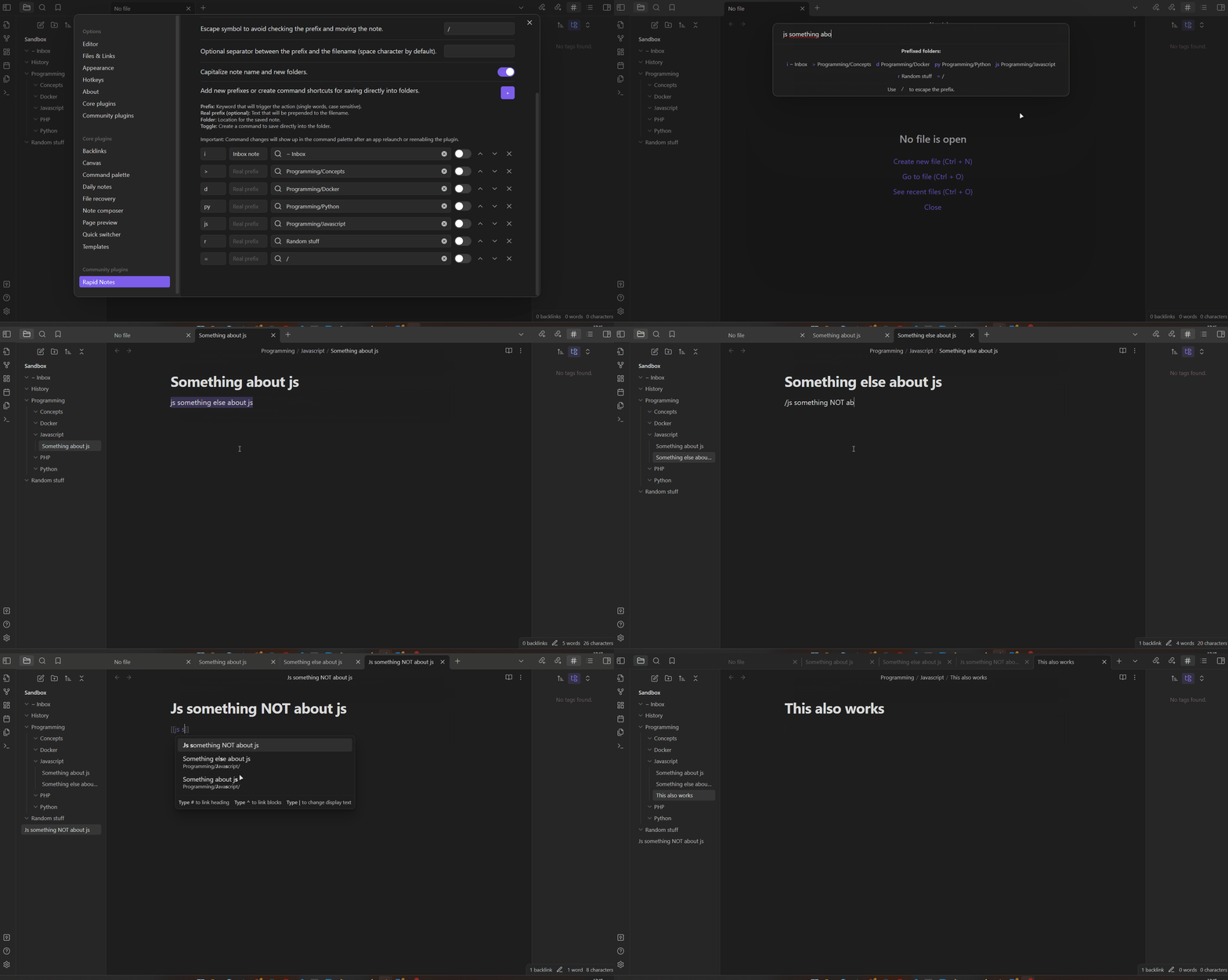
Place notes in specific folders at the moment of creation using the prefixes defined in settings. Optionally add custom prefixes to the filenames and trigger the creation in specific folders with shortcuts or from the editor while typing links.
New in version 1.2
Create notes into your folders right from the editor
- You can trigger the rapid note functionality from the editor, calling the command with the cursor placed within a text in double brackets, or selecting text, with alias support incorporated.
New features with settings available
- You can add an actual prefix to the name of the created note.
- Customize the escape symbol used to avoid moving the note based on the prefix ("/" by default).
- Add a common separator between the prefix and the filename.
- If the new file about to be created already exists, you can choose to open the existent file or create a new one with the same name followed by a number.
- Updated modal with the list of prefixes as memory help. Can be disabled through the settings.
- Option to capitalize the folder and file names.
- Add commands (which can be binded to hotkeys) that allow you to trigger any prefix entry and create the file directly into a folder (same as the Rapid Note command, it can be opened in same tab, new tab, background tab, new pane or new window).
New commands
- Instead of a single "Rapid Note" command, now you can open the file in the same tab, new tab, background tab, new pane or new window.
New hidden features
- If a used folder is renamed/deleted, a warning is shown. In case it's renamed, the entry is updated.
- In the folder suggester, show first the preferred saving location according to the Obsidian settings: Vault folder, an specified location, or the same folder as the current active file.
- If the filename contains "/" the full path is created: folders and filename following the last slash character.
More
- Plugin styles improved for the mobile experience.
- Lots of bug fixes and code improvements. Removed lookbehind in regular expressions which could lead to issues in some iOS versions. Tested in iOS 16.4.1.
- Newly introduced bugs to be fixed.
Quick demo video
A couple of notes the video may not be too clear about: when creating a new note from the editor from a selection, the link to it is created. The escaping character ("/" by default) works both inline and on the prompt.
How to use
In the plugin settings add prefix/folder pairs, considering prefixes must be single words and are case sensitive. Each prefix and folder can be used a single time. When you run the Rapid Notes: New note command (which can be binded to a new hotkey or replace the default "Create New Note" hotkey) if you input the prefix previously set, it's going used to create a new note using the input value without the prefix as name. If no prefix matches, a folder suggest is open. If your input begins with a slash / then the prefix will be ignored and you will always be prompted with a folder suggester.
Example of basic usage
If you have a folder named JavaScript in your vault where you save all notes regarding JavaScript, you could add in the Rapid Notes settings the prefix js and assign it to said folder. Upon triggering the command to create a new note, you could enter into the prompt js Promises and a new file named Promises will be saved into the JavaScript folder.
Example of escaped prefix
If you have your js prefix set, but you wish to create a new file named js rulez, then you can simply input /js rulez into the prompt and you will be prompted to select where to create the new file.
Considerations
- You can combine Rapid Notes with Templater plugin to speed up your workflow even further, assigning templates for folders and enabling the setting to trigger Templater on file creation.
Installation
Find "Rapid Notes" in the Community plugins through the Obsidian app!
Development
- Clone this repo and place it in a new vault for development inside
.obsidian/plugins/folder. - Install NodeJS, then run
npm iin the command line under the repo folder. - Run
npm run devto compile your plugin frommain.tstomain.js. - Make changes to
main.ts(or create new.tsfiles). Those changes should be automatically compiled intomain.js. - Reload Obsidian to load the new version of your plugin ("Reload app without saving" in the command palette for refreshing).
- Enable plugin in settings window.
Credits
This plugin is a fork of Obsidian Sample Plugin and the modules used for prompts and suggesters are based on Liam's Periodic Notes Plugin and SilentVoid13's Templater Plugin. All the credits go to the original authors.