Search...Search plugins and themes...
⌘K
Sign in
  • Get started
  • Download
  • Pricing
  • Enterprise
  • Account
  • Obsidian
  • Overview
  • Sync
  • Publish
  • Canvas
  • Mobile
  • Web Clipper
  • CLI
  • Learn
  • Help
  • Developers
  • Changelog
  • About
  • Roadmap
  • Blog
  • Resources
  • System status
  • License overview
  • Terms of service
  • Privacy policy
  • Security
  • Community
  • Plugins
  • Themes
  • Discord
  • Forum / 中文论坛
  • Merch store
  • Brand guidelines
Follow us
DiscordTwitterBlueskyThreadsMastodonYouTubeGitHub
© 2026 Obsidian

Open Link With

mamorudsmamoruds19k downloads

Open external link with specific browser.

Add to Obsidian
  • Overview
  • Scorecard
  • Updates11

Choose your own way to open external links.

Installation

Manual installation

Download zip archive from releases page. Extract the archive into <your vault>/.obsidian/plugins Enable Open Link With under Settings > Community plugins > Installed Plugins

Usage

Select which browser you want to open external link with in plugin's setting menu.
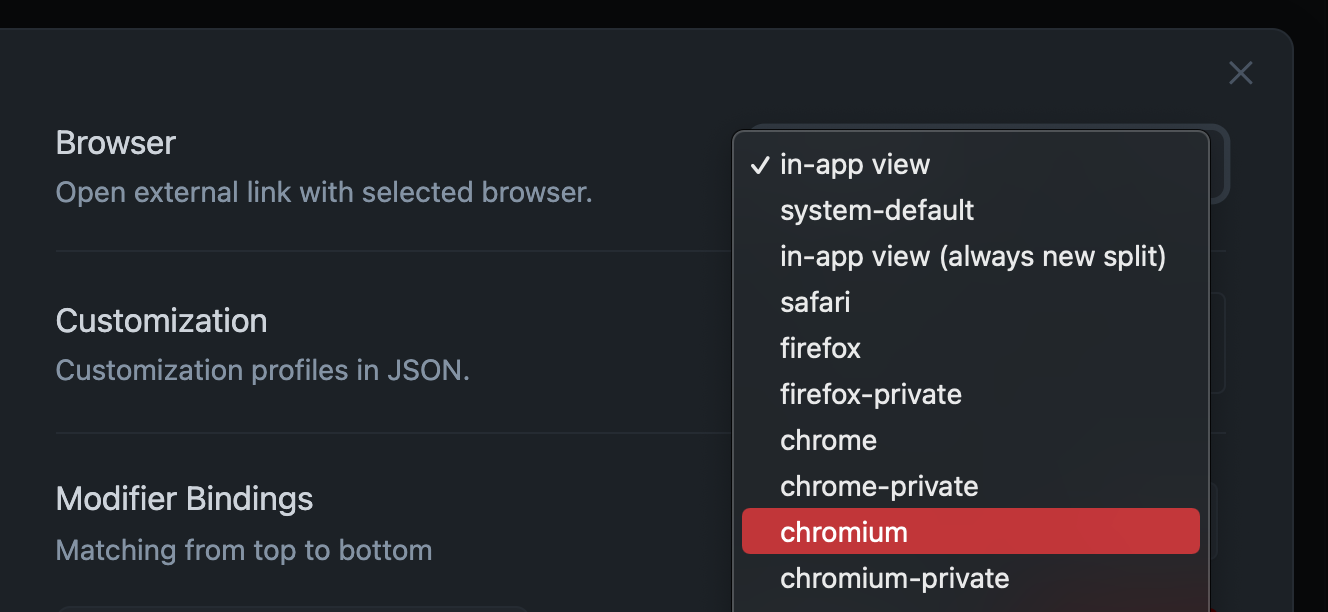
Customization

Put your custom profile in plugin's settings menu. Profile should contain name(string): commands(string[]) which is demonstrated in the following: PS. If the name in the user defined profile is same as the preset, it will be ignored.

Examples:

For MacOS
{
    "waterfox": [
        "/Applications/Waterfox.app/Contents/MacOS/waterfox"
    ],
    "waterfox-private": [
        "/Applications/Waterfox.app/Contents/MacOS/waterfox",
        "--private-window"
    ]
}
For Windows
{
    "opera": [
        "c:/Users/mamoru/AppData/Local/Programs/Opera/launcher.exe"
    ],
    "opera-private": [
        "c:/Users/mamoru/AppData/Local/Programs/Opera/launcher.exe",
        "--private"
    ]
}

Modifier key bindings

The plugin supports multiple open settings by binding modifier key after version 0.1.5. You can set the modifier key bindings to match your personal preferences through the plugin's settings menus.

By default, any modifier key and any mouse button (left or middle button) click will use the global browser, i.e. the browser profile selected in the setting Browser. You can create a custom modifier binding by clicking the New button and setting whether the binding is triggered only by middle mouse button clicks. You can create multiple bindings to personalize the plugin's behavior, and the bindings will be matched from top to bottom.
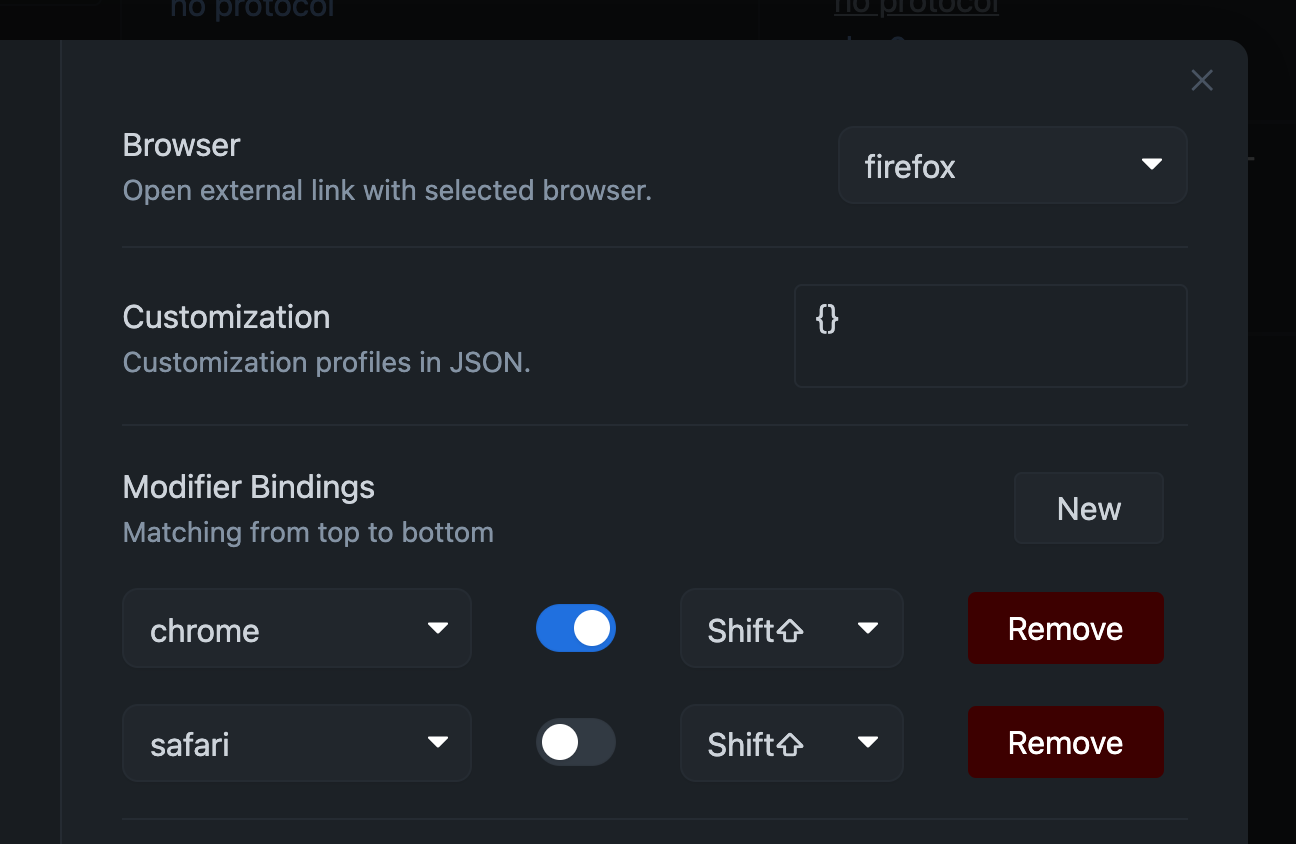
For example, in the above setting, the link will be opened by chrome when shift is pressed and the middle mouse button is clicked; the link will be opened by safari when shift is pressed and the left mouse button is clicked; in other cases, it will be opened by global browser firefox.

Changelog

link of changelogs.

70%
HealthFair
ReviewSatisfactory
About
Open external links in the browser you choose and add custom browser profiles with command paths and arguments. Define modifier-key and mouse-button bindings to open links with different profiles, matched top-to-bottom. Set a global browser for default clicks.
LinksIntegrationsHotkeys
Details
Current version
0.1.10
Last updated
3 years ago
Created
5 years ago
Updates
11 releases
Downloads
19k
Compatible with
Obsidian 1.1+
Platforms
Desktop only
License
MIT
Report bugRequest featureReport plugin
Author
mamorudsmamoruds
github.com/MamoruDS
GitHubmamoruds
  1. Community
  2. Plugins
  3. Links
  4. Open Link With

Related plugins

Local REST API & MCP Server

Unlock your automation needs by interacting with your notes over a secure REST API.

Smart Connections

AI link discovery copilot. See related notes as you write. Lookup using semantic (vector) search across your vault. Zero-setup local model for embeddings, no API keys, private.

Excalidraw

Visual PKM powerhouse. Create and edit Excalidraw drawings.

BRAT

Easily install a beta version of a plugin for testing.

Maps

Adds a map layout to bases so you can display notes as an interactive map view.

Self-hosted LiveSync

Sync vaults securely to self-hosted servers or WEBRTC.

Zotero Integration

Insert and import citations, bibliographies, notes, and PDF annotations from Zotero.

Readwise Official

Sync highlights from Readwise to your vault.

Agent Client

Chat with Claude Code, Codex, Gemini CLI, and more via the Agent Client Protocol — right from your vault.

Fast Note Sync

Real-time sync of your vaults across server, mobile, and web; shareable with anyone; supports REST and MCP integrations to build your personal AI knowledge base.