Search...Search plugins and themes...
⌘K
Sign in
  • Get started
  • Download
  • Pricing
  • Enterprise
  • Account
  • Obsidian
  • Overview
  • Sync
  • Publish
  • Canvas
  • Mobile
  • Web Clipper
  • CLI
  • Learn
  • Help
  • Developers
  • Changelog
  • About
  • Roadmap
  • Blog
  • Resources
  • System status
  • License overview
  • Terms of service
  • Privacy policy
  • Security
  • Community
  • Plugins
  • Themes
  • Discord
  • Forum / 中文论坛
  • Merch store
  • Brand guidelines
Follow us
DiscordTwitterBlueskyThreadsMastodonYouTubeGitHub
© 2026 Obsidian

Habit Tracker

duoaniduoani18k downloads

Create a simple month view for visualizing your punch records.
Add to Obsidian
  • Overview
  • Scorecard
  • Updates5

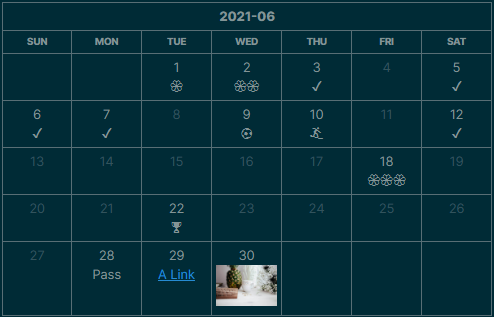
This plugin for Obsidian creates a simple month view for visualizing your punch records.

How To

To show the view above, just create a code block and type:

```habitt
[month:2021-06]
(1,💮)(2,💮💮)(3)(5)(6)(7)(9, ⚽)(10, 🏄)(12)(18,💮💮💮)(22,🏆)(28,Pass) 
```
  • [month:YYYY-MM]: Which month to display
  • (date_num, tag): The day (date_num) you want to punch in, with a tag in it. If tag is missing, such as (12), a default tag ✔️ is given to that day.
  • [width: css_width]: Restrict the Month-view table to css_width, such as [width: 50%], [width: 500px]

Rich Text

Some people like to insert rich text (e.g. links or images). Since v1.0.4, Habit Tracker plugin adds a new configuration Enable HTML to activate HTML parsing. For some security reasons, this config is "off" as default.

To insert Web URL:

```habitt
(1, <a href="https://www.google.com">Google</a>)
```

To insert other note in the Vault (Using Obsidian url):

```habitt
(1, <a href="obsidian://open?vault=my-notes&file=xxx">Google</a>)
```

Learn more about Obsidian url.

To insert a image (from web):

```habitt
(1, <img src="https://www.xyz.com/img.jpg" />)
```

Since now, in Obsidian, we are not able to link the local image using <img /> tag. See Does ANY HTML work in Obsidian w/local files? - Resolved help - Obsidian Forum.

Installation

You can install the plugin via the Community Plugins tab within Obsidian. Just search for "Habit Tracker"

56%
HealthFair
ReviewCaution
About
Display a monthly punchboard for visualizing habit check-ins using a simple habitt code block. Specify the month with [month:YYYY-MM] to render a calendar view. Annotate days with tags or emojis (defaults to a checkmark when omitted) and optionally include links or images via HTML.
CalendarDatesTables
Details
Current version
1.0.4
Last updated
5 years ago
Created
5 years ago
Updates
5 releases
Downloads
18k
Compatible with
Obsidian 0.9.12+
Platforms
Desktop, Mobile
License
MIT
Report bugRequest featureReport plugin
Author
duoaniduoani
github.com/duoani
GitHubduoani
  1. Community
  2. Plugins
  3. Calendar
  4. Habit Tracker

Related plugins

Day Planner

Day planning from a task list in a Markdown note with enhanced time block functionality.

Periodic Notes

Manage your daily, weekly, and monthly notes.

Full Calendar Remastered

Complete Calendar HUB experience. Work with all your calendars in one place. Analyze your time and take action!

Calendarium

Craft mind-bending fantasy and sci-fi calendars.

Journals

Manage your journals.

Chronology

A calendar and a timeline of the note's creation and modification.

Calendar

Explore your daily notes.

Prisma Calendar

Prisma turns any note with a date into a flexible planning system inside Obsidian. There are no rigid schemas or predefined structures — just your data, your rules, fully under your control.

Persian Calendar

Persian Calendar for managing periodic notes based on persian solar (shamsi) calendar.

Contribution Graph

Generate an interactive heatmap to visualize and track your productivity.