
- Overview
- Scorecard
- Updates6
Render Graphviz Diagrams in Obsidian
This plugin uses local graphviz dot executable for rendering.
Usage
- Install graphviz if you haven't yet or use the experimental d3-graphviz support. To download and install graphviz, follow official instructions.
- Inside Obsidian options dialog,
PLUGIN OPTIONS > Obsidian Graphviz > Dot Path, set path to your dot file. - Create a fenced codeblock using
dotas the language. Specify your graphviz code inside. Then preview it. Documentation on Graphviz can be found on graphviz.org
Examples
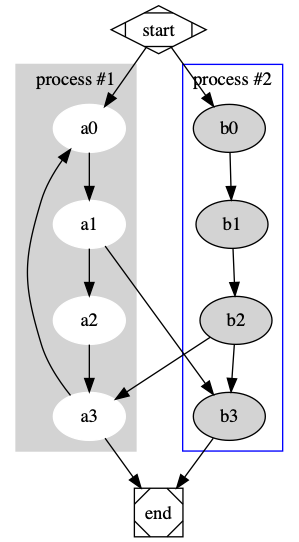
    ``` dot
    digraph G {

      subgraph cluster_0 {
        style=filled;
        color=lightgrey;
        node [style=filled,color=white];
        a0 -> a1 -> a2 -> a3;
        label = "process #1";
      }

      subgraph cluster_1 {
        node [style=filled];
        b0 -> b1 -> b2 -> b3;
        label = "process #2";
        color=blue
      }
      start -> a0;
      start -> b0;
      a1 -> b3;
      b2 -> a3;
      a3 -> a0;
      a3 -> end;
      b3 -> end;

      start [shape=Mdiamond];
      end [shape=Msquare];
    }
    ```
results in:
    ```dot
    graph anundirectedgraph {
      layout=neato;
      a -- b -- c;
    }
    ```
Installation
Inside Obsidian
Settings > Third-party plugins > Community Plugins > Browse and search for Graphviz.
Manually installing the plugin
git clone https://github.com/QAMichaelPeng/obsidian-graphviz.git
cd obsidian-graphviz
npm i
VAULT_FOLDER=<Your vault folder>
PLUGIN_FOLDER=$VAULT_FOLDER/.obsidian/plugins/obisidan-graph-viz
[ -d "$PLUGIN_FOLDER" ] || mkdir -p $PLUGIN_FOLDER
npm run build && cp  ./{main.js,styles.css,manifest.json} $PLUGIN_FOLDER
Credits
- Inspired by Johannes Theiner's obsidian-plantuml.
Authors
Feng Peng(@QAMichaelPeng)
With contributions from
- Dos Santos(@d0ssant0s)
- ebdavison(@ebdavison)
HealthFair
ReviewCaution
About
Render Graphviz DOT diagrams in Obsidian using a local Graphviz dot executable or the experimental d3-graphviz renderer. Create fenced code blocks labeled "dot" to preview directed and undirected graphs, clusters, and layouts directly inside your notes.Details
Current version
1.0.5
Last updated
4 years ago
Created
5 years ago
Updates
6 releases
Downloads
16k
Compatible with
Obsidian 0.11.5+
Platforms
Desktop only
License
MIT