Search...Search plugins and themes...
⌘K
Sign in
  • Get started
  • Download
  • Pricing
  • Enterprise
  • Account
  • Obsidian
  • Overview
  • Sync
  • Publish
  • Canvas
  • Mobile
  • Web Clipper
  • CLI
  • Learn
  • Help
  • Developers
  • Changelog
  • About
  • Roadmap
  • Blog
  • Resources
  • System status
  • License overview
  • Terms of service
  • Privacy policy
  • Security
  • Community
  • Plugins
  • Themes
  • Discord
  • Forum / 中文论坛
  • Merch store
  • Brand guidelines
Follow us
DiscordTwitterBlueskyThreadsMastodonYouTubeGitHub
© 2026 Obsidian

Gitlab Issues

benr77benr775k downloads

Import Gitlab issues.

Add to Obsidian
  • Overview
  • Scorecard
  • Updates10

A plugin for Obsidian to import issues from Gitlab.

Each issue returned from Gitlab is created as an Obsidian note in the specified output directory.

You can create your own template to customise the format of the issue note.

Notes are intended to be READ ONLY, as they will be removed from your Obsidian vault if they no longer are returned by Gitlab.

The latest issues are loaded from Gitlab 30 seconds after Obsidian is started, and then automatically every 15 minutes.

Configuration

You must have a Gitlab account.

  1. Generate a Gitlab Personal Access Token for the plugin that has API scope included.
  2. Install the plugin through the Obsidian Community Plugins section, and then enable it.
  3. Enter the Personal Access Token you created at Gitlab into the Token field in the plugin settings.
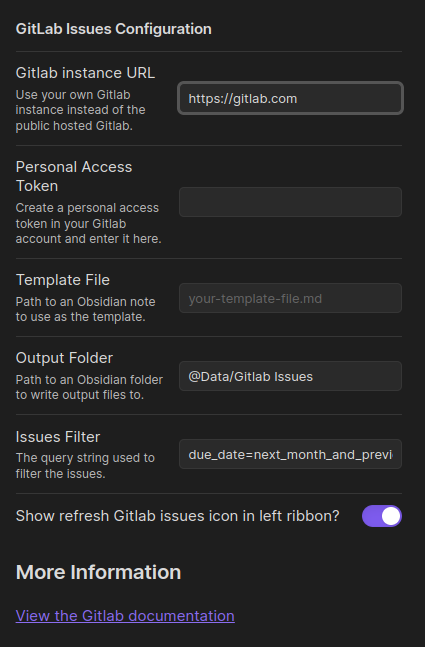
Plugin Settings Screen

Example - Listing upcoming deadlines

With the default filter value of due_date=month, the Gitlab API will return all issues that have a Due Date in the next month.

The plugin will create an Obsidian note file for each issue.

You can then use the excellent DataView Plugin to create lists of upcoming issues to embed anywhere you like in your vault. For example:

dataview
TABLE WITHOUT ID file.link AS "Task", dueDate AS "Due Date" from "@Data/Gitlab Issues"
SORT dueDate

If you then close an issue on Gitlab, or change its due date to be further in the future, the issue will be removed from your vault, and the DataView list will no longer show the issue.

Going Further

Customise the API query

You can use any valid query filter permitted by Gitlab in the "Issues List" endpoint. See the Gitlab API Documentation for all possible options.

Use a custom template

You can customise the template used to create the new notes. Create a note for the template, and specify the path to this note in the plugin settings.

The template must be a valid Handlebars template. See the Handlebars documentation for more information on the syntax.

Currently, the available fields include:

id title description due_date web_url

Bugs

Please report bugs right here in the repository issues section.

Contributions

Contributions are welcome. Please submit a single PR per bug or feature.

License

The plugin code is released under the MIT license. See the LICENSE document for more information.

78%
HealthExcellent
ReviewCaution
About
Import GitLab issues as Obsidian notes into a chosen folder using customizable Handlebars templates. Keep notes read-only and automatically remove any note when its issue no longer appears on GitLab; fetch updates shortly after startup and every 15 minutes.
ImportIntegrationsTemplating
Details
Current version
0.1.10
Last updated
Last month
Created
4 years ago
Updates
10 releases
Downloads
5k
Compatible with
Obsidian 0.12.0+
Platforms
Desktop, Mobile
License
MIT
Report bugRequest featureReport plugin
Author
benr77benr77
github.com/benr77
GitHubbenr77
  1. Community
  2. Plugins
  3. Import
  4. Gitlab Issues

Related plugins

Zotero Integration

Insert and import citations, bibliographies, notes, and PDF annotations from Zotero.

Readwise Official

Sync highlights from Readwise to your vault.

Weread

Sync Tencent Weread highlights and annotations.

ZotLit

Integrate with Zotero, create literature notes, and insert citations from a Zotero library.

Kindle Highlights

Sync your Kindle book highlights using your Amazon login or uploading your My Clippings file.

Telegram Sync

Transfer messages and files from Telegram to Obsidian.

Snipd Official

Sync Snipd podcast highlights to your vault with transcript, notes, AI summaries and metadata.

Media DB

Query multiple APIs for movies, series, anime, games, music releases and wiki articles, and import them into your vault.

Local REST API & MCP Server

Unlock your automation needs by interacting with your notes over a secure REST API.

QuickAdd

Quickly add new notes or content to your vault.