File path to URI
 michalbures24k downloads
Convert file path to URI for easier use of links to local files outside of Obsidian.
- Overview
- Scorecard
- Updates6
This plugin lets you convert a local path to a file url link that can be used to link to files or folders that are located outside of your Obsidian vault.

Use Obsidian's native behaviour ❗
AFAIK this plugin isn't really needed anymore since you can drag any file or folder into your note while holding Ctrl and Obsidian will paste it as a link.
C:\Users\Obsidian\Documents will be pasted as [Documents](file:///C:%5CUsers%5CObsidian%5CDocuments)
How to use this plugin
Convert written path
- Select the whole path you want to convert.
- Use the default hotkey
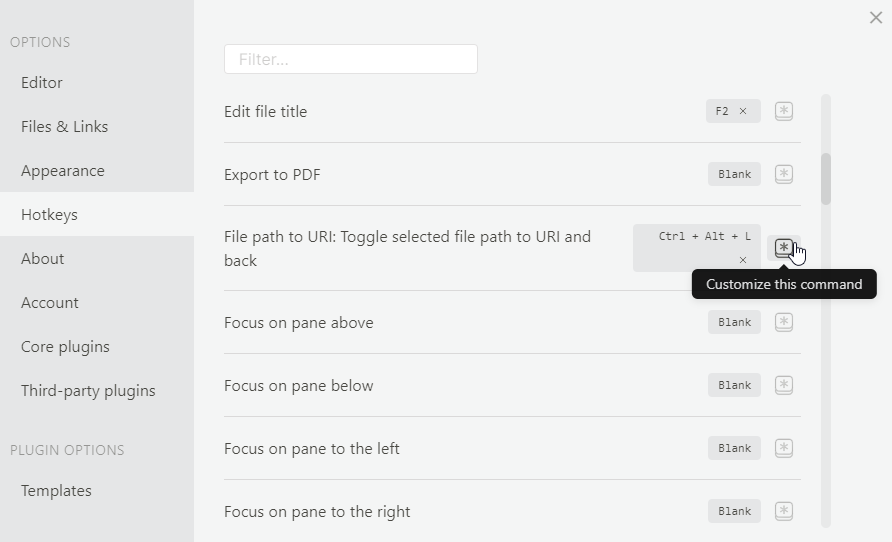
Ctrl/Cmd + Alt + Lor pressCtrl/Cmd + Pto open the command palette and search forFile path to URI: Toggle selected file path to URI and back. - The selected path will toggle between file path and file url.
Convert path from clipboard
- Copy any path such as
C:\Users\Obsidian\Documentsor\\network\folder\to your clipboard - Use the default hotkey
Ctrl/Cmd + Alt + Shift + Lor pressCtrl/Cmd + Pto open the command palette and search forFile path to URI: Paste file path as file uri. - The converted path will be pasted into the editor (that is either
file:///C:/Users/Obsidian/Documentsorfile:///%5C%5Cnetwork/folder/in this example)
Convert path from clipboard to link
- Copy any path such as
C:\Users\Obsidian\Documentsor\\network\folder\to your clipboard - Press
Ctrl/Cmd + Pto open the command palette and search forFile path to URI: Paste file path as file uri link. There is no default hotkey for this command so if you want to use a keyboard shortcut you can set a custom one in Obsidian settings. - The converted path will be pasted into the editor (that is either
[C:\Users\Obsidian\Documents](file:///C:/Users/Obsidian/Documents)or[\\\\network\folder\](file:///%5C%5Cnetwork/folder/)in this example)
Convert path from clipboard to link with only the name as title
- Copy any path such as
C:\Users\Obsidian\Documentsor\\network\folder\to your clipboard - Press
Ctrl/Cmd + Pto open the command palette and search forFile path to URI: Paste file path as file uri link - Name only. There is no default hotkey for this command so if you want to use a keyboard shortcut you can set a custom one in Obsidian settings. - The converted path will be pasted into the editor (that is
either
[Documents](file:///C:/Users/Obsidian/Documents)or[folder](file:///%5C%5Cnetwork/folder/)in this example)
How to change the hotkey
You can change the hotkey combination in Obsidian settings under Hotkeys. Look for File path to URI: Toggle selected file path to URI and back and File path to URI: Paste file path as file uri.
Transforms
C:\Users\Obsidian\Documents<->file:///C://Users//Obsidian//Documents\\network\folder\<->file:///%5C%5Cnetwork/folder/"C:\Users\Obsidian\Documents"->file:///C://Users//Obsidian//DocumentsStrips the surrounding whitespace and double quotation marks from the selection
Version History
1.0.0 (2021-01-17)
- Initial release
1.1.0 (2021-02-11)
- Add support for network paths and trim whitespace and quotation marks from selection
1.2.0 (2021-04-22)
- Add command to paste converted file path from clipboard as file uri
1.3.0 (2021-07-25)
- Add command to paste converted file path from clipboard as file uri link
1.4.0 (2022-07-01)
- Add another command that pastes converted file path from clipboard as file uri link but the link title is only the file/folder name
1.4.1 (2022-09-04)
- Fix '%20' instead of spaces in file/folder names only links
Credits
Code and readme inspired by https://github.com/agathauy/wikilinks-to-mdlinks-obsidian