File Info Panel
 cattailnu27k downloads
Create a File Info view that displays the active file's date created, date modified, file size, and links to open the file in its native application and to open the file's folder.
- Overview
- Scorecard
- Updates12
This plugin for Obsidian creates a File Information view that displays the active file's date created, date modified, file size, and links to open the file in its native application and to open the file's folder. It also has writing statistics (character, word, sentence, paragraph, and line counts) and a word frequency analysis.
Usage
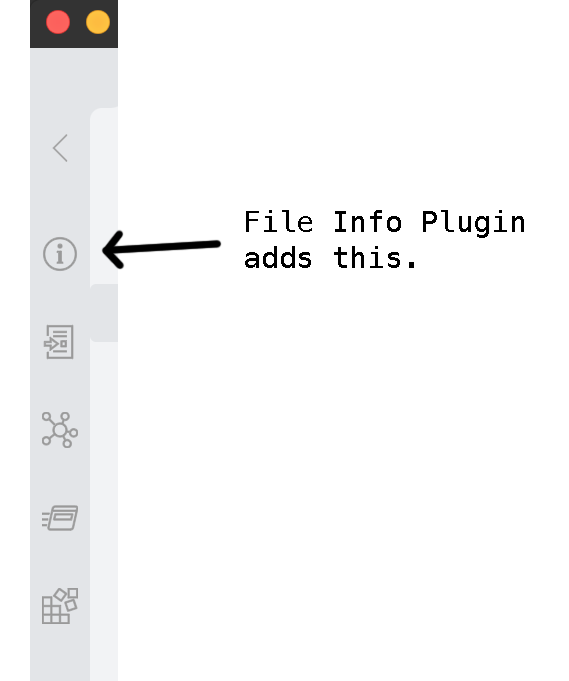
After enabling the plugin in the settings menu, you should see the info button appear in the left navigation panel. This will toggle the File Info Panel view.
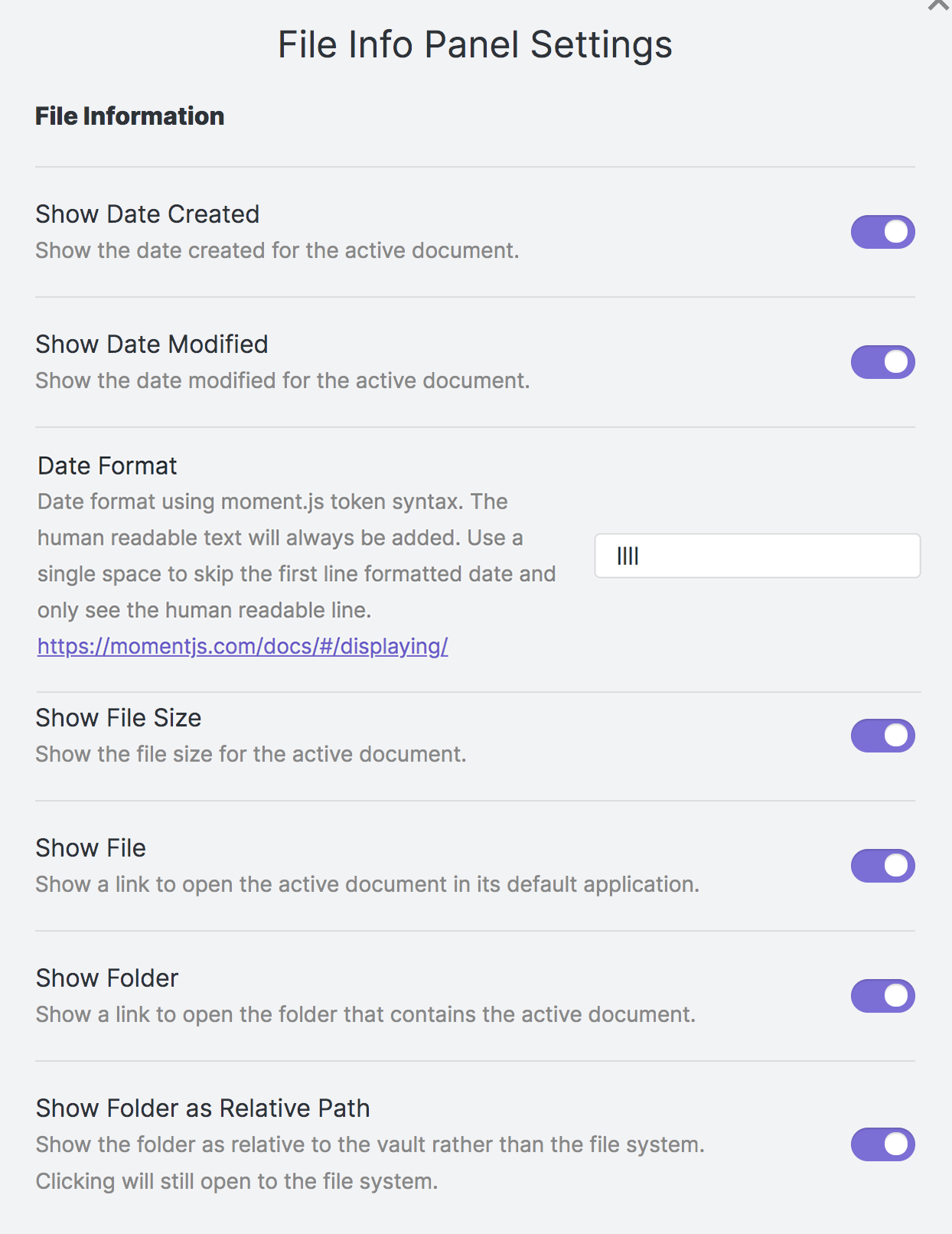
The File Info Panel settings allows you to set which file information is displayed.
Features
- Click on the file name to open the file in its native app.
- Click on the folder name to open the file's location.
- Unobtrusive text matches your currently installed theme.
- File size is displayed in human-readable format (includes bytes, KB, MB, GB, etc.).
- Image files show image width and height.
- Dates include human-readable "from now" text. Example:
Mon, Nov 22, 2021 7:59 PM
21 days ago
- Writing statistics:
- Character, word, sentence, paragraph, and line counts.
- Selected text's character, word, sentence, paragraph, and line counts.
- Estimated page count based on your provided words per page.
- Word frequency analysis. Optional split into two lists based on your provided regex.
- URLs and File names can be separate from Word counts.
Compatibility
obsidian-file-info-panel-plugin has been tested on Mac and Windows 11, Obsidian v0.12.19. Mobile versions appear to be working.
Settings
Show Date Created: Display the date and time the file was created.
Show Date Modified: Display the date and time the file was last modified.
Show File Size: Display the human readable file size.
Show File: Display the file name as a link to open the file in its default application.
Show Folder: Display the file's folder as a link to open that folder.
Show Folder as Relative Path: Display the file's vault-relative location rather than the full path.
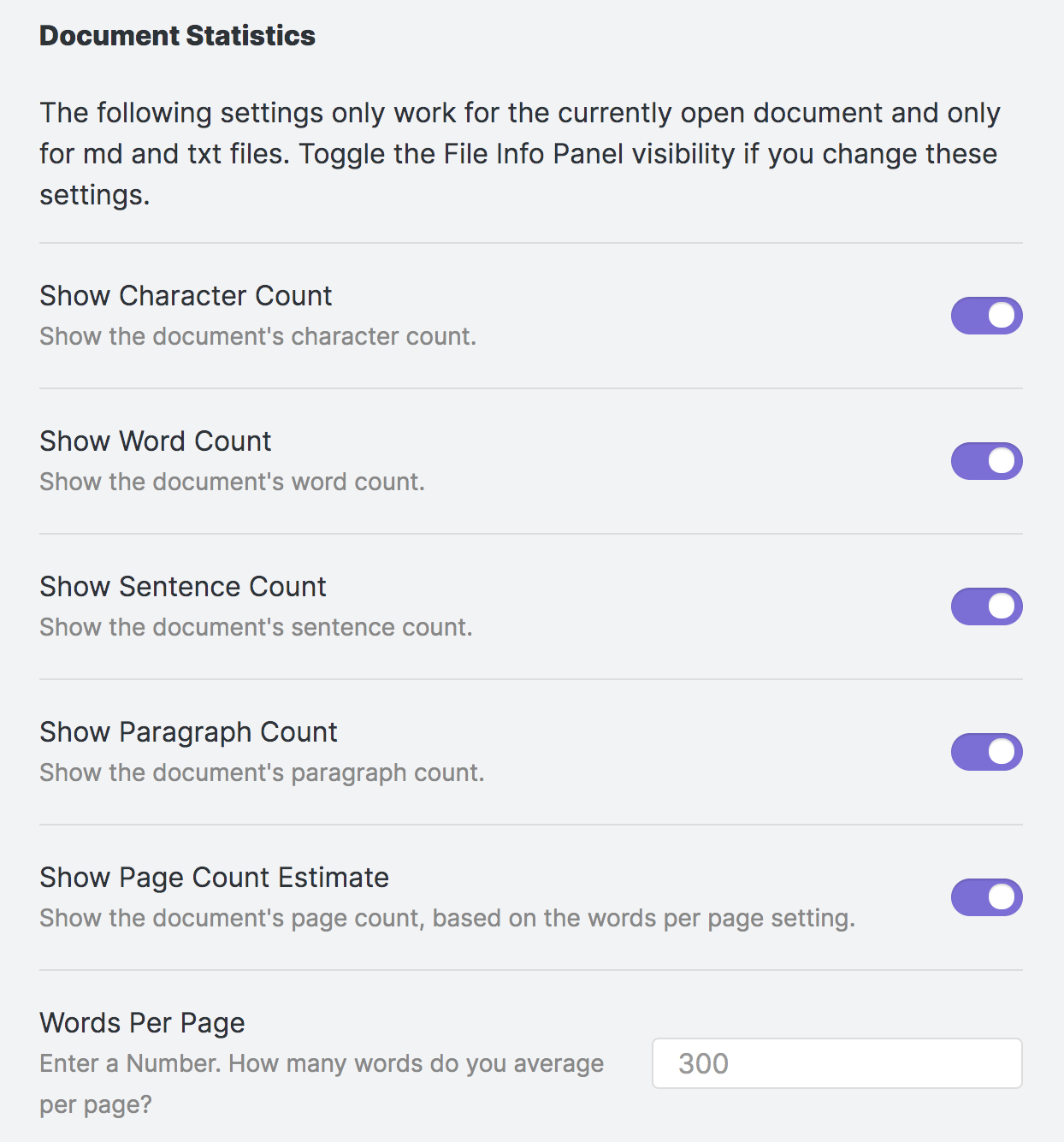
Show Character Count: Display a character count for md and txt files.
Show Word Count: Display a word count for md and txt files.
Show Sentence Count: Display a sentence count for md and txt files.
Show Paragraph Count: Display a paragraph count for md and txt files. Does not include empty lines.
Show Line Count: Display a line count for md and txt files.
Show Page Count Estimate: Display a sentence count for md and txt files.
Words Per Page: Enter the estimated words per page to use in the page count calculation.
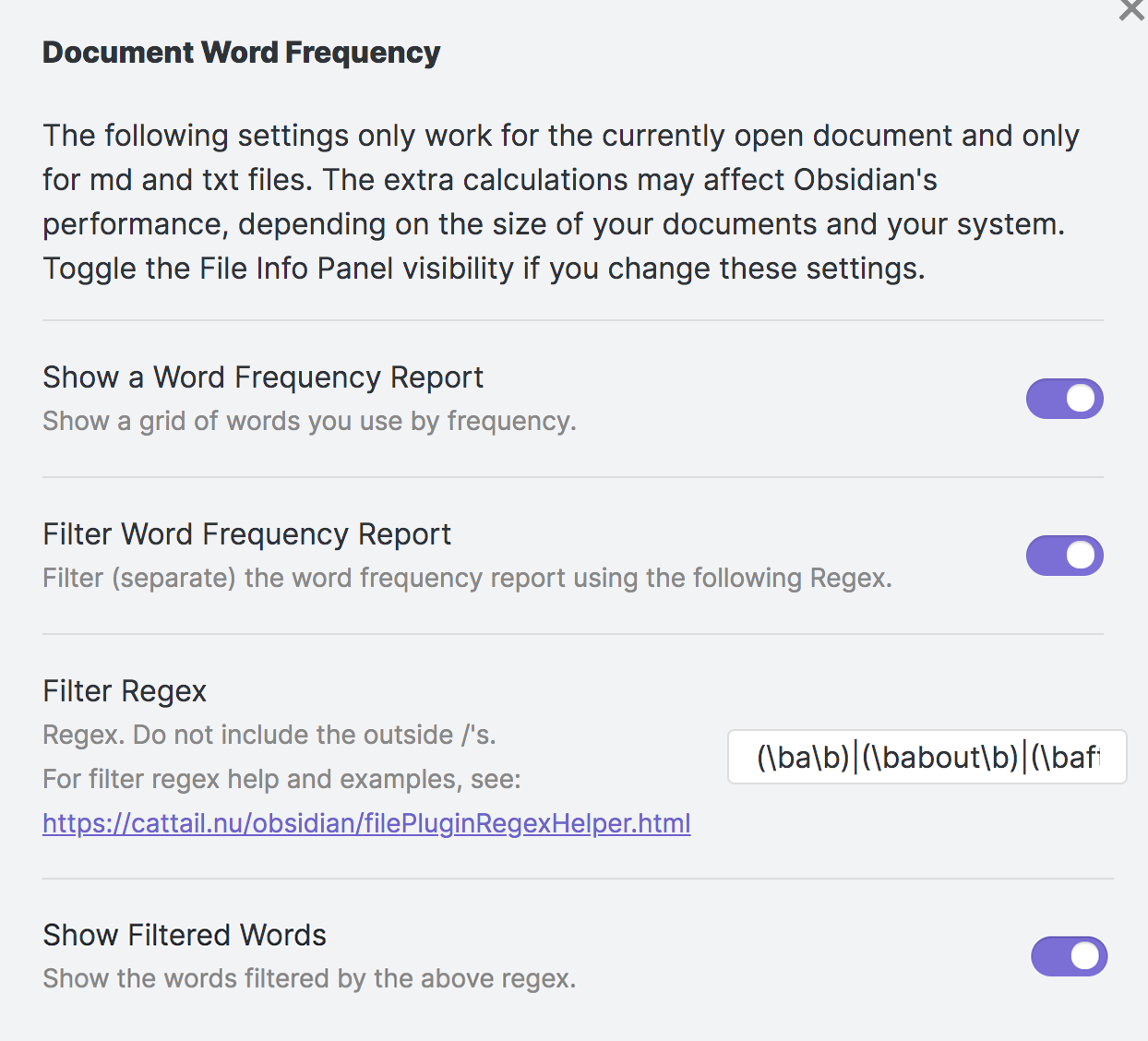
Show a Word Frequency Report: Display a sorted list of unique words and how often these were used.
Filter Word Frequency Report: Split the report into two lists using the provided regex.
Filter Regex: Customize which words are split out of the main report. Regex Assistance
Show Filtered Words: Show the words filtered by the above regex.
Show a URL and File Frequency Report: Shows mentioned URLs and files.
Exclude URLs and Files From Word Frequency Report and Word Counts: Excludes URLs and Files from the word-count parsers. Does not apply to characters, sentences, paragraphs, lines, or pages.
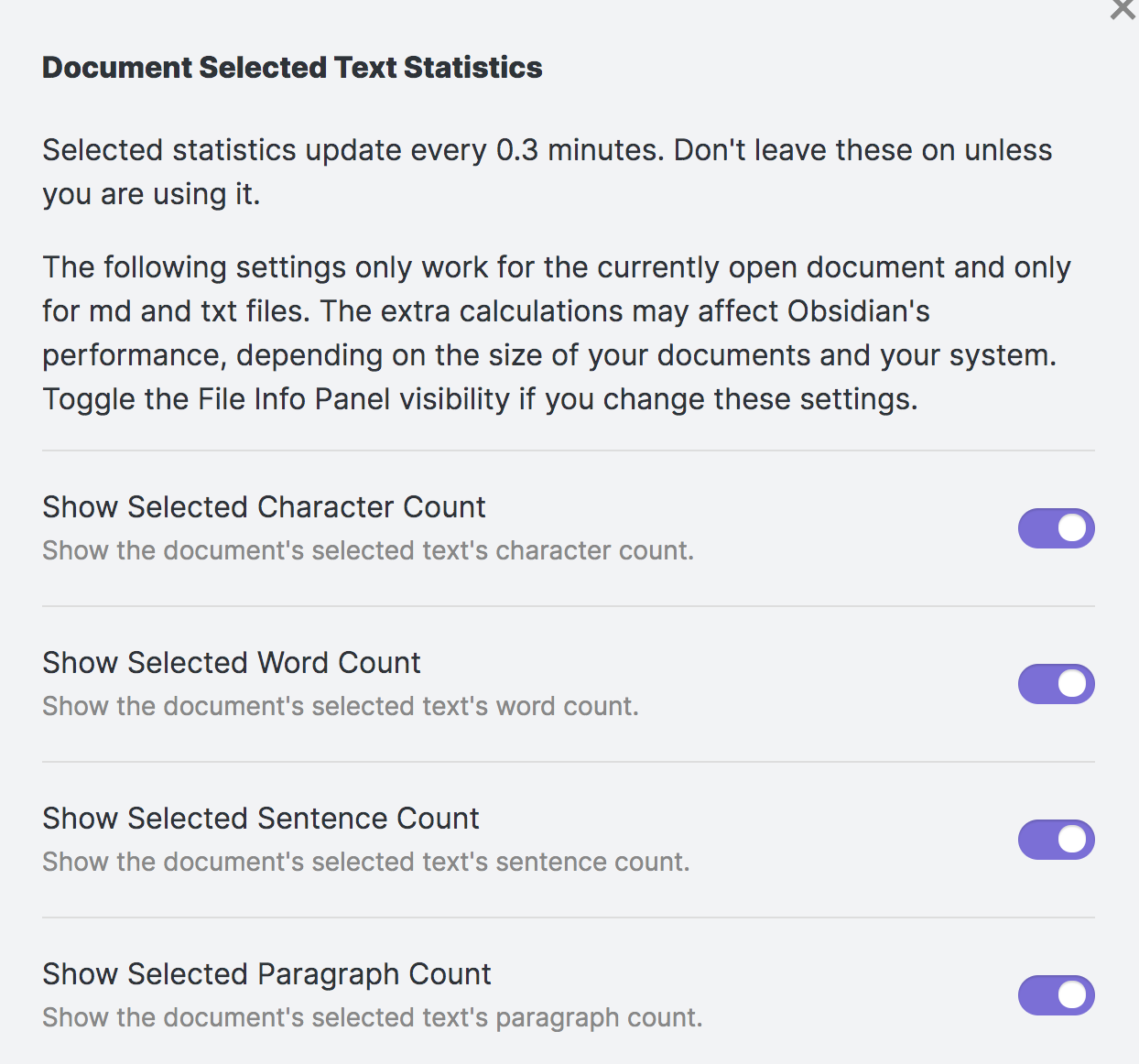
Show Selected Character Count: Display a character count for selected text.
Show Selected Word Count: Display a word count for for selected text.
Show Selected Sentence Count: Display a sentence count for selected text.
Show Selected Paragraph Count: Display a paragraph count for selected text. Does not include empty lines.
Show Selected Line Count: Display a line count for selected text.
Screenshots
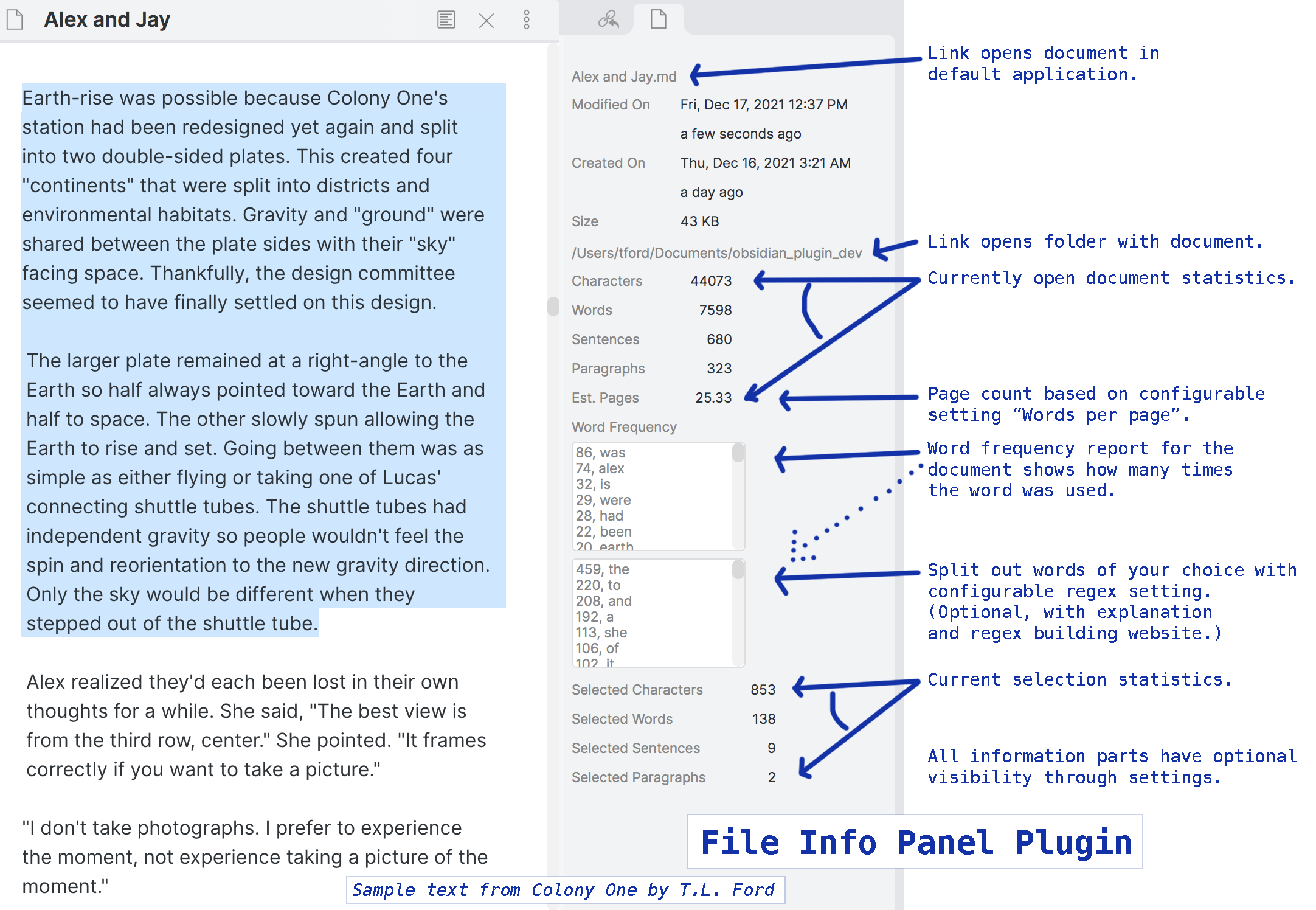 *Screenshot is not showing the URL/File exclusion report.
 ... options for URL / file name report and exclusion ...
Customization
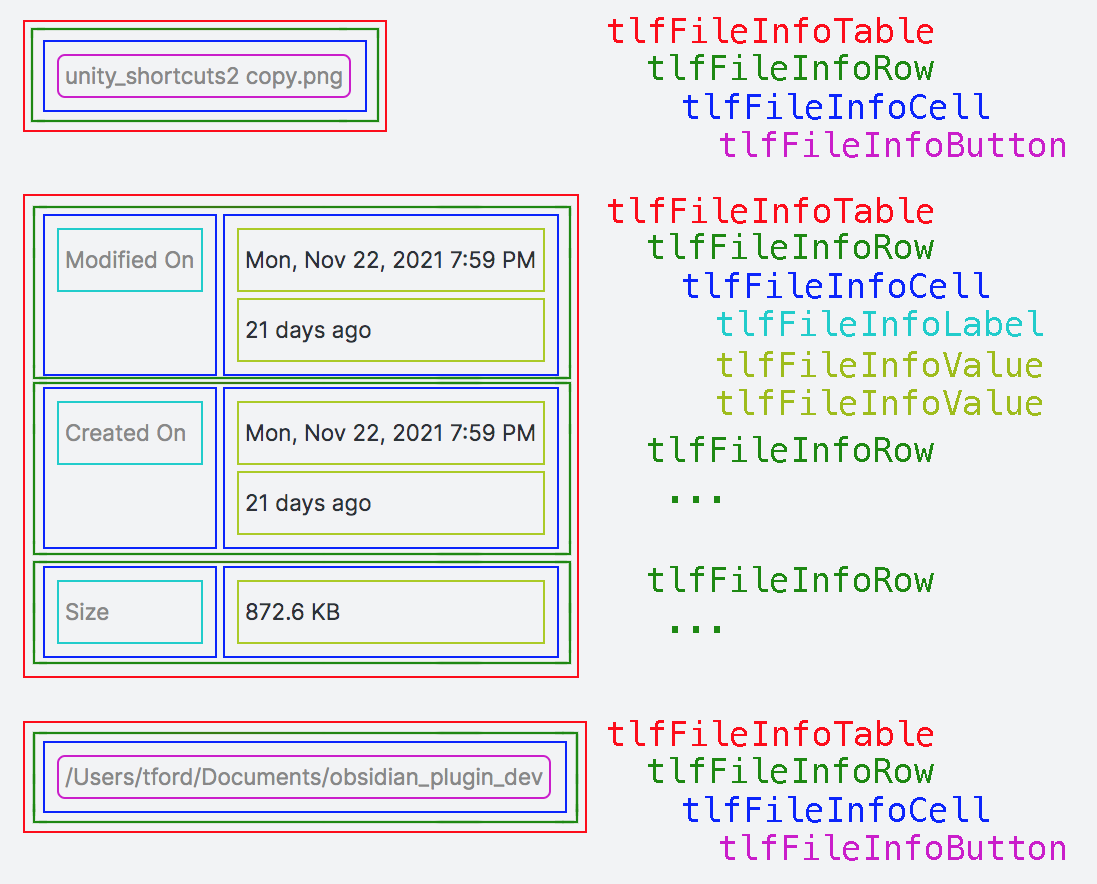
The following CSS Variables can be overridden in your obsidian.css file.
See the notes for wrapping dates/file/folders in the css comments.
/* obsidian-file-info-panel-plugin */
/* https://github.com/CattailNu/obsidian-file-info-panel-plugin


20230112 updated to fix button styles that broke

 */

/* all other tables */
.tlfFileInfoTable {
    display: table;
    border: none;
    margin: 0em;
    padding: 0em;
}

/* the word filter report lists, file open/folder open buttons */
.tlfFileInfoTable100 {
    display: table;
    border: none;
    margin: 0em;
    padding: 0em;
    width: 100%;
}


.tlfFileInfoRow {
    display: table-row;
    border: none;
    margin: 0em;
    margin-bottom: 0.3em;
    padding: 0em;
}


.tlfFileInfoCell {
    display: table-cell;
    border: none;
    margin: 0px;
    margin-left: 0.5em;
    padding: 0em;
    text-align: left;
    white-space: nowrap;
}

/* applies to word/url footnote */
.tlfFileInfoParagraph {
    display: table-cell;
    border: none;
    margin: 0px;
    margin-left: 0.5em;
    margin-right: 0.5em;
    padding: 0em;
    text-align: left;
    white-space: normal;
    word-break: break-word;
}


.tlfFileInfoLabel {
    border: none;
    margin: 0px;
    margin-right: 0.3em;
    padding: 0.3em;
    font-size: 0.7em;
    color: var(--text-muted);
}

/*
    To wrap date text automatically,
    replace "white-space: nowrap;" below in tlfFileInfoValue with:
    white-space: normal;
    word-break: break-word;
*/

.tlfFileInfoValue {
    border: none;
    margin: 0px;
    padding: 0em;
    padding-left: 2em;
    padding-top: 0.3em;
    padding-bottom: 0.3em;
    font-size: 0.7em;
    font-weight: bold;
    height: auto;
    white-space: nowrap;
}

.tlfFileInfoValueNumber {
    border: none;
    margin: 0px;
    padding: 0em;
    padding-left: 3em;
    font-weight: bold;
    font-size: 0.7em;
    text-align: right;
}

.tlfFileInfoCellButton {
    display: table-cell;
    border: none;
    margin: 0px;
    padding: 0.3em;
    text-align: left;
    margin-left: 0.5em;
    padding: 0em;
}

/*
    To wrap text in file name / folder name automatically,
    replace "white-space: nowrap;" below in tlfFileInfoButton with:
    white-space: normal;
    word-break: break-all;
*/

.tlfFileInfoButton {
    border: none;
    margin: 0px;
    margin-bottom:0.3em;
    margin-top:0.3em;
    padding: 0px;
    text-align: left;
    font-size: 0.7em;
    background:none;
    color: var(--text-muted);
    height: 2em;
    width:100%;
    max-width:100%;
    height:auto;
    white-space: nowrap;
}

.tlfFileInfoButton:Hover {
    font-weight: bold;
}

.tlfFileInfoTextArea {
    margin: 0px;
    padding: 0.3em;
    font-size: 0.7em;
    color: var(--text-muted);
    line-height: 1.2;
    width: 100%;
    height: 8em;
}
Say Thanks 🙏
Consider reading and sharing one of my books (available through Amazon). There are fantasy, science fiction, novelty art books, non-fiction, and a thriller. Share links to them. Seriously, I really need your help as an author getting the word out. Trying to be an independently-published author is challenging.
https://www.amazon.com/T.-L.-Ford/e/B0034Q6Q2S
You'll also find a bunch of free content and writing/art tools on my personal website.
Featured: Make your own dreamcatcher graphics: http://www.cattail.nu/journal_tools/page_dreamcatcher_art.html
Change Log
Thank you to those who have taken the time to submit issues on github. Your feedback is helpful!
2.0.2
- Image width/height display fix.
2.0.1
- Basic lint-housekeeping.
2.0.0
- Update for the latest Obsidian app. Closed issues by adding front matter separation, status-bar popup window, and line counts.
1.3.0
- Feature add: separate URLs from word counts and word frequency report. (Issue #9)
- Feature add: open and close items for hotkeys. (Issue #10)
- Feature add: show image width/height for images. (Issue #11)
- Bug Fix: css updated for new version that broke the old css. (Issue #12)
1.2.5
- Bug fix (Issue #8).
1.2.4
- Mobile versions working.
- Selected text counts functioning again (broke with new version of Obsidian).
- Optimization.
- Potential bug fixes.
1.2.1
- Removed reference to timer in the settings as it is no longer used.
- Changed to say "No file." when there is no file.
- Fixed a display bug when file is dragged out of the vault folder while it is open in Obsidian.
- Changed all settings to be on by default.
1.2.0
- Added setting option to change date diplay format.
- Updated view/css to allow better fine-tuning, specifically, the ability to wrap text for file/folder names and filter lists.
- Added setting option to display the folder path as relative to vault.
- Adjusted word frequency textbox display.
- Added setting option to show/hide filtered words.
- Changed the selected text algorithm from a timer to an event, improving responsiveness.
- Changed the document path code to try and fix android issues.
1.1.0
Addition of document statistics.
- Character count
- Word count
- Sentence count
- Paragraph count
- Estimated pages
- Word frequency report with regex filter
- Selected characters count
- Selected Words count
- Selected Sentences count
1.0.1
Initial release: File name link, date modified, date created, full folder path link.