Search...Search plugins and themes...
⌘K
Sign in
  • Get started
  • Download
  • Pricing
  • Enterprise
  • Account
  • Obsidian
  • Overview
  • Sync
  • Publish
  • Canvas
  • Mobile
  • Web Clipper
  • CLI
  • Learn
  • Help
  • Developers
  • Changelog
  • About
  • Roadmap
  • Blog
  • Resources
  • System status
  • License overview
  • Terms of service
  • Privacy policy
  • Security
  • Community
  • Plugins
  • Join the community
  • Discord
  • Forum / 中文论坛
  • Merch store
  • Brand guidelines
Follow us
DiscordTwitterBlueskyThreadsMastodonYouTubeGitHub
© 2026 Obsidian

Aut-O-Backups

ryanpcmcquenryanpcmcquen11k downloads

Automated Dropbox backups of your entire vault.

Add to Obsidian
  • Overview
  • Scorecard
  • Updates55

Automated backups to Dropbox of your entire vault every 20 minutes (starting after a 10 minute delay).
Obsidian Aut-O-Backups logo

Backups are stored here:

/Apps/Obsidian Backups/

Underneath that folder, backups get stored as:

/VAULT_NAME/YEAR/MONTH/DAY/TIME_WITH_FRACTIONAL_SECONDS/VAULT_CONTENTS

We use fractional seconds to prevent collisions with ad hoc backups.

Usage

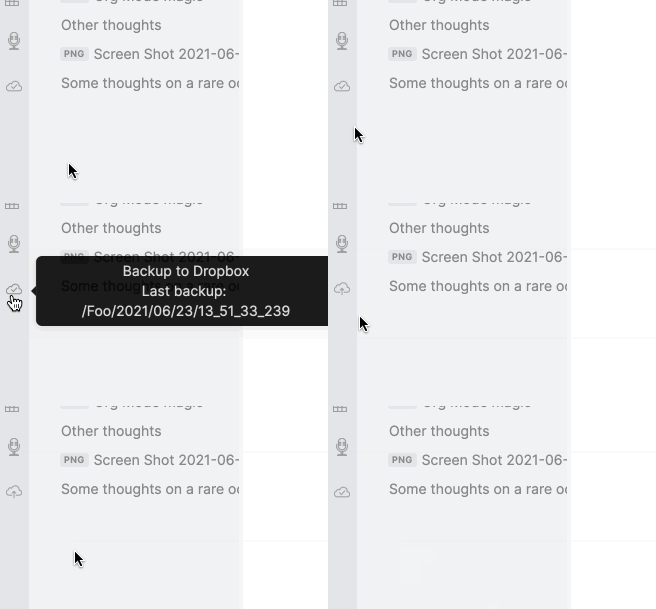
Click the icon to authenticate with Dropbox. After that, backups will happen every 20 minutes (starting after a 10 minute delay). You can also fire off a backup at any time by clicking the ribbon icon.

The slashed cloud indicates that you need to authenticate with Dropbox:

Screen Shot 2021-06-07 at 9 57 49 AM

The large arrow indicates the upload has started:

Screen Shot 2021-06-07 at 9 58 19 AM

The small arrow inside the cloud indicates the upload is about 50% done:

Screen Shot 2021-06-07 at 9 57 59 AM

The cloud with a check mark indicates that the backup is complete!

Screen Shot 2021-06-07 at 9 58 13 AM

Demo:

Demo

Settings

A setting is available to 'Exclude binary files', this will skip any file without one of the following extensions:

  • md
  • org
  • txt

Dropbox permissions

This app requires the following Dropbox permissions: IMG_5695

  • account_info.read: You can't turn this one off, I don't think I actually need it. You can see in the source code that I don't read anything from it.
  • files.metadata.read: You can't turn this one off either. I never read or list files, so it shouldn't be necessary, but Dropbox doesn't allow turning it off.
  • files.content.write: This is the one I actually need. This app only writes files. This app cannot read files. It is also scoped to only its folder.

Known limitations

Any files not in this list:

  • md
  • org
  • txt

Are uploaded as binary files.

Let me know if more files need to be added to this list that are actually plain text.

What happened to 'Dropbox Backups'?

As of version 2.0.0, the app was renamed to follow required branding guidelines.

Manually installing the plugin

  • Copy over main.js, manifest.json, and styles.css to your vault VaultFolder/.obsidian/plugins/obsidian-dropbox-backups/.
65%
HealthFair
ReviewCaution
About
Back up your entire vault to Dropbox every 20 minutes, starting after a 10-minute delay, and trigger manual backups anytime from the ribbon icon. Save backups under /Apps/Obsidian Backups/VAULT_NAME/YEAR/MONTH/DAY/TIME_WITH_FRACTIONAL_SECONDS to avoid collisions, and optionally exclude non-text files so only md, org and txt files are uploaded.
BackupIntegrationsAutomation
Details
Current version
2.1.0
Last updated
4 years ago
Created
5 years ago
Updates
55 releases
Downloads
11k
Compatible with
Obsidian 0.9.12+
License
MPL-2.0
Report bugRequest featureReport plugin
Author
ryanpcmcquenryanpcmcquen
github.com/ryanpcmcquen
GitHubryanpcmcquen
  1. Community
  2. Plugins
  3. Backup
  4. Aut-O-Backups

Related plugins

BRAT

Easily install a beta version of a plugin for testing.

Readwise Official

Sync highlights from Readwise to your vault.

Todoist Sync

Materialize Todoist tasks within your notes.

Shell commands

Define system commands that you want to execute via command palette, hotkeys, URI links or automated events. E.g. open external applications or perform automated file modifications.

Remotely Save

Sync notes between local and cloud with smart conflict: S3, Dropbox, webdav, OneDrive, Google Drive, Box, pCloud, Yandex Disk, Koofr, Azure Blob Storage.

Google Calendar

Interact with your Google Calendar.

Initiative Tracker

TTRPG initiative tracker.

Actions URI

Add additional `x-callback-url` endpoints to the app for common actions — it's a clean, super-charged addition to Obsidian URI.

Templater

Create and use dynamic templates.

Zotero Integration

Insert and import citations, bibliographies, notes, and PDF annotations from Zotero.