Search...Search plugins and themes...
⌘K
Sign in
  • Get started
  • Download
  • Pricing
  • Enterprise
  • Account
  • Obsidian
  • Overview
  • Sync
  • Publish
  • Canvas
  • Mobile
  • Web Clipper
  • CLI
  • Learn
  • Help
  • Developers
  • Changelog
  • About
  • Roadmap
  • Blog
  • Resources
  • System status
  • License overview
  • Terms of service
  • Privacy policy
  • Security
  • Community
  • Plugins
  • Join the community
  • Discord
  • Forum / 中文论坛
  • Merch store
  • Brand guidelines
Follow us
DiscordTwitterBlueskyThreadsMastodonYouTubeGitHub
© 2026 Obsidian

Discord Rich Presence

lukeleppanlukeleppan32k downloads

Update your Discord Status to show your friends what you are working on.

Add to Obsidian
  • Overview
  • Scorecard
  • Updates13

Update your Discord Status to show your friends what you are working on in Obsidian. With Discord Rich Presence.
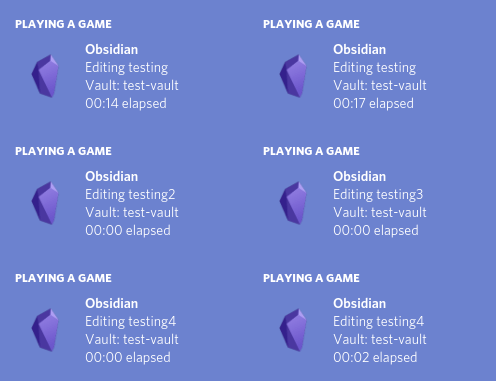
Rich Presence Preview

Usage

After enabling the plugin in settings, your Discord status should show that you are using Obsidian.md.

If Discord isn't open, then you will see "Reconnect to Discord" at the botton of the screen. You can click that to attempt to reconnect. It will only connect if Discord is open.

You can also reconnect to discord rich presence via the Reconnect to Discord command in the command palette. If there is an issue.

Features

  • Updates your Discord Status with Obsidian info, Vault Name and/or Current File Name.
  • Allows you to customise what info is shown.

Settings

Vault Name Settings

  • Toggle whether or not to show Vault Name
  • Set a custom Vault Name to show publicly

File Name Settings

  • Toggle whether or not to show Current File Name
  • Toggle whether or not to show the current file extension

Time Settings

  • Toggle Whether or not to use the total time you have been using Obsidian, instead of the time spent editing a single file.

Notice Settings

  • Toggle whether or not to show Connection Notices

Contributors

@leoccyao

  • Added the disconnect feature
  • Made the plugin much more user friendly

Issues

If you have any issues or suggestions please create an issue or a pull request.

Compatibility

This plugin currently requires Obsidian v0.9.10+

Install

You can install the plugin via the Community Plugins tab within Obsidian.

Manually installing the plugin

  • Copy over main.js, manifest.json to your vault VaultFolder/.obsidian/plugins/your-plugin-id/.
65%
HealthFair
ReviewCaution
About
Update your Discord status to display your Obsidian activity, including vault and current file names. Customize which info appears and show optional time tracking and connection notices, with automatic reconnect when Discord is available.
IntegrationsStatus barFiles
Details
Current version
1.5.1
Last updated
3 years ago
Created
6 years ago
Updates
13 releases
Downloads
32k
License
MIT
Report bugRequest featureReport plugin
Author
lukeleppanlukeleppan
lukeleppan.com
GitHublukeleppan
  1. Community
  2. Plugins
  3. Integrations
  4. Discord Rich Presence

Related plugins

Local REST API

Unlock your automation needs by interacting with your notes over a secure REST API.

Better Word Count

Count the words of selected text in the editor.

Google Drive Sync

Syncs a vault into Google Drive for cross-platform use (works for iOS).

Telegram Sync

Transfer messages and files from Telegram to Obsidian.

Nutstore Sync

Sync your vault with Nutstore (Jianguoyun) using WebDAV protocol.

BRAT

Easily install a beta version of a plugin for testing.

Notebook Navigator

Alternative file browser with folders, tags, properties, shortcuts, previews, keyboard navigation, drag and drop, and pinned notes.

Recent Files

Display a list of recently opened files.

Zotero Integration

Insert and import citations, bibliographies, notes, and PDF annotations from Zotero.

Maps

Adds a map layout to bases so you can display notes as an interactive map view.